
Introduktion
The Altec Lansing VS4221 is a 2.1 speaker system designed to provide enhanced audio for computers, gaming systems, and other compatible devices. This system includes two satellite speakers and one subwoofer, offering a balanced audio experience with clear highs, rich mids, and deep bass. It features a wireless remote for convenient control and multiple input options for versatile connectivity.
Paketets innehåll
Innan du påbörjar installationen, kontrollera att alla komponenter finns i paketet:
- One (1) Altec Lansing VS4221 Subwoofer
- Two (2) Altec Lansing VS4221 Satellite Speakers
- En (1) trådlös fjärrkontroll
- One (1) Remote Control Caddy
- Audio Input Cables (color-coded)
- Strömkabel
Installationsinstruktioner
- Placering av högtalarna: Place the subwoofer on the floor, ideally near a wall or in a corner for optimal bass response. Position the two satellite speakers on either side of your listening area, such as on a desk or shelf. The satellite speakers feature pivoting stands, allowing you to adjust their angle to direct sound towards your ears.
- Connecting Satellite Speakers to Subwoofer: Connect the cables from the satellite speakers to the corresponding output jacks on the back of the subwoofer. Ensure a secure connection.
- Ansluta till en ljudkälla:
- For computers, MP3 players, or devices with a 3.5mm headphone jack: Use the provided 3.5mm audio cable to connect the audio output of your device to the 3.5mm input jack on the subwoofer.
- For televisions or video gaming systems with RCA outputs: Use RCA cables (not necessarily included, but the system supports them) to connect the audio output of your TV or gaming system to the RCA input jacks on the subwoofer. The cables are color-coded for easy installation (typically red for right, white for left).
- Ansluter till ström: Plug the power cable into the subwoofer's power input, then plug the other end into a standard electrical outlet.
- Första start på: Turn on the speaker system using the power button, which may be located on the subwoofer or controlled via the wireless remote.
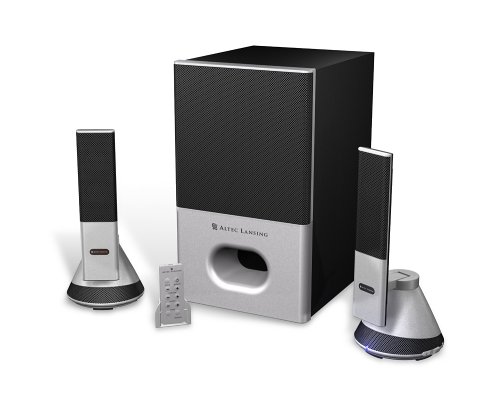
Image: The Altec Lansing VS4221 2.1 Speaker System, showing the subwoofer and two satellite speakers. The satellite speakers are designed with pivoting stands for directional sound.
Bruksanvisning
Använda den trådlösa fjärrkontrollen
The VS4221 system includes a wireless remote control for convenient adjustment of audio settings. Place the remote in its caddy when not in use to prevent misplacement.
- Ström/standby: Press the power button on the remote to turn the system on or put it into standby mode.
- Mastervolym: Use the volume up (+) and volume down (-) buttons to adjust the overall sound level.
- Baskontroll: Adjust the bass level to your preference using the dedicated bass control buttons.
- Diskantkontroll: Adjust the treble level for crisp high frequencies using the dedicated treble control buttons.
- Högljuddhet: Activate or deactivate the loudness feature to enhance bass and treble at lower volumes.
Använda hörlursuttaget
A headphone jack is integrated into the system, typically on one of the satellite speakers or the remote caddy. Plugging in headphones will mute the speakers, allowing for private listening. Unplugging headphones will restore audio through the speakers.
Underhåll
- Rengöring: Använd en mjuk, torr trasa för att rengöra ytorna på högtalarna och subwoofern. Undvik att använda flytande rengöringsmedel eller slipande material, eftersom dessa kan skada ytan eller de interna komponenterna.
- Placering: Ensure the speakers are placed on stable surfaces to prevent accidental falls. Avoid placing them in direct sunlight, near heat sources, or in areas with high humidity.
- Kabelhantering: Håll kablarna organiserade och otrasslade för att förhindra skador och säkerställa korrekt anslutning.
Felsökning
| Problem | Möjlig orsak | Lösning |
|---|---|---|
| Inget ljud från högtalarna. |
|
|
| Förvrängt eller oklart ljud. |
|
|
| Den trådlösa fjärrkontrollen svarar inte. |
|
|
Specifikationer
| Särdrag | Detalj |
|---|---|
| Modellnummer | VS4221 |
| Typ av högtalare | 2.1 Speaker System (Two Satellite Speakers, One Subwoofer) |
| Ljudutmatningsläge | Stereo |
| Högtalare maximal uteffekt | 35 Watt |
| Signal-brusförhållande | 80 dB |
| Subwoofer -drivrutin | 3-inch down-firing |
| Drivrutiner för satellithögtalare | Micro Drivers (for highs), 3-inch Midrange Driver (concealed) |
| Anslutningsteknik | Wired (3.5mm, RCA inputs) |
| Kontrollmetod | Wireless Remote Control, Built-in Controls |
| Kompatibla enheter | Smartphone, Tablet, Laptop, MP3 Player, Desktop, Television, Projector |
| Strömkälla | AC |
| Objektets vikt | 12.3 pund |
| Färg | Svart |
| UPC | 021986941538 |
Garanti och support
The Altec Lansing VS4221 speaker system comes with a Begränsad garanti. For specific details regarding warranty coverage, duration, and terms, please refer to the warranty card included with your product or visit the official Altec Lansing webplats.
For technical support, troubleshooting assistance beyond this manual, or service inquiries, please contact Altec Lansing customer support through their official channels. Keep your purchase receipt and product model number (VS4221) readily available when seeking support.


