
Produkt överview
The Western Digital My Book Essential external hard drive provides 1 terabyte (1TB) of storage capacity. Designed for data backup and archiving, this device features a high-speed USB 2.0 interface for broad compatibility and efficient data transfer. Its design allows it to power on and off in conjunction with your computer, contributing to energy efficiency.
Nyckelfunktioner:
- Enkel installation: Plug-and-play functionality for immediate use.
- Kompakt design: Occupies minimal desk space, similar to a paperback book.
- Energieffektiv: Automatically enters standby mode after 10 minutes of inactivity to conserve power.
- USB 2.0-gränssnitt: Offers convenient and compatible connectivity with various computers.
- PC and Mac Compatible: Supports Windows 2000/XP/Vista and Mac OS X 10.4.8 or later.
Vad finns i lådan
Kontrollera att alla följande artiklar ingår i ditt produktpaket:
- Western Digital My Book Essential WDBAAF0010HBK Hard Drive
- USB-kabel
- AC-adapter
- Snabbinstallationsguide
Installationsinstruktioner
- Anslut nätadaptern: Plug the AC adapter into the power port on the back of the My Book Essential drive. Connect the other end of the AC adapter to a power outlet.
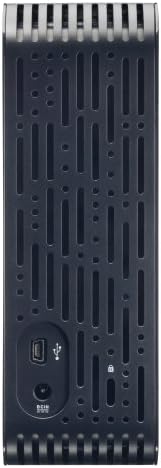
- Anslut USB-kabeln: Connect one end of the supplied USB cable to the USB 2.0 port on the back of the My Book Essential drive. Connect the other end of the USB cable to an available USB port on your computer.
- Ström på: The drive is designed to power on automatically with your computer. Ensure your computer is powered on. The drive's indicator light will illuminate.
- Första erkännandet: Your operating system (Windows or Mac OS) should automatically detect and install the necessary drivers for the drive. This process may take a few moments.
- Åtkomst till enheten: Once installed, the drive will appear as a new storage device in 'My Computer' (Windows) or 'Finder' (Mac OS). You can now begin transferring files.
Note: For detailed operating system-specific instructions or if the drive is not recognized, refer to the included Quick Install Guide or the Western Digital support webplats.
Bruksanvisning
The Western Digital My Book Essential drive functions as an external storage device for your computer. It is ideal for backing up important files, storing large media libraries, and freeing up space on your computer's internal hard drive.
Dataöverföring:
- Att överföra files, simply drag and drop them to and from the My Book Essential drive icon in your computer's file utforskare.
- For optimal performance, ensure the USB cable is securely connected to a USB 2.0 port on your computer.
Energihantering:
- The drive is designed to turn on and off with your computer. When your computer is shut down or put to sleep, the drive will also enter a low-power state.
- After 10 minutes of inactivity, the drive will automatically enter standby mode to save energy. It will resume normal operation when accessed.
Säker borttagning:
Always use the "Safely Remove Hardware" option (Windows) or drag the drive icon to the Trash/Eject (Mac OS) before disconnecting the USB cable to prevent data corruption.
Underhåll
Proper maintenance ensures the longevity and reliable performance of your external hard drive.
- Fysisk vård: Förvara hårddisken på en stabil och välventilerad plats. Undvik att utsätta den för extrema temperaturer, direkt solljus eller fukt. Blockera inte ventilationshålen.
- Rengöring: Använd en mjuk, torr trasa för att rengöra utsidan av enheten. Använd inte flytande rengöringsmedel eller aerosoler.
- Säkerhetskopiering av data: Regularly back up critical data stored on the external drive to another location (e.g., cloud storage, another hard drive) to prevent data loss in case of unforeseen issues.
- Firmware -uppdateringar: Periodically check the Western Digital support webwebbplatsen för tillgängliga firmwareuppdateringar för din modell.
Felsökning
If you encounter issues with your My Book Essential drive, try the following steps:
- Enheten hittades inte:
- Se till att nätadaptern är ordentligt ansluten till både enheten och ett fungerande eluttag.
- Verify the USB cable is firmly connected to both the drive and your computer's USB port. Try a different USB port or cable if available.
- Starta om datorn.
- Check your computer's Disk Management (Windows) or Disk Utility (Mac OS) to see if the drive is recognized but unformatted or unallocated.
- Långsam dataöverföring:
- Ensure you are using a USB 2.0 port. While compatible with USB 1.1, performance will be significantly slower.
- Undvik att köra flera krävande applikationer under stora file överföringar.
- Check for background processes that might be using system resources or disk I/O.
- Drivlampan lyser inte:
- Confirm the AC adapter is connected and the power outlet is active.
- If connected to a computer, ensure the computer is powered on and not in sleep mode.
For further assistance, consult the Quick Install Guide or visit the Western Digital support webplats.
Specifikationer
| Särdrag | Detalj |
|---|---|
| Modellnamn | My Book Essential Edition 2.0 |
| Modellnummer | WDH1U10000N |
| Digital lagringskapacitet | 1024 GB (1 TB) |
| Hårddiskgränssnitt | USB 2.0 |
| Anslutningsteknik | USB |
| Hårddiskformfaktor | 3.5 tum |
| Hårddiskbeskrivning | Skrivbord |
| Kompatibla enheter | Skrivbord |
| Installationstyp | Ansluta |
| Färg | Svart |
| Hårddiskens rotationshastighet | 7200 RPM |
| Läs Speed | 60 megabyte per sekund |
| Mediahastighet | 30 MB/s |
| Kapslingsmaterial | Hard Plastic or Metal |
| Objektets vikt | 3.3 pund |
| Systemkrav | Available USB port, Windows 2000/XP/Vista, Mac OS X 10.4.8 or later |
Garanti och support
The Western Digital My Book Essential drive comes with a 1 års begränsad garanti. For warranty claims, technical support, or to access additional resources such as drivers and software, please visit the official Western Digital support webplats.
Online support: support.wdc.com
Produktbilder




Produktvideor
WD Hard Drives: Essential vs. Home Edition Comparison
This video provides a comparison between the Western Digital My Book Essential and Home Edition hard drives, highlighting their physical differences and connectivity options. It helps users understand the specific features of the Essential model in context.