
1. Introduktion
This manual provides essential instructions for the safe and efficient operation of your Sharp CD-DH950P 240W Mini-Component System. This system features a 5-disc CD changer, a cassette deck, an iPod/iPhone docking station, a USB host for digital audio playback, and an AM/FM tuner. Please read this manual thoroughly before using the system and retain it for future reference.
2. Säkerhetsinformation
- Strömkälla: Anslut endast enheten till ett nätuttag med angiven volym.tage.
- Ventilation: Säkerställ tillräcklig ventilation. Blockera inte ventilationsöppningarna.
- Vatten och fukt: Utsätt inte enheten för regn, fukt eller droppande/stänkande vätskor.
- Värme: Håll enheten borta från värmekällor som element, värmespjäll, spisar eller andra apparater som producerar värme.
- Rengöring: Unplug the unit from the wall outlet before cleaning. Use a soft, dry cloth.
- Underhåll: Försök inte utföra service på denna produkt själv. Överlåt all service till kvalificerad servicepersonal.
3. Paketets innehåll
Kontrollera att ditt paket innehåller följande artiklar:
- Main Unit (CD-DH950P)
- Vänster högtalare
- Höger högtalare
- Fjärrkontroll med batterier
- AM-slingantenn
- FM-kabelantenn
- Nätsladd
4. Inställning
4.1 Ansluta högtalarna
Connect the speaker wires from the main unit to the corresponding terminals on the back of each speaker. Ensure correct polarity (red to red, black to black) for optimal sound quality. The left speaker connects to the left speaker output, and the right speaker to the right speaker output.
4.2 Connecting the Antennas
- FM -antenn: Connect the supplied FM wire antenna to the FM antenna terminal on the rear of the main unit. Extend the wire for better reception.
- AM-antenn: Connect the supplied AM loop antenna to the AM antenna terminals on the rear of the main unit. Position the antenna for best reception.
4.3 Strömanslutning
Plug the power cord into the AC IN jack on the rear of the main unit, then plug the other end into a standard AC wall outlet.
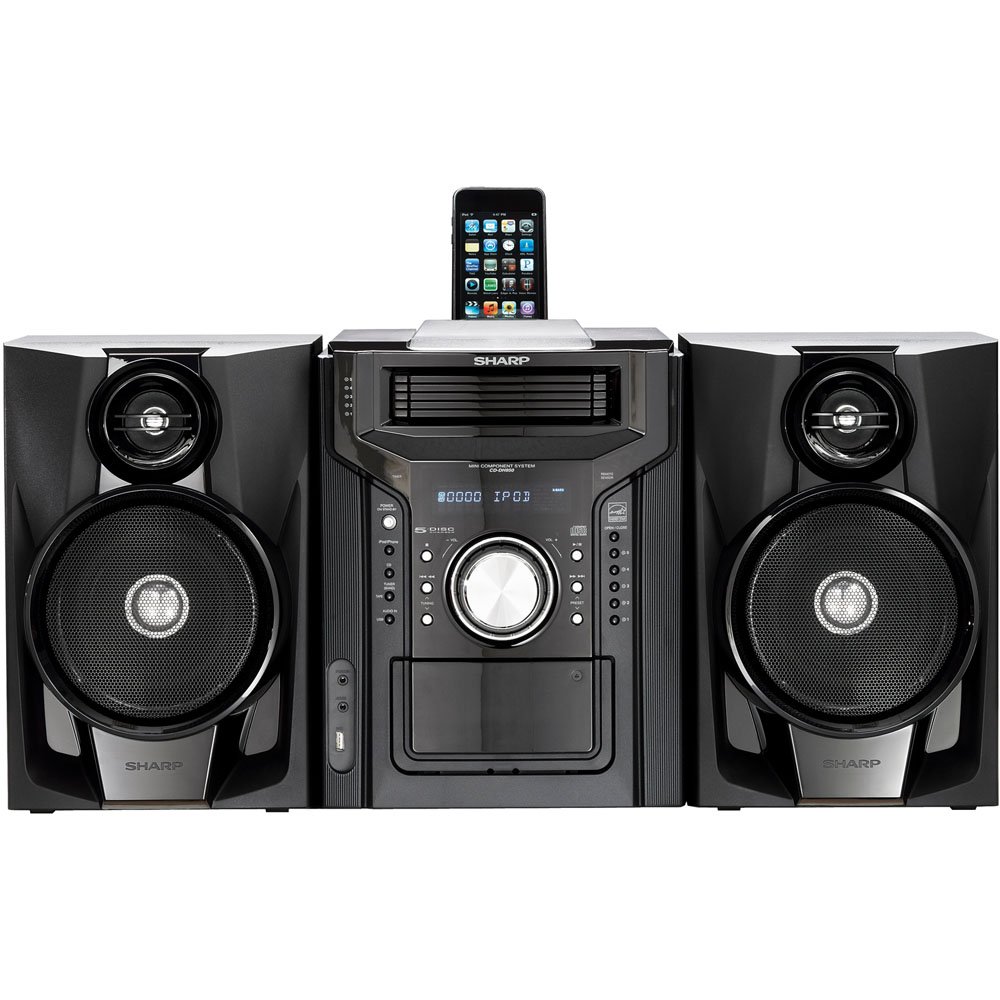
Figur 4.3.1: Sammantaget view of the Sharp CD-DH950P Mini-Component System, showing the main unit flanked by two speakers, with an iPhone docked on top of the main unit.
5. Bruksanvisning
5.1 Ström på/av och volymkontroll
- Tryck på DRIVA -knappen på frontpanelen eller fjärrkontrollen för att slå på eller av enheten.
- Vrid på VOLYM ratten på frontpanelen eller använd VOL +/- knapparna på fjärrkontrollen för att justera ljudnivån.
5.2 CD-uppspelning
This system features a 5-disc CD changer.
- Tryck på ÖPPNA/STÄNG för att öppna CD-facket.
- Place up to five CDs on the disc trays, label side up.
- Trycka ÖPPNA/STÄNG igen för att stänga facket.
- Tryck på CD button to select the CD function.
- Tryck på SPELA/PAUS knappen för att starta uppspelningen.
- Använd HOPPA buttons to navigate between tracks or discs.
5.3 Kassettdäckets användning
- Tryck på TAPE OPEN/CLOSE button to open the cassette deck.
- Sätt i ett kassettband.
- Tryck på TEJP button to select the cassette function.
- Trycka SPELA för att börja spela upp.
- To record, ensure the source is selected (e.g., CD, Tuner) and press the SPELA IN button on the cassette deck.
5.4 iPod/iPhone Docking
The system includes a top-mounted docking slot for compatible iPod and iPhone devices (30-pin connector).
- Carefully place your iPod or iPhone into the docking slot.
- The system will automatically switch to iPod/iPhone mode or you may need to press the iPod / iPhone knapp.
- Use the system's controls or your device's controls to play music. The device will also charge while docked.
5.5 USB Host Playback
Connect a USB storage device containing MP3 or WMA audio files to the USB port on the front panel.
- Sätt i USB-enheten i USB-porten.
- Tryck på USB button to select the USB function.
- Use the playback controls to navigate and play files.
5.6 AM/FM-mottagare
- Tryck på TUNER button to select AM or FM radio.
- Använd TUNING +/- knapparna för att manuellt ställa in en station.
- To auto-scan, press and hold the TUNING +/- knappar.
- To store a preset, tune to the desired station, then press MINNE följt av ett förinställt nummer.
5.7 Ljudingång
Connect an external audio device (e.g., MP3 player, smartphone) to the AUDIO IN jack on the front panel using a 3.5mm stereo cable.
- Connect your device to the AUDIO IN jack.
- Tryck på LJUD IN button to select this source.
- Styr uppspelningen från din anslutna enhet.
6. Underhåll
6.1 Rengöring av enheten
Torka av enhetens utsida med en mjuk, torr trasa. Använd inte slipande rengöringsmedel, vax eller lösningsmedel. Se till att enheten är urkopplad innan rengöring.
6.2 Skötsel av CD-skivor och kassettband
- Handle CDs by their edges to avoid fingerprints and scratches. Clean discs with a soft, lint-free cloth from the center outwards.
- Store cassette tapes away from strong magnetic fields and direct sunlight.
7. Felsökning
| Problem | Möjlig orsak | Lösning |
|---|---|---|
| Ingen ström | Nätsladden är inte ansluten; Fel på eluttaget | Se till att nätsladden är ordentligt isatt; prova ett annat uttag |
| Inget ljud | Volume too low; Speakers not connected; Incorrect source selected | Öka volymen; Kontrollera högtalaranslutningarna; Välj rätt ingångskälla |
| CD-skivan spelas inte | Disc inserted incorrectly; Disc is dirty or scratched | Insert disc correctly (label side up); Clean or replace disc |
| Dålig radiomottagning | Antennen är inte korrekt placerad; Svag signal | Adjust position of AM/FM antennas; Try auto-tuning or manual fine-tuning |
| iPod/iPhone not charging/playing | Device not properly docked; Device not compatible (e.g., newer connector) | Re-dock the device; Note that this system uses a 30-pin connector, newer devices may require an adapter (not included) |
8. Specifikationer
- Stämpla: Skarp
- Modell: CD-DH950P
- Total uteffekt: 240 Watts RMS (85W/ch FTC)
- Högtalarkonfiguration: 2.1 kanal
- Ljudformat som stöds: CD, MP3, WMA
- Signal-till-brusförhållande: 100 dB
- Kompatibla enheter: MP3 Player, Smartphone (via 30-pin dock or USB/Audio In)
- Mått (L x B x H): 27.6 x 13.6 x 13.5 tum
- Artikelvikt: 24.4 pund
- UPC: 074000369863, 074000369290
9. Garantiinformation
This product is covered by a 1-year limited warranty from the date of purchase. Please refer to the warranty card included with your product for full terms and conditions, or contact Sharp customer service for details.
10. Support
For further assistance, technical support, or service inquiries, please contact Sharp customer service. Contact information can typically be found on the Sharp official webwebbplatsen eller i dokumentationen som medföljer din produkt.