
1. Introduktion
This manual provides essential instructions for the installation, operation, maintenance, and troubleshooting of the APC Smart-UPS SRT3000RMXLT 3kVA 208V Rackmount Uninterruptible Power Supply (UPS). Please read this manual thoroughly before installing or operating the equipment to ensure proper usage and safety.
2. Säkerhetsinformation
Följ alla varningar och bruksanvisningar i denna manual. Underlåtenhet att göra detta kan leda till personskador eller skador på utrustningen.
- Elsäkerhet: Denna enhet innehåller farliga voltages. Do not attempt to disassemble the UPS. Servicing should only be performed by qualified personnel.
- Batterisäkerhet: Batteries can present a risk of electrical shock and high short-circuit current. Remove watches, rings, or other metal objects before handling batteries. Use tools with insulated handles.
- Vikt: The UPS is heavy. Use proper lifting techniques and ensure adequate support during installation.
- Miljö: Install the UPS indoors in a controlled environment, free from excessive dust, moisture, and extreme temperatures.
3. Paketets innehåll
Carefully unpack the UPS and inspect for shipping damage. The package should contain the following items:
- APC Smart-UPS SRT3000RMXLT Unit
- Power Supply (Built-In)
- Hårdvara för rackmontering
- Dokumentations-cd
- USB-kabel
- Seriell kabel
4. Inställning
4.1 Fysisk installation
The SRT3000RMXLT is designed for rack installation. Ensure the rack is stable and capable of supporting the UPS weight (approximately 69 pounds).
- Mount the UPS into a standard 19-inch rack using the provided rack-mounting hardware.
- Säkerställ tillräckligt luftflöde runt enheten. Blockera inte ventilationsöppningarna.

Bild 4.1: Framsidan view of the APC Smart-UPS SRT3000RMXLT. This image shows the front panel with the display and ventilation grille.
4.2 Anslutning av UPS-enheten
Connect the UPS to the utility power and your equipment.
- Connect the UPS input power cord to a dedicated 208V AC outlet. The UPS uses a Type B - 3 pin (North American) power plug.
- Connect your equipment to the output receptacles on the rear of the UPS. The unit provides 12 IEC 320 C13/C14 outlets.
- For communication, connect the USB cable or serial cable from the UPS to your computer or network management card.
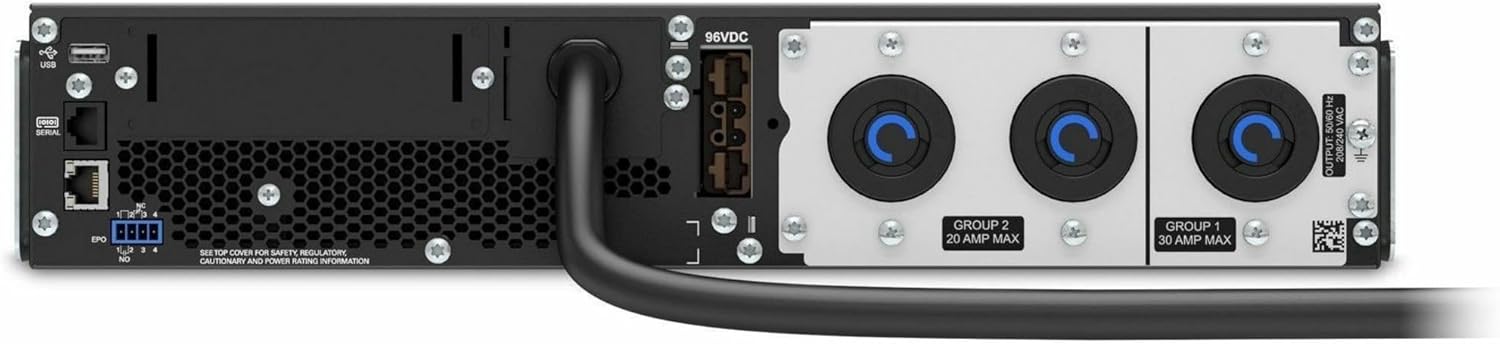
Bild 4.2: Bak view of the APC Smart-UPS SRT3000RMXLT. This image displays the various input and output ports, including USB, serial, EPO, and the 12 output receptacles, along with the main power input.
4.3 Första uppstart
När alla anslutningar är säkra:
- Tryck på strömknappen på frontpanelen för att slå på UPS-enheten.
- The UPS will perform a self-test and the display will show the current status.
- Allow the batteries to charge for at least 6 hours before relying on them for extended backup time.
5. Användning av UPS-enheten
5.1 Frontpanelens display och kontroller
The front panel features an LCD display and control buttons for monitoring and configuring the UPS.
- LCD-skärm: Shows real-time status, load, battery charge, input/output voltage, and event logs.
- ESC-knapp: Exits the current menu or cancels an operation.
- OK -knapp: Bekräftar ett val eller öppnar en meny.
- Upp/Ner-pilar: Navigera genom menyalternativ eller justera inställningar.
5.2 Grundläggande användning
- Slår på: Tryck och håll strömknappen intryckt tills displayen tänds.
- Stänger av: Press and hold the power button until the UPS powers down. Ensure all connected equipment is safely shut down first.
- Batteriläge: I händelse av en makt outage, the UPS will automatically switch to battery power. The display will indicate 'On Battery'.
- Självtest: Initiate a manual self-test through the front panel menu to verify battery and UPS functionality.
6. Underhåll
6.1 Batteribyte
The UPS uses sealed lead-acid batteries. Battery life is typically 3-5 years, depending on environmental conditions and usage. Replace batteries when the UPS indicates a 'Battery Fault' or 'Replace Battery' warning.
- Contact APC support or a certified service technician for battery replacement.
- Always use genuine APC replacement battery cartridges (RBCs) to ensure compatibility and optimal performance.
- Recycle old batteries responsibly.
6.2 Rengöring
Keep the UPS free from dust and debris to ensure proper ventilation.
- Use a soft, dry cloth to clean the exterior of the UPS.
- Använd inte flytande rengöringsmedel eller lösningsmedel.
- Se till att ventilationsöppningarna är fria från hinder.
7. Felsökning
Det här avsnittet innehåller lösningar på vanliga problem. Kontakta teknisk support för mer komplexa problem.
| Problem | Möjlig orsak | Lösning |
|---|---|---|
| UPS-enheten slås inte på | No input power; Battery disconnected or discharged | Check power cord connection; Ensure utility power is present; Allow batteries to charge. |
| UPS-enheten piper kontinuerligt | On battery power; Overload condition | Check utility power; Reduce connected load. |
| Indikatorn "Byt batteri" | Batteriet närmar sig slutet av livslängden | Order and replace the battery cartridge. |
| UPS not providing power to outlets | Output circuit breaker tripped; UPS in fault mode | Reset circuit breaker; Check display for fault codes and consult manual. |
8. Specifikationer
Key technical specifications for the APC Smart-UPS SRT3000RMXLT.
| Särdrag | Specifikation |
|---|---|
| Modellnummer | SRT3000RMXLT |
| Stämpla | APC |
| Utgångseffektkapacitet | 3000 2700 VA / XNUMX XNUMX watt |
| Nominell Output Voltage | 208V AC |
| Nominell ingång Voltage | 208V AC / 230V AC |
| Ingångsfrekvens | 60 Hz |
| Utgångsanslutningar | 12 x IEC 320 C13/C14 |
| Batterityp | Blysyra |
| Typisk laddningstid | 6 XNUMX timmar |
| Typical Backup Time (Full Load) | 4 minuter |
| Formfaktor | Kuggstång |
| Mått (H x B x D) | 9 x 23 x 34 tum |
| Vikt | 69 pund |
| Driftstemperatur | 0–40 °C (32–104 °F) |
9. Garanti och support
9.1 Garantiinformation
APC provides a standard warranty for this product. Please refer to the warranty card included with your product or visit the official APC webwebbplatsen för detaljerade garantivillkor som är specifika för din region.
9.2 Teknisk support
For technical assistance, product information, or troubleshooting beyond the scope of this manual, please contact APC customer support. Have your model number (SRT3000RMXLT) and serial number ready when contacting support.
- Visit the official APC webwebbplats för supportresurser, vanliga frågor och kontaktinformation.
- Online resources often include updated manuals, firmware, and diagnostic tools.