
Introduktion
Tack för köpetasing the QUMOX L165U 2.4GHz Wireless Gamepad. This high-quality game controller is designed for use with PC and Android devices, offering a reliable 2.4GHz wireless connection for an enhanced gaming experience. Please read this manual carefully to ensure proper setup and operation of your new gamepad.

Figure 1: QUMOX L165U Gamepad with included USB adapter and OTG connection kit.
Paketets innehåll
Se till att alla artiklar finns i ditt paket:
- 1x QUMOX L165U Gamepad
- 1x 2.4GHz USB Wireless Adapter
- 1x OTG Connection Kit (Micro USB to USB-A adapter)
Inställning
1. Batteriinstallation
The QUMOX L165U Gamepad is powered by 2 AAA batteries (not included). To install the batteries:
- Leta reda på batterifacket på baksidan av gamepaden.
- Skjut upp batteriluckan.
- Sätt i 2 AAA-batterier och se till att polerna är rättvända (+/-).
- Stäng batteriluckan ordentligt.

Figure 2: Open battery compartment for AAA battery installation.
2. Ansluter till en PC
- Plug the 2.4GHz USB Wireless Adapter into an available USB port on your PC.
- Turn on the gamepad by pressing the 'START' button. The gamepad will automatically attempt to connect.
- The PC should recognize the gamepad and install necessary drivers automatically.
- If the gamepad does not connect, press the 'MODE' button on the gamepad to cycle through connection modes until it is recognized by your PC.
3. Connecting to an Android Device (with OTG support)
- Connect the OTG Connection Kit to your Android device's Micro USB port.
- Plug the 2.4GHz USB Wireless Adapter into the USB-A end of the OTG Connection Kit.
- Turn on the gamepad by pressing the 'START' button. The gamepad will automatically attempt to connect.
- Your Android device should recognize the gamepad.
- If the gamepad does not connect, press the 'MODE' button on the gamepad to cycle through connection modes until it is recognized by your Android device.
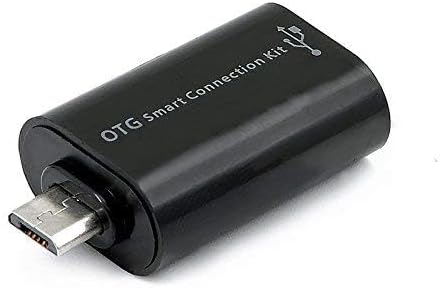
Figure 3: OTG Connection Kit for Android device connectivity.
Bruksanvisning
Once connected, your QUMOX L165U Gamepad is ready for use. The layout is standard for most game controllers.
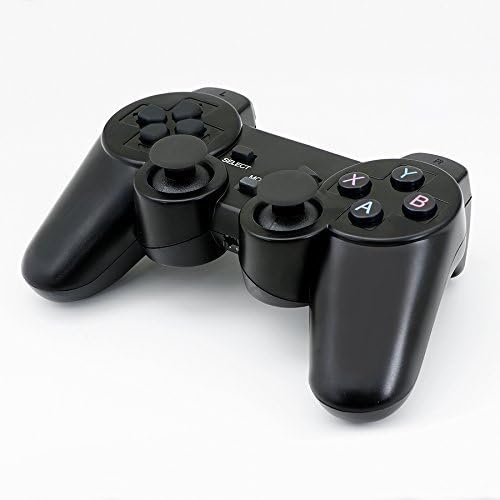
Bild 4: Överst view of the QUMOX L165U Gamepad, highlighting button layout.
- Riktningsplatta (D-Pad): För exakt riktningsinmatning.
- Analoga joystickar: Två analoga spakar för 360-graders rörelse och kamerakontroll.
- Åtgärdsknappar (A, B, X, Y): Standardåtgärdsknappar för kommandon i spelet.
- Axelknappar (L1, R1) och avtryckare (L2, R2): Located on the top of the gamepad for additional actions.
- VÄLJ/BACK-knapp: Används vanligtvis för menynavigering eller specifika funktioner i spelet.
- Startknapp: Used to pause games or confirm selections.
- MODE-knapp: Cycles through different operating modes (e.g., Android, PC) if automatic detection fails.
Videodemonstration
Video 1: A seller-provided overview of a 2-pack wireless controller, demonstrating its features and compatibility. While showing a similar product, it illustrates general wireless controller usage and setup.
Underhåll
- Rengöring: Använd en mjuk, torr trasa för att rengöra gamepaden. Undvik att använda starka kemikalier eller slipande material.
- Lagring: Förvara gamepaden på en sval, torr plats, borta från direkt solljus och extrema temperaturer.
- Batteriomsorg: Ta ur batterierna om gamepaden inte ska användas under en längre tid för att förhindra läckage.
Felsökning
| Problem | Möjlig orsak | Lösning |
|---|---|---|
| Gamepaden ansluter inte. | Low batteries, incorrect mode, adapter not properly inserted. | Replace batteries. Press the 'MODE' button to cycle through modes. Ensure USB adapter is fully inserted into PC or OTG adapter. |
| Knappar eller joysticks svarar inte. | Connection issue, game incompatibility, physical damage. | Reconnect the gamepad. Check game settings for controller support. If issue persists, contact support. |
| Android device does not recognize gamepad. | Android device lacks OTG support, OTG adapter issue. | Verify your Android device supports OTG. Ensure OTG adapter is functioning correctly. |
Specifikationer
| Särdrag | Detalj |
|---|---|
| Modellnummer | L165U |
| Anslutningsteknik | 2.4GHz Wireless (via USB Adapter) |
| Kompatibla enheter | PC, Android (with OTG support) |
| Strömkälla | 2x AAA-batterier |
| Objektets vikt | 5.3 uns |
| Paketets mått | 8.07 x 5.63 x 2.95 tum |
| Färg | Svart |
Garanti och support
For warranty information or technical support, please refer to the contact details provided with your purchase or visit the official QUMOX webwebbplats. Spara ditt inköpsbevis för eventuella garantianspråk.