
SIGMA BC 23.16 STS Set
SIGMA BC 23.16 STS Set Wireless Cyclocomputer User Manual
Model: BC 23.16 STS Set | Brand: SIGMA
1. Introduktion
The SIGMA BC 23.16 STS Set is a high-performance wireless cyclocomputer designed to provide comprehensive data for your cycling activities. This manual will guide you through the installation, setup, operation, and maintenance of your device to ensure optimal performance and longevity.
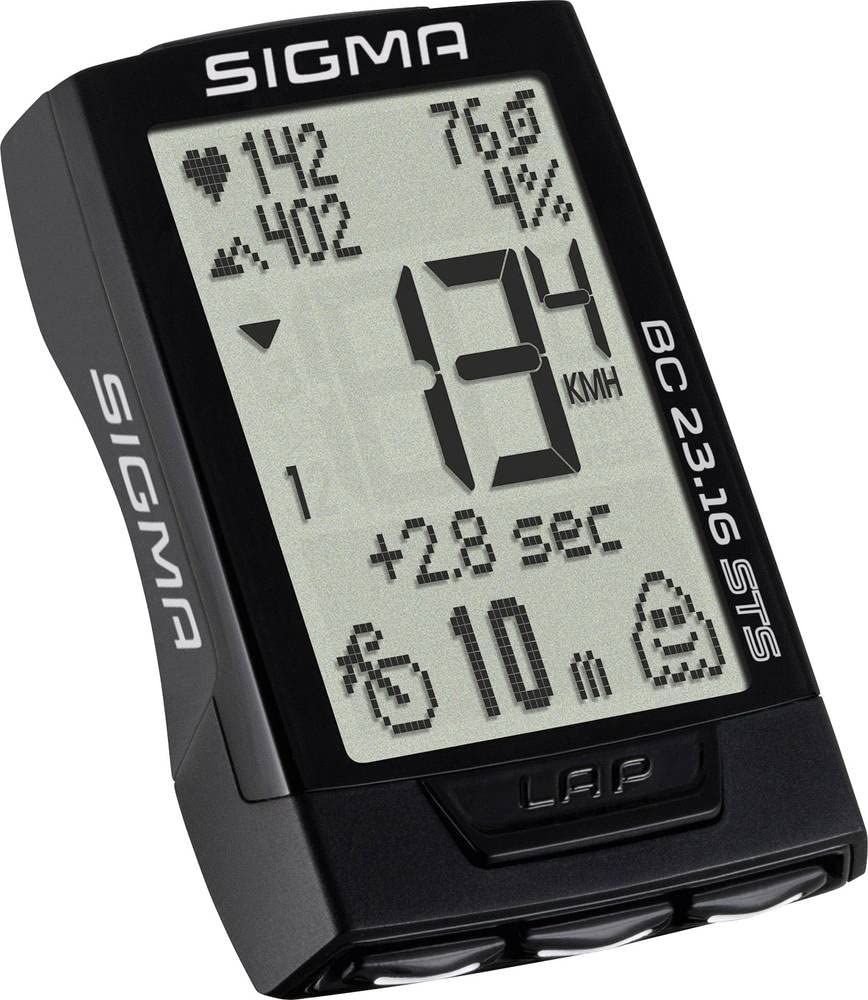
Image: The main unit of the SIGMA BC 23.16 STS Set cyclocomputer, displaying various metrics.
2. Paketets innehåll
Innan du fortsätter med installationen, kontrollera att alla komponenter finns i paketet:
- SIGMA BC 23.16 STS Cyclocomputer Unit
- STS Speed Transmitter
- STS Cadence Transmitter (if included in set)
- R1 DUO Comfortex+ Heart Rate Transmitter (if included in set)
- Styre/styrstamfäste
- Ekermagnet
- Cadence Magnet (if included in set)
- Monteringsmaterial (O-ringar, buntband)
- Batteries (CR2032 for computer, CR2032 for speed/cadence transmitters, CR2032 for heart rate transmitter)
- Bruksanvisning (detta dokument)

Image: All components included in the SIGMA BC 23.16 STS Set package, laid out for inspection.
3. Installation och installation
3.1 Batteriinstallation
The cyclocomputer and transmitters come with pre-installed batteries. If replacement is needed, use CR2032 batteries. Ensure correct polarity when inserting new batteries.

Bild: View of the battery compartment for the SIGMA BC 23.16 STS cyclocomputer, showing the CR2032 battery.
Notera: An integrated memory chip saves all total values and settings when changing the battery, preventing data loss.
3.2 Mounting the Cyclocomputer and Transmitters
- Handlebar/Stem Mount: Secure the mount to your handlebar or stem using the provided O-rings or cable ties.
- Speed Transmitter: Attach the speed transmitter to the front fork, ensuring it aligns with the spoke magnet. The distance between the transmitter and magnet should be approximately 5-10 mm.
- Spoke Magnet: Fasten the magnet to a spoke on your front wheel.
- Cadence Transmitter (if applicable): Mount the cadence transmitter to the chainstay, aligning it with the cadence magnet on the crank arm.
- Heart Rate Transmitter (if applicable): Wear the heart rate chest strap directly on your skin, just below your chest muscles.
3.3 Grundinställningar
Upon first use or after a battery change, you will need to configure basic settings:
- Språk: Välj önskat språk.
- Enheter: Choose between kilometers (km/h) or miles (mph) for speed and distance.
- Hjulstorlek: Accurately measure and input your wheel circumference for precise speed and distance readings. Refer to your bicycle tire for circumference values or measure manually.
- Tidsformat: Set 12h or 24h format.
- Personuppgifter: Input age, weight, and gender for accurate calorie and heart rate zone calculations.

Image: Diagram illustrating the button layout and their primary functions on the SIGMA BC 23.16 STS cyclocomputer.
4. Bruksanvisning
The BC 23.16 STS features an intuitive interface with multiple functions accessible via its buttons.
4.1 Display och navigering
The cyclocomputer features a 2.1-inch display with a backlight function for visibility in various lighting conditions. Use the buttons on the device to navigate through different data screens and menus.

Image: The 2.1-inch screen of the SIGMA BC 23.16 STS cyclocomputer, highlighting its dimensions and backlight capability.
4.2 Nyckelfunktioner
The BC 23.16 STS offers over 23 functions, including:
- Current, Average, and Maximum Speed
- Distance (Trip, Total)
- Ride Time (Trip, Total)
- Klocka
- Temperatur
- Heart Rate (Current, Average, Maximum, Zones)
- Cadence (Current, Average, Maximum)
- Power (Current, Average, Maximum)
- Altitude Functions (Current, Ascent, Descent, Gradient)
- Lap Function
- Kaloriförbrukning
4.3 Automatic Bike Recognition
The cyclocomputer supports automatic recognition for up to two different bikes. This allows you to use the same computer on multiple bicycles without manually changing settings. Ensure each bike has its own speed and cadence transmitters paired to the computer.

Image: Illustration of the automatic bike recognition feature, showing two different cyclists with their respective bikes (Bike 1 and Bike 2).
5. Underhåll
Proper maintenance ensures the longevity and accuracy of your SIGMA BC 23.16 STS Set.
- Rengöring: Clean the cyclocomputer and transmitters with a soft, damp trasa. Använd inte starka kemikalier eller slipande rengöringsmedel.
- Batteribyte: Replace batteries when the low battery indicator appears. Refer to section 3.1 for battery installation details.
- Lagring: När enheten inte används under längre perioder, förvara den på en sval, torr plats, skyddad från direkt solljus.
- Vattentålighet: Enheten är vattentålig, men inte vattentät. Undvik att sänka ner den i vatten.
6. Felsökning
If you encounter issues with your cyclocomputer, refer to the following common problems and solutions:
| Problem | Möjlig orsak/lösning |
|---|---|
| No Speed Display |
|
| Felaktiga avläsningar |
|
| Displayen är tom |
|
| Heart Rate Not Displaying |
|
7. Specifikationer
| Särdrag | Detalj |
|---|---|
| Stämpla | SIGMA |
| Modellnummer | 2317 (BC 23.16 STS Set) |
| Visningstyp | LCD |
| Skärmstorlek | 2.1 tum (ca 5.3 cm) |
| Sensortyp | Speed Sensor (STS Wireless) |
| Batteriets sammansättning | Litium (CR2032) |
| Monteringstyp | Styrfäste |
| User Interface Input | Knappar |
| Färg | Svart |
| Funktioner | 23+ functions (Speed, Distance, Time, HR, Cadence, Power, Altitude, etc.) |
| Batteritid | 2+ years (computer unit) |
8. Garanti och support
Garanti: The product information indicates "Nessuna" (None) for product warranty. Please refer to your point of purchase for any specific return or exchange policies.
Stöd: For further assistance, technical questions, or detailed information not covered in this manual, please visit the official SIGMA webwebbplatsen eller kontakta deras kundsupport. Du hittar mer information på SIGMA Store on Amazon.
Ask a question about this manual
Ask about setup, troubleshooting, compatibility, parts, safety, or missing instructions. Manuals+ will review the question and use this page’s manual context to help answer it.