
Introduktion
This manual provides instructions for the installation, operation, and maintenance of your Audiovox ELEAUDAX80EXT Wireless Extension. This device is designed to expand the functionality of compatible Audiovox phone models, specifically the AX8001, AX8001E, and AX8101AM, by providing an additional wireless handset.
Paketets innehåll
Kontrollera att alla artiklar finns i paketet innan du fortsätter med installationen.
- Audiovox ELEAUDAX80EXT Wireless Extension Unit
- Strömadapter (om tillämpligt)
- Uppladdningsbart batteri (förinstallerat eller separat)
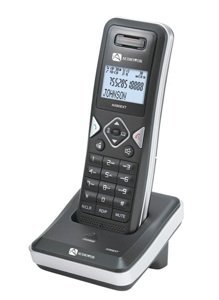
Image: The Audiovox ELEAUDAX80EXT Wireless Extension Unit. This image displays the compact design of the extension handset.
Inställning
- Ladda batteriet: If the battery is not pre-installed, insert it into the extension unit according to the markings. Place the extension unit on its charging cradle (if included) or connect the power adapter directly to the unit and a power outlet. Allow the unit to charge for at least 12-16 hours before initial use.
- Register the Extension:
- Ensure your main Audiovox phone base (AX8001, AX8001E, or AX8101AM) is powered on.
- On the main phone base, locate and press the "Register" or "Page" button. Hold it until the indicator light on the base begins to flash (refer to your main phone's manual for exact instructions).
- While the base is in registration mode, on the ELEAUDAX80EXT extension unit, navigate to the "Menu" and select "Register Handset" or a similar option. Follow the on-screen prompts.
- Once registration is successful, the extension unit will display a confirmation message, and the indicator light on the base will stop flashing.
- Testanslutning: Make a test call from the extension unit to ensure proper functionality.
Bruksanvisning
Ringa ett samtal
- Ta upp luren eller tryck på PRATA knapp.
- Slå önskat telefonnummer.
- Tryck på PRATA button again or place the handset back on the cradle to end the call.
Besvara ett samtal
- När telefonen ringer, lyft luren eller tryck på knappen PRATA knapp.
- För att avsluta samtalet, tryck på AVSLUTA button or place the handset back on the cradle.
Intercom Function (if supported by base unit)
- Tryck på INTERCOM knapp.
- Dial the number of the extension you wish to call (e.g., "2" for the second handset).
- Trycka PRATA to initiate the intercom call.
Underhåll
- Rengöring: Torka av enheten med en mjuk, damp trasa. Använd inte starka kemikalier eller slipande rengöringsmedel.
- Batteriomsorg: For optimal battery life, avoid fully discharging the battery frequently. Keep the unit on its charger when not in use.
- Lagring: If storing the unit for an extended period, remove the battery and store it in a cool, dry place.
Felsökning
| Problem | Lösning |
|---|---|
| Ingen kopplingston / Kan inte ringa samtal |
|
| Handenheten laddas inte |
|
| Dålig samtalskvalitet / Statisk |
|
Specifikationer
- Modellnummer: ELEAUDAX80EXT
- Compatible Base Units: Audiovox AX8001, AX8001E, AX8101AM
- Mått (L x B x H): 20 x 40 x 30 millimeter
- Vikt: 20 gram
- UPC: 044476082719
Garanti och support
For specific warranty information and technical support, please refer to the documentation included with your original Audiovox phone system or visit the official Audiovox webSpara ditt inköpskvitto som inköpsbevis för garantianspråk.
For further assistance, please contact Audiovox customer service.