
Introduktion
This manual provides comprehensive instructions for the HUAYU URC1511 Universal Remote Control. This remote is designed for direct use with Sony, Samsung, and LG LCD/LED Smart TVs, offering a convenient solution to control multiple devices with a single remote. No complex setup is required for these compatible brands.
Inställning
1. Batteriinstallation
Fjärrkontrollen kräver två AAA-batterier (medföljer ej). Följ dessa steg för att installera dem:
- Leta reda på batterifacket på baksidan av fjärrkontrollen.
- Tryck ned fliken och skjut av batterilocket.
- Sätt i två AAA-batterier och se till att de positiva (+) och negativa (-) polerna matchar diagrammen inuti batterifacket.
- Slide the battery cover back on until it clicks into place.
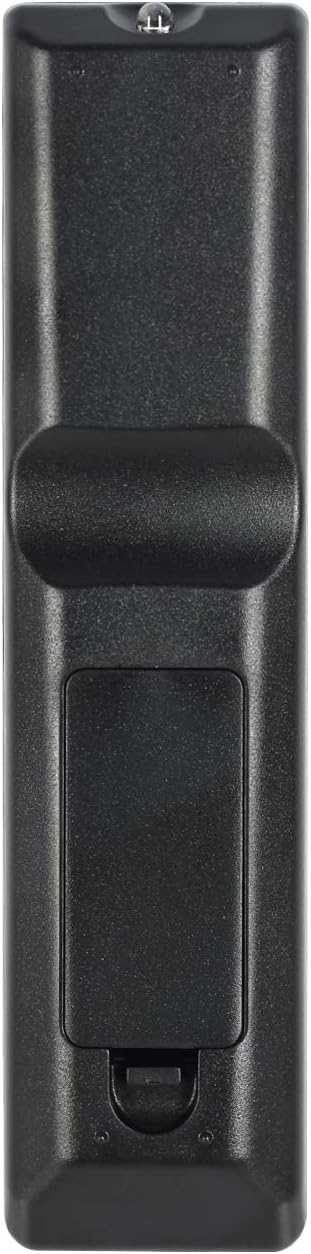
Image: Back of the remote control with battery compartment.
2. Första användning
For SAMSUNG, LG, and SONY brand TVs, the HUAYU URC1511 remote control is ready for use immediately after battery installation. No additional programming or setup is required. Simply point the remote at your TV and begin operating it.
Bruksanvisning
Remote Control Layout and Functions
The HUAYU URC1511 remote control features a standard layout with dedicated buttons for various TV functions. Refer to the image below for a visual guide to the button layout.
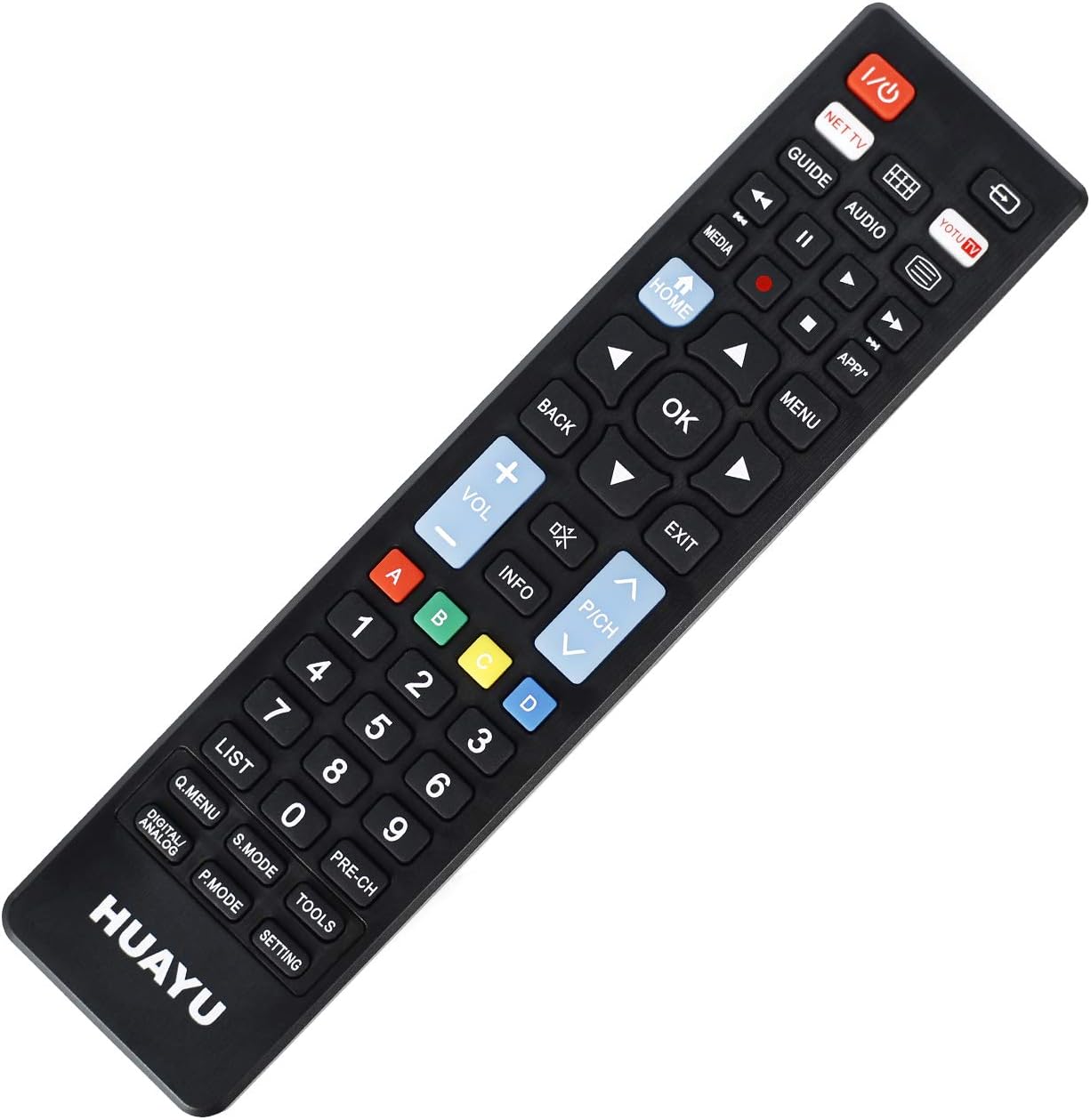
Bild: Fram view av fjärrkontrollen med knapplayout.
Nyckelfunktioner:
- Ström (röd knapp): Slår på eller av TV:n.
- NET TV / YOTU TV: Dedicated buttons for accessing smart TV applications or specific streaming services.
- Guide: Visar den elektroniska programguiden.
- Media: Åtkomst till funktioner för medieuppspelning.
- Hem: Returns to the TV's main home screen or smart hub.
- Tillbaka: Navigerar tillbaka i menyer eller applikationer.
- OK (mittenknapp): Bekräftar val.
- Riktningspilar (upp, ner, vänster, höger): Navigerar genom menyer och alternativ.
- Volym upp/ner (+/-): Justerar TV-volymen.
- Channel Up/Down (P/CH +/-): Byter TV-kanaler.
- Stum: Stänger av eller slår på ljudet på TV:n.
- Meny: Öppnar TV:ns huvudmeny.
- Utgång: Avslutar aktuell meny eller applikation.
- Numeriskt tangentbord (0-9): Direkt kanalingång.
- Färgade knappar (A, B, C, D): Often used for specific functions within smart TV apps or teletext.
- Lista: Displays a list of channels or recordings.
- Q.MENU / DIGITAL ANALOG: Quick menu access or toggling between digital/analog inputs.
- S.LÄGE: Sound mode selection.
- P.LÄGE: Picture mode selection.
- VERKTYG: Accesses TV tools or settings.
- PRE-CH: Återgår till det tidigare viewed kanal.
- MILJÖ: Öppnar TV-inställningar.
Kompatibilitet
Kompatibla TV-märken
This universal remote control is designed for direct compatibility with the following television brands:
- SAMSUNG
- LG
- SONY
No setup is required for these brands; simply insert batteries and begin use.
Specifikationer
Produktspecifikationer
| Särdrag | Detalj |
|---|---|
| Modellnummer | URC1511 |
| Operativt avstånd | Mer än 8 meter |
| Strömkrav | DC 3V |
| Batterityp | Två AAA-batterier (ingår ej) |
| Kompatibla enheter | Tv |
| Max antal enheter som stöds | 3 (for specific brands) |
| Färg | Svart |
| Tillverkare | HUAYU |
Skötsel och underhåll
- Keep the remote control dry. Avoid exposure to water or high humidity.
- Tappa inte fjärrkontrollen och utsätt den inte för hårda stötar.
- Rengör fjärrkontrollen med en mjuk, torr trasa. Använd inte slipande rengöringsmedel eller lösningsmedel.
- Om fjärrkontrollen inte ska användas under en längre tid, ta ur batterierna för att förhindra läckage.
- Avoid exposing the remote control to direct sunlight or extreme temperatures.
Felsökning
Fjärrkontrollen svarar inte:
- Kontrollera batterierna: Se till att batterierna är korrekt isatta med rätt polaritet (+/-). Byt ut gamla eller urladdade batterier mot nya.
- Synlinje: Make sure there is a clear line of sight between the remote control and the TV's infrared receiver. Obstructions can block the signal.
- Avstånd: Ensure you are within the operable distance (typically within 8 meters).
- TV-kompatibilitet: Confirm your TV is one of the directly supported brands (SAMSUNG, LG, SONY).
Buttons Not Working Correctly:
- Rengör fjärrkontroll: Dust or debris under buttons can cause issues. Gently clean around the buttons.
- Batterikontroll: Låga batterier kan ibland orsaka att knapparna inte fungerar korrekt. Byt batterier.
Garanti och kundsupport
For warranty information or technical support regarding your HUAYU URC1511 Universal Remote Control, please refer to the documentation provided at the point of purchase or contact your retailer. Specific warranty terms may vary.