
1. Produkt överview
The PAKITE PAT-590 is a wireless HDMI AV sender system designed to transmit audio and video signals between rooms without the need for cables. It consists of a transmitter and a receiver unit, enabling wireless sharing of content from devices such as DVD players, DVRs, CCTV cameras, IPTV, satellite receivers, or digital TV set-top boxes to TV sets in different locations.
This system utilizes smart 2.4/5GHz dual-band Wi-Fi wireless transmission, offering a long transmission distance, strong anti-interference capabilities, and high mobility. It also supports IR remote control functionality, allowing users to control the source device from the receiver end.
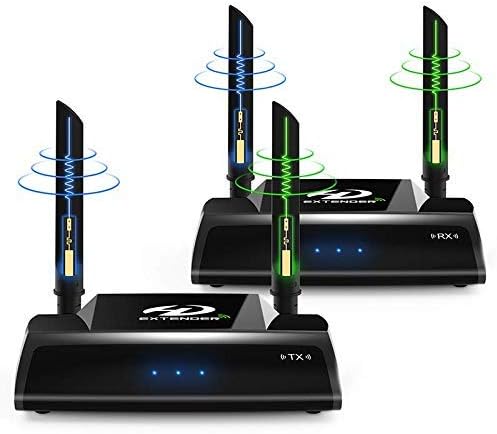
Image 1.1: The PAKITE PAT-590 Wireless HDMI Extender system, showing the transmitter and receiver units with their dual antennas.
2. Paketets innehåll
Kontrollera att alla artiklar som anges nedan ingår i ditt paket:
- 1 x sändarenhet
- 1 x mottagarenhet
- 2 x strömadaptrar (DC 5V/2A)
- 2 x HDMI-kablar
- 1 x IR Extender Cable
- 1 x Användarmanual (detta dokument)
3. Installationsanvisningar
Follow these steps to set up your PAKITE PAT-590 Wireless HDMI Extender system. Ensure all devices are powered off before making connections.
3.1 Komponentidentifiering

Bild 3.1: Detaljerad view of the transmitter and receiver units, highlighting ports such as HDMI Input/Output, IR Extension Interface, Power Input, Reset Button, and Power Switch.
3.2 Anslutningssteg
- Anslut sändaren (TX):
- Connect one end of an HDMI cable to the HDMI output of your source device (e.g., DVD player, set-top box).
- Connect the other end of this HDMI cable to the HDMI-signalingång port on the PAKITE PAT-590 Transmitter unit.
- If you wish to monitor the source locally, connect a second HDMI cable from the HDMI-signalutgång port on the Transmitter to an HDMI input on a local display (optional).
- Connect the IR Extender Cable to the IR Extension Interface on the Transmitter. Position the IR emitter head near the IR sensor of your source device.
- Connect one power adapter to the Strömingång port of the Transmitter and plug it into an electrical outlet.
- Anslut mottagaren (RX):
- Anslut ena änden av en HDMI-kabel till HDMI-signalutgång port on the PAKITE PAT-590 Receiver unit.
- Connect the other end of this HDMI cable to an HDMI input on your remote display (e.g., TV, monitor, projector).
- Connect the second power adapter to the Strömingång port of the Receiver and plug it into an electrical outlet.
- Ström på: Once all connections are secure, switch on the power for both the Transmitter and Receiver units using their respective Power Switches. Then, power on your source device and display.

Image 3.2: Diagram illustrating the connection flow from an HDMI signal source to the transmitter, and wirelessly to the receiver and a remote display, including IR remote control setup.
Important Safety Hint: To prevent damage, always ensure the product is powered off before connecting or disconnecting any cables. Only power on the units after all connections are firmly established. Avoid plugging or unplugging cables while the units are powered on. If the product will not be used for an extended period, please turn it off.
4. Bruksanvisning
4.1 Grundläggande användning
After successful setup and powering on, the transmitter will automatically send the HDMI signal wirelessly to the receiver. The receiver will then output the signal to your connected display. The system supports HDMI resolutions from 480i/576i up to 1080P at 50/60Hz.
4.2 Dual-Band Transmission
The PAT-590 utilizes both 2.4GHz and 5GHz ISM bands for wireless transmission. This dual-band capability helps in achieving faster transmission speeds and improved anti-interference performance. The system automatically manages frequency selection to optimize signal quality.

Image 4.1: Illustration of the 2.4G and 5G dual-frequency transmission capabilities, indicating flexible frequency switching to avoid signal interference.
4.3 IR-fjärrkontrollens funktionalitet
The built-in IR signal extension feature allows you to control your source device (e.g., DVD player, set-top box) remotely from the location of your receiver. Ensure the IR Extender Cable is properly connected to the transmitter and its emitter head is positioned correctly near the IR sensor of your source device. Point your original remote control towards the receiver, and the IR signal will be relayed back to the source.
4.4 OSD Display and Web Konfiguration
The device supports an On-Screen Display (OSD) to monitor device status. Additionally, a web configuration interface is available for advanced settings, providing a simple way to manage the system.
5. Underhåll
To ensure the longevity and optimal performance of your PAKITE PAT-590 Wireless HDMI Extender, follow these general maintenance guidelines:
- Rengöring: Använd en mjuk, torr trasa för att rengöra enheterna. Undvik att använda flytande rengöringsmedel eller slipande material.
- Miljö: Förvara enheterna i en torr miljö, borta från direkt solljus, extrema temperaturer och hög luftfuktighet.
- Stäng av: If the system will not be used for an extended period, power off both the transmitter and receiver units and unplug their power adapters from the electrical outlets.
- Ventilation: Säkerställ ordentlig ventilation runt enheterna för att förhindra överhettning. Blockera inte några ventilationsöppningar.
6. Felsökning
If you encounter issues with your PAKITE PAT-590, please refer to the following troubleshooting tips:
- Ingen signal eller dålig bildkvalitet:
- Verify that all HDMI cables are securely connected to both the source device, transmitter, receiver, and display.
- Ensure both the transmitter and receiver units are powered on and their indicator lights are active.
- Check the distance between the transmitter and receiver. The maximum transmission distance is 100 meters in open space. Walls and other obstacles will reduce this range.
- Minimera hinder mellan sändare och mottagare.
- Kontrollera eventuella störningar från andra trådlösa enheter som arbetar på 2.4 GHz- eller 5 GHz-frekvenser.
- Try repositioning the units or their antennas for better signal reception.
- IR-fjärrkontrollen fungerar inte:
- Ensure the IR Extender Cable is firmly connected to the transmitter.
- Verify that the IR emitter head is correctly positioned directly over or very close to the IR sensor of your source device.
- Check the batteries in your original remote control.
- Video Delay/Lag:
- A slight delay of less than 0.2 seconds may occur due to data compression. This is normal for wireless transmission.
- This product is not recommended for PC gaming or other real-time applications where minimal latency is critical.
- Enheten svarar inte:
- Locate the Reset Button on the unit (refer to Image 3.1). Use a small, pointed object (like a paperclip) to press and hold the reset button for a few seconds to restart the unit.
- Power cycle the units by unplugging them from power for 30 seconds, then plugging them back in and powering them on.
7. Specifikationer
| Särdrag | Specifikation |
|---|---|
| Input/Output Jack | HDMI 1.4 / HDCP 1.4 |
| Output Image Resolution | 720/1080P at 50/60Hz |
| HDMI ljudformat | 1080P HQ |
| HDMI Max Transmission Standard | IEEE 802.11a / b / g / n |
| Driftsfrekvens | 2.4GHz, 5GHz ISM Band |
| Max Wireless Transmission Rate | 2.4G 150Mbps, 5G 300Mbps |
| Överföringsavstånd | 50-100m (open space accessibility) |
| IR -frekvensområde | 38KHz |
| DC-ingång | AC 100V-240V 50 / 60Hz |
| DC-utgång | DC 5V/2A |
| Driftstemperatur | -10℃ till +50℃ |
| Operation Fuktighet | 10-80 % RH (icke-kondenserande) |
| Produktens mått | 158 mm x 128 mm x 37 mm |
8. Garanti och support
Information regarding product warranty and customer support is not available in the provided product data. Please refer to the product packaging or the manufacturer's official webwebbplatsen för information om garantibevakning och hur du kontaktar kundsupport.