
Introduktion
The MUSKY DY28 is a versatile device combining a Bluetooth speaker, smart touch lamp, alarm clock, and MP3 player into a single unit. This manual provides instructions for its setup, operation, and maintenance to ensure optimal performance.
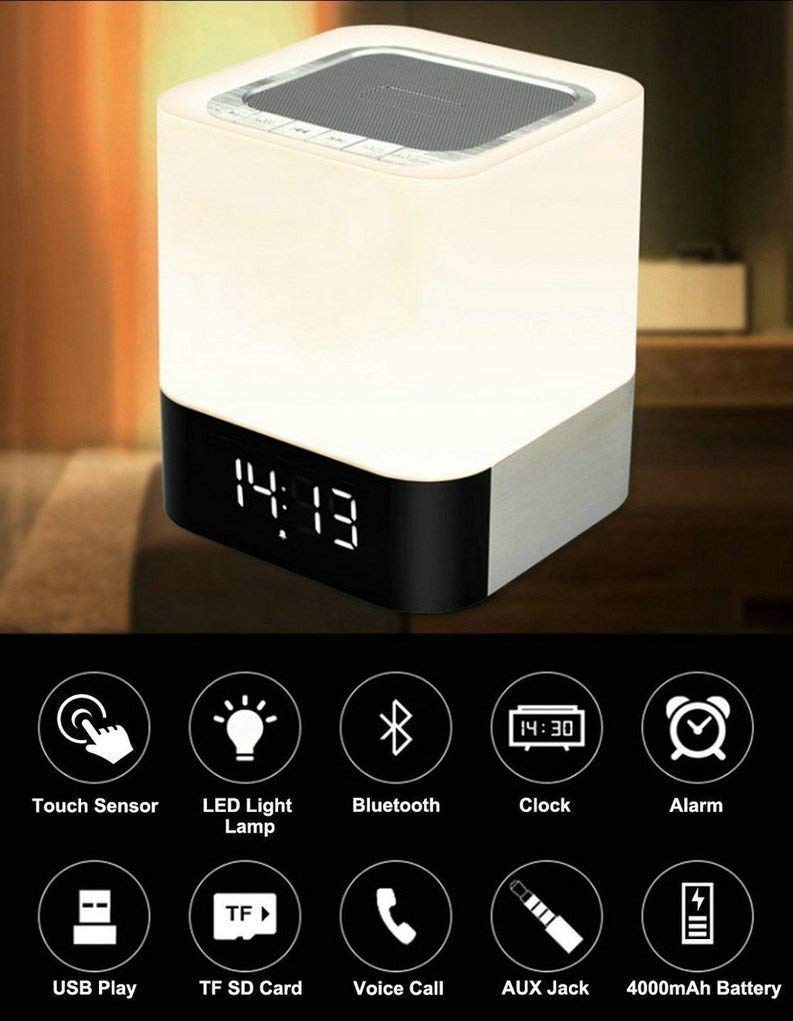
Image: The MUSKY DY28 device, showcasing its integrated clock display and touch-sensitive light panel.
Boxens innehåll
- MUSKY DY28 Bluetooth Speaker
- Användarmanual
- Laddningskabel
Produktegenskaper
- Multifunktionell: Bluetooth speaker, smart touch lamp, alarm clock, and MP3 player.
- Bluetooth 4.0: Easy and stable connection with Bluetooth-enabled devices.
- Justerbart LED-ljus: Warm LED light with adjustable brightness (Max 20 Lumen) via touch sensor.
- Digital Clock & Alarm: Big digit 12/24H alarm clock with calendar, alarm, and sleep mode functions.
- Flera uppspelningslägen: Supports MP3 playback via USB, micro TF/SD Card, and 3.5mm AUX input.
- Ljudkvalité: 5W single acoustic driver with enhanced passive low-frequency radiator for clear sound and solid bass.
- Lång batteritid: Built-in 4000mAh battery provides up to 15 hours of lighting or 9 hours of music playback (depending on usage).
- Handsfreesamtal: Integrated microphone for answering calls.
Inställning
1. Laddar enheten
Before first use, fully charge the speaker. Connect the provided USB charging cable to the charging port on the device and to a standard USB power adapter (not included) or a computer's USB port. The charging indicator will show the charging status.
2. Ström på/av
Locate the Power On/Off switch on the device. Slide the switch to the 'ON' position to power on the speaker. Slide it to 'OFF' to power off.
3. Bluetooth-parning
- Ensure the speaker is powered on and in Bluetooth mode (indicated by a flashing blue light or voice prompt).
- Aktivera Bluetooth på din mobila enhet och sök efter tillgängliga enheter.
- Select 'MUSKY DY28' from the list of devices.
- Once paired, the speaker will indicate a successful connection (e.g., solid blue light or voice prompt).
4. Ställa in tid och alarm
Refer to the detailed control diagram for button locations. Use the 'Mode' button to cycle through functions until the clock setting is displayed. Use the 'Previous' and 'Next' buttons to adjust hours and minutes, and the 'Play/Pause' button to confirm. For alarm settings, follow a similar procedure, activating the alarm function and setting the desired time.

Bild: Detaljerad view of the MUSKY DY28's control panel, highlighting buttons for power, charging, audio inputs, playback, volume, and the touch sensor.
Bruksanvisning
1. Musikuppspelning
The DY28 supports multiple music sources:
- Bluetooth-läge: After successful pairing, play music from your connected device. Use the speaker's 'Play/Pause', 'Previous', and 'Next' buttons to control playback.
- USB-ingång: Sätt i ett USB-minne som innehåller MP3 files i USB-porten. Högtalaren växlar automatiskt till USB-läge och börjar uppspelningen.
- Micro TF/SD Card: Insert a micro TF/SD card with MP3 files into the Micro SD Slot. The speaker will automatically switch to TF/SD card mode and play music.
- AUX-ingång: Connect an external audio device using a 3.5mm AUX cable to the AUX port. The speaker will switch to AUX mode. Control playback from your external device.

Image: Visual guide demonstrating the three primary ways to play music on the DY28: via Bluetooth, Micro SD card, and USB drive.
2. Ljusdrift
The top panel of the speaker features a touch sensor for controlling the LED light. Tap the touch sensor to turn the light on/off and cycle through different brightness levels. The light offers a warm glow suitable for various environments.

Image: The MUSKY DY28 speaker illuminated, serving as a night light with its digital clock display visible in a low-light environment.
3. Väckarklockans funktioner
Once the alarm is set, it will sound at the designated time. To snooze, tap the touch sensor. To turn off the alarm, press the 'Mode' button or power off the device. The sleep mode feature allows the lamp and speaker to automatically turn off after a set period.
4. Handsfree-samtal
When a call comes in while connected via Bluetooth, the speaker will ring. Press the 'Play/Pause' button to answer the call. Press it again to end the call. The integrated microphone allows for hands-free conversation.
Specifikationer
| Särdrag | Detalj |
|---|---|
| Stämpla | MUSKIG |
| Modellnummer | DY28 |
| Anslutningsteknik | Aux, Bluetooth, USB |
| Typ av trådlös teknik | Bluetooth |
| Monteringstyp | Bordsfäste |
| Typ av högtalare | Bokhylla |
| Produktegenskaper | Light for emergency use |
| Controllertyp | Pekplatta |
| Kontrollmetod | Röra |
| Färg | Vit |
| Batterikapacitet | 4000mAh (inbyggd) |
| Battery Life (Lighting) | Upp till 15 timmar |
| Batteritid (musikuppspelning) | Upp till 9 timmar |
| Laddningstid | 2-4 timmar |
| Bluetooth-räckvidd | 33 fot / 10 meter |
| Strömkälla | Batteridriven |
| Antal ljudkanaler | 5 watt |
| Är vattentät | SANN |
| Objektets vikt | 700 gram |
| Kompatibla enheter | MP3-spelare, smartphone, surfplatta |
Felsökning
- Ingen ström: Ensure the device is fully charged. Check the power switch is in the 'ON' position.
- Kan inte para ihop Bluetooth: Make sure the speaker is in Bluetooth pairing mode. Ensure your device's Bluetooth is enabled and within range (10 meters). Try restarting both devices.
- Inget ljud: Check the volume level on both the speaker and your connected device. Ensure the correct input mode (Bluetooth, USB, TF/SD, AUX) is selected.
- Ljuset fungerar inte: Tap the touch sensor on the top of the speaker. Ensure the device has sufficient battery charge.
- Larmet ljuder inte: Kontrollera att alarmtiden är korrekt inställd och att alarmfunktionen är aktiverad.
Underhåll
- Rengör enheten med en mjuk, torr trasa. Använd inte slipande rengöringsmedel eller lösningsmedel.
- Undvik att utsätta högtalaren för extrema temperaturer, direkt solljus eller hög luftfuktighet.
- Förvara enheten på en sval och torr plats när den inte används under längre perioder.
- Försök inte att ta isär eller reparera enheten själv, eftersom detta upphäver garantin.
Officiell produktvideo
Video: Official product video demonstrating the key features and functions of the MUSKY DY28 Bluetooth Speaker, Smart Touch Lamp, and Alarm Clock.
Garanti och support
För garantiinformation och kundsupport, vänligen se dokumentationen som medföljde ditt köp eller kontakta tillverkaren direkt. Spara ditt inköpsbevis för eventuella garantianspråk.


