
Introduktion
This manual provides essential information for the setup, operation, and maintenance of your HCDZ Universal Replacement Remote Control. This remote is designed as a direct replacement for various television models and requires no programming.
Inställning
Batteriinstallation
The HCDZ Replacement Remote Control requires two (2) AAA alkaline batteries (not included).
- Leta reda på batterifacket på baksidan av fjärrkontrollen.
- Skjut försiktigt batterifackets lock nedåt eller utåt för att öppna det.
- Sätt i två AAA-batterier och se till att de positiva (+) och negativa (-) polerna är korrekt inriktade med markeringarna inuti batterifacket.
- Sätt tillbaka batterifackets lock genom att skjuta tillbaka det på plats tills det klickar ordentligt.

Bildbeskrivning: En närbild view of the back of the HCDZ replacement remote control, showing the rectangular battery compartment cover. The cover is black and blends seamlessly with the remote's design.
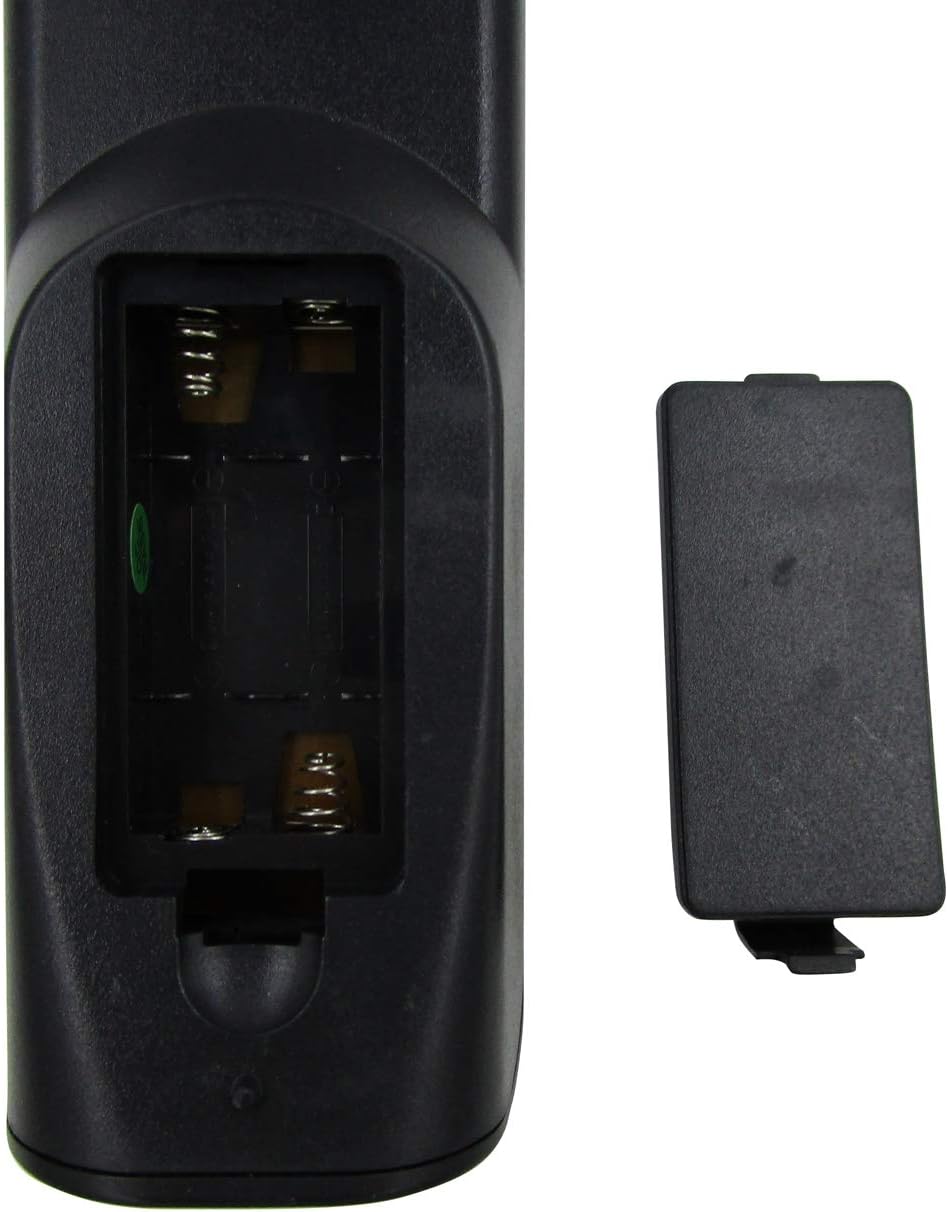
Bildbeskrivning: En närbild view of the HCDZ replacement remote control with the battery compartment open. Two empty slots for AAA batteries are visible, along with the metal spring contacts. The detached battery cover is shown next to the open compartment.
Bruksanvisning
Grundläggande drift
This remote control operates using infrared (IR) technology. Ensure there is a clear line of sight between the remote and your television's IR receiver for optimal performance.
- Driva: Press the Power button to turn your television on or off.
- Kanalval: Use the number buttons to directly enter channel numbers or the Channel Up/Down buttons to navigate sequentially.
- Volymkontroll: Adjust the volume using the Volume Up/Down buttons.
- Stum: Press the Mute button to silence the television audio.
- Indata/källa: Use the Input or Source button to switch between different video inputs (e.g., HDMI, AV).
Driftområde
The remote control has a maximum operating range of approximately 10 meters (33 feet). Performance may vary depending on environmental factors and battery condition.
Underhåll
Rengöring
Använd en mjuk, torr trasa för att rengöra fjärrkontrollen. Använd inte flytande rengöringsmedel eller slipande material, eftersom dessa kan skada fjärrkontrollens yta eller interna komponenter.
Batteribyte
Replace batteries when the remote's response becomes sluggish or stops functioning. Always replace both batteries simultaneously with new AAA alkaline batteries. Do not mix old and new batteries, or different types of batteries.
Felsökning
Vanliga problem och lösningar
- Fjärrkontrollen svarar inte:
- Kontrollera om batterierna är korrekt isatta med rätt polaritet.
- Byt ut batterierna mot nya alkaliska AAA-batterier.
- Se till att det inte finns några hinder mellan fjärrkontrollen och TV:ns IR-mottagare.
- Kontrollera att fjärrkontrollen är riktad direkt mot TV:n.
- Vissa knappar fungerar inte:
- Detta kan tyda på låg batterinivå. Byt batterier.
- Ensure the remote is compatible with your specific television model. Refer to the product listing for compatible models.
If issues persist after following these steps, please contact HCDZ customer support.
Specifikationer
Produktspecifikationer
| Särdrag | Detalj |
|---|---|
| Stämpla | HCDZ |
| Modell | Universell ersättningsfjärrkontroll |
| Kompatibla enheter | Television (Majestic TVDB826BKHK, SANSUI STY0632C, ACONATIC AN-LT3233, etc.) |
| Anslutningsteknik | Infraröd (IR) |
| Max stödda enheter | 1 |
| Controllertyp | Knappkontroll |
| Max arbetsområde | 10 meter (33 fot) |
| Batterier krävs | 2 x AAA alkaliska batterier (ingår ej) |
| Specialfunktioner | No programming needed, ready to use |
Garantiinformation
Begränsad garanti
HCDZ products are typically covered by a limited warranty against defects in materials and workmanship. For specific warranty terms and conditions, please refer to the original product packaging or contact HCDZ customer support. Keep your purchase receipt as proof of purchase.
Kundsupport
Kontakta oss
For further assistance, technical support, or warranty inquiries, please visit the official HCDZ webwebbplats eller kontakta deras kundtjänst.
Online support: HCDZ Store on Amazon
Notera: Specific contact details may vary. Please refer to the product packaging or the HCDZ official webwebbplats för den senaste informationen.