
1. Introduktion
Thank you for choosing the FeinTech LED Desk Lamp LTL00600. This high-quality desk lamp is designed to provide optimal lighting for your workspace while offering convenient features such as a USB charging port, adjustable brightness, and customizable color temperature. Please read this manual thoroughly before use to ensure proper operation and to maximize the lifespan of your product.
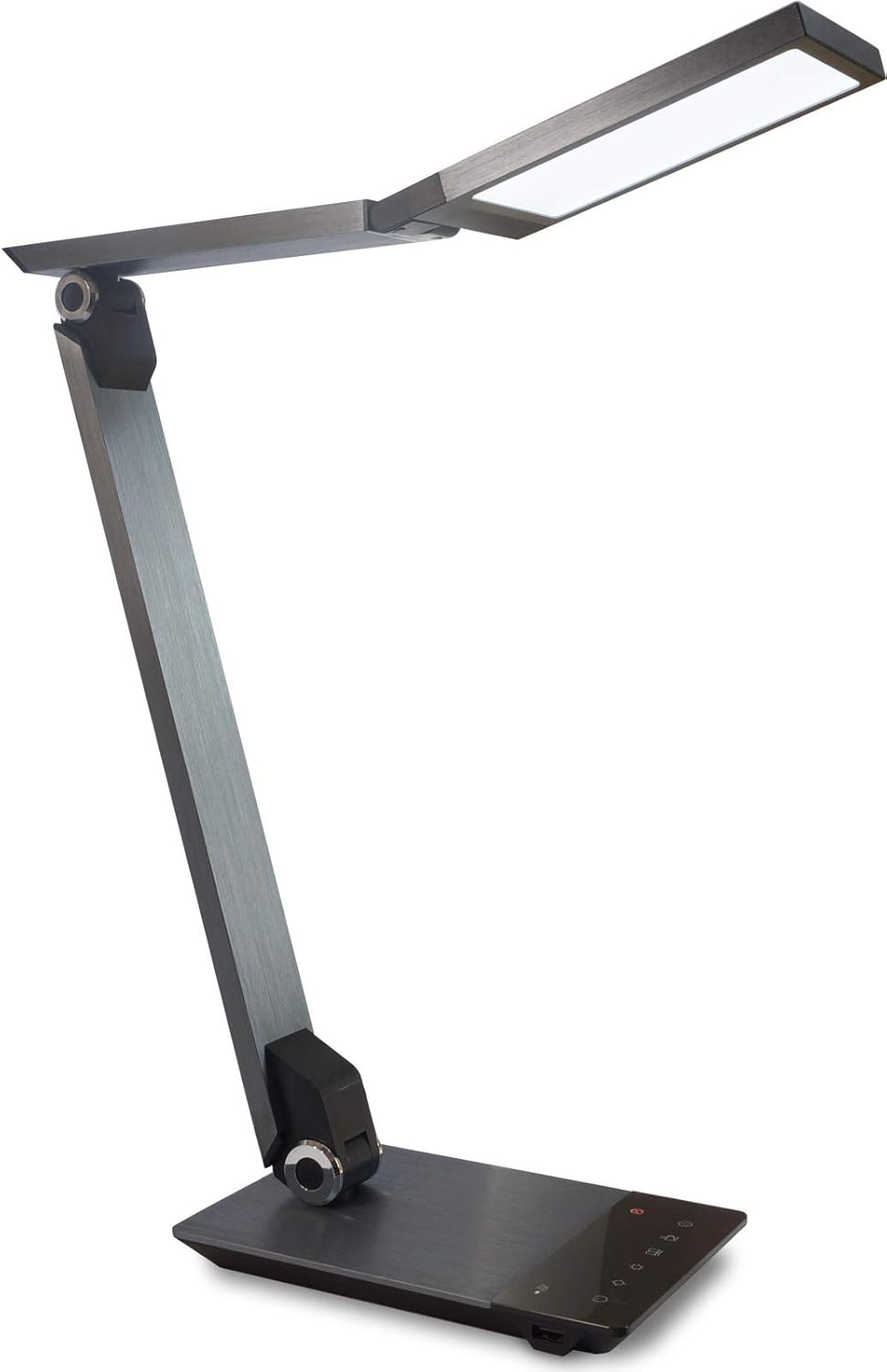
Image 1.1: FeinTech LED Desk Lamp LTL00600. This image displays the lamp in its upright position, showcasing its brushed aluminum finish and sleek design.
2. Säkerhetsinstruktioner
För att förhindra skador eller personskador, vänligen följ följande säkerhetsåtgärder:
- Se till att nätadaptern är ansluten till ett lämpligt eluttag.
- Utsätt inte lamp för vatten eller för hög luftfuktighet.
- Undvik att demontera eller modifiera lampReparationer bör endast utföras av kvalificerad personal.
- Behåll lamp borta från värmekällor och direkt solljus.
- Rengör lamp endast med en mjuk, torr trasa. Använd inte slipande rengöringsmedel eller lösningsmedel.
- Titta inte direkt in i LED-ljuskällan under längre perioder.
3. Paketets innehåll
Kontrollera att alla artiklar finns i paketet:
- FeinTech LED-skrivbord Lamp (Model: LTL00600)
- Strömadapter (12V/2A)
4. Produkt överview
Familiarize yourself with the components of your FeinTech LED Desk Lamp:
- Lamp Huvud: Contains the LED light source.
- Justerbara armar: Multiple joints for flexible positioning.
- Bas: Provides stability and houses the control panel and USB port.
- Kontrollpanel: Touch-sensitive buttons for power, brightness, color temperature, and timer.
- USB laddningsport: Located on the side of the base for device charging.

Bild 4.1: Uppifrån och ner view av lamp's base and control panel. This image highlights the touch-sensitive buttons for various functions.

Bild 4.2: Sida view av lamp's base, showing the integrated USB charging port. This port allows for convenient charging of compatible devices.
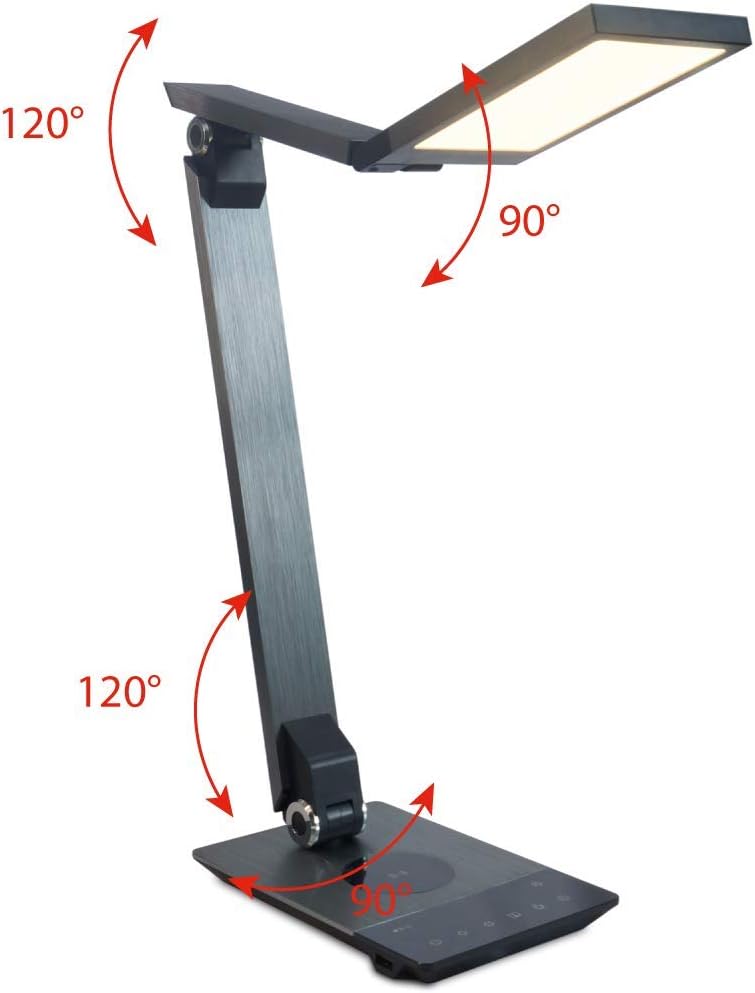
Image 4.3: Diagram illustrating the articulation angles of the lamp's joints. The lamp head can rotate 90 degrees, the upper arm 120 degrees, and the lower arm 120 degrees, allowing for flexible positioning.
5. Inställning
Följ dessa steg för den första installationen:
- Packa upp: Ta försiktigt ut alla komponenter ur förpackningen.
- Placering: Placera lamp base on a stable, flat surface. Ensure there is enough space for the lamp to be adjusted without obstruction.
- Anslut ström: Sätt i nätadapterkabeln i DC-ingången på baksidan av l:n.amp Anslut nätadaptern till ett vanligt eluttag.
6. Bruksanvisning
The FeinTech LED Desk Lamp features intuitive touch controls on its base.
6.1 Ström på/av
- Tryck på Strömknapp on the control panel (refer to Image 4.1) to turn the lamp på eller av.
6.2 Justering av ljusstyrka (dimning)
- Med lamp on, touch and hold the Ljusstyrka upp or Ljusstyrka ner buttons (refer to Image 4.1) to steplessly adjust the light intensity.
- Lamp base will vibrate slightly when the minimum or maximum brightness level is reached.
6.3 Justering av färgtemperatur
- Med lamp on, touch and hold the Color Temperature Up or Color Temperature Down buttons (refer to Image 4.1) to steplessly adjust the light color from warm white (2700K) to cool white (6500K).
- Lamp base will vibrate slightly when the minimum or maximum color temperature is reached.
6.4 Favorite Settings
- Lamp allows you to store and recall 3 favorite light settings (brightness and color temperature).
- To save a setting: Adjust the brightness and color temperature to your desired level. Then, touch and hold one of the Favoritknappar (refer to Image 4.1) until the lamp flashes briefly, indicating the setting is saved.
- To recall a setting: Simply touch the corresponding Favoritknapp.
- The last used brightness and color temperature settings are automatically saved even after the lamp är avstängd.
6.5 USB-laddningsfunktion
- Connect your smartphone or other compatible device to the USB charging port on the side of the lamp base (refer to Image 4.2) using a suitable USB cable.
- The intelligent USB port delivers up to 2.4A for fast charging.
- An LED indicator will signal ongoing and completed charging status.
6.6 Timerfunktion
- Tryck på Timerknapp (refer to Image 4.1) to activate the timer function.
- The first touch activates a 3-minute timer.
- A second touch activates a 1-hour timer.
- Lamp will automatically turn off after the selected time period.
7. Underhåll
För att behålla din lamp's appearance and functionality:
- Koppla alltid bort lamp från strömförsörjningen innan rengöring.
- Torka av lamp med en mjuk, torr, luddfri trasa.
- Använd inte flytande rengöringsmedel eller aerosolrengöringsmedel, eftersom de kan skada ytbehandlingen eller de interna komponenterna.
- Avoid scratching the brushed aluminum surface.
8. Felsökning
Om du stöter på problem med din lamp, se följande vanliga problem och lösningar:
| Problem | Möjlig orsak | Lösning |
|---|---|---|
| Lamp tänds inte. | Ingen strömförsörjning. | Check if the power adapter is securely connected to the lamp and the electrical outlet. Test the outlet with another device. |
| USB-laddning fungerar inte. | Enheten är inte kompatibel eller så är kabeln felaktig. | Ensure your device is compatible with USB charging. Try a different USB cable. Verify the lamp är påslagen. |
| Pekkontrollerna svarar inte. | Tillfälligt programvarufel eller strömproblem. | Disconnect the power adapter for 30 seconds, then reconnect it. Ensure your fingers are clean and dry when operating the touch controls. |
9. Specifikationer
| Modellnummer | LTL 00600 |
| Mått (L x B x H) | 36 x 13.5 x 44 cm (ca 14.2 x 5.3 x 17.3 tum) |
| Vikt | 1.84 kg (ca. 4.06 lbs) |
| Material | Borstad aluminium |
| Ljuskälla | LED |
| Max. Light Output | 500 lumens (1000 lux at 40 cm distance) |
| Färgtemperatur (CCT) | 2700 K (Warm White) to 6500 K (Cool White) |
| Power Consumption (Lamp endast) | Max. 10 W |
| Power Consumption (Lamp & Charging) | Max. 22 W |
| USB-utgång | Upp till 2.4 A |
| Ingång Voltage (adapter) | 12 V / 2 A |
| Switch Typ | Röra |

Image 9.1: Diagram showing the dimensions of the FeinTech LED Desk Lamp. Lamp measures approximately 36 cm in length, 13.5 cm in width, and 44 cm in height.
10. Garanti och support
FeinTech products are designed for reliability and performance. For warranty information or technical support, please refer to the warranty card included with your purchase or visit the official FeinTech webwebbplats. Vänligen spara ditt inköpsbevis för garantianspråk.