
Introduktion
This manual provides detailed instructions for the setup, operation, and maintenance of your BUFFBEE Glow Alarm Clock HRS-BLACK. Please read this manual thoroughly before using the product to ensure proper function and longevity.
Produkt överview
The BUFFBEE Glow Alarm Clock is a versatile device combining a digital alarm clock, FM radio, and a 7-color night light. It is designed to enhance your sleep and wake-up experience with customizable features.
Nyckelfunktioner:
- 3-i-1 funktionalitet: Digital alarm clock, FM radio, and night light.
- 7-färgs nattljus: Adjustable with 5 brightness levels.
- Dubbla larm: Set two independent alarms with choice of FM radio, built-in beep, or bird sounds.
- Adjustable Display Dimmer: 0-100% brightness control for the time display.
- Upplysta knappar: For easy operation in low light conditions.
- Timer för tupplur: Quick nap setting from 10 to 120 minutes.
- Auto-Off Sleep Timer: Automatically turns off night light and FM radio after a set duration.
- USB laddningsport: För laddning av externa elektroniska enheter.
- Energialternativ: AC powered with AAA battery backup (batteries not included).
Paketets innehåll:
- 1 x BUFFBEE Glow Alarm Clock
- 1 x strömadapter
- 1 x Användarmanual
Komponentidentifiering:
Se bilden nedan för en översiktview of the alarm clock's buttons and display.

Bild: Fram view of the BUFFBEE Glow Alarm Clock, showing the digital time display, alarm indicators, and control buttons on the top panel. The top edge features a light strip.
Inställning
1. Strömanslutning:
- Anslut den medföljande nätadaptern till DC-ingången på baksidan av väckarklockan.
- Anslut adaptern till ett vanligt vägguttag.
2. Battery Backup (Optional):
För oavbruten drift vid strömavbrotttages, install 3 AAA batteries (not included) into the battery compartment on the bottom of the unit. The clock will maintain time and alarm settings, and the alarm will still function, but the display and night light may be limited to conserve power.

Bild: Baksida view of the alarm clock showing the power input and battery compartment, alongside a power adapter and three AAA batteries (not included).
3. Inställning av initial tid:
- When first powered on, the display will show a default time.
- Tryck och håll ned TIDSINSTÄLLNING button (usually located on the top panel) until the hour digits flash.
- Använd +/- buttons (or similar navigation buttons) to adjust the hour.
- Trycka TIDSINSTÄLLNING again to confirm the hour and move to minute adjustment.
- Använd +/- knappar för att justera minuterna.
- Trycka TIDSINSTÄLLNING en gång till för att bekräfta och avsluta tidsinställningsläget.
- För att växla mellan 12-timmars- och 24-timmarsformat, tryck på 12/24H button (if available, often combined with time set or a dedicated button).
Bruksanvisning
1. Setting Alarms (Alarm 1 & Alarm 2):
Klockan stöder två oberoende alarm.
- Tryck på LARM 1 knappen (eller LARM 2) once to display the current alarm time.
- Tryck och håll ned LARM 1 (eller LARM 2) button until the hour digits flash.
- Använd +/- knappar för att justera timmen.
- Tryck på LARM button again to confirm the hour and move to minute adjustment.
- Använd +/- knappar för att justera minuterna.
- Tryck på LARM button again to select the alarm sound: FM radio, built-in beep, or bird sounds. Use +/- för att växla mellan alternativen.
- Tryck på LARM tryck på knappen en gång till för att bekräfta och aktivera larmet. En larmikon visas på displayen.
- För att stänga av ett aktivt larm, tryck på motsvarande knapp LARM knappen. Larmikonen kommer att försvinna.
2. Snooze-funktion:
När ett larm ljuder, tryck på den stora knappen SNOOZE / LIGHT button on top to temporarily silence the alarm for 9 minutes. The alarm will sound again after the snooze period.
3. Night Light Operation:
The alarm clock features a 7-color night light with adjustable brightness.

Image: The alarm clock shown with its top light strip illuminated in various colors, demonstrating the 7-color night light feature.
- Tryck på LJUS button (often combined with SNOOZE or a dedicated button) to turn the night light on/off.
- When the night light is on, press the LJUS button repeatedly to cycle through the 7 available colors.
- To adjust the brightness, use the +/- buttons while the night light is active. There are 5 brightness levels.
4. FM-radio:
Den inbyggda FM-radion låter dig lyssna på dina favoritstationer.
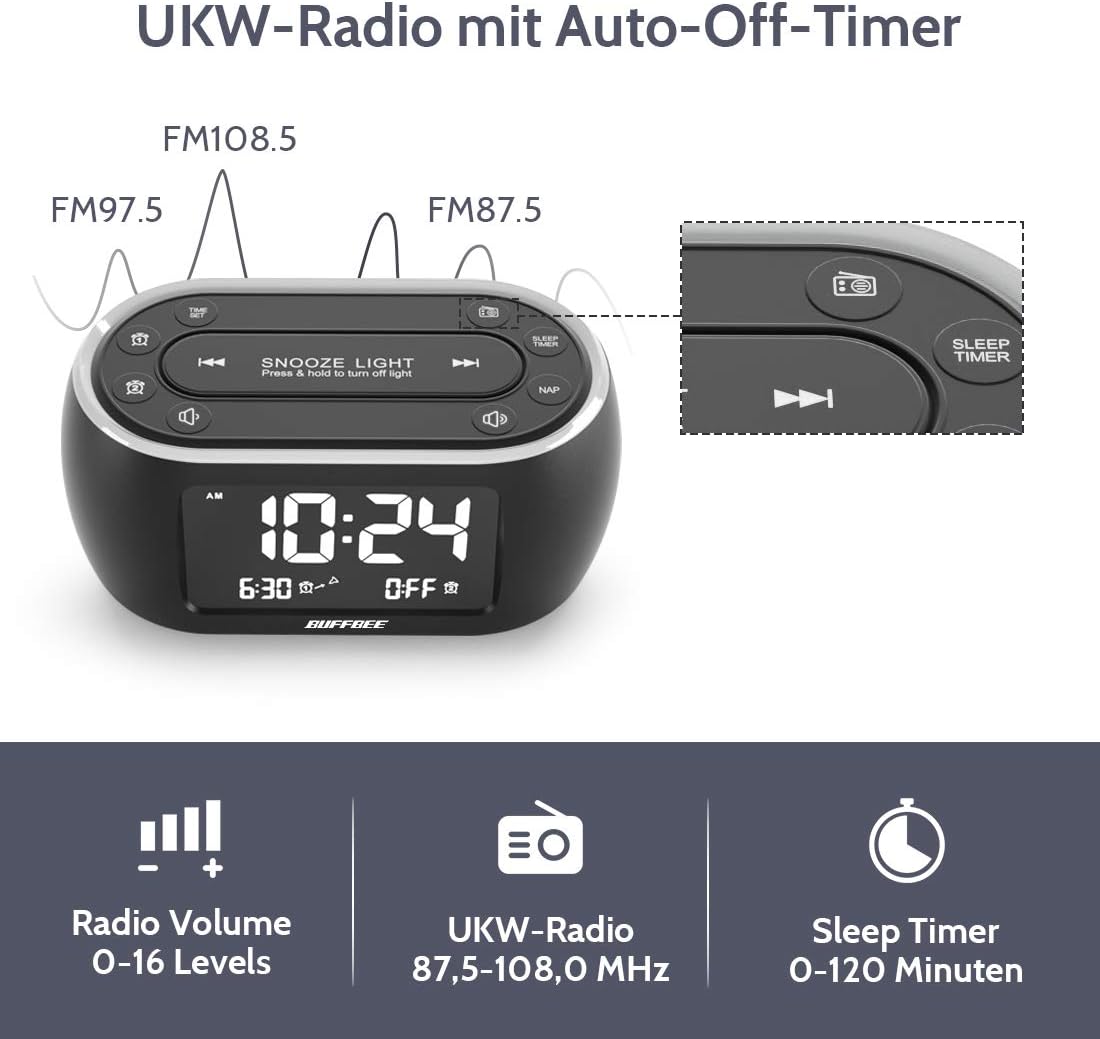
Image: The alarm clock display showing FM radio frequencies (FM108.5, FM97.5, FM87.5) and icons for radio volume and sleep timer.
- Tryck på RADIO button to turn the FM radio on/off.
- Tryck på AVSÖKA button (or similar) to automatically scan and save available FM stations.
- Använd FÖREGÅENDE/NÄSTA knappar för att navigera bland sparade stationer eller ställa in manuellt.
- Justera volymen med VOLYM +/- buttons. The volume can be set from 0 to 16 levels.
5. Nap Timer:
The nap timer allows for quick, short sleep periods without affecting regular alarm settings.
- Tryck på NAP button. The display will show the default nap time (e.g., 10 minutes).
- Tryck på NAP button repeatedly to cycle through preset nap durations (e.g., 10, 20, 30, 60, 90, 120 minutes).
- The nap timer will start automatically after selection.
- To cancel the nap timer, press the NAP button until "OFF" is displayed.
6. Auto-Off Sleep Timer:
Set a timer for the night light and/or FM radio to automatically turn off after a specified duration.
- While the night light or FM radio is active, press the SLEEP TIMER knapp.
- Tryck på SLEEP TIMER button repeatedly to cycle through available durations (e.g., 15, 30, 60, 90, 120 minutes, or OFF).
- The selected duration will be displayed, and the timer will begin. The night light and/or FM radio will turn off automatically when the timer expires.
7. Display Dimmer:
Adjust the brightness of the main time display from 0% to 100%.

Image: Six different views of the alarm clock display, illustrating the range of brightness from very dim to fully bright, and also showing the night light dimmer.
Använd den dedikerade DIMMER ring eller DIMMER +/- buttons (if available) to adjust the display brightness to your preference. This allows for comfortable viewi alla ljusförhållanden.
8. USB Charging Port:
A USB port is located on the back of the unit for charging small electronic devices.

Image: The alarm clock with a smartphone plugged into its side USB port, indicating the charging function.
Connect your device's USB charging cable to the port. The clock must be powered by the AC adapter for the USB charging function to work.
Underhåll
To ensure the longevity and optimal performance of your BUFFBEE Glow Alarm Clock, follow these maintenance guidelines:
- Rengöring: Wipe the unit with a soft, dry cloth. Do not use abrasive cleaners, waxes, or solvents as they may damage the surface.
- Driva: Always disconnect the power adapter from the wall outlet before cleaning or if the unit will be unused for an extended period.
- Miljö: Keep the alarm clock away from direct sunlight, heat sources, and excessive moisture.
- Batteribyte: If using battery backup, replace AAA batteries annually or when the battery indicator suggests low power. Ensure correct polarity when inserting new batteries.
Felsökning
If you encounter issues with your BUFFBEE Glow Alarm Clock, refer to the following common problems and solutions:
| Problem | Möjlig orsak | Lösning |
|---|---|---|
| Klockdisplayen är tom eller flimrar. | No power or loose connection. Low battery backup. | Ensure the power adapter is securely plugged into the clock and the wall outlet. Check if AAA batteries are installed correctly and have sufficient charge. |
| Larmet ljuder inte. | Alarm not activated. Alarm volume too low. | Verify that the alarm icon is displayed. Check the alarm volume setting. Ensure the correct alarm time is set. |
| FM-radiomottagningen är dålig. | Weak signal. Antenna not extended. Interference. | Extend the FM antenna fully. Try repositioning the clock. Perform an auto-scan for stations again. |
| Nattlampan fungerar inte. | Ljusfunktionen är avstängd. | Press the LIGHT button to turn it on. Check if the brightness is set to 0%. |
| USB-laddning fungerar inte. | Clock not connected to AC power. Device not compatible. | Ensure the clock is powered by the AC adapter. Check if your device is compatible with standard USB charging. |
Specifikationer
| Särdrag | Detalj |
|---|---|
| Stämpla | BUFFBI |
| Modellnummer | HRS-BLACK |
| Mått (L x B x H) | 12 x 3.81 x 6 cm (4.72 x 1.5 x 2.36 tum) |
| Vikt | 330 gram (0.73 lbs) |
| Strömingång | AC 100-240V, 50/60Hz |
| Batteribackup | 3 x AAA-batterier (ingår ej) |
| Visningstyp | Digital |
| Displayens ljusstyrka | 0-100% justerbar |
| Nattljusfärger | 7 XNUMX XNUMX färger |
| Nattljusets ljusstyrka | 5 nivåer justerbara |
| FM-radiofrekvens | 87.5-108.0 MHz |
| Larmvolym | 0-16 nivåer justerbar |
| Specialfunktioner | Ambient light, Dual Alarm, Nap Timer, Sleep Timer, USB Charging Port |
Garanti och support
BUFFBEE products are designed for reliability and performance. For specific warranty information, please refer to the documentation included with your purchase or contact BUFFBEE customer support.
If you require technical assistance or have questions regarding your BUFFBEE Glow Alarm Clock, please visit the official BUFFBEE webwebbplatsen eller kontakta deras kundtjänstavdelning. Kontaktuppgifter finns vanligtvis på produktförpackningen eller tillverkarens webplats.