
1. Introduktion
Tack för köpetasing the ORIA Motion Sensor Light. This battery-powered LED night light is designed to provide convenient, automatic illumination in various areas of your home. Please read this manual carefully before installation and use to ensure proper operation and longevity of your device.
2. Paketets innehåll
- 3 x ORIA Motion Sensor Night Light
- 6 x skruvar
- 1 x dubbelhäftande tejp
- 1 x Användarmanual
3. Specifikationer
| Modell | OUS-HY-UF75Y |
| Strömkälla | 3 x AAA-batterier (ingår ej) |
| Voltage | 4.5 volt |
| Wattage | 0.2 Watt |
| Typ av ljuskälla | LED |
| Lumen | 20lm |
| Specialfunktion | Rörelsesensor |
| Livslängd | 20,000 XNUMX timmar |
| Material | Akrylnitril Butadien Styren (ABS) |
| Produktens mått | 1.04 x 2.75 x 3 tum |
| Objektets vikt | 5.9 uns (per enhet) |
4. Säkerhetsinformation
- Blanda inte gamla och nya batterier.
- Blanda inte alkaliska, standardbatterier (kol-zink) eller uppladdningsbara (nickel-kadmium) batterier.
- Se till att batterierna är isatta med rätt polaritet (+ och -).
- Ta ur batterierna om lampan inte ska användas under en längre tid.
- Denna enhet är endast avsedd för inomhusbruk.
- Utsätt inte för vatten eller överdriven fukt.
- Förvaras utom räckhåll för barn.
5. Inställning
5.1 Batteriinstallation
- Vrid försiktigt lampans baksida moturs för att öppna batterifacket.
- Insert 3 AAA batteries (not included) into the compartment, ensuring correct polarity.
- Replace the back cover by aligning the marks and twisting clockwise until secure.
5.2 Monteringsalternativ
The ORIA Motion Sensor Light offers two installation methods:

Image: Demonstrates the two installation methods: using screws for a permanent fixture or double-sided adhesive tape for a temporary, non-damaging mount.
Alternativ 1: Skruvmontering
- Choose a desired location for the light.
- Mark the positions for the two screw holes on the mounting surface.
- Borra pilothål vid behov.
- Secure the light to the surface using the provided screws.
Option 2: Adhesive Tape Mounting
- Clean and dry the desired mounting surface thoroughly.
- Peel off one side of the double-sided adhesive tape and apply it firmly to the back of the light.
- Peel off the other side of the tape and press the light firmly onto the mounting surface for at least 30 seconds.
- Allow 24 hours for the adhesive to fully cure before applying significant pressure.
6. Bruksanvisning
The ORIA Motion Sensor Light features three operating modes: ON, OFF, and AUTO.

Image: Illustrates the light's behavior: off during daylight, activating upon motion detection, and automatically turning off after 30 seconds of no motion.
6.1 Lägesval
Locate the switch on the side of the light to select your desired mode:
- PÅ: The light will remain continuously on, regardless of ambient light or motion.
- OFF: Ljuset kommer att förbli släckt.
- AUTO (Motion Sensor Mode): The light will automatically turn on when motion is detected in a dark environment. It will turn off approximately 30 seconds after motion ceases.
6.2 Rörelsesensorns funktionalitet
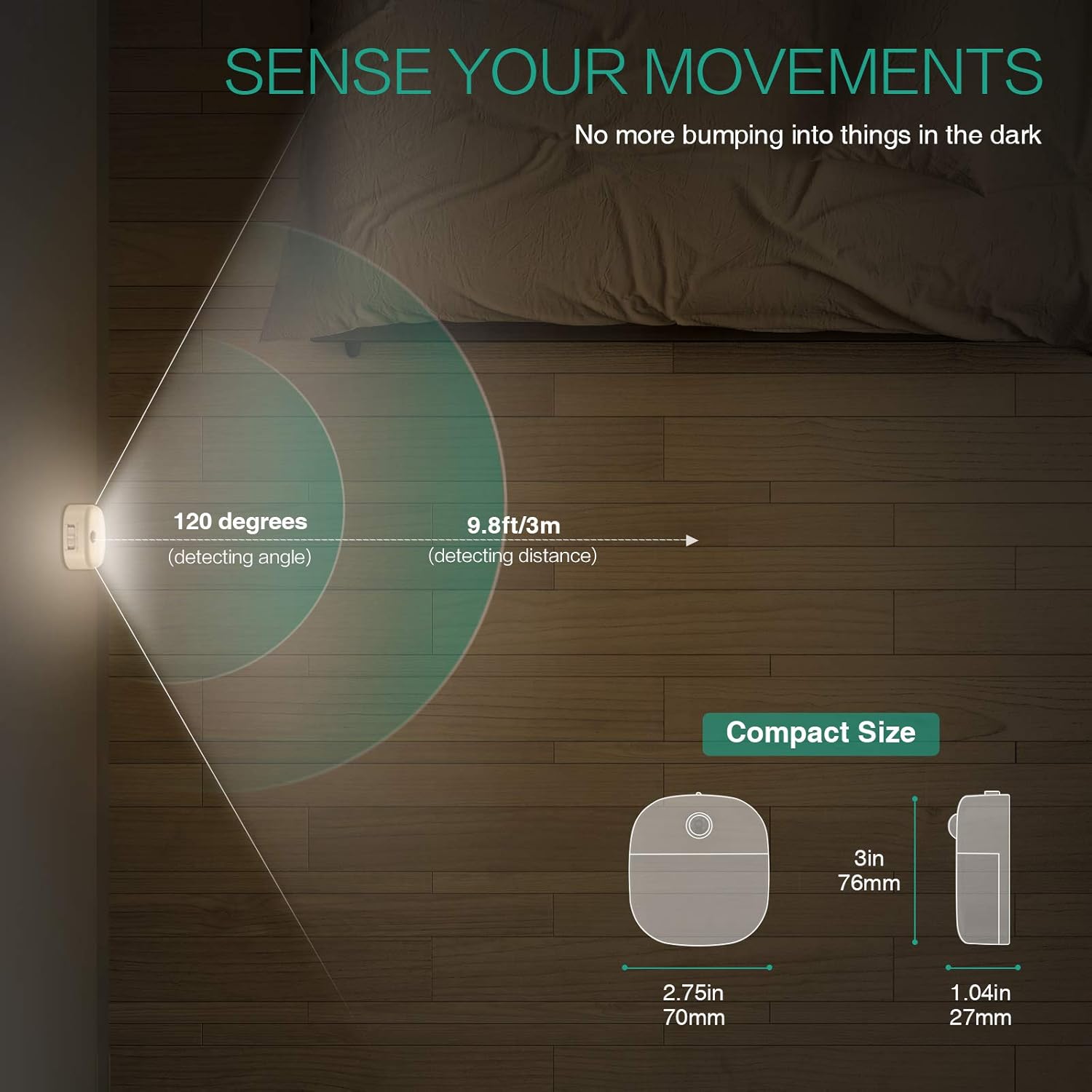
Image: A motion sensor light mounted on a wall, illuminating a staircase as a person ascends, demonstrating its practical application.
- Detektionsvinkel: 120 grader
- Detektionsavstånd: Upp till 9.8 fot (3 meter)
- The sensor is designed to activate only in low-light conditions to conserve battery life.
- Avoid placing the light in direct sunlight or near heat sources, as this may affect sensor performance.
Video: An official product video demonstrating the ORIA Motion Sensor Light's features, including its gentle illumination and motion detection capabilities in various settings like bookshelves and desks.
7. Underhåll
- Rengöring: Wipe the light with a soft, dry cloth. Do not use abrasive cleaners or immerse in water.
- Batteribyte: When the light dims or fails to activate, replace all 3 AAA batteries with new ones. Ensure correct polarity.
- Sensorvård: Keep the motion sensor lens clean and unobstructed for optimal performance.
8. Felsökning
| Problem | Möjlig orsak | Lösning |
|---|---|---|
| Ljuset tänds inte. |
|
|
| Light stays on continuously (in AUTO mode). |
|
|
| Motion sensor is not sensitive. |
|
|
9. Garanti och support
ORIA products are designed for reliability and performance. For warranty information or technical support, please refer to the contact details provided with your purchase or visit the official ORIA webplats.
Vänligen spara denna manual för framtida referens.