
Saooer BLUE 20A
Saooer 20A Solar Charge Controller User Manual
Model: BLUE 20A
Introduktion
This manual provides essential information for the safe and efficient operation of your Saooer 20A Solar Charge Controller. This intelligent regulator is designed to manage the working of solar panels and batteries in a solar system, featuring dual USB ports for mobile device charging. It is compatible with 12V and 24V systems and includes multiple protection functions to ensure system efficiency and prolong battery lifespan.

Bild 1: Framsidan view of the Saooer 20A Solar Charge Controller.
Säkerhetsinstruktioner
- Ensure all connections are correct before powering on the controller. Incorrect wiring can damage the device or connected components.
- The controller is designed for indoor use or in a protected environment. Avoid exposure to direct sunlight, high temperatures, or moisture.
- Försök inte att ta isär eller reparera styrenheten själv. Kontakta kvalificerad personal för service.
- Förvaras utom räckhåll för barn.
- This controller is only suitable for lead-acid batteries: OPEN, AGM, GEL. Do not use with other battery types like Lithium-ion or LiFePO4, as this may cause damage or safety hazards.
- Always connect the battery first, then the solar panel, and finally the load. When disconnecting, reverse the order: disconnect the load, then the solar panel, and finally the battery.
Produktegenskaper
- Automatisk systemvolymtage Identifiering: Automatically detects 12V/24V system voltage.
- PWM-laddning: Efficient Pulse Width Modulation charging mode.
- Dubbla USB-portar: Ger 5V/2A utgång för laddning av mobila enheter.
- LCD-skärm: Clear display of status and data, allowing for convenient mode switching and parameter configuration.
- Flera skyddsfunktioner: Includes short-circuit protection, open-circuit protection, reverse protection, and over-load protection.
- Justerbara parametrar: User-adjustable charge and discharge parameters.
- Temperaturkompensation: Automatic temperature compensation for optimal charging.
Installation och installation
Follow these steps carefully to install your solar charge controller. Incorrect installation can lead to damage or malfunction.
- Förbered ledningar: Ensure all wires are properly stripped and have appropriate connectors if necessary. Use wires of sufficient gauge for your system's current.
- Anslut batteriet: Connect the battery to the charge regulator first. Observe correct polarity (+ to + and - to -). The controller will automatically recognize the battery voltage (12V eller 24V).
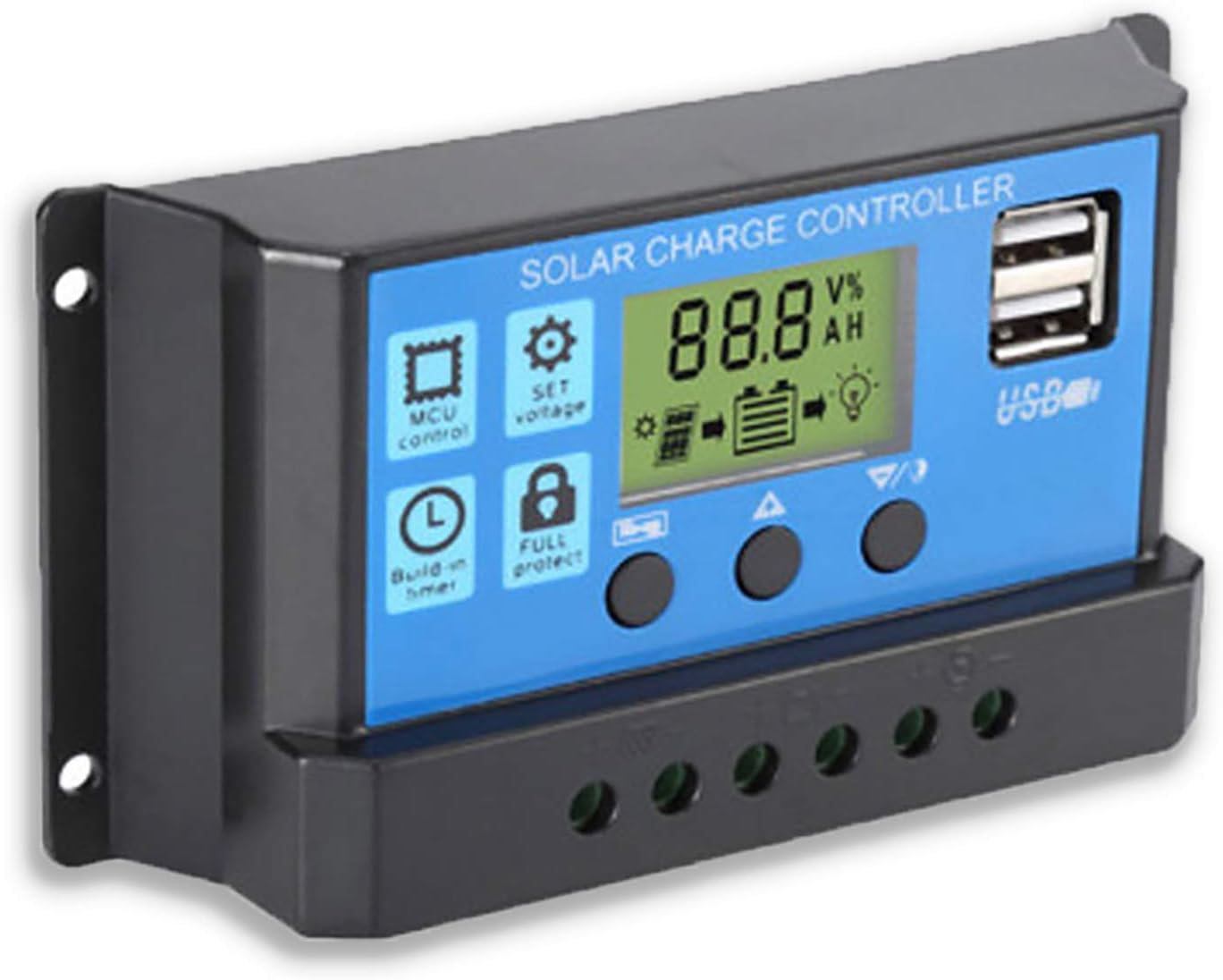
Bild 2: Sida view showing the connection terminals for battery, solar panel, and load.
- Anslut solpanelen: Connect the solar panel to the solar charge controller. Ensure correct polarity.
- Anslut lasten: Connect the consumer or load to the charge controller regulator. Ensure correct polarity.
Viktig anmärkning: Always connect the battery first, then the solar panel, and finally the load. When disconnecting the controller, please remove the solar panel, then the load, and finally the battery. This sequence helps the controller recognize the battery voltage correctly and prevents damage.
Bruksanvisning
LCD-skärm och knappar

Figur 3: Vinklad view showing the LCD display and control buttons.
Styrenheten har en LCD-skärm och tre knappar för manövrering:
- Menyknapp: Used to cycle through display modes and enter parameter setting mode.
- Upp-knapp: Används för att öka värden eller navigera uppåt i menyer.
- Ner-knapp: Används för att minska värden eller navigera nedåt i menyer.
Visningslägen
Press the Menu button to cycle through the following display modes:
- Batteri Voltage (V)
- Solpanel Voltage (V)
- Lastström (A)
- Battery Temperature (°C)
- Laddningsström (A)
- Urladdningsström (A)
- Load Working Mode (24H, 0-23H, 0H)
Parameterinställningar
To enter parameter setting mode, press and hold the Menu button for 5 seconds. Use the Up and Down buttons to adjust values, and the Menu button to confirm and move to the next parameter. Press and hold Menu again to exit setting mode.
| Parameter | Beskrivning | Default (12V) | Range (12V) |
|---|---|---|---|
| B01/B02/B03 | Battery Type Selection (B01=Lead-acid, B02=Lithium Ion, B03=LiFePO4) | B01 | N/A |
| Charge Off Voltage | Voltage at which charging stops | 14.4V | 13.0V–15.0V |
| Urladdningsåterkopplingsvolymtage | Voltage at which load reconnects after low voltage koppla bort | 12.6V | 11.0V–13.5V |
| Utloppsstoppvolymtage | Voltage at which load disconnects to protect battery | 10.7V | 9.0V–11.5V |
| Load Working Time | Timer for load output (24H, 0-23H, 0H) | 24H | N/A |
Note: For 24V systems, multiply the 12V values by two.
Underhåll
- Regelbunden inspektion: Kontrollera regelbundet alla ledningsanslutningar för åtdragning och korrosion.
- Renlighet: Håll styrenheten ren och fri från damm. Använd en torr trasa för rengöring.
- Ventilation: Säkerställ tillräcklig ventilation runt styrenheten för att förhindra överhettning.
- Batterihälsa: Övervaka batterivoltage and health regularly. Replace batteries as needed.
Felsökning
| Problem | Möjlig orsak | Lösning |
|---|---|---|
| Styrenheten slås inte på / LCD-skärmen är tom | Batteriet är inte anslutet eller har omvänd polaritet; Batterivolymtage för lågt. | Check battery connections and polarity. Ensure battery has sufficient charge. |
| Solar panel not charging battery | Solar panel not connected or reverse polarity; Insufficient sunlight; Damaged solar panel. | Check solar panel connections and polarity. Ensure panel is in direct sunlight. Test solar panel output. |
| Lasten fungerar inte | Load not connected or reverse polarity; Battery voltage too low (low voltage disconnect); Overload protection activated. | Check load connections and polarity. Charge battery. Reduce load or check for short circuit. |
| USB-portar laddas inte | Batteri voltage too low; Device not compatible; Faulty USB cable. | Ensure battery is charged. Try a different device or cable. |
| Controller gets hot | Överbelastning; Dålig ventilation. | Reduce load. Ensure controller has adequate airflow and is not in an enclosed space. |
Specifikationer
| Särdrag | Detalj |
|---|---|
| Modell | BLÅ 20A |
| System Voltage | 12V / 24V Auto |
| Max laddnings-/urladdningsström | 20A |
| USB-utgång | Dual USB, 5V/2A (Max) |
| Batteritypskompatibilitet | Lead-acid (OPEN, AGM, GEL) |
| Produktens mått | 5.12 x 2.76 x 1.5 tum (ca 133 mm x 70 mm x 38 mm) |
| Objektets vikt | 5 uns |
| Visa | LCD |
| Driftstemperatur | -35°C till +60°C |

Figure 4: Product dimensions of the solar charge controller.
Garanti och support
For warranty information or technical support, please contact the manufacturer, Saooer, through their official channels. Refer to your purchase documentation for specific warranty terms and contact details.
Tillverkare: Saooer
ASIN: B095764VB7
UPC: 605832982977
Du kan besöka Saooer Store on Amazon för mer information eller för att kontakta support.