
Technics EAH-A800
Technics EAH-A800 Trådlösa Brusreducerande Over-Ear Hörlurar Bruksanvisning
Introduktion
This manual provides essential instructions for the safe and effective use of your Technics EAH-A800 Wireless Noise Cancelling Over-Ear Headphones. Please read this manual thoroughly before using the product and retain it for future reference.

Image: Technics EAH-A800 Wireless Noise Cancelling Over-Ear Headphones in black, showcasinderas eleganta design.
The Technics EAH-A800 headphones are designed to deliver high-fidelity audio with advanced noise-cancelling technology and superior call clarity. They feature multi-point connectivity for seamless switching between devices and comfortable over-ear earpads for extended wear.
Vad finns i lådan
Kontrollera att alla artiklar finns i paketet:
- Technics EAH-A800 Over-Ear Headphones
- USB-laddningskabel
- Audio Cable (3.5 mm jack)
- Skyddsväska

Image: The complete package contents, including the headphones, charging cable, audio cable, and protective case.
Inställning
1. Ladda hörlurarna
Before first use, fully charge the headphones. Connect the USB charging cable to the headphone's charging port and a USB power source. The charging indicator will show the charging status.
2. Bluetooth-parning
- Se till att hörlurarna är avstängda.
- Tryck och håll strömknappen intryckt tills LED-indikatorn blinkar blått och rött, vilket indikerar parkopplingsläge.
- Aktivera Bluetooth på din enhet (smartphone, surfplatta, dator) och sök efter tillgängliga enheter.
- Select "Technics EAH-A800" from the list of found devices.
- När den är ansluten blinkar LED -indikatorn långsamt blått.
3. Technics Audio Connect App
For enhanced control and customization, download the Technics Audio Connect app from your device's app store. The app allows you to adjust sound settings, noise cancellation levels, and other features.

Image: Screenshots of the Technics Audio Connect app, illustrating its interface for sound and ambient control settings.
Bruksanvisning
1. Ström på/av
- To power on: Press and hold the power button until the LED indicator lights up.
- To power off: Press and hold the power button until the LED indicator turns off.
2. Brusreducering och omgivningsljudslägen
The EAH-A800 features active noise cancellation to reduce external distractions and an ambient sound mode to allow you to hear your surroundings.
- Brusreducering: Reduces environmental noise for an immersive listening experience.
- Omgivningsläge: Allows external sounds to be heard, useful for awareness in public spaces.
Switch between modes using the dedicated button on the headphones or through the Technics Audio Connect app.

Image: A visual representation of the noise cancelling technology in action, showing how external sounds are minimized.
3. Flerpunktsanslutning
The headphones can connect to more than two Bluetooth devices simultaneously, allowing for seamless audio switching. For example, you can listen to music from your laptop and instantly answer a call from your smartphone without re-pairing.

Image: A user seamlessly switching audio between a smartphone and a laptop, highlighting the multi-point connectivity feature.
4. Anropsfunktioner
The EAH-A800 headphones are equipped with 8 microphones and advanced wind noise reduction for clear voice transmission during calls. Use the integrated controls to answer, end, or reject calls.
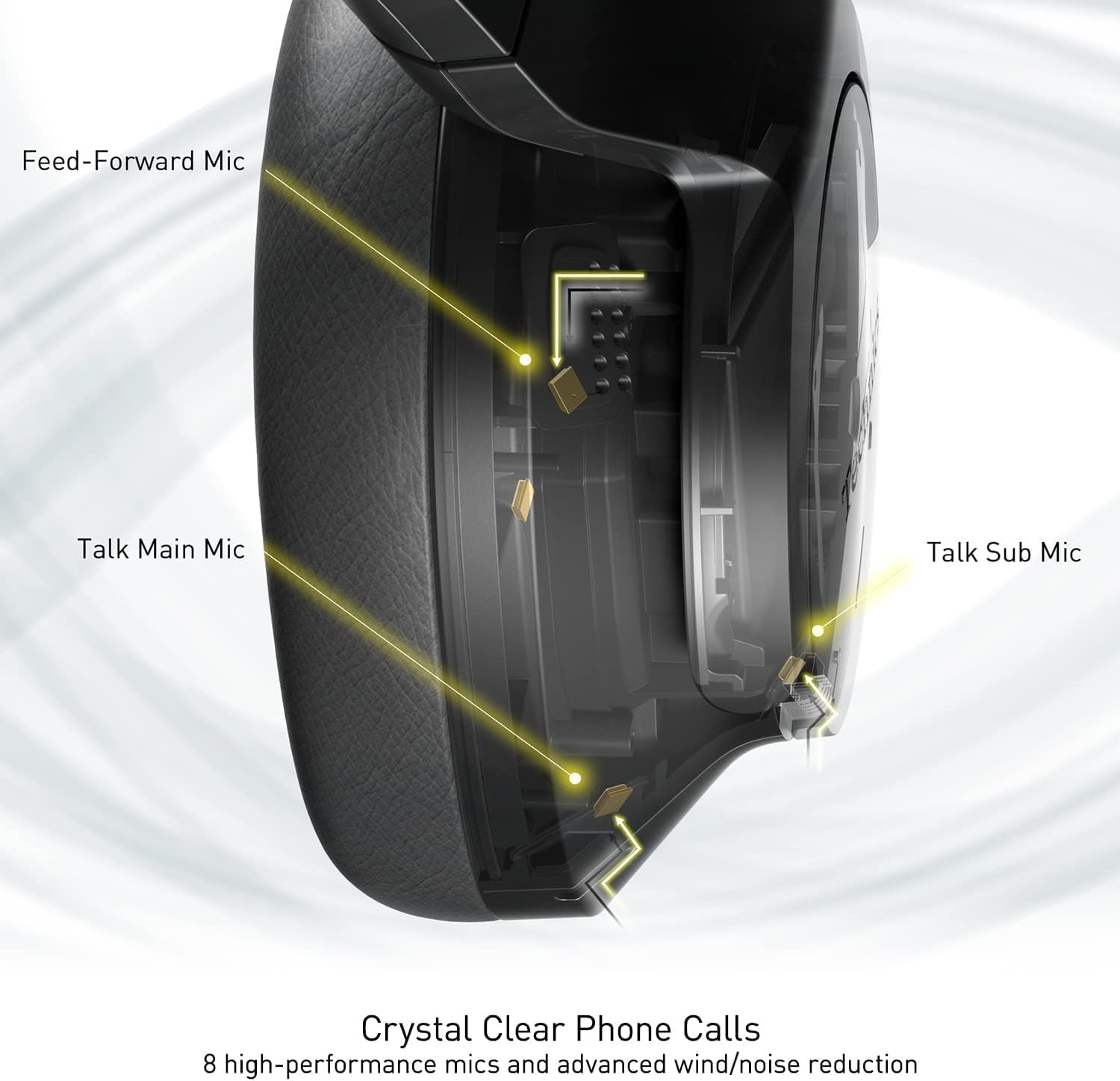
Image: An internal diagram illustrating the strategic placement of 8 microphones within the headphone for optimal call clarity.
5. Kontroller
The headphones feature physical buttons for power, volume, and mode switching, as well as a touch-sensitive panel on one earcup for additional functions. Refer to the quick start guide for a detailed layout of controls.
6. Batteritid och laddning
The EAH-A800 offers up to 50 hours of playback with Active Noise Cancellation (ANC) enabled on a single charge. A quick 15-minute charge provides approximately 10 hours of playback.

Image: A graphic detailing the impressive battery life and quick charge capabilities of the headphones.
Underhåll
1. Städning
- Torka av hörlurarna med en mjuk, torr trasa.
- Torka försiktigt av öronkuddarna med en lätt damp trasa och låt lufttorka helt före användning.
- Använd inte starka kemikalier, lösningsmedel eller slipande rengöringsmedel.
2. Förvaring
When not in use, store the headphones in their protective carrying case to prevent damage from dust, scratches, and impacts. Avoid exposing the headphones to extreme temperatures or humidity.
Felsökning
| Problem | Möjlig orsak | Lösning |
|---|---|---|
| Hörlurarna slås inte på | Lågt batteri | Ladda hörlurarna helt. |
| Kan inte para ihop via Bluetooth | Hörlurar är inte i parkopplingsläge; Enhetens Bluetooth är avstängd; Utom räckhåll | Se till att hörlurarna är i parkopplingsläge (blinkar blått/rött). Slå på Bluetooth på din enhet. Flytta enheten närmare hörlurarna. |
| Inget ljud eller låg volym | Volume too low; Incorrect audio output selected; Device not connected | Increase headphone and device volume. Check device's audio output settings. Re-establish Bluetooth connection. |
| Dålig samtalskvalitet | Microphone obstructed; Weak signal; Environmental noise | Ensure microphones are clear. Move to an area with better signal. Adjust noise cancelling settings via the app. |
| Multi-point connectivity issues | Connection conflict; Device not properly paired | Disconnect from one device and reconnect. Ensure both devices are paired correctly. |
If problems persist, consult the Technics Audio Connect app for further diagnostics or visit the official Technics support webplats.
Specifikationer
| Modellnamn | Technics EAH-A800 |
| Anslutningsteknik | Bluetooth 5.2 |
| Frekvenssvar | 4 Hz - 40 kHz |
| Bullerkontroll | Aktiv brusreducering |
| Batteritid | Up to 50 Hours (with ANC ON) |
| Laddningstid | Approximately 3 Hours (15 min quick charge for 10 hrs playback) |
| Objektets vikt | 10.5 ounces (298 gram) |
| Material | Polyuretan (PU) |
| Hörlursuttag | 3.5 mm Jack |
| Kompatibla enheter | Cellphones, Desktops, Laptops, Tablets, Telephones |
| Specialfunktioner | Fast Charging, Foldable, Microphone Included |
| UPC | 885170381162 |
Garanti och support
Your Technics EAH-A800 headphones are covered by a manufacturer's warranty. For specific warranty terms, registration, and support inquiries, please refer to the official Technics webwebbplats eller kontakta deras kundtjänst.
For additional information, FAQs, and software updates, please visit the official Technics brand store or support pages:
Relaterade dokument - EAH-A800
 |
Technics EAH-A800 digitala trådlösa stereohörlurar – bruksanvisning och användarhandbok Omfattande användarmanual för Technics EAH-A800 digitala trådlösa stereohörlurar, som täcker installation, användning, säkerhet, felsökning och underhåll för optimal ljudupplevelse och information om efterlevnad. |
 |
Technics EAH-A800 digitala trådlösa stereohörlurar bruksanvisning och säkerhetsinformation Omfattande guide för Technics EAH-A800 trådlösa stereohörlurar, som täcker installation, säkerhetsåtgärder, specifikationer, underhåll och information om efterlevnad. |
 |
Technics EAH-AZ80 Hörlurar: Guide för ihopparning, felsökning och underhåll A comprehensive guide to pairing your Technics EAH-AZ80 true wireless earbuds with Bluetooth devices, troubleshooting common issues like poor connectivity and no sound, and instructions on how to clean the earbuds and charging case. |
 |
Technics EAH-A800 Wireless Stereo Headphones User Manual This manual provides detailed operating instructions for the Technics EAH-A800 wireless stereo headphones, covering setup, features, troubleshooting, and specifications. |
 |
Technics EAH-A800 digitala trådlösa stereohörlurar Bruksanvisning This owner's manual provides comprehensive instructions for the Technics EAH-A800 Digital Wireless Stereo Headphones, covering setup, operation, safety precautions, and troubleshooting. |
 |
Technics EAH-AZ100/AZ80/AZ60M2/AZ40M2 Owner's Manual Comprehensive owner's manual for Technics EAH-AZ100, EAH-AZ80, EAH-AZ60M2, and EAH-AZ40M2 wireless stereo earphones. Learn about setup, features, maintenance, and troubleshooting. |
Ask a question about this manual
Ask about setup, troubleshooting, compatibility, parts, safety, or missing instructions. Manuals+ will review the question and use this page’s manual context to help answer it.