
1. Introduktion
This manual provides essential instructions for the proper use and maintenance of your LOTUS Smartwatch Model 50003/A. Please read this guide thoroughly before using your smartwatch to ensure optimal performance and longevity.
The LOTUS Smartwatch 50003/A features an intuitive interface and elegant design, offering a variety of smart functions. It is equipped with Bluetooth connectivity, allowing seamless synchronization with your mobile devices. This synchronization enables features such as call and message notifications, music control, and other practical functions for daily life.
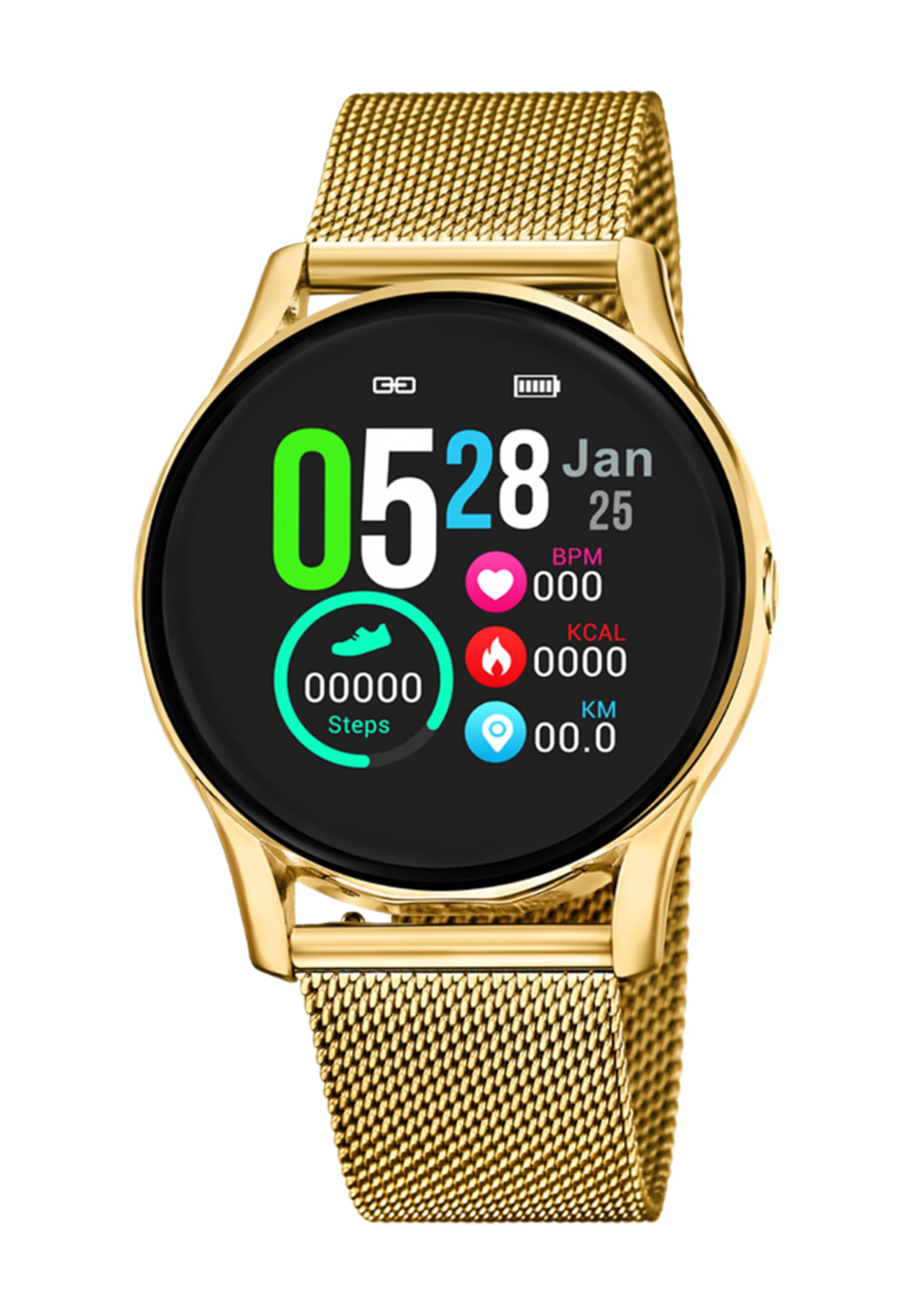
Bild 1.1: Framsidan view of the LOTUS Smartwatch 50003/A.
2. Paketets innehåll
Please check the package contents upon unboxing. The standard package for the LOTUS Smartwatch 50003/A should include:
- LOTUS Smartwatch 50003/A
- Laddningskabel
- Användarmanual (detta dokument)
3. Installationsguide
3.1. Laddning av smartklockan
Ladda din smartklocka helt före första användningen.
- Anslut laddningskabeln till laddningsporten på baksidan av smartklockan.
- Anslut den andra änden av laddningskabeln till en USB-nätadapter (medföljer ej) eller en dators USB-port.
- Klockans display visar laddningsstatus. Räkna med cirka 2–3 timmar för en full laddning.
3.2. Installera Companion-appen
To unlock all features and synchronize your smartwatch with your smartphone, you need to install the official LOTUS Connected app.
- Scan the QR code provided in the watch packaging or search for "LOTUS Connected" in your smartphone's app store (Google Play Store for Android, Apple App Store for iOS).
- Ladda ner och installera appen.
- Följ instruktionerna på skärmen för att skapa ett konto eller logga in.

Image 3.2: Synchronizing the smartwatch with the companion app on a smartphone.
3.3. Para ihop med din smartphone
Ensure Bluetooth is enabled on your smartphone and the smartwatch is charged.
- Open the LOTUS Connected app on your smartphone.
- Follow the app's instructions to add a new device.
- The app will search for available smartwatches. Select "LOTUS 50003/A" from the list.
- Confirm the pairing request on both your smartphone and smartwatch if prompted.
- När den är ihopparad synkroniserar klockan tid och data med din telefon.
4. Bruksanvisning
4.1. Grundläggande navigering
- Pekskärm: Svep åt vänster/höger, uppåt/nedåt för att navigera genom menyer och funktioner. Tryck för att välja.
- Sidoknappar: The smartwatch may have one or more physical buttons. Typically, one button serves as a power on/off, back, or home button. Refer to the on-screen prompts for specific button functions.

Bild 4.1: Example of a smartwatch display showing activity data.
4.2. Nyckelfunktioner
- Aviseringar: Receive alerts for incoming calls, messages, and app notifications directly on your wrist. Manage notification settings via the LOTUS Connected app.
- Musikkontroll: Styr musikuppspelning på din anslutna smartphone (spela upp, pausa, hoppa över spår, justera volymen).
- Aktivitetsspårning: Monitor steps, distance, calories burned, and sleep patterns. View detaljerad statistik i den medföljande appen.
- Vattentålighet: The smartwatch is water resistant. Avoid prolonged submersion or use in hot water/steam. Refer to specifications for exact water resistance rating.
5. Underhåll
5.1. Rengöring av din smartklocka
- Torka av klockans skärm och hölje med en mjuk, luddfri trasa.
- För envis smuts, lätt dampSkölj trasan med vatten. Undvik starka kemikalier eller slipande material.
- Se till att laddningskontakterna är rena och torra innan laddning.
5.2. Batterivård
- Charge the smartwatch regularly. Avoid letting the battery completely drain for extended periods.
- Do not expose the smartwatch to extreme temperatures, as this can affect battery life and performance.
- Om klockan inte ska användas under en längre tid, ladda den till cirka 50 % innan du förvarar den.
6. Felsökning
6.1. Vanliga problem och lösningar
- Klockan slås inte på: Se till att klockan är fulladdad. Anslut den till laddaren och vänta några minuter innan du försöker slå på den.
- Kan inte para ihop med smartphone:
- Se till att Bluetooth är aktiverat på din smartphone.
- Se till att smartklockan är inom räckhåll för din telefon.
- Starta om både din smartphone och smartklocka.
- Försök att ta bort parkopplingen och parkoppla enheten igen via appen.
- Meddelanden som inte mottagits:
- Check notification settings in the LOTUS Connected app.
- Se till att appen har nödvändiga behörigheter på din smartphone.
- Verify that the smartwatch is properly connected via Bluetooth.
- Kort batteritid:
- Minska skärmens ljusstyrka.
- Disable unnecessary notifications or features.
- Se till att klockan är fulladdad före användning.
6.2. Fabriksåterställning
If issues persist, a factory reset may resolve them. This will erase all data on the smartwatch and restore it to its original settings.
- Navigate to the "Settings" menu on your smartwatch.
- Look for an option like "System," "Reset," or "Factory Reset."
- Bekräfta återställningen när du uppmanas.
- After resetting, you will need to re-pair the smartwatch with your phone and set it up again.
7. Specifikationer
| Särdrag | Detalj |
|---|---|
| Stämpla | LOTUS |
| Modellnummer | 50003/A |
| Färg | Svart |
| Operativsystemkompatibilitet | Android, iOS |
| Skärmstorlek | 39.65 millimeter |
| Specialfunktioner | Vattentålig |
| Kompatibla enheter | Smartphone |
| Batteriets sammansättning | Litium metall |
| Tillgänglighet av reservdelar | 5 år |
8. Garanti och support
Your LOTUS Smartwatch 50003/A comes with a manufacturer's warranty. Please refer to the warranty card included in your product packaging for specific terms and conditions.
Reservdelar till denna modell finns tillgängliga i upp till 5 år från inköpsdatum.
For technical support, service, or warranty claims, please contact LOTUS customer service through their official webwebbplatsen eller kontaktinformationen som finns i din garantidokumentation.