
1. Introduktion
Tack för köpetasing the eppfun SK001 USB Speakerphone. This device is designed to provide clear and efficient audio conferencing for home offices, remote work, and small to medium-sized meeting rooms. It features 360° voice pickup, smart voice enhancement, and broad compatibility with popular conferencing platforms.
2. Paketets innehåll
Kontrollera att alla artiklar finns i ditt paket:
- eppfun SK001 USB Speakerphone
- USB-C till USB-C-kabel
- USB-A till USB-C-kabel
- Bruksanvisning (detta dokument)
3. Produkt överview
The eppfun SK001 features intuitive controls for managing your calls and audio settings.

Bild: Överst view of the eppfun SK001 speakerphone showing its control buttons. The buttons include microphone mute, microphone volume up/down, and speaker volume up/down.
Kontrollknappar:
- Mikrofonavstängningsknapp: Press to mute or unmute the microphone. An indicator light will show the mute status.
- Microphone Volume Up/Down: Justerar mikrofonens ingångskänslighet.
- Speaker Volume Up/Down: Adjusts the speaker output volume.
Portar:
- USB-C-port: For connecting to your computer using the provided USB cables.
4. Inställning
The eppfun SK001 is a plug-and-play device, requiring no driver installation for most operating systems.
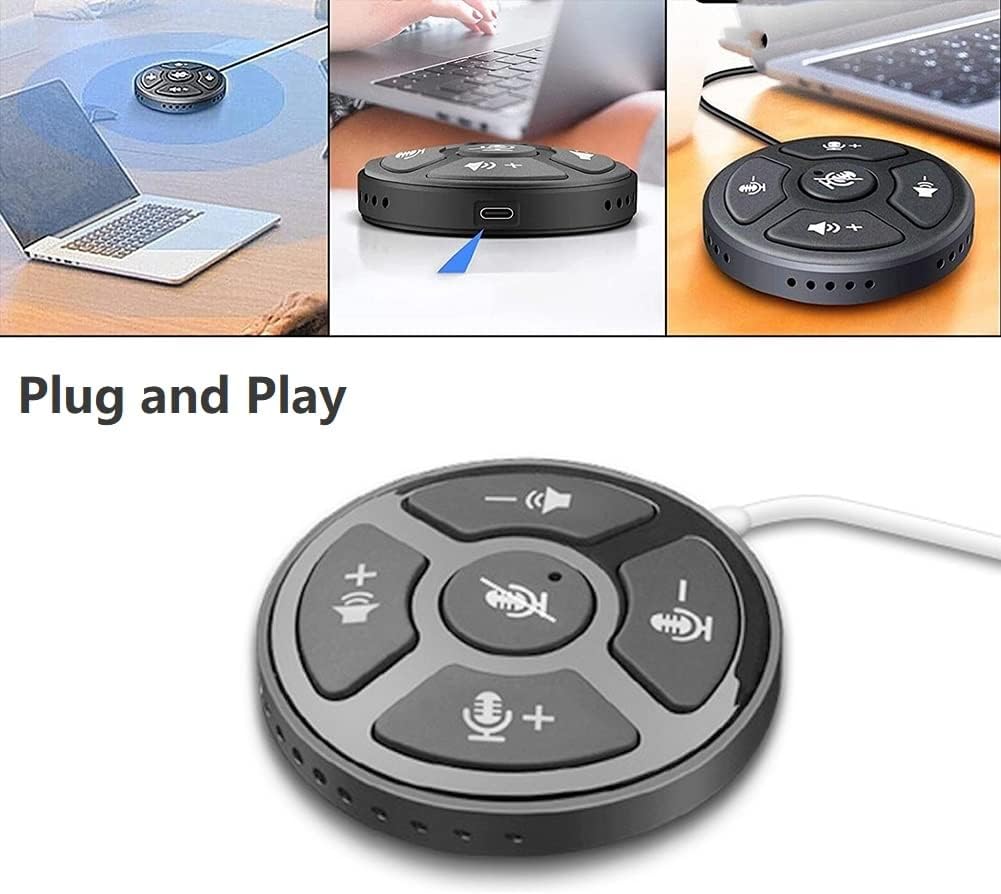
Image: A collage showing the eppfun SK001 speakerphone connected to a laptop via USB, highlighting its plug-and-play functionality.
- Connect the Speakerphone:
- Use the provided USB-C to USB-C cable or USB-A to USB-C cable.
- Connect one end of the cable to the USB-C port on the SK001 speakerphone.
- Connect the other end of the cable to an available USB port (USB-A or USB-C) on your computer (PC, laptop, or Mac).
- Systemigenkänning: Din dator bör automatiskt identifiera och installera de nödvändiga drivrutinerna. Den här processen kan ta en liten stund.
- Select as Audio Device:
- Open your operating system's sound settings (e.g., Windows Sound Settings, macOS System Preferences > Sound).
- Select "eppfun SK001" as your default input (microphone) and output (speaker) device.
- In your conferencing software (e.g., Zoom, Microsoft Teams, Skype), navigate to its audio settings and select "eppfun SK001" for both microphone and speaker.
5. Bruksanvisning
Basic Call Management:
- Volymjustering: Use the speaker volume up (+) and down (-) buttons on the device to control the playback volume.
- Mikrofonavstängning: Press the central microphone mute button to toggle the microphone on or off. A red indicator light typically signifies that the microphone is muted. This mute function is linked with Zoom Meeting certification.
- Mikrofonkänslighet: Use the microphone volume up (+) and down (-) buttons to adjust the microphone's input sensitivity.
Nyckelfunktioner:
- 360° omnidirektionell röstupptagning: The SK001 is equipped with high-performance microphones capable of capturing voices from all directions within a 5-meter radius, ideal for small to medium-sized conference rooms.
- Smart Voice Enhancement: Features echo cancellation, reverberation suppression, and noise reduction to ensure clear audio during calls.
- Zoom Meeting Certified: Guarantees high-quality calls and seamless integration with Zoom, including synchronized mute status.
6. Underhåll
- Rengöring: Use a soft, dry cloth to clean the surface of the speakerphone. Do not use liquid cleaners or aerosols.
- Lagring: Förvara enheten på en sval, torr plats när den inte används.
- Hantering: Avoid dropping the device or exposing it to extreme temperatures or humidity.
7. Felsökning
- No Sound / Microphone Not Working:
- Ensure the USB cable is securely connected to both the speakerphone and your computer.
- Verify that "eppfun SK001" is selected as the default audio input and output device in your computer's sound settings and within your conferencing application.
- Check if the microphone is muted on the device (red indicator light) or within your software.
- Adjust the volume levels on both the speakerphone and your computer.
- Try connecting the speakerphone to a different USB port or a different computer to rule out port or system issues.
- Dålig ljudkvalitet:
- Ensure the speakerphone is placed on a stable surface, away from obstructions.
- Confirm that the microphone sensitivity is appropriately set.
- Check for background noise in your environment. The device has noise reduction, but extreme noise can still affect quality.
- Verify your internet connection stability if experiencing issues during online calls.
- Enhet som inte känns igen:
- Koppla bort och anslut USB-kabeln igen.
- Starta om datorn.
- Prova en annan USB-port på din dator.
- Se till att ditt operativsystem är uppdaterat.
8. Specifikationer
| Särdrag | Detalj |
|---|---|
| Modellnummer | SK001 |
| Stämpla | eppfun |
| Anslutningsteknik | USB (USB-C, USB-A) |
| Mikrofonformfaktor | Mini |
| Polärt mönster | Omnidirectional (360°) |
| Audio Känslighet | 30 decibel |
| Sound Pickup Range | Upp till 5 meter |
| Hårdvaruplattform | Bärbar dator, PC |
| Kompatibla operativsystem | Windows XP/Vista/7/8/10/11, Mac OS |
| Objektets vikt | 80 gram (2.82 ounces) |
| Paketets mått | 6.1 x 4.72 x 1.3 tum |
9. Garanti och support
The eppfun SK001 comes with a 12 månaders garanti från inköpsdatum. Denna garanti täcker tillverkningsfel och funktionsfel vid normal användning.
For technical support, warranty claims, or any questions regarding your eppfun SK001 speakerphone, please contact eppfun customer service. Refer to the contact information provided on the eppfun official webwebbplatsen eller din köphandling.
Vänligen spara ditt inköpsbevis för garantiändamål.