
Introduktion
Thank you for choosing the Technics EAH-AZ60M2 Wireless in-Ear Noise-Cancelling Headphones. This manual provides essential information for the proper setup, operation, and maintenance of your new headphones. Please read this manual thoroughly before use to ensure optimal performance and longevity of the product.

Image: The Technics EAH-AZ60M2 wireless in-ear headphones, shown alongside their compact black charging case.
Vad finns i lådan
Upon opening the packaging, please verify that all the following components are included:
- Technics EAH-AZ60M2 Wireless In-Ear Noise-Cancelling Headphones (Left and Right earbuds)
- Laddningsväska
- USB-C laddningskabel
- Multiple sizes of Earpieces (7 pairs)
- Användarmanual (detta dokument)
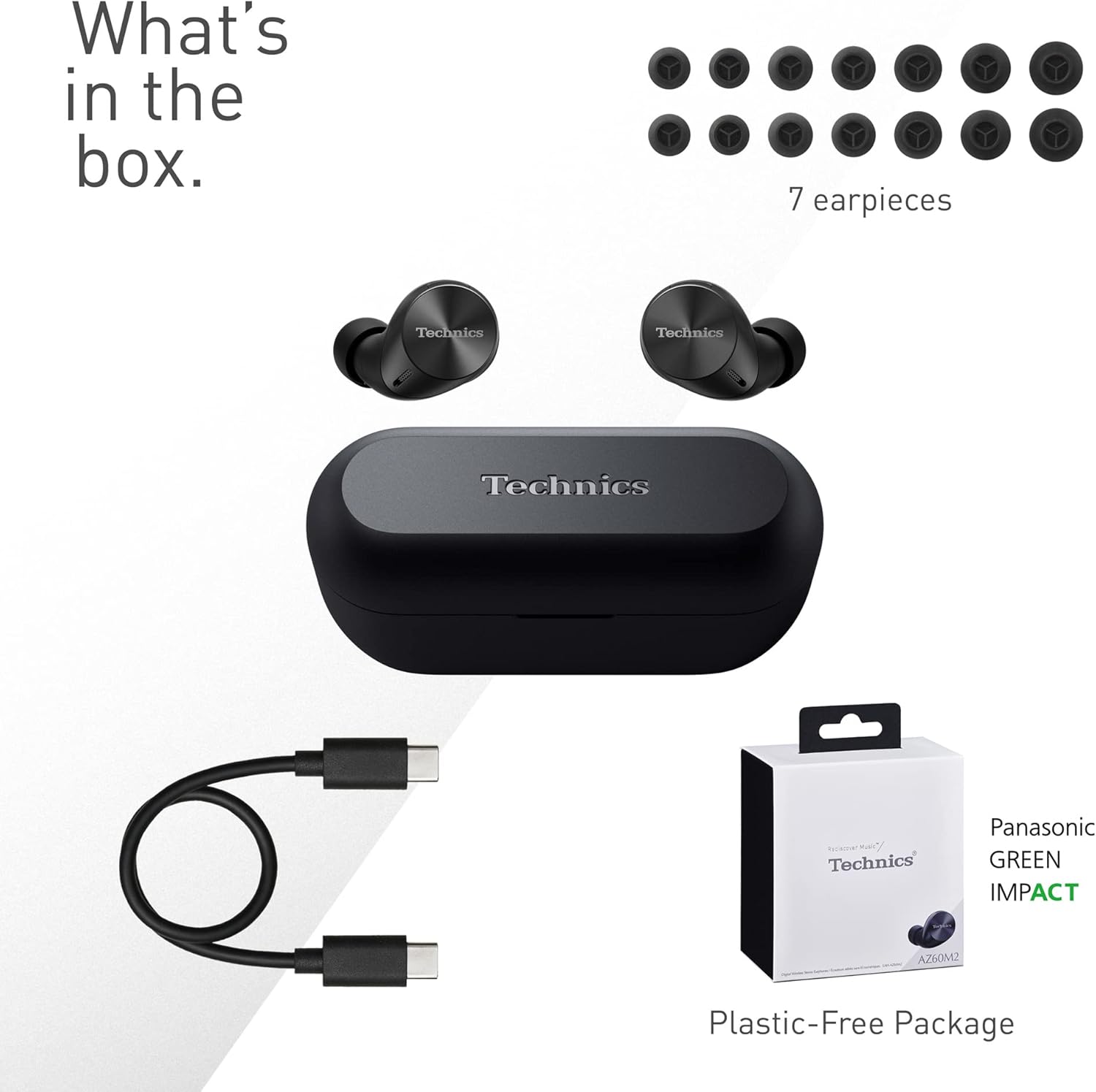
Image: A visual representation of the items included in the product packaging: the two earbuds, the charging case, a USB-C charging cable, and a selection of seven different earpiece sizes.
Inställning
Första laddning
Ladda hörlurarna och laddningsfodralet helt före första användningen.
- Placera båda öronsnäckorna i laddningsfodralet.
- Anslut USB-C-laddningskabeln till laddningsporten på fodralet och till en USB-strömkälla.
- The indicator lights on the case will show charging status. A full charge typically takes approximately 2.5 hours for the case and earbuds.
Para ihop med en enhet
The EAH-AZ60M2 headphones use Bluetooth for wireless connection.
- Öppna laddningsfodralet med hörlurarna inuti. Hörlurarna går automatiskt in i parkopplingsläge.
- Aktivera Bluetooth på din enhet (smartphone, surfplatta, dator) och sök efter tillgängliga enheter.
- Select "EAH-AZ60M2" from the list of found devices.
- Once connected, a confirmation sound will play from the headphones.
Technics Audio Connect App
For enhanced control and customization, download the "Technics Audio Connect" app from your device's app store (Google Play for Android 6.0+ or App Store for iOS 12+). The app allows you to:
- Kontrollera batterinivåerna.
- Select EQ sound modes.
- Adjust noise cancelling levels.
- Anpassa peksensorns funktioner.
- Utför firmwareuppdateringar.
Bruksanvisning
Bär hörlurarna
Select the earpieces that provide the most comfortable and secure fit for optimal sound quality and noise cancellation. The app can assist in finding the best fit. Insert the earbuds gently into your ears and rotate them slightly to ensure a snug seal.

Image: A person wearing the Technics EAH-AZ60M2 headphones, illustrating their comfortable, low-profile design. The image also displays the wide range of eartip sizes available for a customized fit.
Tryck på kontroller
The headphones feature touch-sensitive panels on each earbud for controlling playback, calls, and noise modes. Functions can be customized via the Technics Audio Connect App.
| Handling | Vänster hörsnäcka | Rätt hörsnäcka |
|---|---|---|
| Enkeltapp | Spela/pausa, svara på samtal | Spela/pausa, svara på samtal |
| Dubbeltryck | Hoppa över spår framåt | Volym upp |
| Trippeltryck | Hoppa över spår bakåt | Volym ner |
| Långt tryck | Toggle Noise Cancelling/Ambient Mode | Röstassistent |
Ljudkontrolllägen
The EAH-AZ60M2 features Dual Hybrid Active Noise Cancelling for immersive listening and Ambient Sound Modes for situational awareness.
- Aktiv brusreducering (ANC): Minskar externt brus för fokuserad lyssning.
- Natural Ambient Mode: Allows you to hear surrounding sounds naturally.
- Attention Mode: Focuses on human voices, making it easier to hear announcements or conversations without removing the headphones.
Toggle between these modes by long-pressing the left earbud's touch sensor, or adjust settings precisely using the Technics Audio Connect App.

Image: A close-up of a single Technics EAH-AZ60M2 earbud, highlighting its key audio features including Hi-Res Audio Wireless support, LDAC compatibility, 8mm drivers, and Noise Cancelling capabilities.
Flerpunktsanslutning
The headphones support multipoint connection, allowing simultaneous pairing with up to three devices (e.g., a smartphone, tablet, and PC). This enables seamless switching between audio sources without re-pairing.
- To switch audio, simply play content on the desired device. The headphones will automatically connect to the active audio source.
- Note: LDAC playback is not possible when connected to three devices simultaneously.

Image: A person sitting at a desk, demonstrating the smart 3-device switching feature of the Technics EAH-AZ60M2 headphones, with connection lines illustrating simultaneous pairing to a smartphone, tablet, and laptop.
Making and Receiving Calls (JustMyVoice Technology)
The EAH-AZ60M2 incorporates JustMyVoice Technology, utilizing 8 separate microphones and advanced wind noise reduction to isolate and amplify your speech while minimizing background noise during calls.
- Svara samtal: Tryck en gång på endera hörluren.
- Avsluta samtal: Tryck en gång på endera hörluren under ett samtal.
- Avvisa samtal: Långt tryck på endera hörluren.
- Single Earphone Use: You can use one earbud independently while the other is charging or stored.

Image: A person outdoors, demonstrating the JustMyVoice Technology feature of the Technics EAH-AZ60M2 headphones, with visual cues indicating sound pickup and voice isolation.
Laddning och batteritid
The EAH-AZ60M2 headphones offer extended listening times with the included charging case.
- Batteritid för hörlurar: Up to 7 hours of playback with Active Noise Cancelling (ANC) enabled.
- Total Playback with Case: Up to 24 hours of total playback time with multiple charges from the case.
- Snabbladdning: En snabbladdning på 15 minuter ger cirka 70 minuters uppspelningstid.
Qi trådlös laddning
The charging case supports Qi wireless charging. Simply place the case on a compatible Qi wireless charger (sold separately) to charge.

Image: An illustration depicting the battery life of the Technics EAH-AZ60M2 headphones, showing 7 hours of listening time for the earbuds and an additional 24 hours of backup with the charging case.
Underhåll
Rengöring
- Regularly clean the earbuds, especially the earpieces and mesh grilles, with a soft, dry, lint-free cloth.
- Remove earpieces and clean them with mild soap and water if necessary, ensuring they are completely dry before reattaching.
- Rengör laddningskontakterna på både öronsnäckorna och inuti fodralet med en torr bomullspinne.
- Använd inte slipande rengöringsmedel, alkohol eller lösningsmedel.
Vattenbeständighet
The EAH-AZ60M2 earbuds are IPX4 water resistant, meaning they are protected against splashing water from any direction. This makes them suitable for light rain or intensive workouts.
- Laddningsfodralet är inte vattentätt.
- Doppa inte öronsnäckorna i vatten.
- Ensure earbuds are dry before placing them back into the charging case.
Lagring
När de inte används, förvara hörlurarna i laddningsfodralet för att skydda dem och hålla dem laddade. Förvara svalt och torrt, skyddat från direkt solljus och extrema temperaturer.
Felsökning
| Problem | Möjlig orsak | Lösning |
|---|---|---|
| Inget ljud från hörlurarna. | Headphones not paired or connected. Low battery. Volume too low. | Ensure headphones are paired and connected to your device. Charge headphones. Increase volume on both headphones and device. |
| Cannot pair headphones. | Headphones not in pairing mode. Device Bluetooth off. Interference. | Ensure earbuds are in the case and lid is open to enter pairing mode. Turn device Bluetooth off and on. Move closer to device. Forget device and re-pair. |
| Brusreducering är inte effektiv. | Poor earbud fit. ANC mode not active. | Try different earpiece sizes for a better seal. Ensure ANC is enabled via touch control or app. |
| Samtalskvaliteten är dålig. | Environmental noise. Single earbud use. | Ensure both earbuds are used for optimal call quality. Move to a quieter environment. |
| Hörlurarna laddas inte. | Poor contact. Faulty cable/charger. | Ensure earbuds are correctly seated in the case. Clean charging contacts. Try a different USB-C cable or power source. |
For further assistance, refer to the Technics Audio Connect App or visit the official Technics support webplats.
Specifikationer
| Särdrag | Detalj |
|---|---|
| Modellnamn | EAH-AZ60M2 |
| Artikelnummer | EAH-AZ60M2EK |
| Stämpla | Teknik |
| Färg | Svart |
| Anslutningsteknik | Trådlös (Bluetooth) |
| Formfaktor | In-Ear |
| Bullerkontroll | Active Noise Cancellation (Dual Hybrid) |
| Drivrutinsstorlek | 8 mm |
| Mikrofoner | 8 (for JustMyVoice Technology) |
| Flerpunktsanslutning | Upp till 3 enheter |
| Vattenbeständighet | IPX4 (endast hörlurar) |
| Earbud Battery Life (ANC On) | Upp till 7 timmar |
| Total Battery Life with Case | Upp till 24 timmar |
| Laddningsfodral batteri | 24 Hours average life |
| Laddar | USB-C, Qi Wireless Charging |
| Artikelvikt (hörlurar) | 7 gram (ca 0.247 uns) |
| Bärväska Vikt | 28 gram |
| Produktens mått | 1.1 x 0.91 x 1.02 tum (hörlurar) |
Garanti och support
For information regarding warranty coverage, terms, and conditions, please refer to the warranty card included with your product or visit the official Technics webplats.
For technical support, product registration, or frequently asked questions, please visit the Technics support page or contact their customer service.
- Technics Official Webplats: www.technics.com
- Technics Audio Connect-appen: Tillgänglig på Google Play Store och Apple App Store.