
Introduktion
The Nonstop NSA2-BK Station A is a versatile bedside companion designed to enhance your daily routine. This device integrates a wireless Bluetooth speaker, an alarm clock, and a multi-functional charging station, providing convenience and relaxation in one compact unit. It features soothing soundscapes for improved sleep and multiple charging options for your devices.

Bild 1: Framsidan view of the Nonstop NSA2-BK Station A, displaying the digital clock, alarm settings, and charging indicators.
Nyckelfunktioner
- Trådlös Bluetooth-högtalare: Enjoy enhanced stereo sound for music, videos, and apps from your Bluetooth-enabled devices.
- Relaxation Soundscapes: Improve sleep quality with built-in soothing sounds, including gentle ocean waves, calming rain, and noise-masking ambient sounds.
- Trådlös Qi-laddning: Conveniently charge Qi-compatible smartphones by simply placing them on the top surface of the unit.
- Dual USB Universal Charging: Equipped with two USB ports to charge a variety of devices, including smartphones, iPads, Kindles, and wireless headphones.

Figure 2: Illustration of the relaxation sound features, showing icons for Gentle Waves, Soothing Rain, and White Noise.
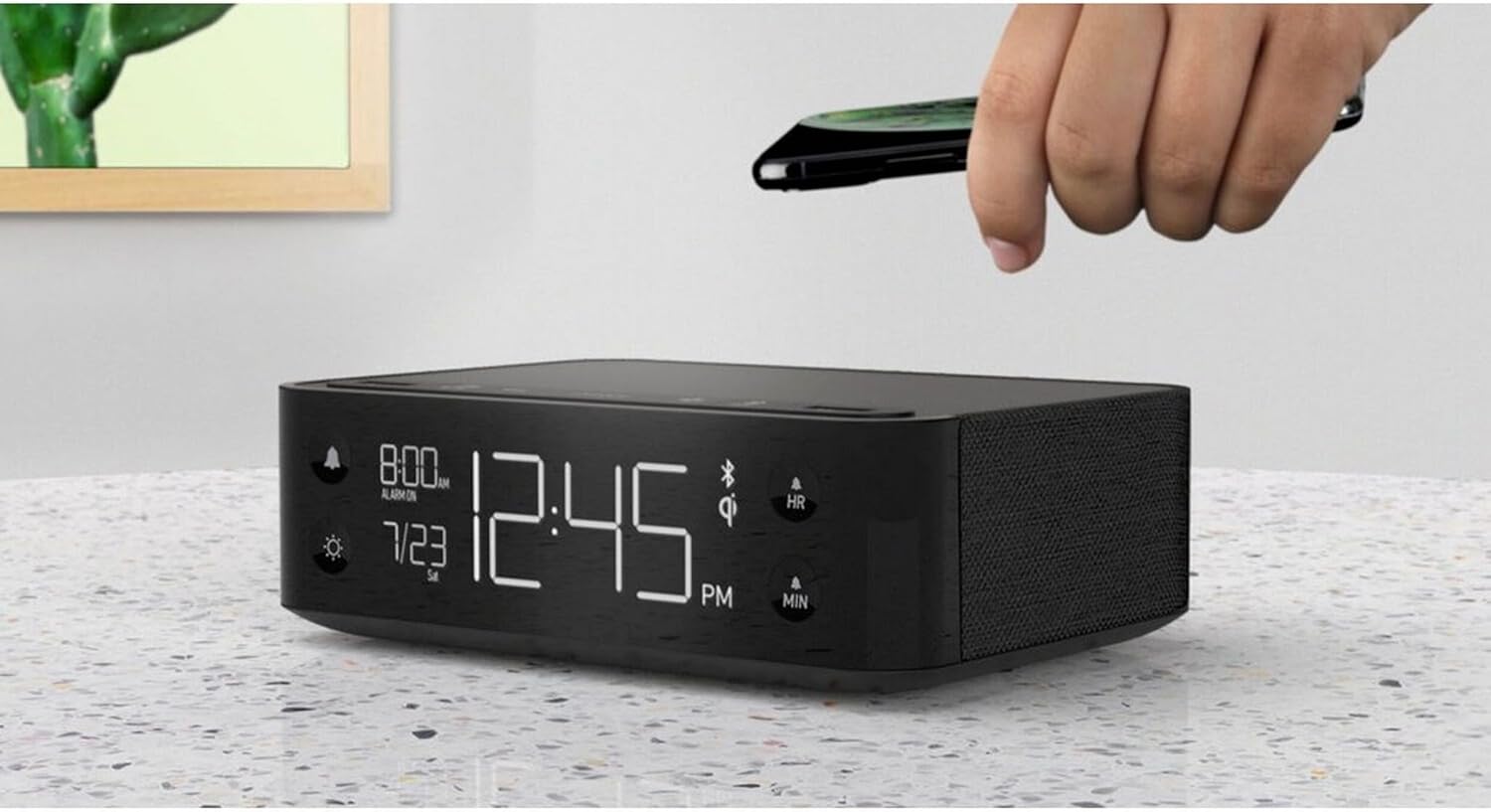
Figure 3: A smartphone being placed on the top surface of the Station A for wireless charging.
Inställning
1. Strömanslutning
- Unpack the Nonstop NSA2-BK unit and all accessories from the packaging.
- Anslut den medföljande nätadaptern till DC-ingången på baksidan av enheten.
- Plug the power adapter into a standard electrical outlet. The display will illuminate, indicating the unit is powered on.
2. Initial Clock Setting
Upon first power-up, the clock may display a default time. Refer to the "Operating Instructions" section for detailed steps on setting the current time and date.
3. Bluetooth-parning
- Ensure Bluetooth is enabled on your mobile device (smartphone, tablet, etc.).
- On the Nonstop NSA2-BK, press the Bluetooth pairing button (refer to button layout in "Operating Instructions" if available, otherwise assume a standard Bluetooth icon button). The Bluetooth indicator on the display will flash.
- On your mobile device, search for available Bluetooth devices. Select "Nonstop NSA2-BK" from the list.
- Once paired, the Bluetooth indicator on the unit will become solid, and you will hear an audible confirmation.
4. Wireless Qi Charging Setup
No specific setup is required for wireless charging beyond connecting the unit to power. Simply place your Qi-compatible device on the designated charging pad on top of the unit. Ensure the device is centered for optimal charging.
Bruksanvisning
Ställa in tid och datum
- Tryck och håll ned TIDSINSTÄLLNING button (or equivalent, often combined with HR/MIN buttons).
- Använd HR (Timme) och MIN (Minute) buttons to adjust the time.
- Tryck på TIDSINSTÄLLNING button again to confirm and move to date setting (if applicable).
- Använd HR och MIN buttons to adjust the month and day.
- Trycka TIDSINSTÄLLNING att gå ur.
Ställa in och använda alarmet
- Tryck och håll ned LARMINSTÄLLNING button (bell icon). The alarm time will flash.
- Använd HR och MIN knapparna för att ställa in önskad alarmtid.
- Trycka LARMINSTÄLLNING igen för att bekräfta.
- För att aktivera/avaktivera larmet, tryck på LARM PÅ / AV button (bell icon). An alarm indicator will appear/disappear on the display.
- När larmet ljuder trycker du på SNOOZE button (if available, or any button except alarm off) for a temporary pause. Press the LARM PÅ / AV button to turn off the alarm completely.
Using Bluetooth Speaker
- Ensure the unit is paired with your device (see "Bluetooth Pairing" in Setup).
- Play audio from your paired device. Sound will be output through the NSA2-BK speaker.
- Adjust volume using the volume controls on your paired device or on the NSA2-BK unit (if available).
Playing Relaxation Sounds
- Tryck på LJUD button (or similar, possibly a wave/rain icon).
- Press repeatedly to cycle through available soundscapes (Ocean Waves, Rain, Ambient Sounds).
- Tryck och håll ned LJUD button to turn off the soundscape.
Using Charging Functions
- Trådlös Qi-laddning: Place your Qi-compatible smartphone centrally on the top charging pad. A charging indicator on the display will illuminate.
- USB-laddning: Connect your device's USB charging cable to one of the two USB ports on the back or side of the unit. Charging will begin automatically.
Justera skärmens ljusstyrka
- Tryck på DIMMER button (sun icon).
- Press repeatedly to cycle through different brightness levels for the display.
Underhåll
- Rengöring: Koppla ur strömmen före rengöring. Använd en mjuk, torr trasa för att torka av enhetens utsida. Använd inte flytande rengöringsmedel eller slipande material.
- Lagring: Om enheten ska förvaras under en längre tid, koppla bort den från strömmen och förvara den på en sval, torr plats.
- Undvik vätskor: Håll enheten borta från vatten eller överdriven fukt.
- Ventilation: Säkerställ ordentlig ventilation runt enheten för att förhindra överhettning. Blockera inte ventilationsöppningarna.
Felsökning
| Problem | Möjlig orsak | Lösning |
|---|---|---|
| Enheten slås inte på. | Strömadaptern är inte ansluten eller uttaget är inte aktivt. | Se till att nätadaptern är ordentligt ansluten till enheten och ett fungerande eluttag. |
| Bluetooth-enheten kan inte paras ihop. | Unit is not in pairing mode; device is too far; another device is already connected. | Ensure the NSA2-BK is in pairing mode. Move device closer. Disconnect any previously paired devices. |
| Trådlös laddning fungerar inte. | Device is not Qi-compatible; device not centered; foreign objects on pad; thick phone case. | Verify device supports Qi wireless charging. Re-position device centrally. Remove foreign objects or thick phone cases. |
| USB-laddning fungerar inte. | Cable is faulty; device is not compatible; unit is overloaded. | Try a different USB cable. Ensure device is compatible. Avoid charging too many high-power devices simultaneously. |
| Larmet ljuder inte. | Larmet är inte aktiverat; volymen är för låg. | Ensure the alarm is set and activated (alarm indicator visible). Increase the unit's volume. |
Specifikationer
- Stämpla: Nonstop
- Modell: NSA2-BK
- Färg: Black, Ocean
- Artikelvikt: 3 pund
- Hårdvarugränssnitt: USB
- Kompatibla enheter: iPad, Smartphones, Kindle, Wireless Headphones (via USB/Qi)
- Totalt antal USB-portar: 2
- Wattage: 10 watts (for charging)
- UPC: 840148709171
- ASIN: B0C8LDWF57
- Först tillgängliga: 29 juli 2024
Garanti och support
Specific warranty details for the Nonstop NSA2-BK are typically provided with the product packaging or on the manufacturer's official website. Please refer to these sources for comprehensive warranty information.
For technical support, troubleshooting assistance beyond this manual, or inquiries regarding parts and service, please contact Nonstop customer support through their official webwebbplatsen eller kontaktinformationen som finns i produktens originaldokumentation.
Obs: Spara alltid ditt inköpsbevis för garantiärenden.