
1. Introduktion
Thank you for choosing the LIFETIME GD-BL 44-Inch Ergonomic Z-Shaped Gaming Desk. This manual provides essential information for the safe assembly, operation, and maintenance of your new desk. Please read it thoroughly before use and retain it for future reference.
2. Säkerhetsinformation
- Viktgräns: Do not exceed the maximum weight recommendation of 150 pounds (68 kg) on the desktop. Overloading can cause instability and damage.
- Montering: Follow assembly instructions carefully to ensure stability and safety. Ensure all screws and fasteners are tightened securely before use.
- Placering: Placera skrivbordet på en plan, stabil yta. Undvik att placera det i områden med hög luftfuktighet eller direkt solljus för att förhindra materialförstöring.
- Barn: Håll smådelar och förpackningsmaterial utom räckhåll för barn under montering för att förhindra kvävningsrisk.
- kablar: Utilize the wire management features to prevent tripping hazards and protect cables from damage.
3. Paketets innehåll
Kontrollera att alla komponenter finns innan monteringen påbörjas. Om några delar saknas eller är skadade, vänligen kontakta kundsupport.
- Desktop (Carbon Fiber Surface)
- Z-Shaped Leg Frames (Alloy Steel)
- Tvärstänger/stödbalkar
- Justerbara utjämningsfötter
- Mugghållare
- Hörlurskrok
- Kabelhanteringsbricka
- Monteringsdetaljer (skruvar, insexnyckel etc.)
- Instruktionsmanual
4. Installation och montering
The desk requires assembly and includes all necessary tools. Follow the provided instructions for a quick setup in approximately 30 minutes.
- Packa upp komponenter: Ta försiktigt ut alla delar ur förpackningen och lägg dem på en mjuk, ren yta för att undvika repor.
- Fäst benramar: Secure the Z-shaped leg frames to the underside of the desktop using the provided screws and Allen wrench. Ensure the frames are oriented correctly.
- Montera tvärstag: Attach any reinforcing crossbars or support beams between the leg frames as indicated in the detailed assembly diagram.
- Justera nivåfötterna: Screw the adjustable leveling feet into the bottom of the leg frames. Adjust them to ensure the desk is stable and level on your floor.
- Fäst tillbehör: Install the cup holder, headphone hook, and cable management tray to the designated locations on the desk.
Video: Montering överview for a similar gaming desk. This video demonstrates the general process of assembling a desk with a metal frame and desktop, including attaching legs and ensuring stability. Note that specific steps may vary slightly from your model.

Bild: Visual representation of the desk dimensions, highlighting the 44-inch width, 23.5-inch depth, and 29.5-inch height. This helps in planning your space for the desk.
5. Funktioner och driftsätt
Your LIFETIME GD-BL gaming desk is designed for optimal functionality and comfort.
- Spacious Carbon Fiber Surface: Skrivbordet på 44" x 23.5" ger ample space for multiple monitors, keyboards, mice, and other gaming or work essentials. The carbon fiber texture is stylish and durable.
- Ergonomic Z-Shaped Design: The unique Z-shaped alloy steel legs offer superior stability and a modern aesthetic, minimizing wobble during intense use.
- Integrerad mugghållare: A convenient, expandable cup holder is attached to the side of the desk, keeping your beverages secure and preventing spills on the desktop.
- Hörlurskrok: A dedicated hook allows you to hang your gaming headset or headphones, keeping them within reach and off the desktop.
- Ledningshantering: The integrated cable management tray helps organize and conceal power cords and peripheral cables, maintaining a clean and clutter-free workspace.
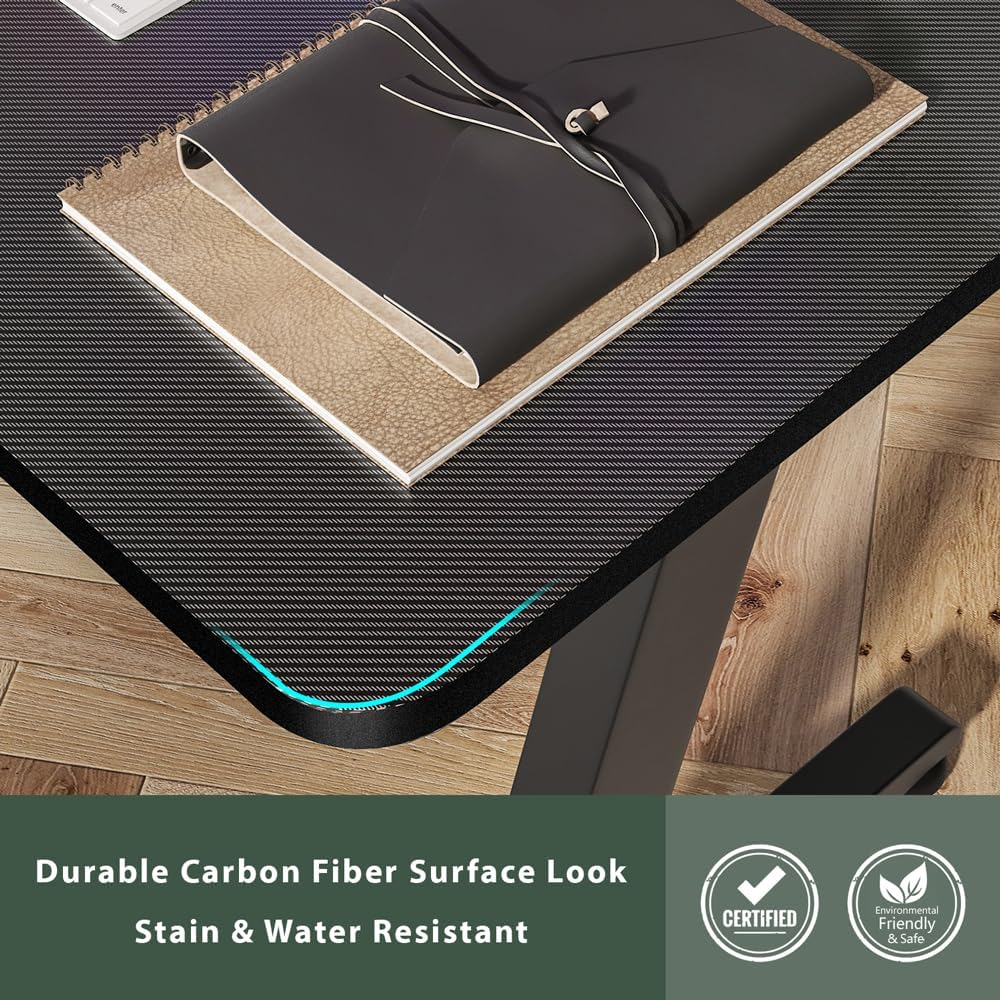
Bild: En detaljerad view of the carbon fiber surface, showcasing its texture and finish. This surface is designed for durability and a modern aesthetic.

Bild: The desk set up in a room, demonstrating the practical use of the integrated cup holder and the overall spaciousness for a gaming setup.
6. Underhåll
För att säkerställa att ditt skrivbord håller länge och ser bra ut, följ dessa underhållsriktlinjer:
- Rengöring: Torka av skrivbordet och ramen med en mjuk, damp trasa. Undvik slipande rengöringsmedel eller starka kemikalier som kan skada ytan.
- Spill: Clean up spills immediately to prevent staining, especially on the carbon fiber surface.
- Fästelement: Kontrollera regelbundet alla skruvar och fästelement för att säkerställa att de sitter ordentligt fast. Dra åt vid behov för att bibehålla stabiliteten.
- Undvik värme: Do not place hot items directly on the desktop without a protective coaster.
7. Felsökning
Om du stöter på problem med ditt skrivbord kan du använda följande vanliga lösningar:
- Skrivbordet är vingligt:
- Se till att alla monteringsskruvar är ordentligt åtdragna.
- Adjust the leveling feet on the bottom of the legs to compensate for uneven floor surfaces.
- Saknade delar:
- Double-check all packaging materials. Small parts may be tucked away.
- Refer to the package contents list. If parts are genuinely missing, contact LIFETIME customer support.
- Ytrepor:
- While the carbon fiber surface is durable, deep scratches may occur from sharp objects. Use a desk mat to protect the surface.
8. Specifikationer
| Stämpla | LIVSTID |
| Modellnummer | GD-BL |
| Objektets mått (L x B x H) | 44 x 23.5 x 29.5 tum |
| Bordsskivans tjocklek | 1.2 tum |
| Maximal vikt rekommendation | 150 pund (68 kg) |
| Toppmaterialtyp | Kolfiber |
| Basmaterial | Legerat stål |
| Färg | Svart |
| Monteringstid (ungefär) | 30 minuter |
| Inkluderar alla monteringsverktyg | Ja |
9. Garanti och support
LIFETIME is committed to providing high-quality products. For warranty information, product support, or to report missing/damaged parts, please visit the official LIFETIME webwebbplatsen eller kontakta deras kundtjänst direkt. Spara ditt inköpskvitto för garantiärenden.
För ytterligare information och support, besök LIFETIME Store on Amazon.