
1. Produkt överview
The GOLOZA LA-C337 is a versatile digital alarm clock featuring a 180° rotatable projection, a large curved LED display, and a convenient USB charging port. It is designed for clear time display and easy operation.

Image 1.1: The GOLOZA Digital Projection Alarm Clock, showcasing its curved display and compact design, placed on a nightstand.
2. Paketets innehåll
Kontrollera paketet för följande artiklar:
- GOLOZA Digital Projection Alarm Clock (LA-C337)
- Micro USB-kabel
- Strömadapter
- Användarmanual
3. Produktfunktioner
- Curved LED Display: Large, clear digital time display with adjustable brightness.
- 180° Projection: Projects time onto a wall or ceiling with adjustable brightness and rotation.
- Dubbla larm: Set two independent alarms with progressive volume.
- Snooze-funktion: Möjliggör extra sömntid efter att alarmet ljuder.
- USB laddningsport: Ladda dina mobila enheter bekvämt.
- Minnesbatteri: Built-in button battery maintains time settings during power outages.
Bild 3.1: En närbild view of the GOLOZA Digital Projection Alarm Clock's clear, blue LED display, showing the time.
4. Inledande installation
4.1 Strömanslutning
- Connect the Micro USB cable to the power input port on the back of the alarm clock.
- Anslut den andra änden av USB-kabeln till den medföljande nätadaptern.
- Insert the power adapter into a standard electrical outlet. The clock display will light up.
Notera: The built-in button battery serves as a backup for time and alarm settings during a power interruption. It does not power the main display or projection.
4.2 Ställa in tid och datum
Specific button names are not provided, but typically these clocks have 'TIME SET', 'MODE', or similar buttons. Refer to the physical unit for exact button labels.
- Tryck och håll ned Tid inställd button (or similar) to enter time setting mode. The hour digits will flash.
- Använd +/- or Upp/Ner knappar för att justera timmen.
- Tryck på Tid inställd tryck på knappen igen för att bekräfta timmen och gå vidare till minutinställning. Minutsiffrorna blinkar.
- Använd +/- or Upp/Ner knappar för att justera minuterna.
- Tryck på Tid inställd button again to confirm minutes and exit time setting mode.
- Follow similar steps to set the date if your model supports it (usually by pressing the Time Set button multiple times to cycle through year, month, day).
5. Bruksanvisning
5.1 Ställa in larm
Klockan stöder två oberoende alarm (Alarm 1 och Alarm 2).
- Tryck och håll ned Larm 1 button (or similar) to enter Alarm 1 setting mode. The alarm hour digits will flash.
- Använd +/- or Upp/Ner knappar för att justera alarmtimmen.
- Tryck på Larm 1 tryck på knappen igen för att bekräfta timmen och gå vidare till minutinställning. Alarmminutsiffrorna blinkar.
- Använd +/- or Upp/Ner knappar för att justera larmminuterna.
- Tryck på Larm 1 button again to confirm minutes and select the alarm sound (e.g., Beep, Chord, Bird Song).
- Tryck på Larm 1 button one more time to activate/deactivate Alarm 1 and exit setting mode. An alarm icon will appear on the display when active.
- Upprepa processen för Larm 2 med hjälp av motsvarande knapp.
5.2 Justera skärmens ljusstyrka
The main LED display typically has multiple brightness levels.
- Tryck på Ljusstyrka button (or a dedicated dimmer button) repeatedly to cycle through the available brightness levels (e.g., High, Medium, Low, Off).
5.3 Using Projection Feature
The projection feature allows you to view the time on a wall or ceiling.
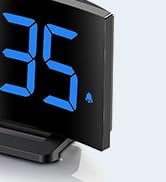
Image 5.1: The GOLOZA Digital Projection Alarm Clock actively projecting the time onto a surface, demonstrating its projection capability.
- Activating/Deactivating Projection: Tryck på Projektor button (or similar) to turn the projection on or off.
- Adjusting Projection Brightness: While the projector is on, press the Projektorns ljusstyrka button (or the same Projector button repeatedly) to cycle through brightness levels (e.g., High, Medium, Low).
- Roterande projektion: The projector lens can be physically rotated 180° to adjust the projection angle. Some models may also have a button to flip the projected image.
5.4 USB Charging Port Usage
The integrated USB port allows you to charge external devices.
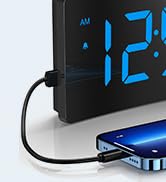
Image 5.2: The GOLOZA Digital Projection Alarm Clock with a smartphone connected to its USB charging port, illustrating its charging capability.
- Anslut enhetens USB-laddningskabel till USB-utgången på väckarklockan.
- Se till att väckarklockan är påslagen.
- The clock's USB port provides power to charge your device.
5.5 Snooze -funktion
När ett larm ljuder, tryck på Snooze button (often a large button on top) to temporarily silence the alarm. The alarm will sound again after a preset interval (e.g., 9 minutes).
5.6 Justering av larmvolym
The alarm volume is progressive, meaning it starts soft and gradually increases. Some models may offer adjustable volume levels.
- Om tillgängligt, tryck på Volym button (or a dedicated switch) to adjust the alarm volume to your preferred level.
6. Underhåll
- Rengöring: Torka av klockan med en mjuk, torr trasa. Använd inte slipande rengöringsmedel eller lösningsmedel.
- Placering: Place the clock on a stable, flat surface away from direct sunlight, heat sources, and moisture.
- Batteri: The internal button battery is for memory backup. If the clock consistently loses settings after a power outage, the battery may need replacement by a qualified technician.
7. Felsökning
| Problem | Möjlig orsak | Lösning |
|---|---|---|
| Klockdisplayen är avstängd. | Ingen strömanslutning. | Se till att nätadaptern är ordentligt ansluten till klockan och ett fungerande eluttag. |
| Projektionen är svag eller otydlig. | Incorrect brightness setting; dirty lens; too much ambient light. | Adjust projection brightness. Clean the projector lens with a soft cloth. Reduce ambient light in the room. |
| Larmet ljuder inte. | Alarm is not activated; alarm volume is too low. | Ensure the alarm icon is visible on the display. Check and adjust alarm volume. |
| Time settings are lost after power outage. | Det interna reservbatteriet är urladdat eller felaktigt. | The internal button battery may need replacement. Contact customer support. |
| USB-laddning fungerar inte. | Clock not powered; faulty USB cable; device not compatible. | Ensure the clock is powered. Try a different USB cable. Check device compatibility. |
8. Specifikationer
| Särdrag | Detalj |
|---|---|
| Modellnummer | LA-C337 |
| Mått (L x B x H) | 17.7 x 3.81 x 7.8 cm |
| Vikt | 310 gram |
| Stämpla | GOLOZA |
| Färg | Blå |
| Stil | Modern/Elegant/Minimalist |
| Specialfunktioner | Integrated Design, Built-in Button Battery (for memory), USB Charging Port, Super Clear Projection, Progressive Volume, Curved Display |
| Strömkälla | Electrical (USB Powered) |
| Form | Rectangular, Curved Screen |
| Batterier ingår | No (Internal button battery for memory backup is pre-installed but not user-replaceable) |
| UPC/GTIN | 647697054284 |
9. Garanti och support
GOLOZA is committed to providing quality products and customer satisfaction.
- Returpolicy: 6 Months Return period.
- Garanti: 24 Months Warranty from the date of purchase.
- Stöd: Lifetime Support is provided for this product.
For any questions, technical assistance, or warranty claims, please contact GOLOZA customer service through your purchase platform or the official GOLOZA webplats.


