
Xprinter XP-Q801K
Xprinter XP-Q801K termisk kvittoskrivare användarmanual
Model: XP-Q801K
1. Introduktion
This manual provides comprehensive instructions for the setup, operation, and maintenance of your Xprinter XP-Q801K Thermal Receipt Printer. This printer is designed for efficient and reliable receipt printing in various business environments, featuring high-speed direct thermal printing and a USB interface for easy connectivity.

Bild 1: Framsidan view of the Xprinter XP-Q801K Thermal Receipt Printer, showing the paper output slot and control buttons.
2. Inställning
2.1 Uppackning
Carefully remove the printer and all accessories from the packaging. Verify that all components are present:
- Xprinter XP-Q801K Thermal Receipt Printer
- Strömadapter
- USB-kabel
- Paper Roll (starter)
- Användarmanual (detta dokument)
2.2 Ansluta skrivaren
Before connecting, ensure the printer is powered off. Locate the ports on the rear of the printer.
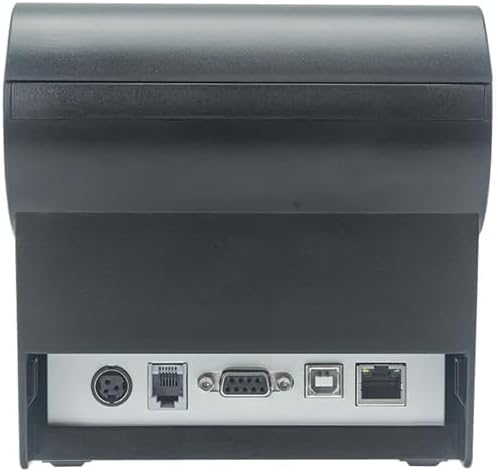
Bild 2: Bak view of the printer, highlighting the power, USB, and other interface ports.
- Anslut ström: Insert the power adapter cable into the printer's power input port (DC 24V/2.5A) and plug the adapter into a suitable electrical outlet (AC 100-240V, 50-60Hz).
- Anslut USB: Connect one end of the provided USB cable to the USB port on the printer and the other end to an available USB port on your computer.
- Kassalåda (valfritt): If using a cash drawer, connect its cable to the cash drawer port (DC 24V/1A) on the printer.
2.3 Ladda pappersrullen
The printer uses 80mm wide thermal paper rolls.
- Open the paper cover by pushing the cover open button (usually located on the side or front).
- Insert the thermal paper roll with the printing surface facing the print head. Ensure the roll is seated correctly in the paper compartment.
- Dra ut en liten mängd papper förbi skäraren.
- Stäng papperslocket ordentligt tills det klickar på plats.
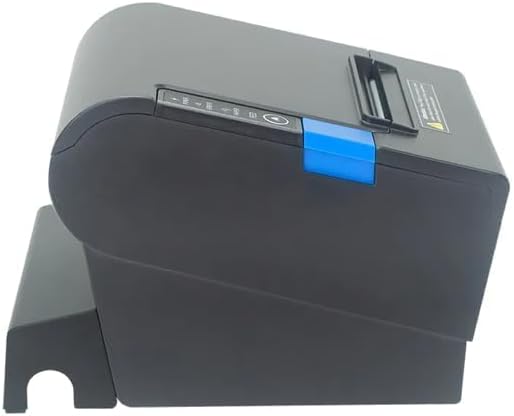
Bild 3: Sida view of the printer, illustrating the paper cover mechanism.
2.4 Installation av drivrutiner
The printer requires a driver to communicate with your computer. Drivers are typically available for Windows, Linux, Android, and Mac operating systems.
- For Windows users, the printer often supports plug-and-play installation or requires a specific Windows driver.
- For Linux, Android, and Mac, SDKs (Software Development Kits) are usually provided for integration.
Se tillverkarens website or the included driver CD/USB drive for the latest drivers and installation instructions specific to your operating system.
3. Använda skrivaren
3.1 Slå på/av
Locate the power switch on the side or rear of the printer. Flip the switch to the 'ON' position to power on the printer. The 'POWER' indicator light will illuminate. Flip to 'OFF' to power down.
3.2 Indicator Lights and Buttons
The front panel typically features several indicator lights and buttons:
- DRIVA: Indikerar att skrivaren är påslagen.
- FEL: Illuminates or flashes to indicate an error condition (e.g., paper out, print head overheating, cutter error).
- PAPPER: Indicates that the paper roll is low or out.
- FEED-knapp: Press to manually feed paper. Hold to perform a self-test print (if supported by model).
3.3 Grundläggande utskrift
Once the printer is connected and drivers are installed, you can print receipts from your POS software or application. Ensure the printer is selected as the default or active printer in your system settings.
The printer supports various print speeds up to 300 mm/s and automatic paper cutting after each print job.
4. Underhåll
Regelbundet underhåll säkerställer optimal prestanda och förlänger skrivarens livslängd.
4.1 Rengöring av skrivhuvudet
The print head should be cleaned regularly, especially if print quality degrades.
- Stäng av skrivaren och koppla ur strömkabeln.
- Öppna pappersluckan.
- Använd en bomullspinne lättampened with isopropyl alcohol (ethanol) to gently wipe the thermal elements of the print head.
- Låt skrivhuvudet torka helt innan du stänger locket och ansluter strömmen igen.
4.2 Cleaning the Cutter
Paper dust can accumulate around the cutter blade, affecting its performance.
- Stäng av skrivaren och koppla ur strömkabeln.
- Carefully remove any visible paper dust or debris from around the cutter blade using a soft brush or compressed air.
- Do not use liquids on the cutter.
4.3 Allmän rengöring
Torka av skrivarens utsida med en mjuk, damp trasa. Undvik att använda starka kemikalier eller slipande rengöringsmedel.
5. Felsökning
Det här avsnittet behandlar vanliga problem som du kan stöta på med din skrivare.
| Problem | Möjlig orsak | Lösning |
|---|---|---|
| Skrivaren slås inte på. | Strömkabeln är inte ansluten; Fel på eluttaget; Strömbrytaren är avstängd. | Ensure power cable is securely connected. Test power outlet. Turn power switch to 'ON'. |
| Ingen utskrift. | Paper out; Paper loaded incorrectly; Driver not installed or incorrect; USB cable loose; Printer not selected. | Load new paper roll. Re-load paper correctly. Install/reinstall correct driver. Check USB connection. Select printer in software. |
| ERROR light is on/flashing. | Paper out; Paper jam; Print head overheating; Cutter error. | Load paper. Clear paper jam. Allow printer to cool down. Check cutter for obstructions. |
| Dålig utskriftskvalitet. | Dirty print head; Low quality paper; Old paper roll. | Clean the print head (see Section 4.1). Use high-quality thermal paper. Replace old paper rolls. |
Om problemet kvarstår efter att du har försökt med dessa lösningar, vänligen kontakta kundsupporten.
6. Specifikationer
| Särdrag | Detalj |
|---|---|
| Utskriftsmetod | Direkt termisk |
| Pappersbredd | 80 mm |
| Utskriftshastighet | 230 mm / s, 260 mm / s, 300 mm / s |
| Gränssnitt | USB |
| Linjeavstånd | 3.75 mm (adjustable by commands) |
| Character Size (ANK) | Font A: 1.5 × 3.0 mm (12 × 24 dots) Font B: 1.1 × 2.1 mm (9 × 17 dots) |
| Character Size (Chinese/Traditional Chinese) | 3.0 × 3.0 mm (24 × 24 dots) |
| Streckkodstyper | UPC-A / UPC-E / JAN13 (EAN13) / JAN8 (EAN8) / CODE39 / ITF / CODABAR / CODE93 / CODE128 |
| 2D streckkod | QR Code / PDF417 |
| NV Flash Memory | 256 KB |
| Ingångseffekt | AC 100-240V, 50-60Hz |
| Uteffekt | DC 24V/2.5A |
| Kassalådans utmatning | DC 24V/1A |
| Vikt | 1.0 kg |
| Mått (D × B × H) | 194.5 × 145 × 146.4 mm |
| Driftstemperatur | 0~45°C |
| Driftfuktighet | 10~80% RH |
| Skärliv | 1.5 miljoner nedskärningar |
| Skrivhuvudets liv | 150 km |
| OS-kompatibilitet | Windows, Linux, Android, Mac |