
Ampire CPM 101
AMPIRE CPM 101 Smartphone Monitor Användarmanual
Model: CPM 101
1. Introduktion
This user manual provides comprehensive instructions for the installation, operation, and maintenance of your AMPIRE CPM 101 Smartphone Monitor. Please read this manual thoroughly before using the device to ensure proper functionality and safety.
2. Säkerhetsinformation
Följ alltid följande säkerhetsåtgärder för att förhindra skador på enheten eller dig själv:
- Försök inte att ta isär eller modifiera enheten.
- Se till att alla anslutningar är säkra innan du slår på.
- Undvik att utsätta enheten för extrema temperaturer, direkt solljus eller fukt.
- Install the monitor in a location that does not obstruct the driver's view or interfere with vehicle safety systems.
- Only use the provided cables and accessories.
3. Produkt överview
De AMPIRE CPM 101 is a 10-inch high-resolution touchscreen monitor designed to integrate smartphone functionalities like Apple CarPlay and Android Auto into your vehicle. It also supports the display of an optional rearview kamera.
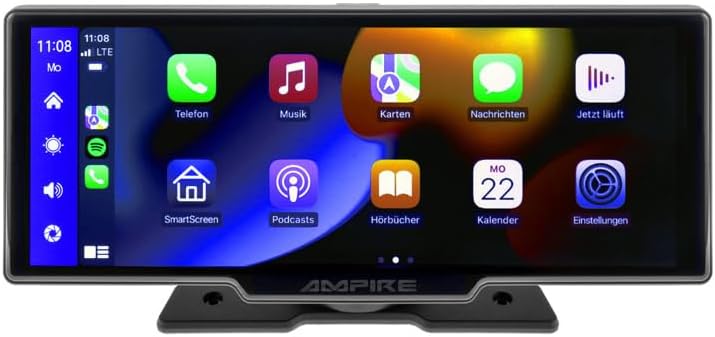
Bild 3.1: Framsidan view av AMPIRE CPM 101 monitor showing the user interface with various app icons.

Figur 3.2: Den AMPIRE CPM 101 monitor with its base, highlighting key features such as Bluetooth, Apple CarPlay, Android Auto, 1080p Full HD, Wi-Fi, and 10-inch display.

Figure 3.3: Contents of the AMPIRE CPM 101 package, including the monitor, rearview camera, and various connection cables.

Figur 3.4: Den AMPIRE CPM 101 monitor displaying a split screen with navigation on one side and a rearview camera feed on the other.
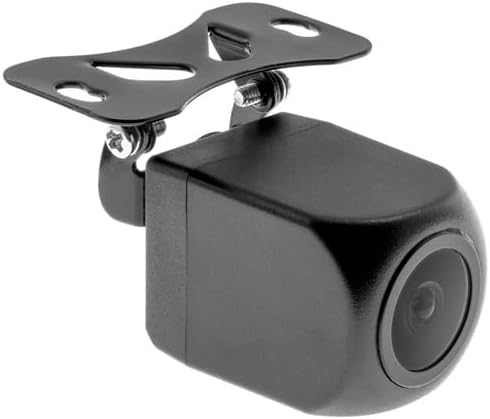
Bild 3.5: Närbild view of the compact rearview camera with its mounting bracket.
4. Installation och installation
De AMPIRE CPM 101 is designed for easy integration into most vehicles. Professional installation is recommended for optimal performance and safety.
4.1. Paketets innehåll
Innan installationen påbörjas, kontrollera att alla komponenter finns:
- AMPIRE CPM 101 Monitor
- Power Cable Set
- Bakview Camera (optional, if included in your package)
- Anslutningskabel för kamera
- Monteringsbygel
- Användarmanual
4.2. Montering av monitorn
- Välj en lämplig plats på instrumentbrädan som inte skymmer din view eller störa krockkuddarna.
- Rengör monteringsytan noggrant.
- Attach the mounting bracket to the monitor.
- Securely mount the monitor to the dashboard using the provided adhesive or screws, ensuring it is stable.
4.3. Kabelanslutningar
Connect the power cable set to your vehicle's power source (ACC, B+, GND). If installing a rearview camera, connect its video cable to the monitor's camera input and its power cable to the vehicle's reverse light circuit for automatic activation.
- Röd tråd: Connect to ACC (Accessory Power).
- Gul tråd: Connect to B+ (Constant Power).
- Svart tråd: Connect to GND (Ground).
- Reverse Trigger Wire (if applicable): Connect to the vehicle's reverse light positive wire.
5. Bruksanvisning
5.1. Slå på / av
The monitor will power on automatically when the vehicle's ignition is turned on (ACC power). To manually turn off, press and hold the power button (if available) or turn off the vehicle's ignition.
5.2. Connecting to Apple CarPlay / Android Auto
The CPM 101 supports wireless connection to Apple CarPlay and Android Auto. Notera: Devices with only 2.4 GHz Wi-Fi are not supported. iPhone 5 or newer is required for Apple CarPlay.
- Se till att din smartphones Bluetooth och Wi-Fi är aktiverade.
- On the CPM 101 monitor, navigate to the "Phone" or "Connect" menu.
- Välj "Para ny enhet" eller liknande alternativ.
- On your smartphone, search for and select the CPM 101 in the Bluetooth device list.
- Bekräfta parkopplingskoden på båda enheterna.
- Once paired via Bluetooth, the monitor will automatically establish a Wi-Fi connection for CarPlay or Android Auto.
5.3. Using the Rearview Kamera
Om en bakreview camera is connected, the monitor will automatically switch to the camera view when the vehicle is put into reverse gear. The image will revert to the previous screen when taken out of reverse.
5.4. Systeminställningar
Access the system settings menu on the monitor to adjust display brightness, audio output, language, and other preferences. Refer to the on-screen prompts for specific setting options.
6. Underhåll
För att säkerställa din livslängd och optimala prestanda AMPIRE CPM 101 monitor, follow these maintenance guidelines:
- Rengöring av skärmen: Använd en mjuk, luddfri trasa för att försiktigt torka av skärmen. För envisa fläckar, torka lättampSkölj trasan med vatten eller en skärmrengöringslösning. Använd inte slipande rengöringsmedel eller lösningsmedel.
- Allmän städning: Keep the monitor and its surroundings free from dust and debris. Use a soft brush or compressed air to clean vents and connectors.
- Temperatur: Avoid exposing the device to extreme hot or cold temperatures for prolonged periods.
- Lagring: If storing the vehicle for an extended period, consider disconnecting the monitor's power to prevent battery drain.
7. Felsökning
Om du stöter på problem med din AMPIRE CPM 101 monitor, refer to the following common problems and solutions:
| Problem | Möjlig orsak | Lösning |
|---|---|---|
| Monitorn slås inte på. | Ingen strömförsörjning; lös anslutning; trasig säkring. | Kontrollera strömkabelanslutningarna. Verifiera fordonets säkringscentral. Se till att tändningen är påslagen. |
| Kan inte ansluta till Apple CarPlay/Android Auto. | Smartphone Wi-Fi/Bluetooth off; incompatible phone; 2.4 GHz Wi-Fi only. | Ensure Bluetooth and Wi-Fi are on. Check phone compatibility (iPhone 5+). Confirm phone supports 5 GHz Wi-Fi. Re-pair device. |
| Bakview kameran visar inte. | Kameran är inte ansluten; backningskabeln är inte ansluten; felaktig kamera. | Check camera video and power connections. Ensure vehicle is in reverse. Test camera if possible. |
| Inget ljud. | Volume too low; incorrect audio output setting; Bluetooth not connected. | Increase volume. Check audio output settings on monitor. Ensure Bluetooth is connected to your vehicle's audio system. |
Om problemet kvarstår efter att du har provat dessa lösningar, vänligen kontakta kundsupporten.
8. Specifikationer
Nedan följer de tekniska specifikationerna för AMPIRE CPM 101 Smartphone Monitor:
| Särdrag | Specifikation |
|---|---|
| Stämpla | Ampvrede |
| Displaystorlek | 10 tum |
| Visningstyp | LCD, Color Screen |
| Anslutningsteknik | Bluetooth, WiFi |
| Kompatibla enheter | Smartphones with Apple CarPlay or Android Auto (wireless connection) |
| Specialfunktioner | Wireless Apple CarPlay & Android Auto, Optional Rearview Kameradisplay |
| Ljudutmatningsläge | Stereo |
| Uteffekt | 50 Watt |
| Produktens mått | 29 x 15 x 10 cm |
| ASIN | B0CKLSWGY7 |
| Första tillgängliga datum | 6 oktober 2023 |
9. Garanti och support
For warranty information and technical support, please refer to the documentation included with your purchase or visit the official Ampvrede webwebbplats. Spara ditt inköpsbevis för garantiärenden.
Online support: www.ampire.de
Ask a question about this manual
Ask about setup, troubleshooting, compatibility, parts, safety, or missing instructions. Manuals+ will review the question and use this page’s manual context to help answer it.