
1. Produkt överview
The Dioche 1080P HD Smart Camera is designed for home security and monitoring, offering high-definition video, motion detection, and night vision capabilities. This manual provides essential information for setting up, operating, and maintaining your camera.

Bild 1.1: Framsidan view of the Dioche 1080P HD Smart Camera.
Video 1.1: En övergångview of the Dioche 1080P HD Smart Camera's design and features.
2. Nyckelfunktioner
- 1080P HD-video: Captures clear, high-definition video for detailed monitoring.
- Avancerat nattseende: Provides clear images in low-light conditions, extending visibility up to 40ft.
- Rörelsedetektering: Detekterar automatiskt rörelser och skickar varningar till din mobila enhet.
- Tvåvägs ljud: Allows for communication through the camera via the mobile application.
- Fjärrövervakning: Få tillgång till livevideoflöde och inspelat footage from anywhere using your smartphone.
- Molnlagring: Offers an option for secure storage of surveillance footage.
- Enkel installation: Designad för snabb och enkel installation.
3. Paketets innehåll
Kontrollera att alla artiklar finns i ditt paket:
- 1 x Dioche 1080P HD Smart Camera
- 1 x Laddkabel
- 1 x Bruksanvisning (detta dokument)
- 2 x Expansion Tubes
- 2 x skruvar

Bild 3.1: Alla komponenter ingår i produktpaketet.
4. Produktdiagram
Familiarize yourself with the different parts of your Dioche Smart Camera:
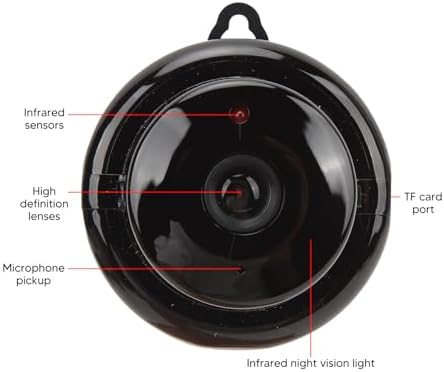
Image 4.1: Labeled diagram of the camera's components.
- Infraröda sensorer: Detect ambient light levels for automatic night vision activation.
- High Definition Lenses: Capture 1080P resolution video.
- Mikrofonupptagning: Records audio and enables two-way communication.
- TF-kortport: Slot for inserting a MicroSD card (not included) for local storage.
- Infrared Night Vision Light: Emits infrared light for clear viewunder mörka förhållanden.
5. Installationsanvisningar
Follow these steps to set up your Dioche Smart Camera:
- Ström på: Connect the camera to a power source using the provided charging cable. The camera will power on automatically.
- Ladda ner app: Download the recommended mobile application (e.g., "V380 Pro" or similar, refer to packaging for specific app name) from your smartphone's app store (Android or iOS).
- Skapa konto: Öppna appen och registrera ett nytt konto eller logga in om du redan har ett.
- Lägg till enhet: Follow the in-app instructions to add your new camera. This typically involves scanning a QR code on the camera or manually selecting the device type and connecting to its Wi-Fi hotspot.
- Anslut till Wi-Fi: Configure the camera to connect to your home 2.4GHz Wi-Fi network. Ensure your smartphone is also connected to the same network during setup.
- Montera kamera: Choose a suitable location for your camera. It can be placed on a flat surface or mounted to a wall or ceiling using the included screws and expansion tubes. Ensure the camera has a clear view av det område du vill övervaka.

Bild 5.1: Example of mounting the camera to a surface.
6. Bruksanvisning
Once set up, you can control and monitor your camera using the mobile application:
- Bo View: Öppna appen och välj din kamera för att view livevideoflödet.
- Rörelsedetekteringsvarningar: Enable motion detection in the app settings to receive push notifications on your phone when movement is detected. Adjust sensitivity as needed.
- Nattseende: The camera automatically switches to night vision mode in low light. You can typically toggle this feature manually within the app if desired.
- Tvåvägs ljud: Use the microphone and speaker icons in the app to listen to the camera's environment or speak through the camera.
- Inspelning och uppspelning: Tillgång inspelad footage from the cloud storage or MicroSD card (if installed) through the app's playback feature.
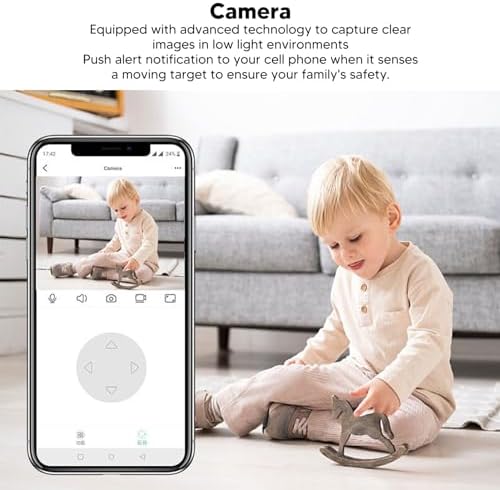
Image 6.1: Using the mobile application for live monitoring.
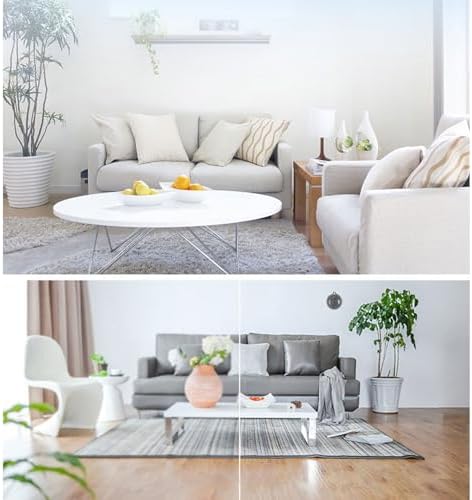
Image 6.2: Demonstration of the camera's night vision capability.
7. Underhåll
För att säkerställa optimal prestanda och lång livslängd för din kamera:
- Rengöring: Torka försiktigt av kameralinsen och kamerahuset med en mjuk, torr trasa. Undvik att använda starka kemikalier eller slipande material.
- Placering: Se till att kameran är placerad på en stabil plats, borta från direkt solljus, extrema temperaturer och fukt.
- Programuppdateringar: Regularly check the mobile application for firmware updates for your camera to ensure you have the latest features and security enhancements.
8. Felsökning
Om du stöter på problem med din kamera kan du se följande vanliga problem och lösningar:
| Problem | Möjlig lösning |
|---|---|
| Kamera offline/Kan inte ansluta | Ensure the camera is powered on. Check your Wi-Fi connection and signal strength. Restart the camera and your router. Re-add the camera in the app if necessary. |
| Inga rörelsedetekteringsvarningar | Verify motion detection is enabled in the app settings. Adjust sensitivity. Check app notification settings on your phone. |
| Dålig videokvalitet | Ensure the lens is clean. Check your internet connection speed. Adjust video quality settings in the app if available. |
| Tvåvägsljud fungerar inte | Check microphone and speaker permissions for the app on your phone. Ensure volume is up on both ends. |
Om problemet kvarstår, vänligen kontakta kundsupporten.
9. Specifikationer
Detailed technical specifications for the Dioche 1080P HD Smart Camera:

Image 9.1: Camera dimensions.
| Särdrag | Detalj |
|---|---|
| Modellnamn | Diocherkmcdyn6vq |
| Videoinspelningsupplösning | 1080p |
| Anslutningsprotokoll | Wi-Fi (2.4 GHz) |
| Specialfunktion | Rörelsesensor, Nattseende, Tvåvägsljud |
| Kompatibla enheter | Smartphone (Android, iOS) |
| Monteringstyp | Väggfäste |
| Kapslingsmaterial | Akrylnitril Butadien Styren (ABS) |
| Rekommenderad användning | Baby Monitoring, Home Security, Pet Monitoring |
| Krävs batterier | No (Powered via USB cable) |
10. Garanti och support
For warranty information and technical support, please refer to the product packaging or contact the retailer where you purchased the Dioche 1080P HD Smart Camera. Keep your proof of purchase for warranty claims.