
1. Produkt överview
The Irfora SZ305 is a professional digital multimeter designed for accurate and rapid measurement of various electrical parameters. It features a high-definition backlit LCD display for clear readings in diverse environments and a retractable stand for convenient use.
Viktiga funktioner inkluderar:
- AC/DC Voltage och Strömmätning
- Diode, Resistance, and Capacitance testing
- Frekvensmätning
- Buzzer continuity test
- hFE Triode testing for NPN/PNP transistors
- Non-Contact Voltage (NCV) detektering
- Battery detection (1.5V, 3V, 9V, 12V)

Image 1.1: The Irfora SZ305 Digital Multimeter highlighting its various measurement functions including AC/DC voltage/current, diode, capacitance, frequency, buzzer, resistance, NCV induction, hFE, and battery detection.
2. Säkerhetsinformation
Please read and understand all safety instructions before operating the multimeter. Failure to follow these instructions may result in electric shock, fire, or damage to the device.
- Always ensure the multimeter is set to the correct function and range before making any measurements.
- Försök inte mäta voltages or currents exceeding the maximum specified limits for the device.
- Var extremt försiktig när du arbetar med spänningsförande kretsar. Hög volymtagdet kan vara farligt.
- Kontrollera testkablarna för skador före varje användning. Använd inte om isoleringen är sprucken eller skadad.
- Använd inte multimetern om den verkar skadad eller inte fungerar korrekt.
- Avoid using the multimeter in wet environments or during electrical storms.
- Byt batterier omedelbart när indikatorn för låg batterinivå visas för att säkerställa korrekta avläsningar.
- Always disconnect test leads from the circuit before changing functions or ranges.
3. Installation och första användning
3.1 Batteriinstallation
The multimeter requires batteries for operation. To install or replace batteries:
- Se till att multimetern är avstängd och att testkablarna är bortkopplade.
- Leta reda på batterifackets lock på enhetens baksida.
- Använd en skruvmejsel för att öppna facket.
- Insert new batteries, observing correct polarity (+ and -).
- Sätt tillbaka batterifackets lock och fäst det med skruven.
3.2 Using the Retractable Support Stand
The multimeter is equipped with a retractable stand on its back for convenient viewing during measurements.
- To deploy the stand, gently pull it outwards from the back of the device until it locks into position.
- Place the multimeter on a flat surface.
- To retract the stand, push it back into its original position until it is flush with the device body.
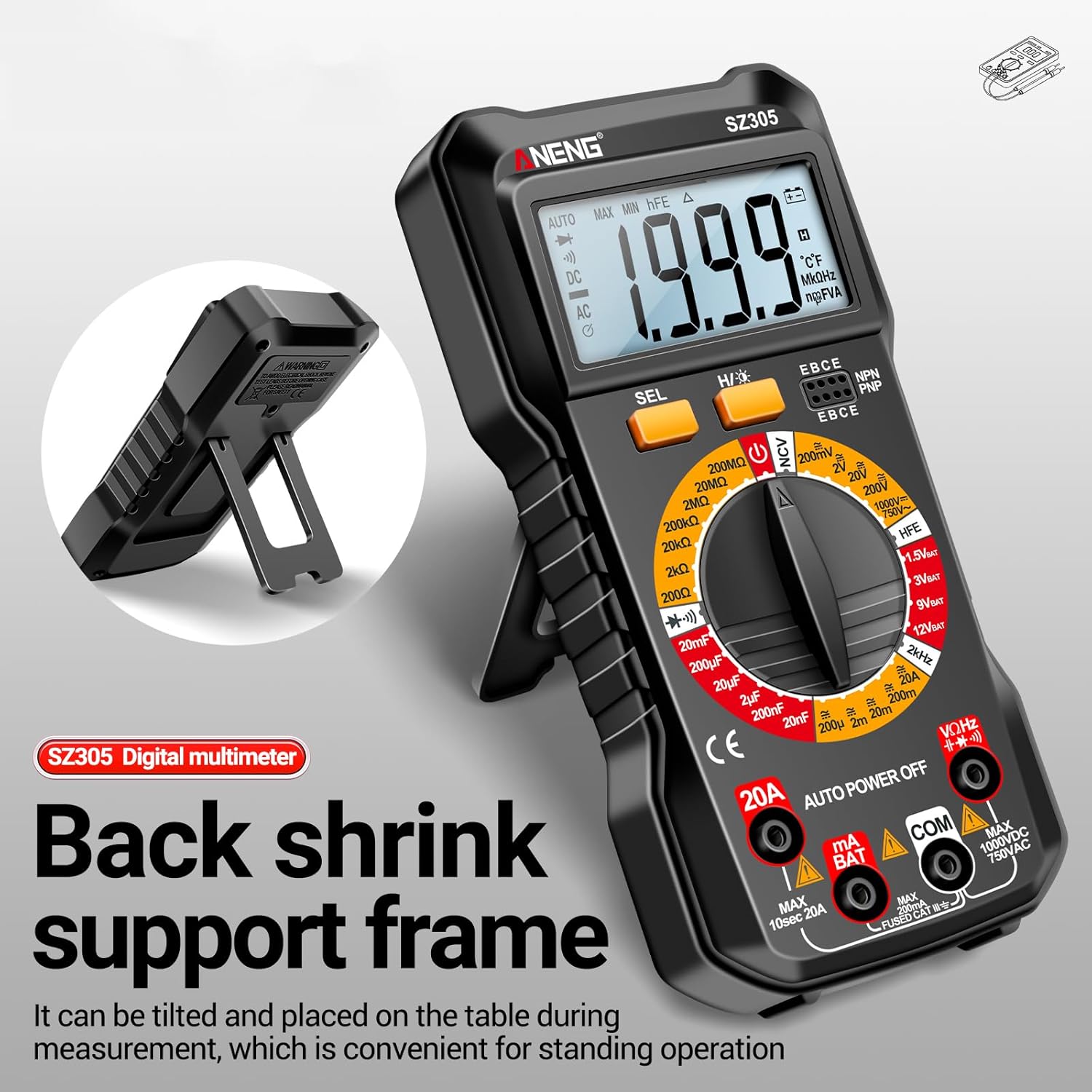
Image 3.1: The Irfora SZ305 Digital Multimeter demonstrating its retractable back support frame for angled viewing on a table.
4. Bruksanvisning
This section details how to perform various measurements with your Irfora SZ305 Digital Multimeter.
4.1 Ström på/av och bakgrundsbelysning
- To power on the device, rotate the rotary switch from "AUTO POWER OFF" to any desired measurement function.
- To power off, rotate the switch back to "AUTO POWER OFF". The device also features an auto-power-off function after a period of inactivity.
- To activate the LCD backlight, press and hold the "H/☝" button. The backlight will illuminate, improving visibility in dark environments. Press and hold again to turn off.

Image 4.1: The Irfora SZ305 Digital Multimeter displaying its high-definition backlit LCD screen, enhancing readability in low-light conditions.
4.2 AC/DC Voltage Mätning
- Insert the red test lead into the "VHz" jack and the black test lead into the "COM" jack.
- Rotate the rotary switch to the "V~" (AC Voltage) or "V=" (DC Voltage) räckvidd.
- Anslut testproberna över kretsen eller komponenten som ska mätas.
- Läs voltage värde som visas på LCD-skärmen.
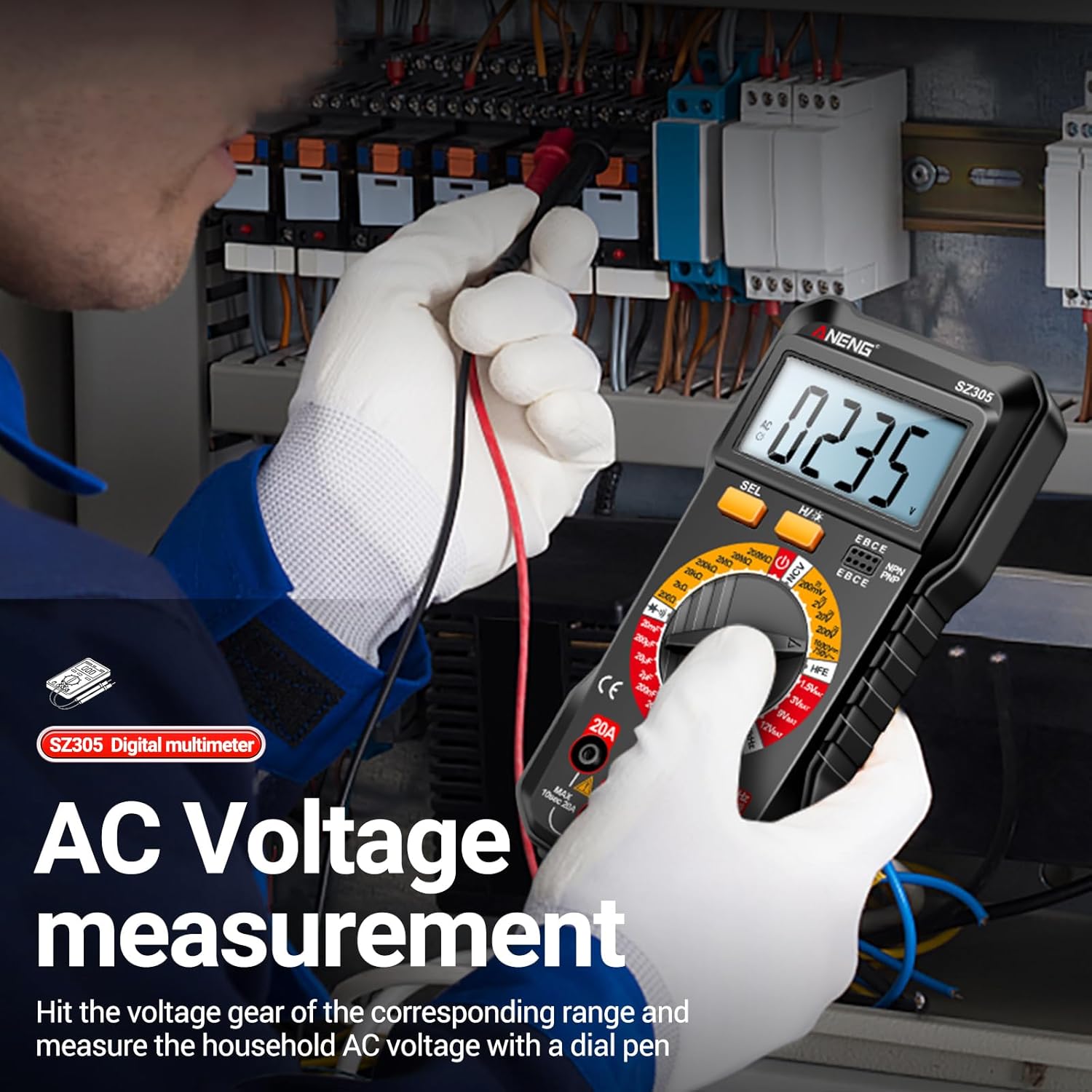
Image 4.2: A user measuring AC voltage with the Irfora SZ305 Digital Multimeter in an electrical panel, demonstrating proper probe placement.
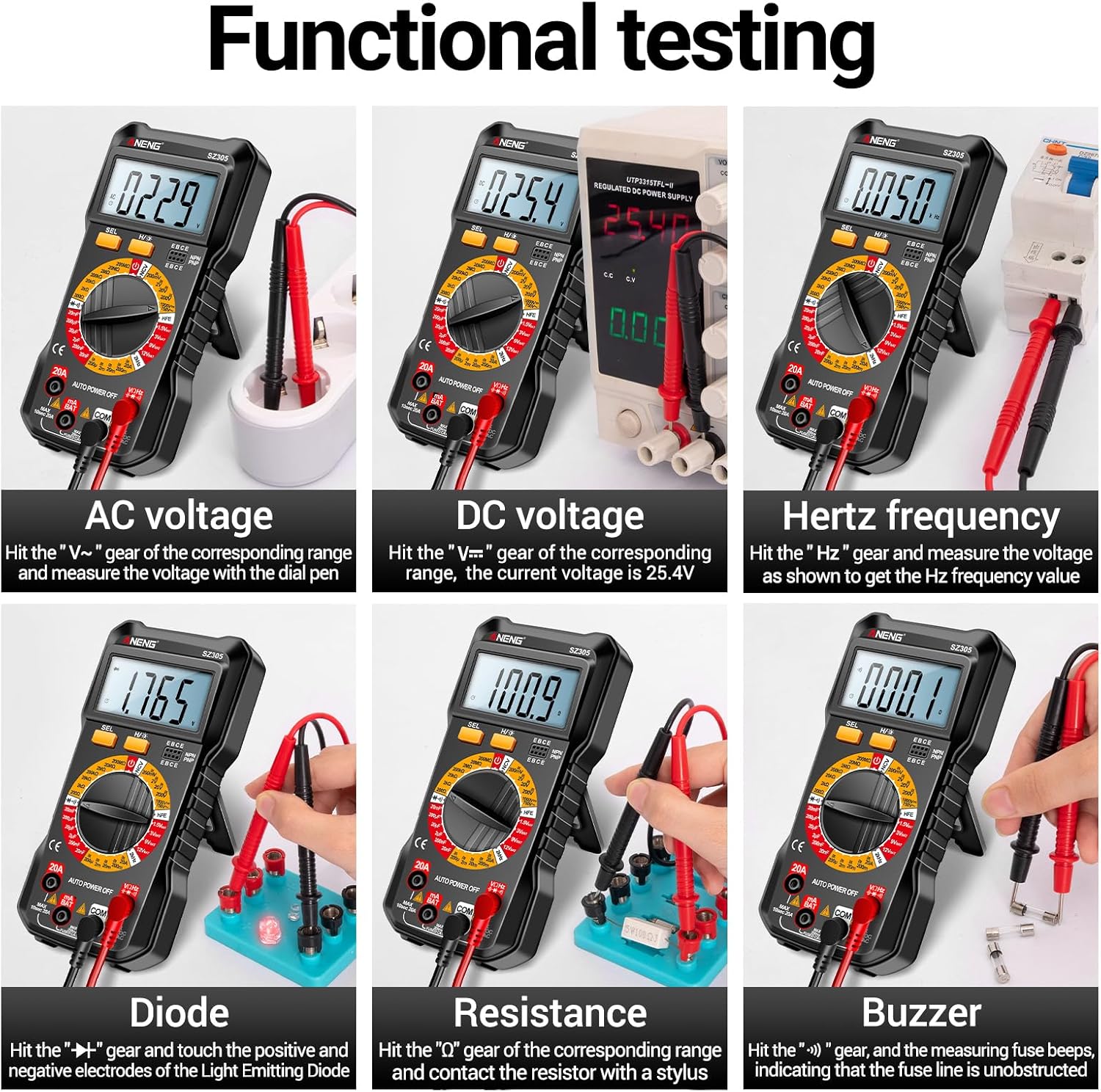
Bild 4.3: Examples of functional testing with the Irfora SZ305, showing measurements for AC voltage, DC voltage, Hertz frequency, diode, resistance, and continuity (buzzer).
4.3 Mätning av växelström/likström
Försiktighet: Ensure the circuit is de-energized before connecting the multimeter in series for current measurement. Incorrect connection can blow the fuse or damage the meter.
- Insert the red test lead into the "mA" or "20A" jack (depending on expected current) and the black test lead into the "COM" jack.
- Rotate the rotary switch to the appropriate "mA~" / "mA=" or "20A~" / "20A=" range.
- Öppna kretsen där strömmen ska mätas och seriekoppla multimetern.
- Sätt ström till kretsen och läs av strömvärdet.

Bild 4.4: Examples of functional testing with the Irfora SZ305, showing measurements for 9V, 3V, 1.5V, and 12V batteries, hFE, capacitance, AC current, and DC current.
4.4 Motståndsmätning
- Insert the red test lead into the "VHz" jack and the black test lead into the "COM" jack.
- Rotate the rotary switch to the "Ω" (Resistance) range.
- Ensure the component to be measured is de-energized. Connect the test probes across the component.
- Läs av resistansvärdet.
4.5 Kapacitansmätning
- Insert the red test lead into the "VHz" jack and the black test lead into the "COM" jack.
- Rotate the rotary switch to the "F" (Capacitance) range.
- Se till att kondensatorn är helt urladdad före mätning för att förhindra skador på mätaren.
- Anslut testproberna över kondensatorns terminaler.
- Läs av kapacitansvärdet.
4.6 Diode Test and Continuity (Buzzer)
- Insert the red test lead into the "VHz" jack and the black test lead into the "COM" jack.
- Rotate the rotary switch to the "Diode/Buzzer" symbol.
- For Diode Test: Anslut den röda sonden till anoden och den svarta sonden till katoden på dioden. En framåtriktad volymtage drop will be displayed. Reverse the probes; an open circuit ("OL") should be displayed.
- För kontinuitetstest: Connect the probes across the circuit or component. If resistance is below a certain threshold, the buzzer will sound, indicating continuity.
4.7 Frekvensmätning (Hz)
- Insert the red test lead into the "VHz" jack and the black test lead into the "COM" jack.
- Rotate the rotary switch to the "Hz" range.
- Anslut testproberna över signalkällan.
- Read the frequency value displayed.
4.8 hFE Triode Test
This function measures the DC current gain (hFE) of transistors.
- Rotate the rotary switch to the "hFE" position.
- Identify whether the transistor is NPN or PNP type.
- Insert the transistor leads (Emitter, Base, Collector) into the corresponding sockets on the multimeter's hFE test port.
- Read the hFE value displayed on the screen.

Image 4.5: The Irfora SZ305 Digital Multimeter conducting an hFE test, showing a transistor inserted into the dedicated test socket.
4.9 Non-Contact Voltage (NCV) Detektion
NCV-funktionen möjliggör detektering av AC-volymtagutan direktkontakt, vilket ökar säkerheten.
- Rotate the rotary switch to the "NCV" position.
- Bring the top front part of the multimeter close to the suspected AC voltage source (e.g., a live wire, outlet).
- The multimeter will emit an audible alarm and the NCV indicator will flash. The closer the device is to the voltage source, the more urgent the alarm will be.

Image 4.6: The Irfora SZ305 Digital Multimeter demonstrating its Non-Contact Voltage (NCV) detection feature near an electrical outlet, indicating the presence of AC voltage.
4.10 Battery Detection (1.5V, 3V, 9V, 12V)
The multimeter can test common battery voltages.
- Rotate the rotary switch to the desired battery voltage range (e.g., "1.5V BAT", "3V BAT", "9V BAT", "12V BAT").
- Anslut den röda testkabeln till batteriets positiva pol och den svarta testkabeln till batteriets negativa pol.
- Läs voltage visas på skärmen.
5. Underhåll
5.1 Rengöring
För att rengöra multimetern, torka av höljet med rengöringsmedel.amp trasa och ett milt rengöringsmedel. Använd inte slipmedel eller lösningsmedel. Se till att enheten är avstängd och bortkopplad från alla kretsar före rengöring.
5.2 Batteribyte
Refer to section 3.1 for instructions on battery installation and replacement. Replace batteries when the low battery indicator appears on the display to maintain measurement accuracy.
5.3 Byte av säkring
If the current measurement function fails, the fuse may need replacement. This typically requires opening the back casing of the multimeter. Refer to the specifications for the correct fuse type and rating. If unsure, consult a qualified technician.
6. Felsökning
- Ingen eller svag display:
- Check battery charge. Replace batteries if low.
- Ensure the multimeter is powered on by rotating the switch from "AUTO POWER OFF".
- Felaktiga avläsningar:
- Se till att rätt funktion och område är valt för mätningen.
- Check test leads for proper connection and damage.
- Verify battery charge. Low batteries can affect accuracy.
- Ensure the circuit or component is properly prepared (e.g., capacitor discharged).
- Strömmätningen fungerar inte:
- Check if the fuse is blown. Replace if necessary (refer to section 5.3).
- Ensure test leads are connected to the correct current jacks ("mA" or "20A").
- Verify the multimeter is connected in series with the circuit.
- NCV function not responding:
- Ensure the rotary switch is set to "NCV".
- Confirm there is an AC voltage source present.
7. Specifikationer
| Särdrag | Detalj |
|---|---|
| Modell | SZ305 |
| Stämpla | Irfora |
| Visa | 1999 räkningar, bakgrundsbelyst LCD |
| Funktioner | AC/DC Voltage, AC/DC Current, Resistance, Capacitance, Frequency, Diode, Continuity, hFE, NCV, Battery Test |
| Automatisk avstängning | Ja |
| Färg | Svart |
| Tillverkarens referens | TYHDEE24863B |
Note: Detailed measurement ranges and accuracies are typically found in the full product datasheet.