
1. Introduktion och överview
This manual provides essential instructions for the safe and efficient use of your Maxcom MM135L Basic Mobile Phone. The MM135L is designed for straightforward communication, featuring a user-friendly interface, large keys, and a 1.77-inch screen. It supports 2G networks and includes dual SIM capability, an SOS button for emergencies, and convenient USB-C charging. Please read this manual thoroughly before operating the device.
2. Paketets innehåll
Kontrollera att alla artiklar finns i paketet:
- Maxcom MM135L Mobile Phone
- Battery (Lithium-Ion, 600 mAh)
- USB-kabel
- Ejektor för SIM-fack
- Användarmanual (detta dokument)
3. Enhetslayout
Familiarize yourself with the physical components of your Maxcom MM135L phone.
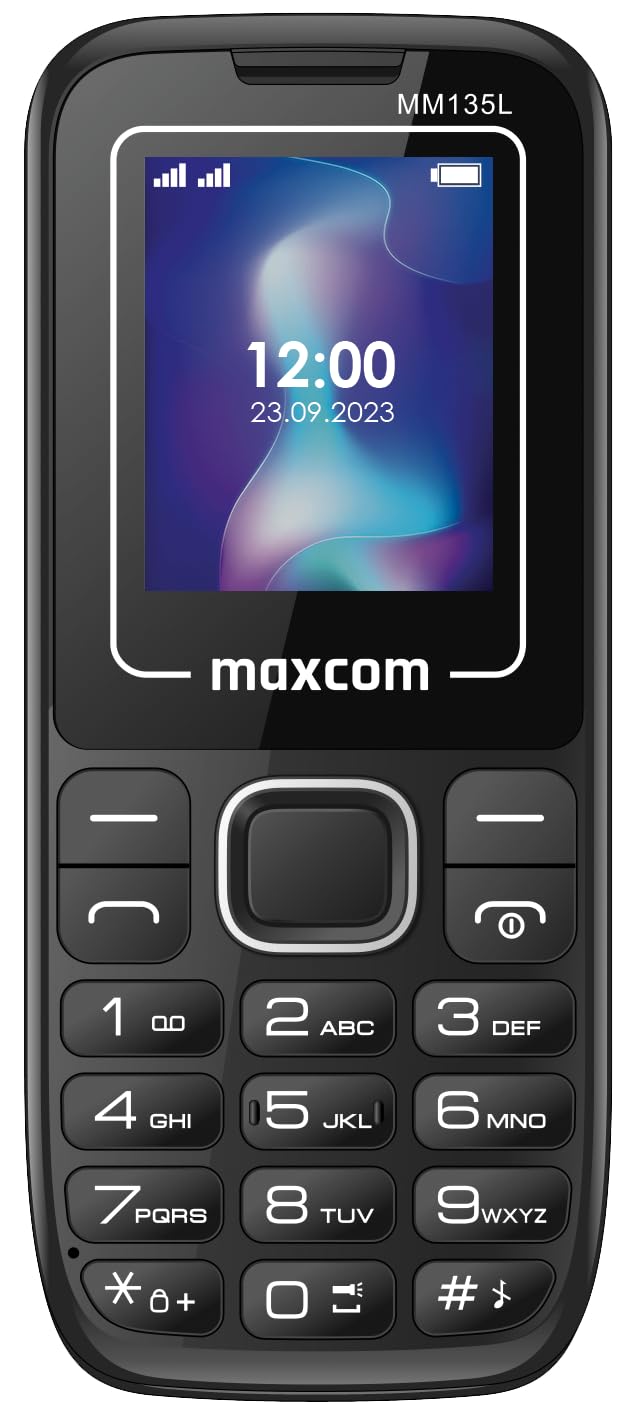
Bild 3.1: Bak view of the Maxcom MM135L phone, showing the blue textured back cover, Maxcom logo, and speaker grille at the top.

Bild 3.2: Framsidan view of the Maxcom MM135L phone, displaying the screen, large numeric keypad, and call/end buttons.

Figure 3.3: Bottom edge of the phone, featuring the USB-C charging port and a 3.5mm headphone jack.

Figure 3.4: Top edge of the phone, highlighting the integrated flashlight.
Nyckelkomponenter:
- Skärm: 1.77-inch LCD for clear text and call information.
- Numerisk knappsats: Large, tactile buttons for easy dialing and texting.
- Call/End Buttons: Dedikerade knappar för att hantera samtal.
- Navigeringsknappar: För menynavigering.
- SOS-knapp: Located on the rear for emergency calls (refer to Figure 3.1).
- Ficklampa: Integrated at the top of the device (refer to Figure 3.4).
- USB-C-port: For charging the device (refer to Figure 3.3).
- Hörlursuttag: 3.5mm port for audio accessories (refer to Figure 3.3).
4. Inställning
4.1 Batteriinstallation
- Ta försiktigt bort telefonens baksida.
- Rikta in batteriets kontakter med polerna inuti batterifacket.
- Tryck försiktigt batteriet på plats.
- Sätt tillbaka bakstycket och se till att det klickar ordentligt.
4.2 Installation av SIM -kort
The Maxcom MM135L supports dual SIM cards.
- With the phone powered off and the back cover removed, locate the SIM card slots.
- Sätt i ditt/dina SIM-kort i den/de avsedda kortplatsen/kortplatserna med guldkontakterna nedåt, i den riktning som anges på telefonen.
- Se till att SIM-kortet/SIM-kortet/-korten sitter ordentligt i.
- Replace the back cover and battery.
4.3 Ladda telefonen
The phone uses a USB-C port for charging.
- Connect the USB-C cable to the charging port at the bottom of the phone (refer to Figure 3.3).
- Anslut den andra änden av USB-kabeln till en kompatibel USB-nätadapter eller en dators USB-port.
- Batteriindikatorn på skärmen visar laddningsstatusen.
- Koppla bort laddaren när batteriet är fulladdat.
Notera: For optimal battery life, fully charge the phone before first use.
5. Bruksanvisning
5.1 Ström på/av
- För att slå på: Tryck och håll ned Call/Power knappen tills skärmen tänds.
- För att stänga av: Tryck och håll ned Slut/Power button until the power off options appear, then confirm.
5.2 Ringa och ta emot samtal
- Så här ringer du ett samtal: Ange telefonnumret med hjälp av knappsatsen och tryck på Samtal knapp.
- För att svara på ett samtal: Tryck på Samtal knappen när telefonen ringer.
- Avsluta ett samtal: Tryck på Avsluta knapp.
5.3 Skicka och ta emot meddelanden
- Navigate to the "Messages" menu using the navigation keys.
- Select "Create New Message" to compose an SMS.
- Ange mottagarens nummer och ditt meddelande och skicka sedan.
- Received messages will appear in the "Inbox".
5.4 Använda SOS-knappen
The SOS button is located on the rear of the phone. It is designed for emergency situations.
- Att aktivera: Press and hold the SOS button for several seconds.
- The phone will automatically sound an alarm and send emergency SMS messages to pre-set contacts.
- It will then automatically call the saved emergency contacts in a loop until a call is answered.
- Ensure emergency contacts are properly configured in the phone settings.
5.5 Ficklampans funktion
The built-in flashlight can be activated for convenience.
- Refer to the phone's specific settings or a dedicated side button for flashlight activation. Typically, a long press on a designated key or a side switch controls it.
6. Underhåll
- Rengöring: Använd en mjuk, torr trasa för att rengöra telefonens yta. Undvik flytande rengöringsmedel.
- Batteriomsorg: Do not expose the battery to extreme temperatures. Avoid fully discharging the battery frequently.
- Lagring: Förvara telefonen på en sval och torr plats när den inte används under längre perioder.
- Vattentålighet: Den här telefonen är inte vattentålig. Undvik kontakt med vätskor.
7. Felsökning
| Problem | Möjlig lösning |
|---|---|
| Telefonen slås inte på. | Se till att batteriet är korrekt installerat och laddat. Anslut laddaren och försök igen. |
| Kan inte ringa eller ta emot samtal. | Check if the SIM card is properly inserted and activated. Verify network signal strength. Contact your service provider if issues persist. |
| Batteriet laddas inte. | Ensure the USB-C cable and charger are securely connected and functional. Try a different charging cable or adapter. |
| SOS-knappen fungerar inte. | Verify that emergency contacts are saved in the phone's settings. Ensure the phone has network coverage. |
| Dålig samtalskvalitet. | Move to an area with better network reception. Check the speaker and microphone for obstructions. |
8. Specifikationer
| Särdrag | Detalj |
|---|---|
| Modellnamn | MM135L |
| Skärmstorlek | 1.77 tum |
| Visningstyp | LCD |
| Upplösning | 128 x 160 |
| Cellulär teknik | 2G |
| SIM-stöd | Dubbla SIM |
| Batterityp | Litium-jon |
| Batterikapacitet | 600 mAh |
| Laddningsport | USB-C |
| Mått (L x B x H) | 7 x 14 x 3.5 cm |
| Vikt | 60 g |
| Specialfunktioner | SOS Button, Flashlight, Expandable Memory, Fast Charging Support |
9. Garanti och support
For warranty information, technical support, or service inquiries, please refer to the warranty card included with your product or contact Maxcom customer service directly. Keep your proof of purchase for warranty claims.