
1. Introduktion
Welcome to the instruction manual for your TURN RAISE Triple Lens Sewer Inspection Camera. This industrial borescope is designed for detailed visual inspection in hard-to-reach areas, featuring a triple-lens system, a 5-inch IPS screen, and a 50-foot semi-rigid cable. Please read this manual thoroughly before operating the device to ensure safe and effective use.
2. Säkerhetsinformation
- Do not use this device for medical purposes.
- Keep the device away from fire, water, or other corrosive materials.
- Förvara på en torr, sval plats när den inte används.
- Ensure proper handling and storage of all accessories.
- Avoid bending the cable excessively or forcefully, as this may damage internal components.
3. Paketets innehåll
Kontrollera att alla artiklar som listas nedan ingår i ditt paket:
- Borescope Camera with Light (x1)
- Bärväska (x1)
- Typ-C-laddningskabel (x1)
- Krok (x1)
- Magnet (x1)
- Manuell (x1)
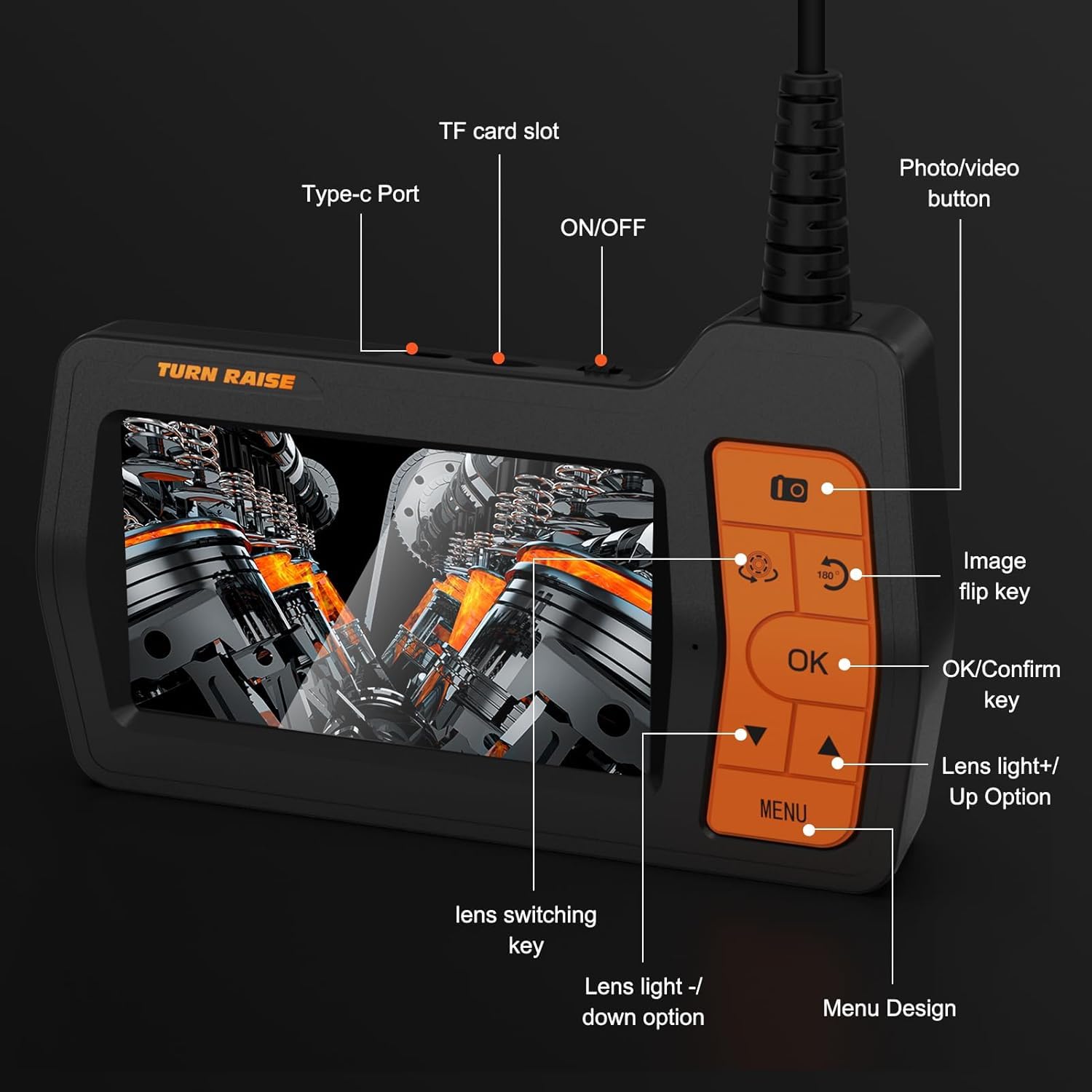
Image: The complete package including the borescope, coiled cable, carrying case, charging cable, hook, magnet, and manual.
4. Produkt överview
The TURN RAISE Triple Lens Sewer Inspection Camera is an advanced tool for industrial and home inspections, providing clear visual access to confined and hard-to-reach areas.
Nyckelfunktioner:
- Triple-Lens System: Allows for an all-round view with front and side cameras, reducing the need to twist the cable. Features 5 viewing modes and focal ranges of 1.9-4.7 inches (front cam A), 1.2-3.1 inches (side cam B), and 0.8-2.4 inches (side cam C).
- 5-tums IPS-skärm: Provides wider visibility and a clearer view with HD full viewing angle and high brightness.
- 50-foot Semi-Rigid Cable: A long, flexible cable that retains its shape for inspecting sewers, wells, chimneys, P-structure pipes, and other confined spaces.
- IP67 Vattentät sond: The camera probe is IP67 rated, making it suitable for harsh and humid environments.
- Justerbara LED-lampor: Features 8+2 adjustable LED light beads with 5 brightness levels for clear visibility in low-light conditions.
- Photo & Video Recording: Supports photo and video capture with a 32GB storage card included.
- No External Devices Needed: Operates independently without requiring Wi-Fi, Bluetooth, or a smartphone app.

Image: The main borescope unit with its integrated screen and the coiled 50-foot semi-rigid cable.
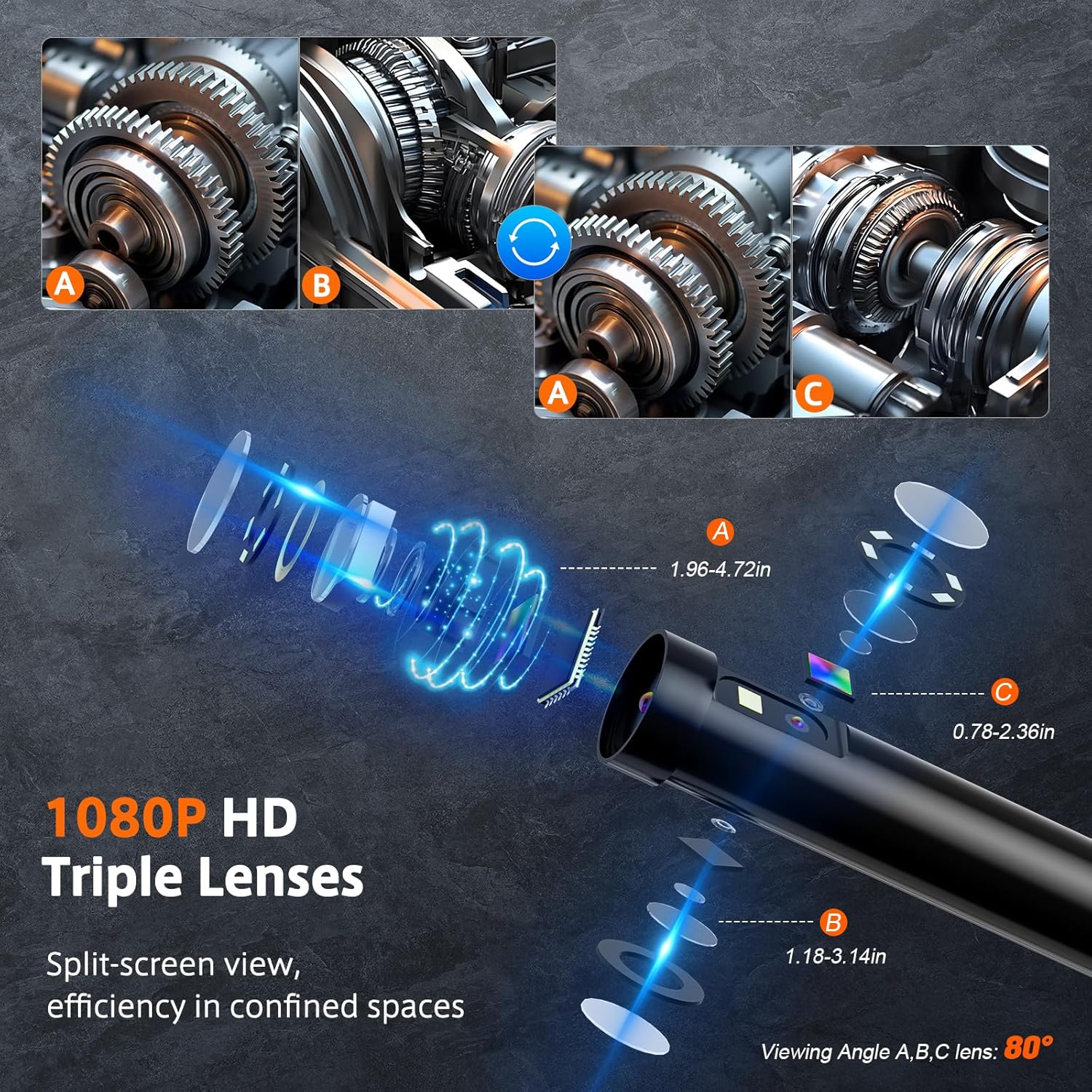
Image: A detailed diagram showing the three lenses (A, B, C) and their respective focal ranges for comprehensive viewing.
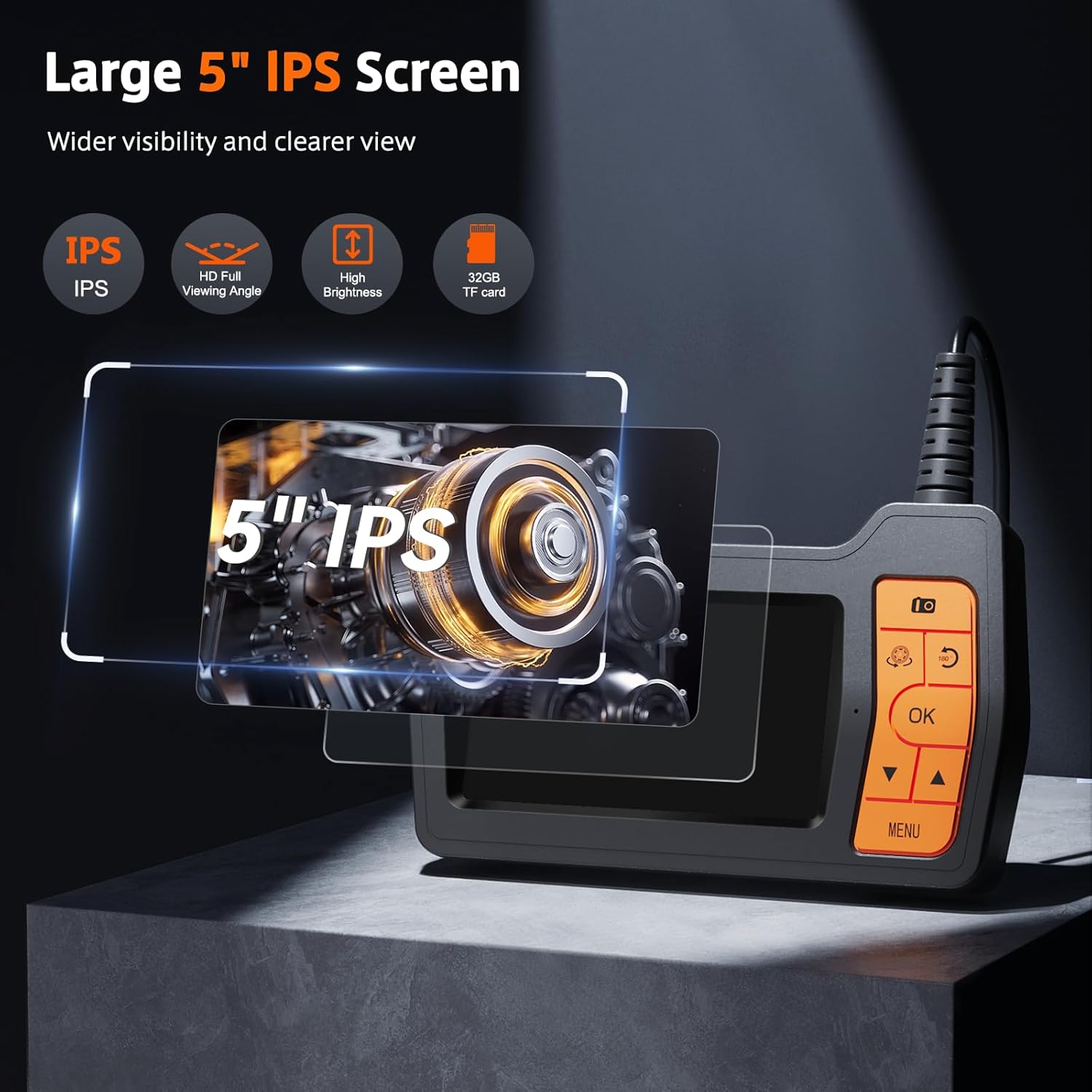
Image: The large 5-inch IPS screen, highlighting its wide visibility and clear display for detailed inspections.

Image: The IP67-rated illuminating probe submerged in water, demonstrating its waterproof capability and adjustable LED lights.
Video: Demonstrates the 1080P Triple-Lens with Split-Screen functionality, showing how different camera views can be displayed simultaneously for enhanced inspection.
5. Inställning
- Laddning: Before first use, fully charge the device. Connect the provided Type-C charging cable to the charging port on the side of the main unit. The charging indicator will show the status.
- SD-kort isättning: Locate the TF card slot, usually protected by a rubber cover on the side of the main unit. Insert the included 32GB storage card until it clicks into place. Ensure the card is inserted correctly.
- Sondanslutning: Ensure the camera probe's connector is securely fastened to the corresponding port on the main unit.
- Ström på: Press and hold the power button (usually marked with a power symbol) for a few seconds until the screen illuminates and the TURN RAISE logo appears.

Bild: En detaljerad view of the borescope's control panel, highlighting the Type-C port, TF card slot, ON/OFF button, and other control keys.
6. Bruksanvisning
- Ström på/av: Håll strömbrytaren intryckt för att slå på eller stänga av enheten.
- Bo View: Once powered on, the screen will display the live feed from the camera probe.
- Lens Switching: Use the 'lens switching key' (often labeled with a camera icon or arrows) to cycle between the front camera (A) and side cameras (B and C), or various split-screen views.
- Justera ljusstyrkan: Use the 'Lens Light +/-' buttons (up/down arrows) to adjust the brightness of the LED lights on the camera probe. There are 5 levels of brightness.
- Bild Flip: Use the 'Image Flip Key' (often a 180° rotation icon) to rotate the image on the screen if needed.
- Fotoinsamling: Press the 'Photo/Video button' (camera icon) once to take a still photograph.
- Videoinspelning: Press and hold the 'Photo/Video button' to start recording video. Press again to stop recording.
- ReviewMedia: Access recorded photos and videos through the menu system (usually by pressing the 'MENU' button and navigating to the gallery).
Video: A demonstration of the 50FT Triple Lens Sewer Camera in action, showcasing its ability to navigate and capture clear footage in pipes.
Video: Shows high-definition live footage captured by the borescope, demonstrating the clarity and detail of the image quality during an inspection.
7. Underhåll
- Rengöring av sonden: After each use, especially in dirty or wet environments, gently clean the camera lens and LED lights with a soft, damp cloth. Ensure no liquid enters the main unit.
- Lagring: Store the borescope and all accessories in the provided carrying case in a cool, dry place, away from direct sunlight and extreme temperatures.
- Batteriomsorg: Ladda enheten regelbundet, även om den inte används ofta, för att bibehålla batteriets skick. Undvik att ladda ur batteriet helt under längre perioder.
8. Felsökning
| Problem | Möjlig orsak | Lösning |
|---|---|---|
| Ingen bild på skärmen | Probe not connected, low battery, device off | Ensure probe is securely connected, charge battery, power on device |
| Bilden är suddig/mörk | Insufficient lighting, dirty lens, incorrect focal range | Adjust LED brightness, clean lens, adjust probe distance to object |
| Cannot record photos/videos | SD card full/missing, SD card error | Insert SD card, check available space, format SD card (backup data first) |
| Enheten slås inte på | Low battery, faulty power button | Charge device for at least 2 hours, contact support if issue persists |
Video: Demonstrates the borescope's independent operation, emphasizing that no Wi-Fi or phone connection is required, simplifying troubleshooting related to connectivity.
9. Specifikationer
- Modellnummer: AT036
- Kabellängd: 50 feet (Semi-Rigid)
- Skärmstorlek: 5 inches (IPS)
- Videoinspelningsupplösning: 1080p
- Macro Focus Range: 0.8-2.4 inches (Side Cam C), 1.2-3.1 inches (Side Cam B), 1.9-4.7 inches (Front Cam A)
- Vattentät betyg: IP67 (sond)
- LED-lampor: 8+2 adjustable LEDs with 5 brightness levels
- Lagring: 32 GB TF-kort (ingår)
- Batteri: 2800mAh Rechargeable Battery (up to 2 hours operation)
- Färg: Orange
- Paketets mått: 9.57 x 7.83 x 4.25 tum
- Vikt: 3.5 pund
10. Garanti och support
Your TURN RAISE Triple Lens Sewer Inspection Camera comes with a manufacturer's warranty. For any issues, questions, or support needs, please refer to the contact information provided in your product manual or reach out to TURN RAISE customer service. We are committed to resolving any problems as soon as possible, typically within 24 hours.