
1. Introduktion
The Minolta MND60V VLOG Camera Kit is designed for capturing high-quality photos and videos. This kit includes a 64MP camera capable of 4K Ultra HD video at 60 frames per second, along with essential accessories such as a tripod, external microphone, LED light, and wide-angle/macro lenses. This manual provides instructions for setting up, operating, and maintaining your camera kit to ensure optimal performance.

Image 1.1: The Minolta MND60V VLOG Camera Kit, showcasing its core capabilities for high-resolution photography and video recording.
2. Paketets innehåll
Innan du börjar, kontrollera att alla artiklar som anges nedan finns med i ditt paket:
- Minolta MND60V Camera
- Accessory Mount Arms
- LED-videoljus
- Bärväska
- Tripod Pouch
- Stereo mikrofon
- Axelrem
- 32 GB minneskort
- Stativ med fjärrkontroll
- Litiumjonbatteri
- AC-adapter
- Wide-angle + Macro Lens
- USB-kablar
- Användarmanual (detta dokument)
- Garantikort

Image 2.1: All components included in the Minolta MND60V VLOG Camera Kit.
3. Inställning
3.1 Ladda batteriet
- Insert the Lithium-Ion Battery into the camera.
- Connect the AC Adaptor to the camera's USB port and plug it into a power outlet.
- Laddningsindikatorlampan tänds. När den är fulladdad kommer lampan att ändras eller släckas.
3.2 Sätta i minneskortet
The camera supports Micro SD cards. A 32GB card is included.
- Locate the memory card slot on the camera (refer to the camera diagram).
- Sätt i Micro SD-kortet med de guldfärgade kontakterna nedåt tills det klickar på plats.
- För att ta ut, tryck försiktigt på kortet tills det fjädrar ut.
3.3 Fästa tillbehör
The kit includes various accessories to enhance your recording experience.

Image 3.1: Minolta MND60V camera with all accessories mounted.
- Stativ: Attach the camera to the tripod's mounting screw. The tripod can be used as a stand, a selfie stick, or a power source with its built-in 2,500mAh battery.
- Extern mikrofon: Mount the stereo microphone onto one of the accessory mount arms and plug its cable into the camera's microphone input jack.
- LED-videoljus: Mount the LED light onto another accessory mount arm. Ensure it is charged or has fresh batteries if applicable.
- Wide-angle + Macro Lens: Screw the desired lens onto the front of the camera's main lens.
4. Använda kameran
4.1 Ström på/av
Press and hold the power button located on the camera body to turn the camera on or off.
4.2 Basic Photo and Video Recording
- Lägesval: Use the mode dial or menu to select between photo and video modes.
- Inramning: Use the 3-inch LCD screen to compose your shot. The screen can be flipped for self-recording.
- Recording/Shutter: Press the dedicated record button for video or the shutter button for photos.
4.3 Using the LCD Screen
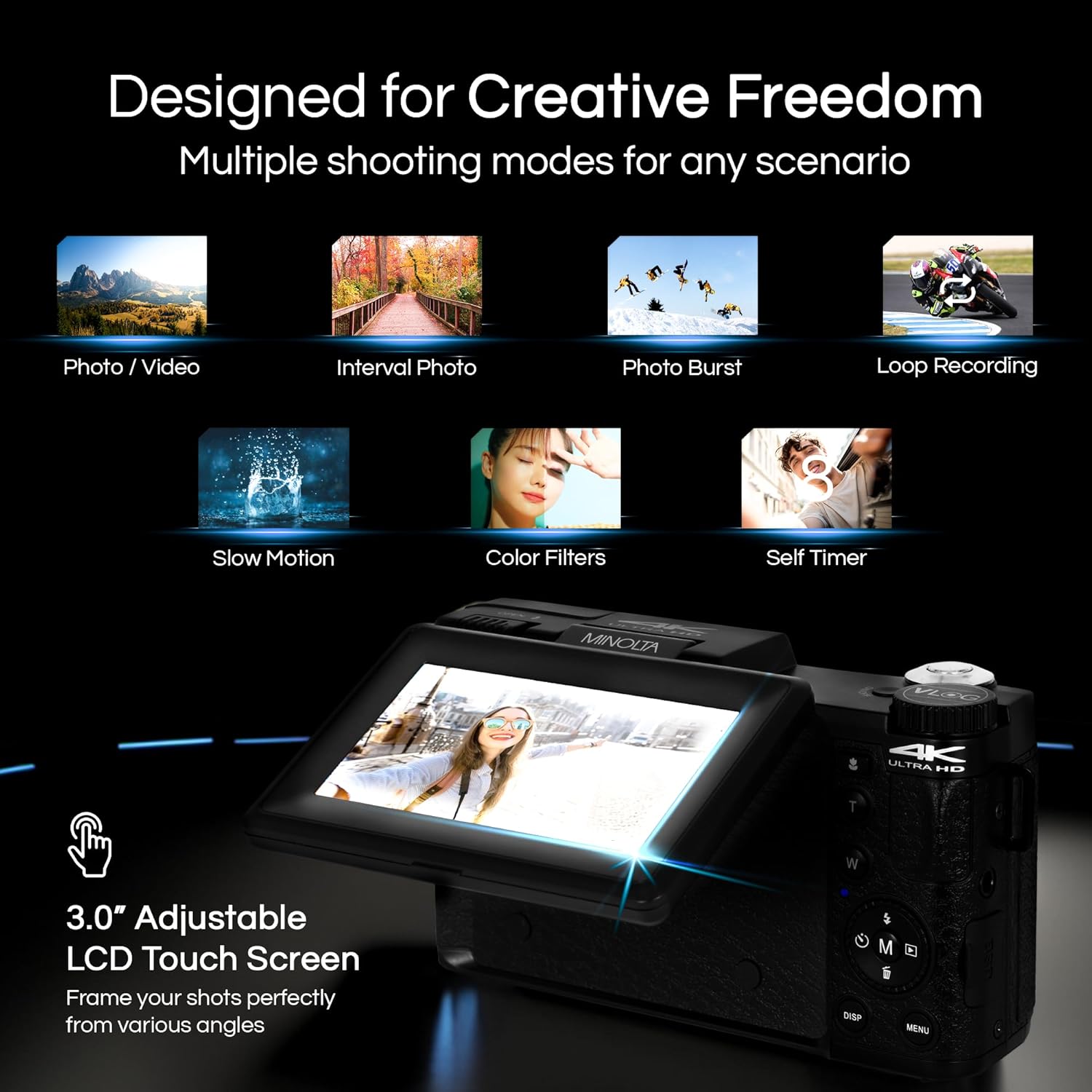
Image 4.1: The adjustable LCD screen showing various shooting modes.
The 3-inch LCD screen provides a live view, access to menus, and playback options. It can be rotated and flipped, making it suitable for vlogging and shooting from various angles. Navigate menus using the touch screen or physical buttons.
4.4 Zoomfunktion
The camera features 16x digital zoom. Use the zoom lever (often marked 'W' for Wide and 'T' for Telephoto) to adjust the focal length. Note that digital zoom may reduce image quality compared to optical zoom.

Bild 4.2: Example of using digital zoom to capture distant details.
4.5 Specialfunktioner och lägen

Image 4.3: Icons illustrating the camera's creative modes.
The MND60V offers several creative modes:
- Slow Motion: Spelar in video med högre bildfrekvens för uppspelning i slowmotion.
- Slinginspelning: Spelar in video kontinuerligt och skriver över den äldsta files när minneskortet är fullt.
- Time-lapse: Captures a series of photos at set intervals and combines them into a video.
- Scenval: Pre-set modes optimized for specific shooting conditions (e.g., portrait, landscape).
- Självutlösare: Delays the shutter release for a few seconds, allowing you to get into the shot.
4.6 Använda fjärrkontrollen
The included tripod features a built-in wireless remote. This allows you to start/stop recording or take photos from a distance, ideal for group shots or vlogging.
4.7 Överföring Files
Connect the camera to a computer using the provided USB cable. The camera will appear as a removable drive, allowing you to copy photos and videos to your computer.
5. Underhåll
5.1 Rengöring av kameran
- Använd en mjuk, torr trasa för att rengöra kamerahuset.
- Använd en specialduk och rengöringslösning för linsen. Undvik att röra vid linsytan med fingrarna.
- Använd inte starka kemikalier eller slipande material.
5.2 Batterivård
- Ladda batteriet helt före första användning.
- Förvara batteriet på en sval, torr plats när den inte används.
- Undvik att utsätta batteriet för extrema temperaturer.
5.3 Förvaring
When not in use, store the camera and its accessories in the provided carrying case to protect them from dust, moisture, and physical damage.
6. Felsökning
If you encounter issues with your Minolta MND60V camera, refer to the following common problems and solutions:
| Problem | Möjlig orsak | Lösning |
|---|---|---|
| Kameran slås inte på. | Batteriet är urladdat eller felaktigt isatt. | Se till att batteriet är fulladdat och korrekt isatt. |
| Photos/Videos are blurry. | Autofocus issue, insufficient light, or camera shake. | Ensure proper lighting. Allow camera to focus before capturing. Use the tripod for stability. Avoid excessive digital zoom in low light. |
| Batteriet töms snabbt. | Frequent use of screen/LED light, cold environment, or aging battery. | Reduce screen brightness. Turn off LED light when not needed. Keep battery warm in cold conditions. Consider a replacement battery if performance significantly degrades. |
| Fel på minneskort. | Kortet är fullt, skadat eller inkompatibelt. | Format the memory card (this will erase all data). Try a different compatible Micro SD card. |
| No audio in video recordings. | External microphone not connected or faulty. | Ensure the external microphone is securely plugged into the camera's microphone input. Check microphone settings in the camera menu. |
7. Specifikationer
Key technical specifications for the Minolta MND60V VLOG Camera Kit:
| Särdrag | Specifikation |
|---|---|
| Modellnummer | MND60V |
| Effektiv stillbildsupplösning | 64 MP |
| Videoupplösning | 4K (3840 Pixels Effective Video Resolution) |
| Videobildfrekvens | 60 FPS (för 4K) |
| Fotosensorteknik | CMOS (2/3-inch Photo Sensor Size) |
| Visa | 3 tums LCD-skärm |
| Typ av fokus | Autofokus |
| Digital zoom | 16x |
| Linstyp | Wide Angle (Minimum/Maximum Focal Length: 3.95 mm) |
| Maximal bländare | 1.8 f |
| Bildstabilisering | Digital |
| Typ av flashminne | Micro SD |
| Anslutningsteknik | USB |
| Videoinspelningsformat | MP4 |
| Ljudformat som stöds | AAC |
| Bildformat som stöds | JPEG |
| Strömkälla | Lithium-Ion Battery (1 AAA battery required for remote, included) |
| Objektets vikt | 3.5 pund |
| Färg | Svart |
| Drag | Anti-Shake, Built-In Flash, Microphone Input, Remote Control, Slow Motion, Time Lapse, Timer |
8. Garantiinformation
The Minolta MND60V VLOG Camera Kit comes with a Limited 1 Year Manufacturer Warranty. Please refer to the included Warranty Card for detailed terms and conditions, including coverage, limitations, and how to make a claim.
9. Kundsupport
For further assistance, technical support, or inquiries regarding your Minolta MND60V VLOG Camera Kit, please visit the official Minolta webwebbplats eller kontakta deras kundtjänstavdelning. Kontaktinformation finns vanligtvis på garantikortet eller tillverkarens webplats.