
1. Introduktion och överview
The Ditec RM-L 1370 is a universal replacement remote control designed for a wide range of Sony Bravia televisions. This remote offers direct compatibility with various Sony LCD, LED, UHD, OLED, and QLED 4K Ultra HD Smart Android TV models, eliminating the need for complex programming or pairing. It features dedicated hotkeys for popular streaming services like YouTube and Netflix for convenient access.

Image: The Ditec RM-L 1370 remote control, highlighting its compatibility as a single remote solution for Sony TVs.
2. Installation och första användning
This remote control is designed for immediate use without any setup or programming. Simply insert the required batteries, and it will be ready to operate your compatible Sony TV.
2.1 Batteriinstallation
- Leta reda på batterifacket på baksidan av fjärrkontrollen.
- Skjut upp batterifackets lock.
- Insert two (2) AAA batteries (not included), ensuring correct polarity (+ and - terminals).
- Stäng batterifacket ordentligt.

Bild: Baksida view på fjärrkontrollen, som illustrerar batterifackets placering.
2.2 Första användning
Once batteries are installed, point the remote control towards your Sony TV and press the Power button. The remote should operate your TV without any further configuration.
3. Bruksanvisning
The Ditec RM-L 1370 remote control provides all standard functions for your Sony Bravia TV, along with convenient shortcut buttons.
3.1 Grundläggande funktioner
- Strömknapp: Slår på eller av TV:n.
- Sifferknappar (0-9): För direkt kanalval.
- Volym upp/ner: Justerar TV-volymen.
- Kanal upp/ner: Byter TV-kanaler.
- Navigeringsplatta (upp/ned/vänster/höger/enter): För menynavigering och val.
- Hemknapp: Accesses the TV's Smart Home screen or main menu.
- Retur-/Tillbaka-knapp: Återgår till föregående skärm eller meny.
- Alternativknapp: Visar kontextkänsliga alternativ.
3.2 Specialfunktioner
- YouTube Hotkey: Directly launches the YouTube application.
- Netflix Hotkey: Directly launches the Netflix application.
The remote features an enhanced infrared sensor for a farther transmitting distance, allowing effective control up to 50 feet.

Image: The remote control demonstrating its farther distance sensor, capable of operating up to 50 feet.
4. Kompatibilitet
The Ditec RM-L 1370 universal remote is compatible with a wide range of Sony Bravia LCD, LED, UHD, OLED, and QLED 4K Ultra HD Smart Android TVs. It is designed to replace many original Sony remote models, including but not limited to:
- RMT-TX100U, RMT-TX102U
- RMF-TX200U, RMF-TX201U, RMF-TX220U
- RMT-TX300U, RMF-TX310U
- RMT-TX500U, RMF-TX520U, RMF-TX600U
- And many other Sony TV remote models.
For a comprehensive list of compatible Sony TV remote models, please refer to the image below:
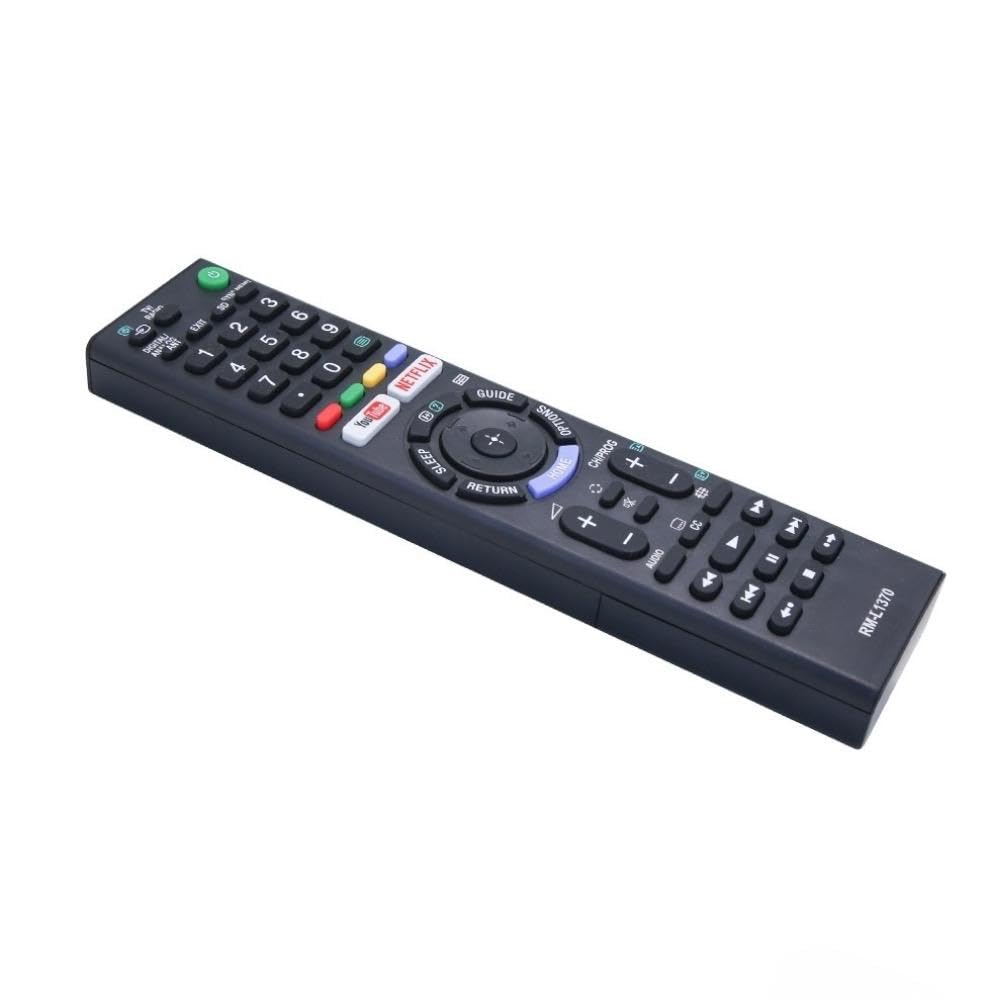
Image: A detailed list of Sony TV remote models that are compatible with the Ditec RM-L 1370.
It is recommended to compare the appearance of this remote with your original remote for visual confirmation of compatibility.
5. Underhåll
5.1 Batteribyte
When the remote control's performance degrades or it stops responding, replace the batteries with two new AAA alkaline batteries. Always replace both batteries at the same time. Do not mix old and new batteries or different types of batteries.
5.2 Rengöring
Använd en mjuk, torr trasa för att rengöra fjärrkontrollen. Använd inte flytande rengöringsmedel, sprayer eller slipande material, eftersom dessa kan skada fjärrkontrollens yta eller interna komponenter.
6. Felsökning
- Fjärrkontrollen svarar inte:
- Kontrollera om batterierna är korrekt isatta med rätt polaritet.
- Byt ut gamla batterier mot nya.
- Se till att det inte finns några hinder mellan fjärrkontrollen och TV:ns infraröda mottagare.
- Se till att du befinner dig inom det effektiva driftsområdet (upp till 50 fot).
- Specifika knappar fungerar inte:
- Some advanced functions or TV-specific features might not be supported by a universal replacement remote.
- Ensure the TV is powered on and functioning correctly.
7. Specifikationer
| Särdrag | Detalj |
|---|---|
| Stämpla | Ditec |
| Modell | RM-L 1370 |
| Kompatibla enheter | Sony Bravia LCD, LED, UHD, OLED, QLED 4K Ultra HD Smart Android TVs |
| Anslutningstyp | Infraröd (IR) |
| Batterier krävs | 2 x AAA (ingår ej) |
| Specialfunktioner | Ergonomic design, YouTube & Netflix Hotkeys |
| Produktens mått | 3 x 3 x 12 cm |
| Objektets vikt | 80 g |
| Ursprungsland | Kina |
8. Support
For assistance with compatibility or any questions regarding your Ditec RM-L 1370 remote control, you may contact support by sending a picture of your old remote or your device's brand name and model number to +91 9924350801. This will help in verifying compatibility or addressing specific queries.

Image: Information on how to contact support for compatibility checks or questions.