
Rocketek FBA_RT-CR7
Rocketek CAC Card Reader User Manual
Model: FBA_RT-CR7 | 2-in-1 USB/Type C Dual Connector
1. Introduktion
Thank you for choosing the Rocketek CAC Card Reader. This device is a versatile 2-in-1 USB/Type C dual connector smart card reader designed for secure access and data transfer. It is compatible with a wide range of smart cards, including DOD Military Common Access Cards (CAC), Government IDs, National IDs, and various banking cards. This manual provides essential information for setting up, operating, and maintaining your card reader.
2. Paketets innehåll
- 1 x Rocketek CAC Card Reader (Model: FBA_RT-CR7)
- 1 x Användarmanual (detta dokument)
3. Produktfunktioner
- Dubbel anslutning: Equipped with both USB-A and Type-C connectors for broad device compatibility.
- Plug & Play: Automatic driver installation for Windows systems.
- Bred kompatibilitet: Supports ISO7816 Class A, B, and C (5V/3V/1.8V) Smart Cards, including CAC, Government ID, National ID, ActivClient, AKO, OWA, DKO, JKO, NKO, BOL, GKO, Marinenet, AF Portal, Pure Edge Viewer, ApproveIt, DCO, DTS, LPS, Disa Enterprise Email.
- Förbättrad säkerhet: Ideal for high-security federal government applications, online banking, Windows authentication, and Single Sign-On (SSO).
- Bärbar design: Mini foldable design, thumb-sized, and convenient for travel without external power cords.
- Varaktighet: Built to withstand extensive use.
4. Installationsguide
4.1 Ansluta kortläsaren
The Rocketek CAC Card Reader features a 2-in-1 design with both USB-A and Type-C connectors. Choose the appropriate connector for your device.
- Identify the available USB-A or Type-C port on your computer, laptop, or compatible Android device.
- Plug the corresponding connector of the card reader firmly into the port.

Image: The Rocketek CAC Card Reader connected to a laptop, demonstrating its compact design and dual USB-A/Type-C connectivity. A smart card is shown inserted into the reader.

Bild: En detaljerad view of the card reader's integrated USB-A and Type-C connectors, highlighting their design and indicating that Lightning and Micro USB ports are not compatible.
4.2 Installation av drivrutiner
The card reader is designed for ease of use with plug-and-play functionality.
- Windows-system: The driver will automatically install upon connecting the device. No manual installation is typically required.
- Mac OS-användare: Java is necessary for the card reader to function correctly. Please install Java from Java's official webwebbplats (www.java.com) before using the reader.
- DOD and USG Users: A third-party CAC Enabler program is required for full functionality with military and government cards.
For additional driver downloads and support, please visit the Rocketek webplats: www.rocketek.hk.

Image: An illustration emphasizing the ease of driver installation and directing users to the Rocketek webwebbplats för support och nedladdningar.
5. Bruksanvisning
5.1 Sätta i ett smartkort
- Ensure the card reader is connected to your device.
- Locate the smart card slot on the reader.
- Insert your smart card (e.g., CAC card, ID card, bank card) into the slot with the chip facing upwards and towards the reader. Push gently until it is fully seated.
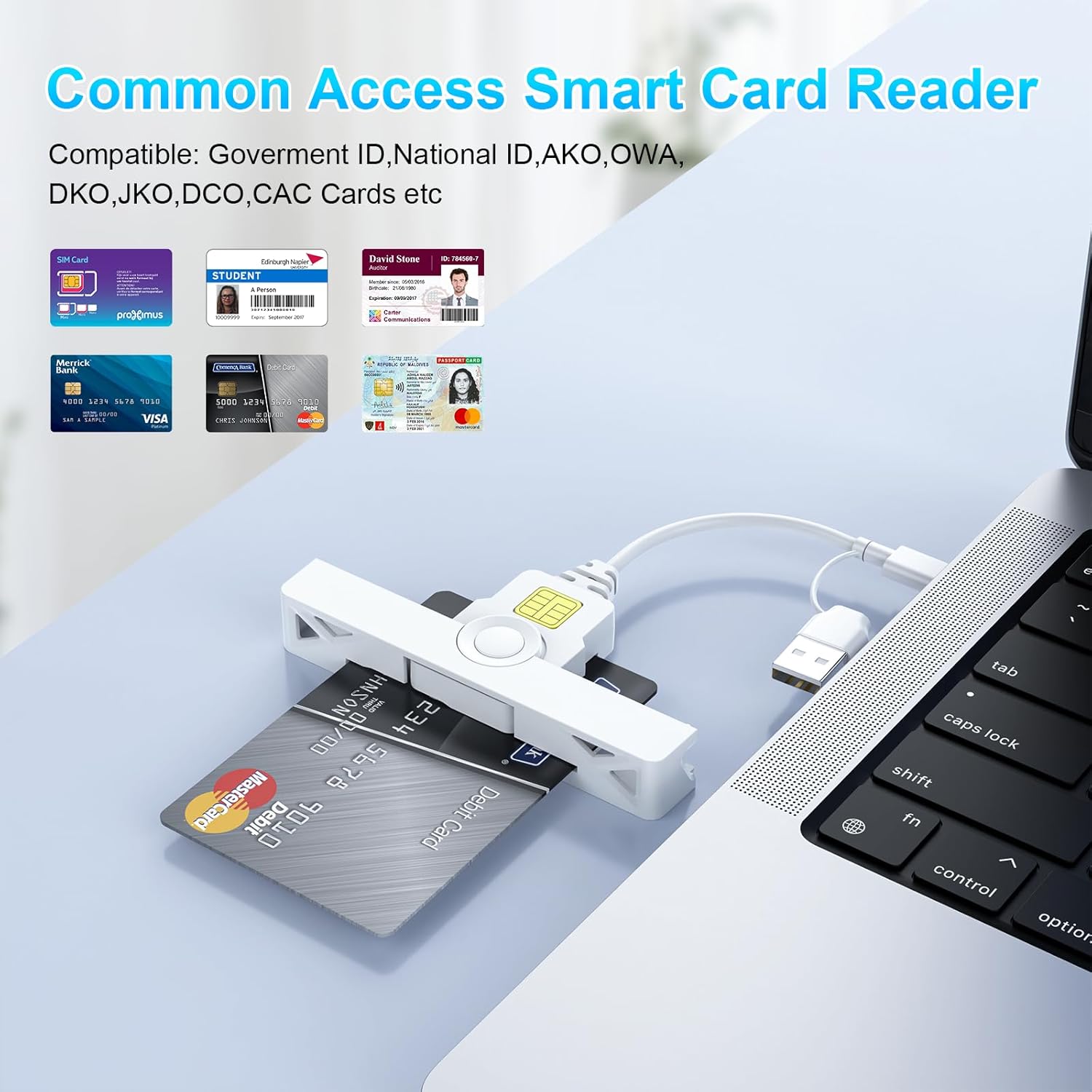
Image: The card reader shown with various types of smart cards, including government IDs and bank cards, demonstrating its broad compatibility for common access.
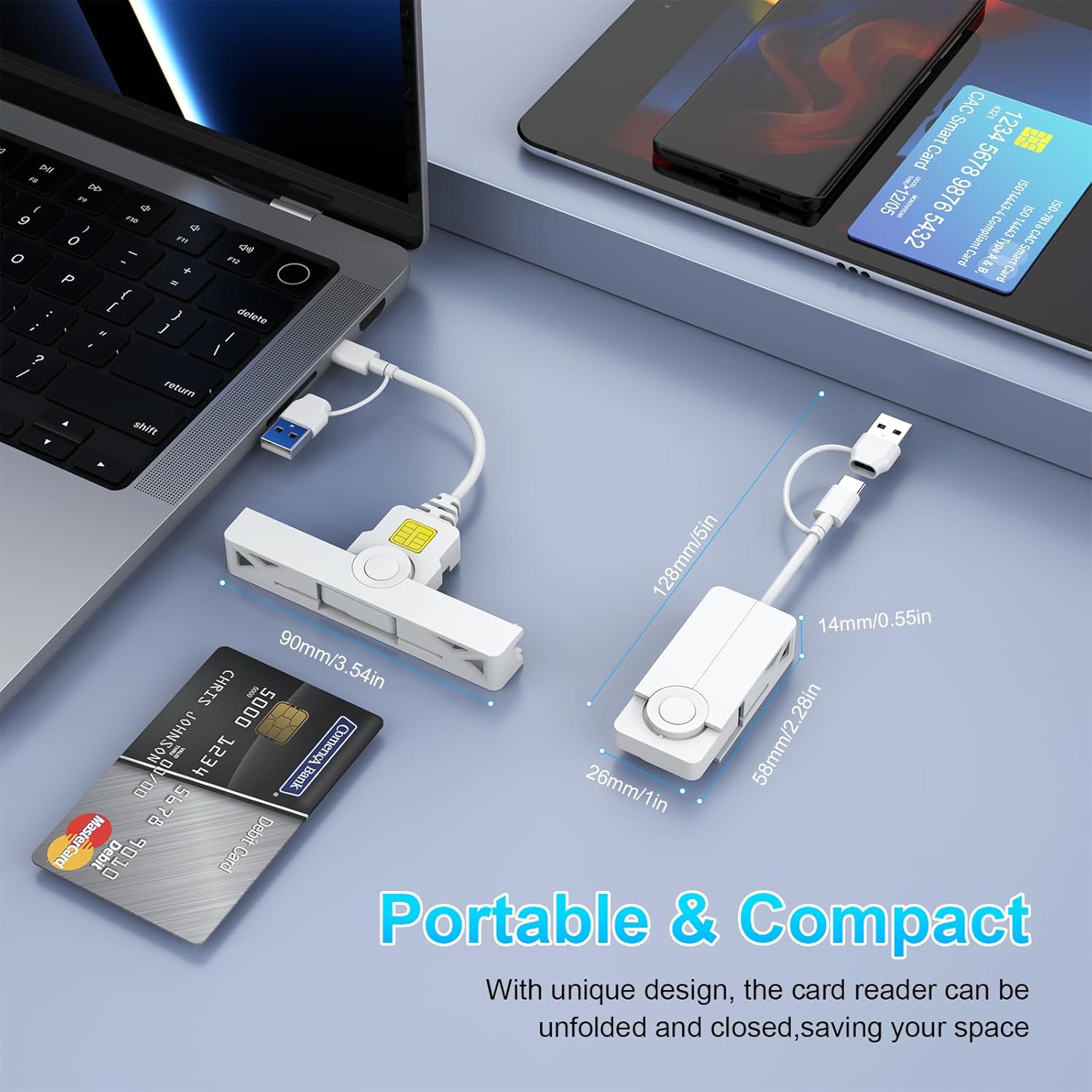
Bild: Ett collage av närbilder views detailing the card reader's features, including the smart card insertion point, the dual connectors, and its compact, foldable design.
5.2 Använda kortläsaren
Once the card is inserted and recognized by your system, you can proceed with your desired operation:
- Säker inloggning: Use with ActivClient, AKO, OWA, DKO, JKO, NKO, BOL, GKO, Marinenet, AF Portal, Pure Edge Viewer, ApproveIt, DCO, DTS, LPS, Disa Enterprise Email for secure access.
- Online Banking/Payment: Facilitates secure online transactions.
- Digital signatur: Supports applications requiring digital signatures.
5.3 Ta bort ett smartkort
Gently pull the smart card out of the slot when you are finished with your operation. Ensure any active processes using the card are completed before removal.
6. Kompatibilitet
The Rocketek CAC Card Reader offers broad compatibility with various operating systems and devices.
- Operativsystem: Windows (10/8/7/Vista/XP), Mac OS, Android.
- Enheter: Laptops (e.g., Macbook, AirRetina, Lenovo Yoga, ThinkPad), Desktop PCs, Android Phones, Surface, IdeaPad.

Bild: En överview of the card reader's extensive compatibility, displaying various laptops, smartphones, and operating system logos it supports.
6.1 Port Design for Convenience
The compact and foldable design of the Rocketek card reader ensures it does not block neighboring USB ports on your device, allowing for simultaneous use of other peripherals.
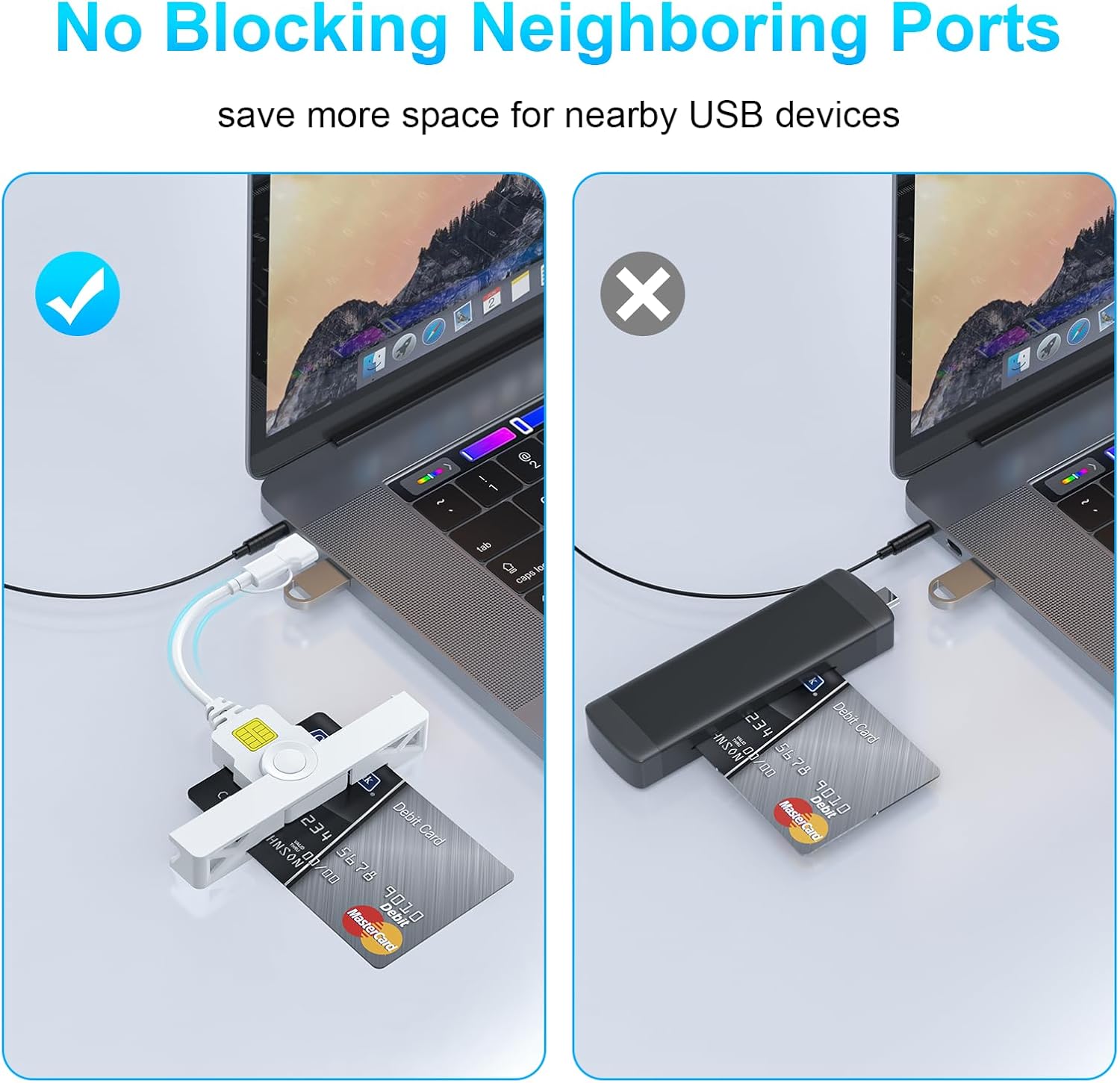
Image: A visual comparison demonstrating how the Rocketek reader's slim profile prevents it from obstructing adjacent USB ports, unlike bulkier alternatives.
7. Underhåll
To ensure the longevity and optimal performance of your Rocketek CAC Card Reader, follow these simple maintenance guidelines:
- Håll enheten ren och fri från damm och skräp. Använd en mjuk, torr trasa för rengöring.
- Avoid exposing the reader to extreme temperatures, humidity, or direct sunlight.
- Försök inte att ta isär eller modifiera enheten, eftersom detta upphäver garantin.
- Store the reader in a safe place when not in use, ideally in its folded, compact form to protect the connectors.
8. Felsökning
If you encounter issues with your Rocketek CAC Card Reader, please refer to the following common solutions:
- Reader Not Detected:
- Ensure the reader is firmly plugged into a working USB-A or Type-C port.
- Prova en annan USB-port på din dator.
- Starta om datorn.
- For Mac OS, verify that Java is installed and up to date.
- Kortet känns inte igen:
- Ensure the smart card is inserted correctly with the chip facing upwards.
- Check if the card is damaged or dirty. Clean the chip gently if necessary.
- Verify that you have the necessary third-party software (e.g., CAC Enabler for DOD/USG users) installed and configured correctly.
- Ensure the card type is supported by the reader (ISO7816 Class A, B, C).
- Drivrutinsproblem:
- For Windows, check Device Manager for any yellow exclamation marks next to the card reader device. If found, try updating the driver or uninstalling and reinstalling the device.
- Besök www.rocketek.hk for the latest drivers and troubleshooting guides.
9. Specifikationer
| Särdrag | Detalj |
|---|---|
| Stämpla | Rocketek |
| Modellserie | FBA_RT-CR7 |
| Anslutningsteknik | USB typ A, USB typ C |
| Kompatibla operativsystem | Mac OS, Windows |
| Objektets vikt | 0.634 uns |
| Paketets mått | 5.2 x 3.35 x 0.63 tum |
| Färg | Vit |
| Medietyp som stöds | CAC (Common Access Card) |
| Tillverkare | SHENZHEN ROCKETEK ELECTRONICS CO., LTD. |
10. Garanti och support
Rocketek stands behind the quality of its products.
- Tillverkarens garanti: This product comes with an 18-month manufacturer's warranty.
- Ersättningspolicy: Hassle-free replacement is available for eligible issues.
- Teknisk support: Enjoy free lifetime technical support for your Rocketek CAC Card Reader.
For warranty claims, technical assistance, or further inquiries, please visit the official Rocketek webwebbplatsen eller kontakta deras kundsupportkanaler.
Officiell Webplats: www.rocketek.hk
Relaterade dokument - FBA_RT-CR7
 |
Reparationsmanual för RAFA125-1 oljefri luftkompressor Detta dokument innehåller information om reparation och reservdelar för RAFA125-1, en oljefri luftkompressor på 1 hästkraft, inklusive diagram och artikelnummer för olika komponenter. |
 |
Beikell B6319 USB-C & USB 3.0 Card Reader User Guide Comprehensive user guide for the Beikell B6319, a high-speed 4-in-1 USB-C and USB 3.0 card reader supporting SD, TF, MS, and CF cards with OTG functionality. |
 |
SuntoRSI SD-kortläsare bruksanvisning för iPhone och iPad Omfattande bruksanvisning för SuntoRSI SD-kortläsare med detaljerad information om specifikationer, kompatibilitet och steg-för-steg-guider för att överföra foton och videor mellan SD-kort och iOS-enheter (iPhone/iPad). |
 |
JOYROOM 4-i-1-kortläsare användarmanual | Anslut och överför Filemed iOS-enheter Omfattande användarmanual för JOYROOM S-H142 4-i-1-kortläsaren. Lär dig hur du överför foton, videor och dokument mellan SD-/TF-kort, USB-enheter och dina iOS-enheter (iPhone/iPad). Inkluderar installation, användning och felsökning. |
 |
ACR39U-UF Smart Card Reader användarmanual Omfattande användarmanual för ACS ACR39U-UF smartkortläsare, med detaljerad information om funktioner, specifikationer, korttyper som stöds, applikationer, operativsystemkompatibilitet, garanti och efterlevnadsinformation. |
 |
UGREEN CR127 2-i-1 USB 3.0 SD/TF-kortläsare Manual Bruksanvisning för UGREEN CR127 2-i-1 USB 3.0 SD/TF-kortläsare, med information om produktfunktioner och hur man använder den på ett säkert sätt. |
Ask a question about this manual
Ask about setup, troubleshooting, compatibility, parts, safety, or missing instructions. Manuals+ will review the question and use this page’s manual context to help answer it.