
1. Introduktion
This manual provides essential instructions for the safe and efficient use of your Meizu Note 21 Pro smartphone. Please read this manual thoroughly before operating the device and retain it for future reference.
2. Vad finns i lådan
- Meizu Note 21 Pro Smartphone
- Strömadapter
- (Other accessories such as USB cable, SIM ejector tool, and documentation may vary by region.)
3. Enhetslayout
Familiarize yourself with the physical components of your Meizu Note 21 Pro.
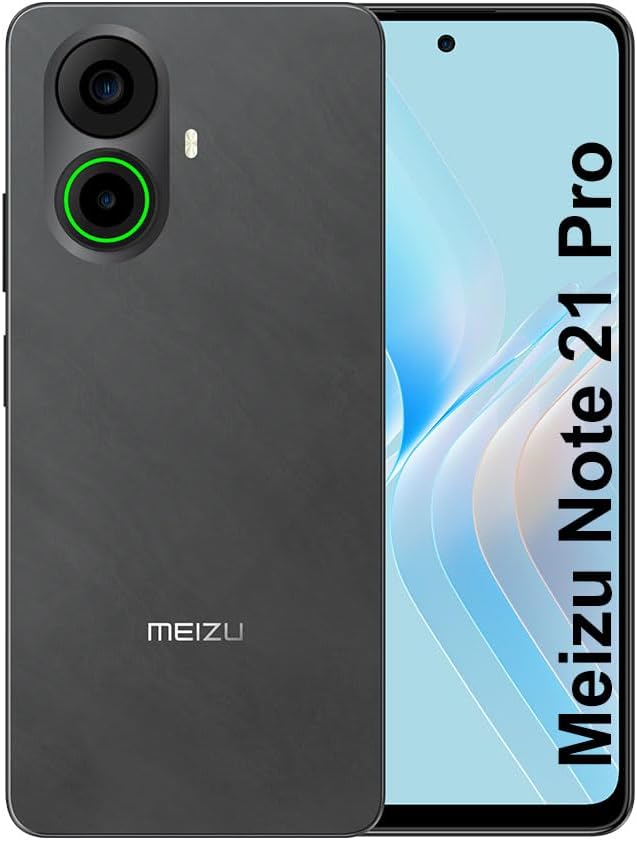
Bild 3.1: Fram och bak view of the Meizu Note 21 Pro. The front displays the screen with a punch-hole camera. The rear shows the dual camera module with a green accent ring on one lens, a flash, and the "MEIZU" logo at the bottom.
- Främre display: 6.78-inch FHD+ screen with a 120Hz refresh rate.
- Främre kamera: Placerad högst upp i mitten av skärmen.
- Bakre kameror: Dual camera system, including a 64MP main camera.
- Sidosensor för fingeravtryck: Integrated for secure access.
- USB-port: För laddning och dataöverföring.
- 3.5 mm ljudjack: För hörlurar.
- SIM-/MicroSD-korthållare: Supports Dual Nano SIM and MicroSD cards.
4. Inställning
4.1. Sätta i SIM- och MicroSD-kort
- Leta reda på SIM-kortfacket på sidan av enheten.
- Sätt i SIM-kortsutmatningsverktyget i det lilla hålet bredvid facket och tryck försiktigt tills facket hoppar ut.
- Placera ditt/dina Nano-SIM-kort och/eller MicroSD-kort i de avsedda platserna på facket. Se till att de guldfärgade kontakterna är vända nedåt.
- Sätt försiktigt tillbaka facket i enheten tills det klickar på plats.
4.2. Första start och installation
- Press and hold the Power button until the Meizu logo appears.
- Följ anvisningarna på skärmen för att välja språk, ansluta till ett Wi-Fi-nätverk och konfigurera ditt Google-konto.
- During setup, you will be guided to configure security features such as a PIN, pattern, or password.
4.3. Fingerprint Recognition Setup
- Navigera till Inställningar > Säkerhet och integritet > Lås upp med fingeravtryck.
- Follow the on-screen instructions to register your fingerprint by repeatedly touching the side-mounted sensor.
- Se till att ditt finger täcker hela sensorområdet under registreringen för optimal prestanda.
5. Använda din enhet
5.1. Display och navigering
- The 6.78-inch FHD+ display operates at a 120Hz refresh rate for smooth visuals.
- Navigate the Android 14 operating system using touch gestures: tap, swipe, pinch-to-zoom.
- Få åtkomst till snabbinställningar genom att svepa nedåt från skärmens överkant.
5.2. Kamerafunktioner
- Öppna Kamera-appen från startskärmen eller applådan.
- The rear camera system features a 64MP main sensor for high-resolution photos and a 2MP depth-of-field camera for portrait effects.
- The 13MP front-facing camera is suitable for selfies and video calls.
- Tap on the screen to focus, and use the on-screen shutter button to capture images. Explore various modes like Portrait, Night, and Pro within the camera app.
5.3. Prestanda och lagring
- The MediaTek G99 Octa Core processor ensures efficient performance for applications and multitasking.
- The device comes with 256GB of internal storage and 8GB of RAM.
- Storage can be expanded using a MicroSD card (sold separately).
5.4. Batteri och laddning
- The Meizu Note 21 Pro is equipped with a 5000mAh battery.
- Use the provided Power Adapter for 30W fast charging.
- To charge, connect the USB cable to the phone's USB port and the power adapter, then plug the adapter into a wall outlet.
5.5. Anslutningsmöjligheter
- 4G LTE: Supports various LTE FDD and TDD bands for cellular data. Note: This international version works on T-Mobile in the USA and globally with other carriers.
- Wi-Fi 5: Anslut till trådlösa nätverk för internetåtkomst.
- Bluetooth: Kombinera med trådlösa tillbehör som hörlurar och högtalare.
- NFC: För kontaktlösa betalningar och snabb parkoppling med kompatibla enheter.
- GPS: För platstjänster och navigering.
6. Underhåll
- Rengöring: Använd en mjuk, luddfri trasa för att rengöra skärmen och enhetens hölje. Undvik starka kemikalier eller slipande material.
- Batteriomsorg: Avoid extreme temperatures. Do not fully discharge the battery frequently. For optimal battery longevity, keep the charge between 20% and 80%.
- Programuppdateringar: Kontrollera och installera regelbundet systemuppdateringar för att säkerställa optimal prestanda och säkerhet. Gå till Inställningar > System > Systemuppdatering.
7. Felsökning
| Utfärda | Möjlig lösning |
|---|---|
| Enheten slås inte på | Ensure the battery is charged. Connect the device to the power adapter and try again. If unresponsive, press and hold the Power button for 10-15 seconds to force a restart. |
| Dålig nätverkssignal | Check if the SIM card is correctly inserted. Move to an area with better network coverage. Restart the device. Verify with your carrier that your plan is active. |
| Appar är långsamma eller kraschar | Stäng bakgrundsapplikationer. Rensa appens cache (Inställningar > Appar > välj app > Lagring och cache > Rensa cache). Restart the device. Ensure sufficient storage space. |
| Fingeravtryckssensorn fungerar inte | Ensure your finger and the sensor are clean and dry. Re-register your fingerprint in settings. |
8. Specifikationer
- Modell: Meizu Note 21 Pro
- Operativsystem: Android 14
- Processor: MediaTek G99 Octa Core (2.2GHz)
- Visa: 6.78 inches FHD+ (1080 x 2160 resolution), 120Hz Refresh Rate
- RAM: 8 GB
- Intern lagring: 256 GB
- Bakre kamera: 64MP huvudkamera + 2MP djupkamera
- Främre kamera: 13 MP
- Batteri: 5000mAh, 30W snabbladdning
- Anslutning: 4G LTE (FDD:1,2,3,4,5,7,8,12,17,18,19,20,26,28,66; TDD:38,40,41), 3G WCDMA, 2G Quad Band, Wi-Fi 5, Bluetooth, NFC, GPS
- Ljuduttag: 3.5 mm
- Mått: 6.64 x 2.96 x 0.33 tum
- Vikt: 1.1 pund
9. Garanti och support
For warranty information and technical support, please refer to the warranty card included with your product or visit the official Meizu webwebbplats. Spara ditt inköpsbevis för garantiärenden.
For further assistance, you may contact Meizu customer service through their official channels.