
1. Introduktion
This manual provides detailed instructions for the safe installation, operation, and maintenance of your PHORUS 48-inch Modern White Ceiling Fan with Lights and Remote/APP Control. Please read all instructions carefully before beginning installation and retain this manual for future reference.
2. Säkerhetsinformation
- Se till att strömmen är frånkopplad vid säkringen före installation eller service.
- All kabeldragning måste ske i enlighet med nationella och lokala elföreskrifter. Om du inte är bekant med kabeldragning, kontakta en kvalificerad elektriker.
- The fan must be mounted with a minimum of 7 feet (2.1 meters) clearance from the floor to the blade trailing edge.
- Monteringsstrukturen måste kunna bära fläktens vikt (cirka 13.4 pund).
- Böj inte bladhållarna under installation eller rengöring.
- Denna fläkt är avsedd för inomhusbruk.
3. Paketets innehåll
Kontrollera att alla komponenter finns innan installationen påbörjas:
- Fläktmotoraggregat
- Hängbräda
- 5 fläktblad
- LED Lampskugga
- Fjärrkontroll (med 2 AAA-batterier)
- Skruvar och monteringsdetaljer
- Instruktionsmanual

4. Specifikationer
| Särdrag | Specifikation |
|---|---|
| Stämpla | FORUS |
| Modellnamn | #8907 |
| Storlek | 48 tum |
| Färg | Vit |
| Material | Akryl, plast |
| Motortyp | Likströmsmotor (30W) |
| Ljuskälla | LED (28W) |
| Ljusa färger | 3 (White, Warm, Neutral) |
| Dimming Range | Steglös (10%-100%) |
| Vindhastigheter | 6 |
| Kontrollmetod | Fjärrkontroll, APP-kontroll |
| Specialfunktioner | Reversible Function, 2-Hour Timer, Memory Function |
| Ljudnivå | Under 35 dB |
| Produktens mått | 48 cm L x 48 cm B x 10.83 cm H |
| Objektets vikt | 13.4 pund |
5. Installation och installation
5.1 Checklista före installation
- Se till att strömförsörjningen är avstängd vid huvudströmbrytaren.
- Confirm you have all necessary tools (screwdriver, drill, wire strippers, etc.).
- Verify that the ceiling junction box is securely mounted and capable of supporting the fan.
5.2 Steg-för-steg-installation
- Attach Blades to Motor Assembly: Secure each of the five fan blades to the motor assembly using the provided screws. Ensure the 'THIS SIDE UP' marking on the blade attachment is facing upwards.
- Install LED Light Board: Carefully place the LED light board into the designated area on the motor assembly and secure it with screws. Connect the LED wires.
- Attach LED Lampskugga: Placera lysdioden lampshade over the light board and twist it clockwise until it is securely fastened.
- Mount Hanging Board: Secure the hanging board to your ceiling junction box using appropriate screws. Ensure it is firmly attached.
- Anslut ledningar: Connect the fan's electrical wires to your household wiring. The typical connections are: Black (Live) to Black (Live), White (Neutral) to White (Neutral), and Yellow/Green (Ground) to Green (Ground). Use the provided wire connectors.
- Secure Fan to Hanging Board: Lift the fan assembly and attach it to the hanging board, ensuring all wires are tucked safely inside the canopy. Secure the fan with the provided screws.
6. Bruksanvisning
6.1 Fjärrkontrollfunktioner
The included remote control allows for convenient operation of your ceiling fan:
- Ström på/av: Tryck på strömknappen för att slå på eller av fläkten och lampan.
- Fläkthastighet: Select from 6 wind speeds (1-6) to adjust airflow.
- Ljus på/av: Styr ljuset oberoende av fläkten.
- Färgtemperatur: Cycle through 3 light colors: White (6000K), Neutral (4500K), and Warm (3000K).
- Dimming: Justera ljusstyrkan från 10 % till 100 %.
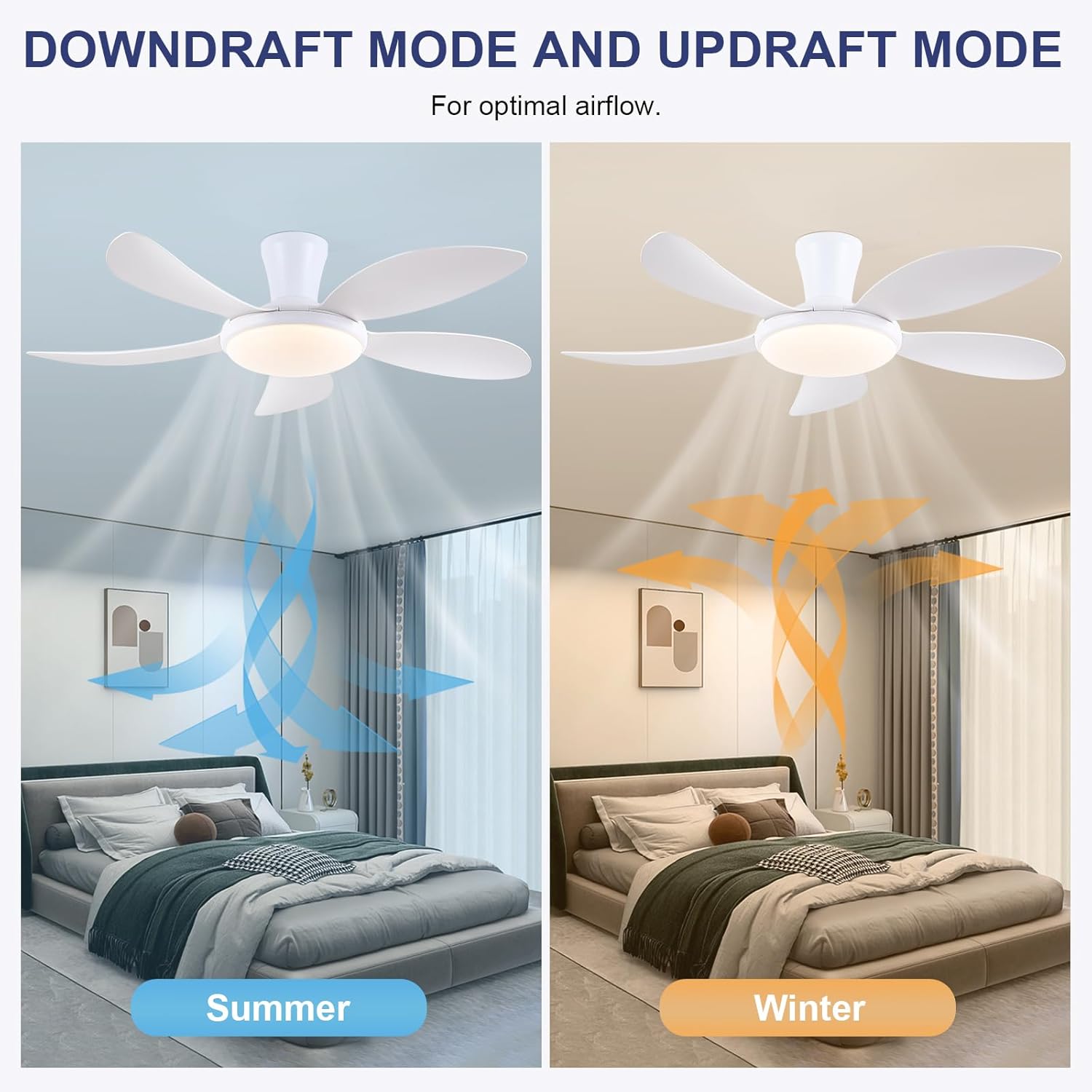
- Vändbar funktion: Press the F/R key to change the blade rotation direction for summer (downdraft) or winter (updraft) modes. The fan will stop briefly before reversing.
- Timer: Set a 2-hour timer for automatic shutdown.
- Nattläge: Activates a low-speed fan and dim light setting.

6.2 Remote Code Pairing
If the remote control is not responding, it may need to be paired:
- Turn off the main power supply to the fan for one minute.
- Turn on the main power supply and simultaneously long-press the 'Code Key' button on the remote control for 3-5 seconds.
- The fan light will blink 2-3 times, indicating successful code matching. The remote can now be operated normally.
6.3 APP-kontroll
Control your fan using the 'Fan Lamp Pro' mobile application:
- Ladda ner APP: Scan the QR code provided in the product images or search for "Fan Lamp Pro" i din appbutik.
- Anslut via Bluetooth: Se till att din telefons Bluetooth är aktiverat.
- Para enhet: Open the app, add a new device, and follow the on-screen instructions to connect to your fan. The fan light will blink twice upon successful connection.
- Funktioner: The app allows control over fan speeds, light colors, dimming, reverse function, and timer settings, similar to the remote control.
6.4 Fan Speed and Airflow
- Nivå 1-2: Low Comfortable Wind, suitable for sleep.
- Nivå 3-4: Medium Natural Wind, suitable for daily life.
- Nivå 5-6: High Cooling Wind, suitable for hot weather.

6.5 Ljusinställningar
- The LED light source supports stepless dimming and memory function, retaining your last brightness and color temperature setting.
- Choose from 3 color temperatures: 3000K (Warm Light), 4500K (Natural Light), and 6000K (White Light).

6.6 Reversibel funktion
The reversible DC motor allows you to change the direction of the fan seasonally:
- Sommarläge (nedåtgående drag): Blades rotate counter-clockwise, pushing cool air downwards.
- Vinterläge (uppåtgående vindkraft): Blades rotate clockwise, drawing cool air up and circulating warm air downwards.
7. Underhåll
- Rengöring: För att rengöra fläkten, torka av med en mjuk, damp trasa. Använd inte slipande rengöringsmedel eller lösningsmedel.
- Bladvård: The ABS blades are designed to be easy to clean and resistant to deformation.
- Regelbundna kontroller: Kontrollera regelbundet alla anslutningar och skruvar för att säkerställa att de sitter ordentligt fast.
8. Felsökning
Om du stöter på problem med din fläkt, se följande vanliga problem och lösningar:
- Fläkten fungerar inte: Check power supply, ensure all wiring connections are secure, and verify remote control pairing.
- Ljuset fungerar inte: Check power supply, ensure light wires are connected, and verify remote control pairing.
- Fläkten är bullrig: Ensure all screws are tightened, especially on the blades and mounting bracket. Check for any obstructions.
- Fjärrkontrollen fungerar inte: Replace batteries, ensure line of sight to the fan, and re-pair the remote control as per section 6.2.
- Problem med APP-anslutning: Ensure Bluetooth is on, the app is updated, and try re-pairing the device.
9. Garanti och support
PHORUS provides a one-year quality warranty for this product. For any damage or quality problems, free replacement service is offered. If you have any questions or require assistance, please contact PHORUS customer service. You will receive a satisfactory answer within 24 hours.
For additional support and resources, please visit the official PHORUS webwebbplatsen eller hänvisa till kontaktinformationen som du fick vid ditt köp.