
Introduktion
This manual provides detailed instructions for the safe and effective use of your Andis 560980 Limited Edition Galaxy Envy Li Cordless Clipper and Slimline Pro Cordless Beard Trimmer Combo Kit. Please read all instructions carefully before operating the devices and retain this manual for future reference.
Viktig säkerhetsinformation
WARNING: To reduce the risk of electric shock, injury, or damage, always follow these basic safety precautions:
- Undvik kontakt med ögon, hud och vatten.
- Håll borta från värmekällor och öppen låga.
- Använd inte under laddning.
- Always unplug or remove the battery before cleaning.
- Använd inte på spädbarn eller barn utan vuxenövervakning.
- Följ rekommenderade rengörings- och underhållsrutiner.
Paketets innehåll
Your Andis 560980 Combo Kit includes the following items:
- Andis Galaxy Envy Li Cordless Clipper
- Andis Slimline Pro Cordless Beard Trimmer
- Multiple Attachment Guide Combs (various sizes)
- Laddningsadaptrar
- Bladolja
- Rengöringsborste
- Bladskydd

En detaljerad view of the accessories included with the Andis 560980 kit, showing the range of guide combs, power adapters, and lubricating oil for maintenance.
Inställning
1. Laddning av enheterna
Both the clipper and trimmer are equipped with rechargeable lithium-ion batteries, providing up to two hours of run-time. For optimal performance, fully charge the device before its first use.
- Connect the appropriate charging adapter to the device and plug it into a suitable power outlet.
- Laddningsindikatorlampan tänds.
- Låt enheten laddas helt.
- The devices can also be used corded if the battery is low or for continuous operation.
2. Attaching and Removing Guide Combs
The kit includes various guide combs to achieve different cutting lengths. To attach a comb:
- Se till att enheten är avstängd.
- Rikta in styrkammen med bladet och skjut den ordentligt på plats tills den klickar.
För att ta bort en kam:
- Se till att enheten är avstängd.
- Gently lift the back of the comb and slide it off the blade.
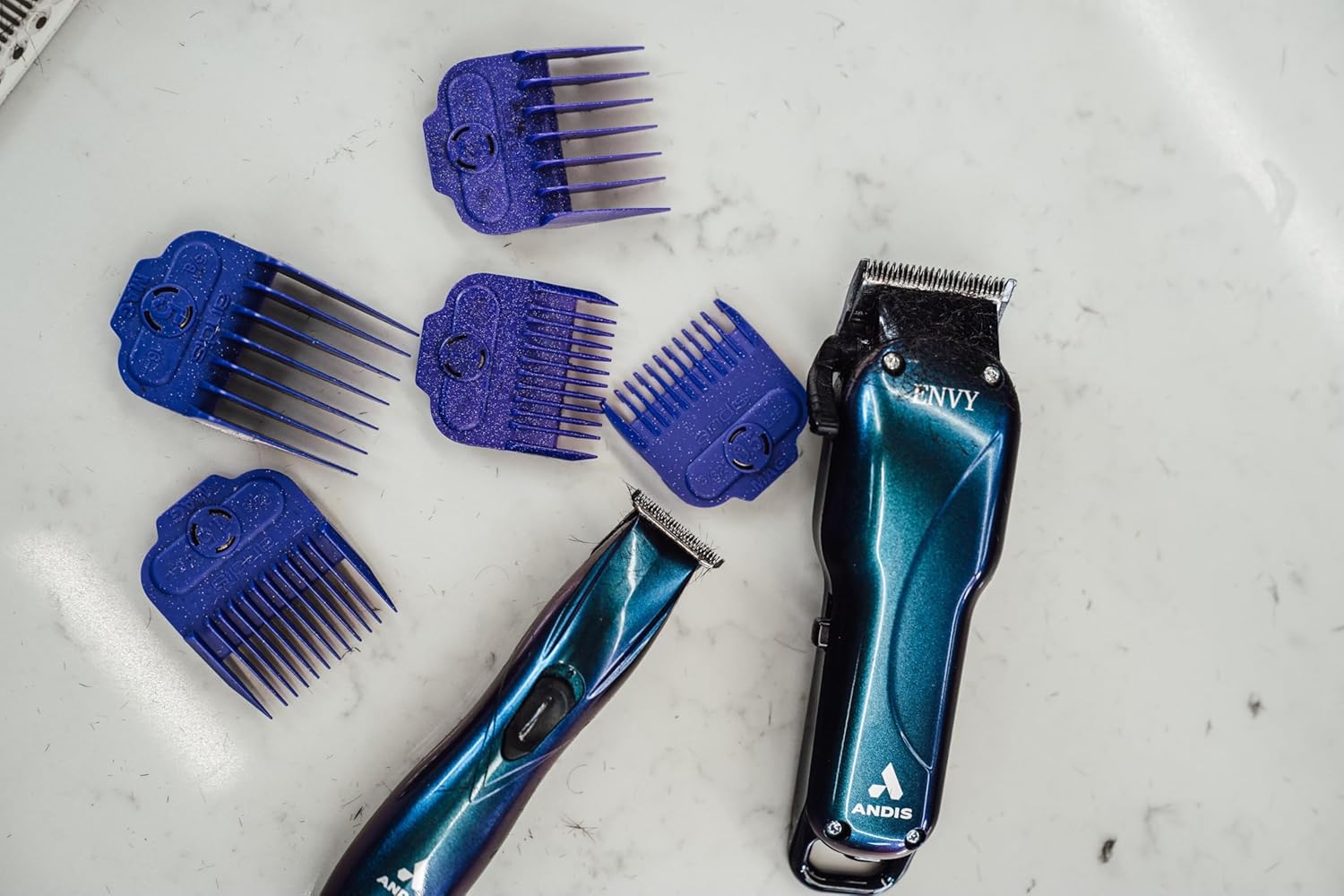
The Andis Galaxy Envy Clipper displayed with a selection of its included attachment combs, demonstrating the different cutting lengths available.
Bruksanvisning
1. Using the Clipper (Galaxy Envy Li)
The Galaxy Envy Li Cordless Clipper is designed for cutting, tapering, and fading hair. Its carbon-steel blade adjusts from 000 to 1.
- Välj önskad styrkam och fäst den ordentligt.
- Slå på klippmaskinen med strömbrytaren.
- For tapers and fades, use the adjustable lever on the side of the clipper to change the blade height. The lever allows for precise adjustments between 000 (closest cut) and 1 (longer cut).
- For razor-sharp lines, the blade can be zero-gapped by a professional.
- Flytta klipparen mot hårets växtriktning för en jämn klippning.
- Stäng av klippmaskinen efter användning.
2. Using the Trimmer (Slimline Pro)
The Slimline Pro Cordless Beard Trimmer is ideal for trimming beards, designing, and texturizing.
- Choose the appropriate guide comb for your desired beard length or use without a comb for close trimming and detailing.
- Slå på trimmern.
- For beard trimming, move the trimmer in the direction of hair growth for a uniform trim.
- For detailing and sharp lines, use the edge of the blade carefully.
- Stäng av trimmern efter användning.

A professional barber using the Andis Slimline Pro Trimmer to create intricate designs on a client's hair, highlighting its precision capabilities.
Underhåll
1. Rengöring av knivarna
Regular cleaning ensures optimal performance and longevity of your devices.
- Turn off and unplug the device (if corded).
- Use the provided cleaning brush to remove loose hair from the blades.
- For a more thorough cleaning, detach the blades if possible and clean under running water (refer to specific device instructions for water resistance). Ensure blades are completely dry before reattaching.
2. Smörjning av knivarna
Apply blade oil regularly to keep the blades sharp and moving smoothly.
- After cleaning, apply a few drops of the provided blade oil across the top of the blades.
- Slå på apparaten i några sekunder för att fördela oljan jämnt.
- Torka av överflödig olja med en ren trasa.
3. Förvaring
Store your clipper and trimmer in a cool, dry place. Use the blade protector to prevent damage to the blades when not in use.
Felsökning
If you encounter any issues with your Andis devices, please refer to the following common solutions:
- Enheten slås inte på: Ensure the device is fully charged. If using corded, check the power connection.
- Dålig skärprestanda: Clean and oil the blades. Ensure blades are free of hair and debris. Blades may need sharpening or replacement if dull.
- Överhettning: Ensure blades are clean and oiled. Allow the device to cool down if it feels excessively warm.
For persistent issues, please contact Andis customer support.
Specifikationer
| Särdrag | Detalj |
|---|---|
| Modellnummer | 560980 |
| Stämpla | Andis |
| Strömkälla | Batteridriven (uppladdningsbar litiumjon) |
| Körtid | Upp till 2 timmar |
| Bladmaterial | Rostfritt stål |
| Clipper Blade Adjustment | 000 to 1 (adjustable lever) |
| Färg | Galaxy (Limited Edition) |
| Objektets vikt | 1.02 kilogram (2.24 pund) |
| Mått | 9.41 x 9.29 x 3.03 cm (förpackning) |
| Målgrupp | Unisex-vuxna |
| Hårtyp | Alla |
Garanti och support
Your Andis 560980 Combo Kit is covered by a Manufacturer’s 12-month limited warranty. Please retain your proof of purchase for warranty claims.
For product support, warranty information, or to purchase replacement parts, please visit the official Andis Store or contact their customer service directly.