
1. Introduktion
Thank you for choosing the JENABOM Mini Cordless Rotary Tool. This versatile and compact tool is designed for precision tasks such as sanding, polishing, drilling, etching, engraving, and various DIY crafts. Its cordless design and variable speed settings offer convenience and control for a wide range of applications. Please read this manual thoroughly before operating the tool to ensure safe and efficient use.

Figure 1.1: JENABOM Mini Cordless Rotary Tool and included accessories.
2. Säkerhetsinformation
Följ alltid grundläggande säkerhetsåtgärder när du använder elverktyg för att minska risken för brand, elstötar och personskador.
Allmänna säkerhetsregler:
- Läs alla instruktioner: Bekanta dig med verktygets användning och säkerhetsföreskrifter.
- Använd ögonskydd: Bär alltid skyddsglasögon eller skyddsglasögon med sidoskydd.
- Säkra arbetsstycket: Alltid clamp or otherwise secure the workpiece. Do not hold it by hand.
- Håll arbetsområdet rent: Röriga ytor och bänkar leder till skador.
- Avoid dangerous environment: Använd inte elverktyg i damp eller våta platser, eller utsätt dem för regn. Håll arbetsområdet väl upplyst.
- Håll barn borta: Alla besökare ska hållas på säkert avstånd från arbetsområdet.
- Klä dig ordentligt: Bär inte löst sittande kläder eller smycken. De kan fastna i rörliga delar. Gummihandskar och halkfria skor rekommenderas vid arbete utomhus. Bär skyddande hårskydd för att innehålla långt hår.
- Use right tool: Tvinga inte verktyg eller tillbehör att utföra ett jobb som det inte är designat för.
- Underhåll verktyg med omsorg: Håll verktygen skarpa och rena för bättre och säkrare prestanda. Följ instruktionerna för smörjning och byte av tillbehör.
- Koppla bort verktyg: When not in use, before servicing, or when changing accessories, disconnect the tool from its power source.
- Undvik oavsiktlig start: Ensure the switch is in the OFF position before connecting to power source.
- Var uppmärksam: Se upp med vad du gör, använd sunt förnuft. Använd inte verktyget när du är trött.
3. Paketets innehåll
När du öppnar paketet, vänligen kontrollera att alla artiklar som anges nedan finns med och är oskadade:
- 1 x JENABOM Mini Cordless Rotary Tool
- 1 x USB-laddningskabel
- 5 x Sliphuvuden
- 4 x 12.7mm Sanding Rings
- 4 x 6.3mm Sanding Rings
- 1 x 12.7mm Rubber Wheel
- 1 x 6.3mm Rubber Wheel
- 1 x Plastic Storage Box

Figure 3.1: All components included in the 15-piece set.
4. Produkt överview
Familiarize yourself with the different parts of your JENABOM Mini Cordless Rotary Tool:

Figure 4.1: Labeled diagram of the rotary tool's main components.
- Kasta: Holds the various accessories securely.
- Main Shaft Lock Switch: Used to lock the shaft for easy accessory changes.
- Cooling Port: Hjälper till att avleda värme under drift.
- Tap Position Indicator Light: Indicates the current speed setting.
- Power Switch / 3-Gear Adjustment: Turns the tool on/off and cycles through speed settings.
- USB laddningsport: För anslutning av USB-laddningskabeln.
The tool operates on a 3.6V lithium battery and has a clamping range of 1-3mm. Its net weight is approximately 100g.
5. Installation och installation av tillbehör
Follow these steps to properly install accessories into your rotary tool:
- Press down the main shaft lock switch and unscrew the chuck counter-clockwise until it is loose enough to insert an accessory.
- Insert the desired accessory (e.g., grinding head, sanding band) into the chuck. Ensure the accessory shaft is fully seated.
- While still holding the main shaft lock switch, tighten the chuck clockwise until the accessory is firmly secured. Release the lock switch.

Figure 5.1: Step-by-step guide for accessory installation.
The tool features a copper spindle and copper sandwich design for secure accessory holding, ensuring stability and preventing slippage during operation. The collet size is 1-3mm.

Figure 5.2: Detail of the copper spindle and collet for secure accessory attachment.
6. Bruksanvisning
Ström på/av och hastighetsjustering:
To turn on the tool, press the Power Switch. The tool has three variable speed settings:
- Första växeln: 5000 RPM
- Andra växeln: 10000 RPM
- Tredje växeln: 15000 RPM
Press the Power Switch repeatedly to cycle through the speed settings. The tap position indicator lights will illuminate to show the current speed. To turn off the tool, continue pressing the Power Switch until all lights are off.

Figure 6.1: Three-gear power adjustment indicated by lights.
Applikationer:
This rotary tool is suitable for a variety of tasks. Always select the appropriate accessory and speed for your specific application.
- Putsning: Use polishing accessories for smoothing surfaces.
- Ta bort rost: Attach a wire brush or abrasive accessory to remove rust from metal.
- Slipning: Utilize grinding stones for shaping and sharpening.
- Träsnideri: Use carving bits for detailed work on wood, plastic, or soft metals.
- Borrning: Employ small drill bits for precision drilling.
- Skärande: Use cutting discs for light cutting tasks.
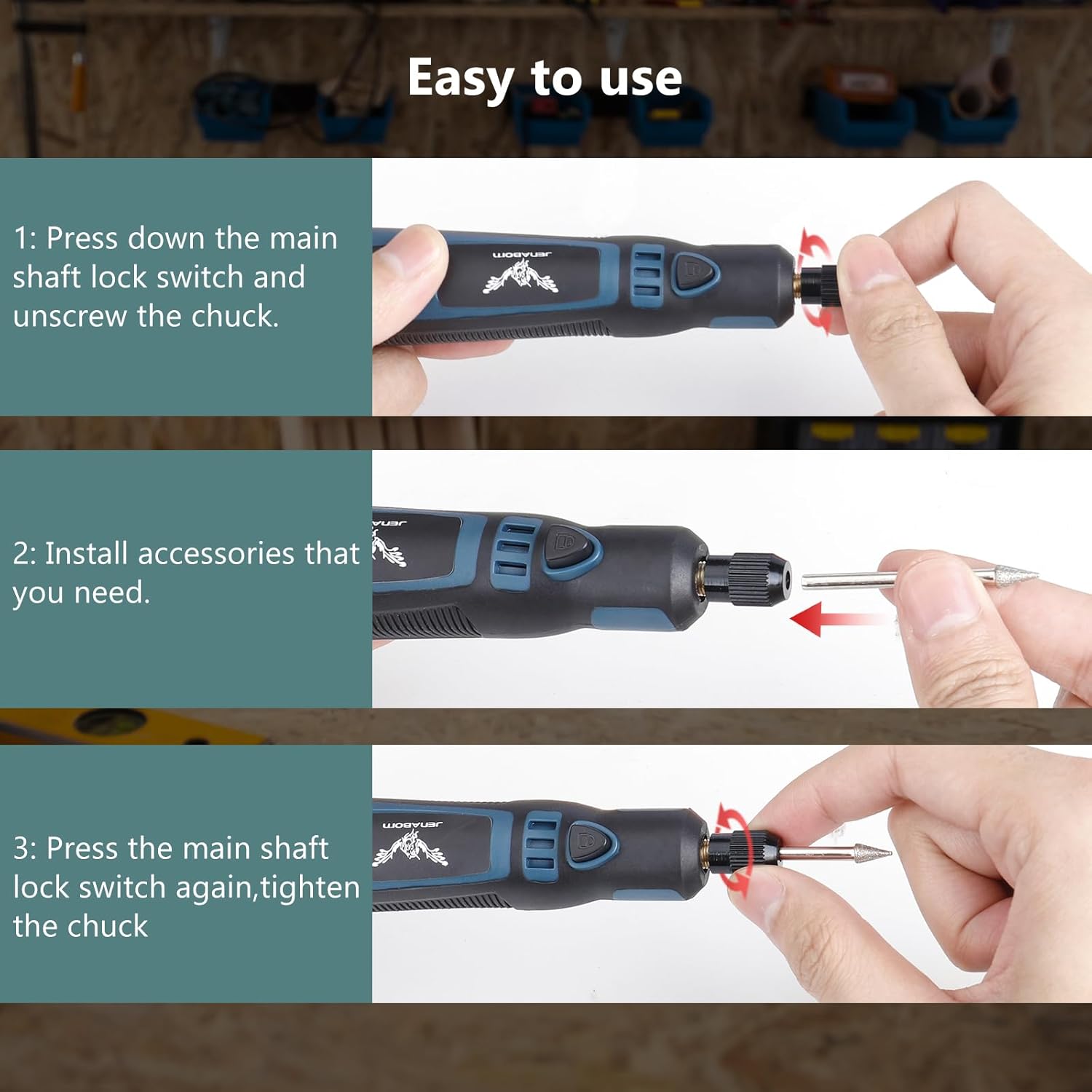
Figure 6.2: Various applications of the JENABOM Mini Cordless Rotary Tool.
For optimal performance and safety, ensure the tool is held firmly without jumping or shaking during operation. The design promotes high concentricity for precise work.

Figure 6.3: Maintaining stability for precise work.
7. Ladda batteriet
The JENABOM Mini Cordless Rotary Tool is equipped with a 3.6V 700mAh rechargeable battery. To charge the tool:
- Connect the small end of the provided USB charging cable to the USB Charging Port on the tool.
- Connect the larger end of the USB cable to a standard USB power adapter (not included), computer USB port, or power bank.
- The indicator lights on the tool will show charging status.
- A full charge typically takes 2 to 3 hours and provides approximately 60 minutes of continuous operation.

Figure 7.1: Charging the rotary tool via USB.
8. Underhåll
Proper maintenance ensures the longevity and optimal performance of your rotary tool.
- Rengöring: After each use, wipe down the tool with a clean, dry cloth. Use a soft brush to remove dust and debris from the cooling ports and chuck area. Do not use harsh chemicals or abrasive cleaners.
- Lagring: Store the tool and its accessories in the provided plastic box in a dry, cool place, away from direct sunlight and moisture.
- Batteriomsorg: For best battery life, avoid completely draining the battery frequently. Charge the tool regularly, even if not in use for extended periods (e.g., every 3-6 months).
- Tillbehörsinspektion: Regularly inspect accessories for wear or damage. Replace worn or damaged accessories immediately to ensure safe and effective operation.
9. Felsökning
If you encounter issues with your rotary tool, refer to the following common problems and solutions:
| Problem | Möjlig orsak | Lösning |
|---|---|---|
| Verktyget slås inte på. | Batteriet är urladdat. | Charge the tool fully. |
| Strömbrytaren är inte helt inkopplad. | Press the power switch firmly. | |
| Accessory wobbles or falls out. | Chucken är inte tillräckligt åtdragen. | Ensure the main shaft lock is engaged and tighten the chuck firmly. |
| Incorrect accessory size for chuck. | Use accessories with a shaft diameter between 1-3mm. | |
| Verktyget förlorar kraft snabbt. | Batteriet är inte fulladdat eller åldrat. | Ensure full charge. If battery life significantly degrades, consider replacement if available or contact support. |
| Verktyget överhettas. | Prolonged heavy use or blocked cooling vents. | Allow tool to cool down. Ensure cooling ports are clear of debris. Avoid excessive pressure during operation. |
Om problemet kvarstår efter att du har försökt med dessa lösningar, vänligen kontakta kundsupporten.
10. Specifikationer
| Särdrag | Specifikation |
|---|---|
| Stämpla | JENABOM |
| Modellnummer | TY-CM01 |
| Voltage | 3.6 volt |
| Strömkälla | Batteridriven (uppladdningsbar USB) |
| Batterikapacitet | 700 mAh |
| Laddningstid | 2-3 timmar |
| Kontinuerlig drifttid | Ca. 60 minuter |
| Hastighetsinställningar | 3 (5000 varv/min, 10000 varv/min, 15000 varv/min) |
| Chuck Clampräckvidd | 1-3 mm |
| Objektets vikt | 9.6 ounces (ca 272 g) |
| Mått (paket) | 8.5 x 4.5 x 2.4 tum |
| Specialfunktioner | Compact, Lightweight, Variable Speed, Spindle Lock |
| Rekommenderad användning | Engraving, Cutting, Grinding, Polishing, Sanding, Carving |
11. Garanti och support
JENABOM is committed to providing high-quality products. For information regarding warranty coverage, technical support, or replacement parts, please refer to the warranty card included with your product or visit the official JENABOM webwebbplats. Du kan också kontakta säljaren direkt via din köpplattform för hjälp.
Vänligen spara ditt inköpsbevis för eventuella garantianspråk.