
1. Introduktion
Thank you for choosing the MOUNTUP Dual Monitor Arm MU8012-W-07. This instruction manual provides essential information for the safe and correct installation, operation, and maintenance of your new monitor arm. Please read this manual thoroughly before installation and keep it for future reference.
Säkerhetsföreskrifter
- Se till att alla komponenter är på plats och oskadade före montering. Använd inte om några delar saknas eller är defekta.
- Verify that your desk surface is strong enough to support the combined weight of the monitor arm and your monitors.
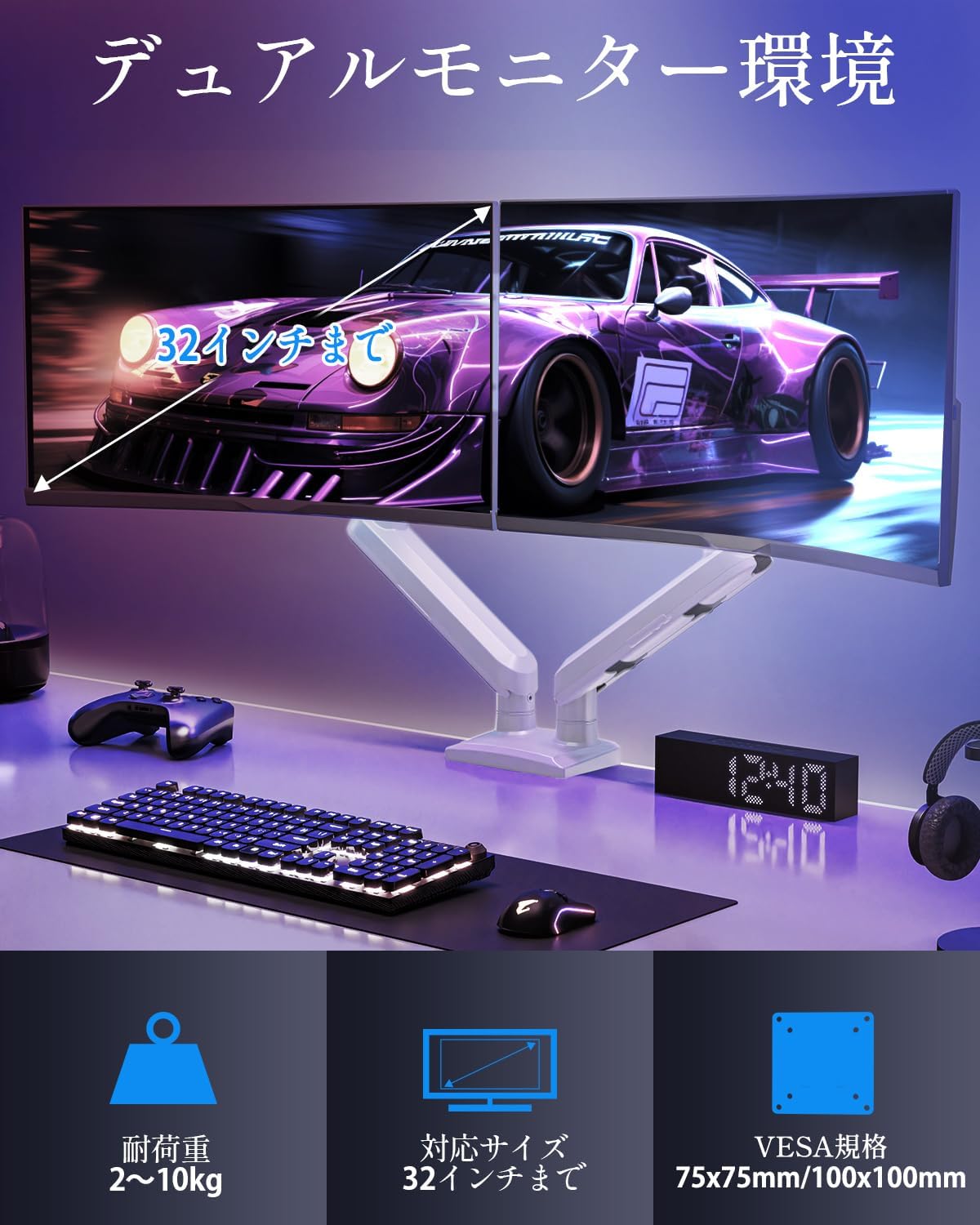
- Do not exceed the maximum weight capacity of 10kg (22 lbs) per arm.
- Always follow the installation steps carefully. Improper installation may result in product damage or personal injury.
- Keep children away from the product during assembly. Small parts may be a choking hazard.
2. Paketets innehåll
Kontrollera att alla följande komponenter ingår i ditt paket:
- Monitor Arm Assembly (x1)
- VESA-platta (x2)
- Skrivbord Clamp Bas (x1)
- Grommet Base (x1)
- Monteringssats (skruvar, brickor, distanser)
- Sexkantsnycklar (olika storlekar)
- Bruksanvisning (x1)
3. Specifikationer
| Särdrag | Specifikation |
|---|---|
| Modell | MU8012-W-07 |
| Material | Legerat stål |
| Färg | Vit |
| Skärmstorlekskompatibilitet | 13–32 tum |
| Viktkapacitet (per arm) | 2–10 kg (4.4–22 pund) |
| VESA-kompatibilitet | 75x75mm, 100x100mm |
| Monteringsalternativ | Clamp, Genomföring |
| Tilt Range | +85° till -45° |
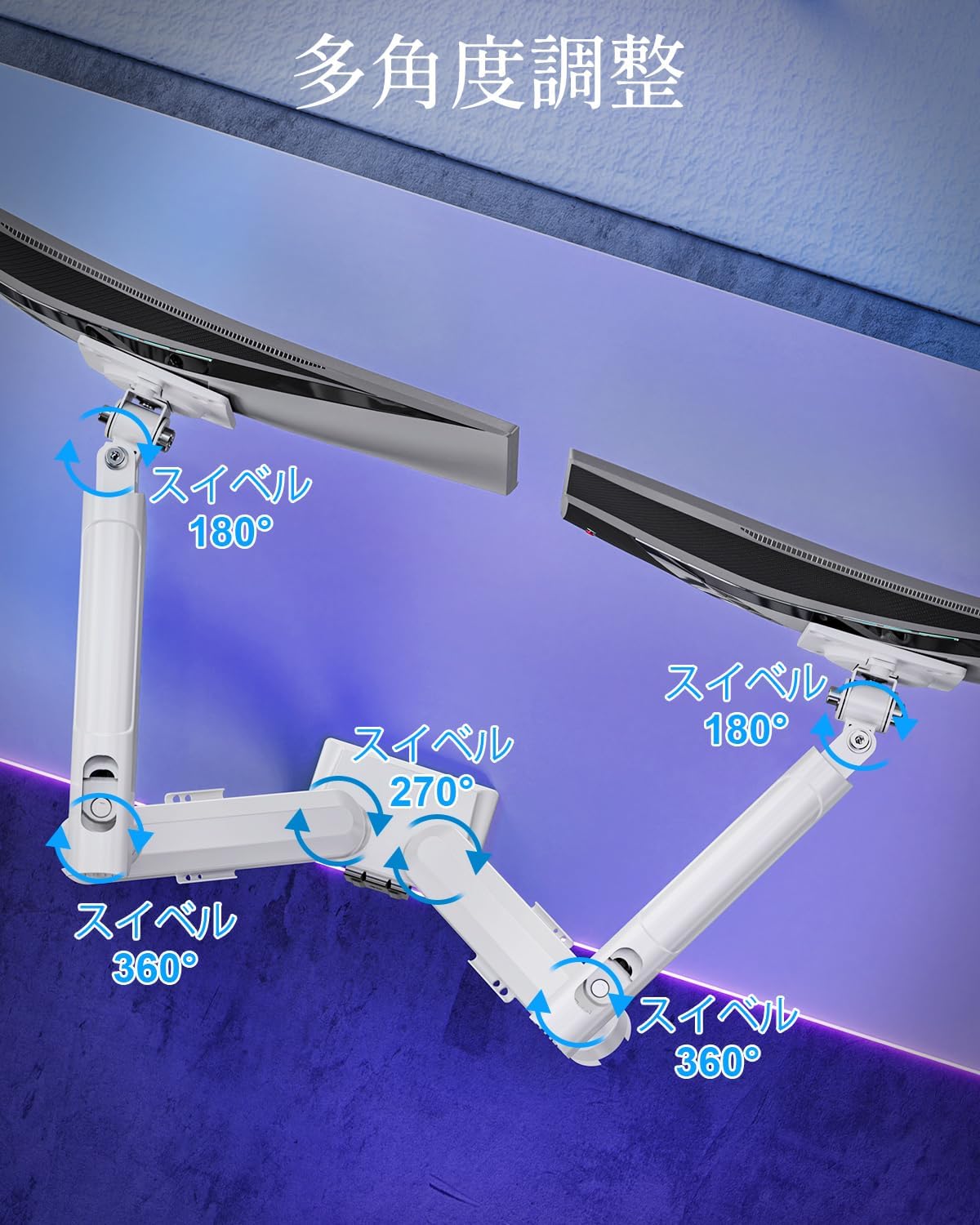
| Svängbar räckvidd | 180° (monitor plate), 270° (middle joint), 360° (base) |
| Rotation (Pivot) | 360° |
| Maxhöjdjustering | 44 cm (17.3 tum) |
| Max armförlängning | 50 cm (19.7 tum) |
| Produktens vikt | 3.1 kg (6.8 lbs) |

4. Installation och installation
Steg 1: Välj din monteringsmetod
The MOUNTUP Dual Monitor Arm supports two installation methods: Clamp Mount and Grommet Mount. Choose the method that best suits your desk.

Clamp Montering Installation
- Fäst clamp base to the main pole of the monitor arm.
- Placera clamp onto the edge of your desk. Ensure the desk thickness is between 10-70mm (0.4-2.7 inches).
- Dra åt clamp skruva tills armen är ordentligt fastsatt på skrivbordet. Se till att den är stabil och inte vinglar.

Genomföringsmontering
- If your desk has a grommet hole, ensure its diameter is between 10-60mm (0.4-2.4 inches) and the desk thickness is between 10-70mm (0.4-2.7 inches).
- Attach the grommet base to the main pole.
- För in öljettens bult genom skrivbordshålet och fäst den underifrån med den medföljande plattan och muttern.
- Tighten the nut until the arm is firmly attached to the desk.
Steg 2: Fäst VESA-plattor på bildskärmar
- Carefully lay your monitor face down on a soft, clean surface.
- Rikta in VESA-plattan med monteringshålen på baksidan av din bildskärm.
- Use the appropriate screws (M4 or M5) and washers from the hardware kit to secure the VESA plate to the monitor. Do not overtighten.
Steg 3: Montera bildskärmar på armar
- Slide the monitor (with the attached VESA plate) onto the VESA head of the monitor arm.
- Ensure the monitor clicks into place or is securely fastened by the quick-release mechanism.
- Upprepa för den andra skärmen.

Steg 4: Kabelhantering
Route your monitor cables through the integrated cable management clips on the underside of the arms. This helps maintain a tidy workspace.

5. Drift och justeringar
The MOUNTUP Dual Monitor Arm offers flexible adjustments to optimize your viewerfarenhet.

Adjusting Arm Tension (Gas Spring)
The gas spring mechanism allows for smooth height adjustments. If your monitor sags or is difficult to move, you may need to adjust the tension.

- To increase tension (if monitor sags): Use the provided hex wrench to turn the adjustment screw clockwise.
- To decrease tension (if arm is too stiff): Turn the adjustment screw counter-clockwise.
- Always adjust tension with the arm held horizontally. Test the movement after each small adjustment until the monitor holds its position freely.
Monitorjusteringar
- Höjdjustering: Gently push or pull the monitor up or down to your desired height. The gas spring will assist in holding the position. Max height is 44cm (17.3 inches).
- Lutningsjustering: Tilt the monitor screen up to +85° or down to -45° to reduce glare and optimize viewing angles. Loosen the tilt bolt, adjust, then re-tighten.
- Vridjustering: The arm allows for 180° swivel at the monitor plate, 270° at the middle joint, and 360° at the base, providing wide range of motion.
- Rotation (Pivot): Rotera skärmen 360° för att växla mellan liggande och stående läge.

6. Underhåll
- Rengöring: Torka av monitorarmen med en mjuk, damp trasa. Undvik slipande rengöringsmedel eller lösningsmedel som kan skada ytan.
- Periodiska kontroller: Kontrollera regelbundet alla skruvar och anslutningar för att säkerställa att de är ordentligt åtdragna. Dra åt vid behov.
- Gas Spring Longevity: The high-quality gas spring is tested for over 20,000 cycles. Proper tension adjustment will help maintain its performance over time.

7. Felsökning
- Övervaka om Sags eller inte stannar uppe: The gas spring tension is too low. Refer to the "Adjusting Arm Tension" section and turn the adjustment screw clockwise to increase tension.
- Arm is Too Stiff or Difficult to Move: The gas spring tension is too high. Refer to the "Adjusting Arm Tension" section and turn the adjustment screw counter-clockwise to decrease tension.
- Monitorns wobbles: Ensure all mounting screws (VESA plate to monitor, arm to desk) are securely tightened. Check that the desk clamp or grommet mount is firm.
- Monitor Tilt Angle Won't Hold: The tilt bolt may be loose. Tighten the tilt bolt on the VESA head.
8. Garanti och support
MOUNTUP tillhandahåller en 2 års kvalitetsgaranti från inköpsdatumet för denna produkt. Denna garanti täcker tillverkningsfel och problem som uppstår vid normal användning.
If you encounter any problems with your MOUNTUP Dual Monitor Arm, or if you have questions regarding installation or operation, please contact our customer support. You can typically find seller contact information through your purchase history on the platform where you bought the product (e.g., Amazon order details).
Please have your model number (MU8012-W-07) and purchase date ready when contacting support to ensure a swift resolution.