
1. Introduktion
This manual provides detailed instructions for the setup, operation, and maintenance of your GIEC G5300 4K Ultra HD Blu Ray Player. Designed for an enhanced home entertainment experience, this player supports true 4K ultra-high-definition picture quality, HDR10, Dolby Vision, BT.2020 color spaces, and Dolby audio decoding for immersive visuals and sound.
2. Säkerhetsinformation
- Ensure proper ventilation around the player to prevent overheating.
- Utsätt inte enheten för regn eller fukt för att minska risken för brand eller elchock.
- Avoid placing heavy objects on top of the player.
- Öppna inte c:nasing; överlåt all service till kvalificerad personal.
- Håll spelaren borta från direkt solljus, värmekällor och starka magnetfält.
- Använd endast strömadaptern som medföljer enheten.
3. Paketets innehåll
Kontrollera att alla artiklar som listas nedan ingår i ditt paket:
- GIEC G5300 Blu-ray Player (x1)
- HDMI-kabel (x1)
- Fjärrkontroll (x1)
- Användarmanual (x1)
4. Produkt överview
4.1 Frontpanel

Bild 4.1: Framsidan view of the GIEC G5300 Blu Ray Player, showing the disc tray, display, USB port, and control buttons (power, play/pause, eject).
- Skivfack: Insert Blu-ray or DVD discs here.
- Displaypanel: Shows playback status and time.
- USB 3.0-port: Anslut USB-lagringsenheter för medieuppspelning.
- Kontrollknappar: Power On/Off, Play/Pause, Eject.
4.2 Bakpanel och anslutningar

Bild 4.2: Bak view of the GIEC G5300 Blu Ray Player, highlighting various input/output ports including LAN, HDMI 2.0, HDMI 1.4, USB 3.0, Coaxial, and Optical outputs.
- LAN-port: For network connection (e.g., firmware updates).
- HDMI 2.0 Output (Video/Audio): Primary HDMI output for 4K video and audio.
- HDMI 1.4 Output (Audio Only): Dedicated HDMI output for audio to an AV receiver.
- USB 3.0 Input: Anslut USB-lagringsenheter för medieuppspelning.
- Koaxial utgång: Digital ljudutgång.
- Optisk utgång: Digital ljudutgång.
5. Inställning
5.1 Installation av batteri i fjärrkontrollen
Sätt i två AAA-batterier (medföljer ej) i fjärrkontrollen och se till att polerna är rättvända.
Video 5.1: This video demonstrates how to install batteries into the remote control and connect the Blu-ray player to a TV using an HDMI cable.
5.2 Connecting to a Display Device (TV/Projector)
- Anslut ena änden av den medföljande HDMI-kabeln till HDMI 2.0 Output (Video/Audio) port on the rear of the Blu-ray player.
- Connect the other end of the HDMI cable to an available HDMI input port on your TV or projector.
- For separate audio output, connect another HDMI cable from the HDMI 1.4 Output (Audio Only) port to your AV receiver, or use the Coaxial/Optical outputs.
5.3 Strömanslutning
- Connect the power cable to the power input on the rear of the Blu-ray player.
- Anslut den andra änden av strömkabeln till ett vägguttag.
- Turn on your TV/projector and select the correct HDMI input source corresponding to the port you connected the Blu-ray player to.
- Press the Power button on the Blu-ray player or remote control to turn on the unit.
6. Bruksanvisning
6.1 Skivuppspelning
- Ensure the player is powered on and connected to your display device.
- Tryck på UTSATS knappen på frontpanelen eller fjärrkontrollen för att öppna skivfacket.
- Carefully place a Blu-ray or DVD disc onto the tray with the label side facing up.
- Tryck på UTSATS button again to close the tray. The player will automatically begin loading and playing the disc.
- Använd fjärrkontrollen för uppspelningsfunktioner som uppspelning, paus, stopp, snabbspolning framåt och bakåt.
6.2 Uppspelning av USB-media
The GIEC G5300 supports playback of various media files från en USB-lagringsenhet.
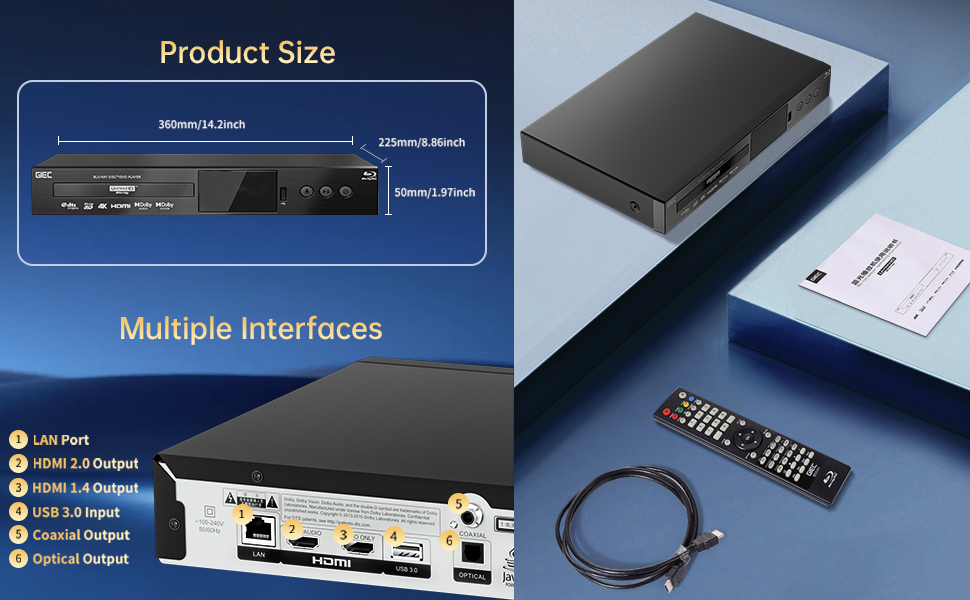
Figure 6.1: Illustration of the multiple disc, video, and audio formats supported by the player.
- Sätt i din USB-lagringsenhet i USB 3.0-port on the front or rear panel.
- Navigate to the "Video," "Music," or "Photo" section on the player's main menu using the remote control.
- Välj din önskade file from the USB device to begin playback.
Format som stöds:
- Skivtyper: BD, BD-R, BD-RE, DVD-R/RW, DVD+R/RW, DVD-Video, VCD, CD, CD-R/RW.
- Videoformat: MPEG-1, MPEG-2, MPEG-4, VC1, H.264, MOV, MKV, AVI, TS.
- Ljudformat: AAC, APE, CUE, FLAC, OGG, MP3, WAV.
7. Funktioner
- 4K Ultra HD Playback: Experience movies and shows in stunning 4K resolution with clearer images and richer colors.
- Stöd för HDR10: Enjoy a wider range of brightness and contrast, revealing more detail in both dark and bright scenes.
- Dolby Vision: Enhances image quality by dynamically adjusting brightness and expanding dynamic range for more detailed and vivid pictures.
- BT.2020 Color Spaces: Provides a broader color gamut than standard 1080p Blu-ray, resulting in purer, more natural, and realistic colors.
- Dolby Sound & DTS Decoding: Supports Dolby audio decoding and DTS effects for an immersive 5.1 stereo surround sound experience.
- 3D Blu-ray Playback: Compatible with 3D Blu-ray discs for an immersive three-dimensional viewing experience (requires a 3D-compatible TV and glasses).
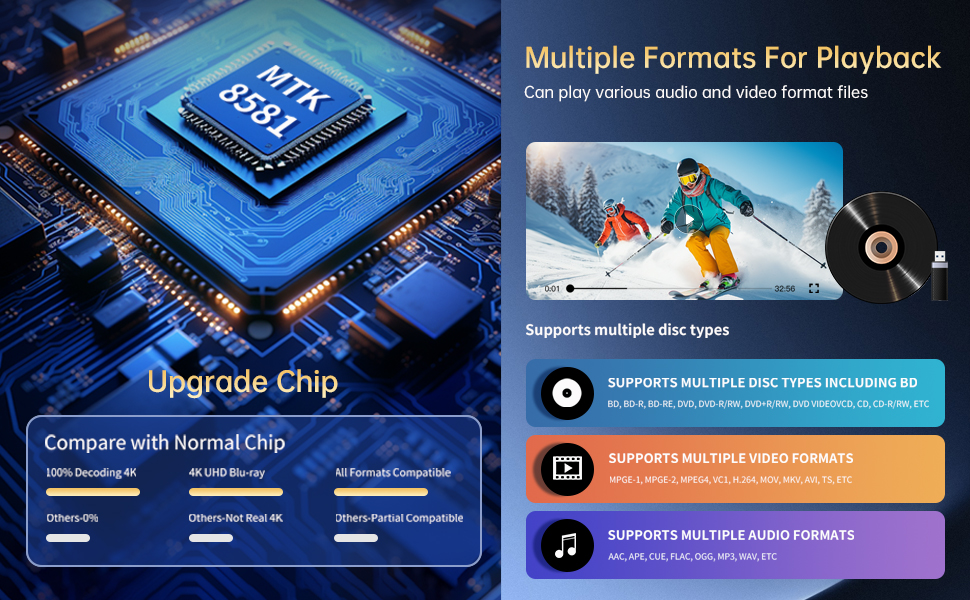
Figure 7.1: Visual comparison illustrating the difference between 8-bit (16.67 million colors) and 10-bit (1.07 billion colors) color depth, highlighting the enhanced detail and delicacy of 10-bit color.

Figure 7.2: The GIEC G5300 Blu Ray Player connected to a TV, showcasing its support for 4K UHD, 3D, HDR, HDR10+, Dolby, and Dolby Vision technologies.
8. Underhåll
- Rengöring: Use a soft, dry cloth to clean the exterior of the player. Do not use liquid or aerosol cleaners.
- Skivvård: Håll skivorna i kanterna. Rengör skivorna med en mjuk, luddfri trasa och torka av dem från mitten och utåt.
- Ventilation: Ensure the player's ventilation openings are not blocked to prevent overheating.
9. Felsökning
If you encounter issues with your Blu-ray player, please refer to the following common solutions:
- Ingen ström: Check if the power cable is securely connected to both the player and the power outlet. Ensure the outlet is functional.
- Ingen bild/ljud: Verify that the HDMI cable is correctly connected to both the player and the TV/receiver. Ensure the correct HDMI input is selected on your TV/receiver.
- Skivan spelas inte: Check if the disc is clean and free of scratches. Ensure the disc is inserted correctly with the label side up. The player supports Region A Blu-ray discs and all region DVD discs.
- Fjärrkontrollen fungerar inte: Check the batteries in the remote control and replace them if necessary. Ensure there are no obstructions between the remote and the player.
10. Specifikationer
| Särdrag | Detalj |
|---|---|
| Varumärke | GIEC |
| Modellnamn | G5300 |
| Objektets vikt | 4.18 pund (1.9 kilo) |
| Produktens mått | 14.2 x 8.9 x 2 tum |
| Färg | Svart |
| Medietyp | Blu-ray-skiva, DVD |
| Upplösning | 3840x2160 (4K Ultra HD) |
| Specialfunktioner | Anti-Shock, Compact, Dust Proof, Multi-Format Playback, Surround Sound, HDR10, Dolby Vision, BT.2020 Color Spaces |
| Anslutningstyp | HDMI (Dual Outputs), USB 3.0, Coaxial, Optical, LAN |
| Anslutningsteknik | HDMI |
11. Garanti och support
For warranty information or technical support, please refer to the documentation included with your purchase or contact GIEC customer service. Keep your proof of purchase for warranty claims.