
LAUNCH LAUNCH X431 CRP919 EV
LAUNCH X431 CRP919 EV Scanner User Manual
Model: LAUNCH X431 CRP919 EV
Märke: LAUNCH
1. Introduktion
The LAUNCH X431 CRP919 EV is a state-of-the-art diagnostic scan tool designed for both traditional internal combustion engine (ICE) vehicles and the rapidly growing new energy vehicle (NEV) market, including hybrid and electric vehicles (EVs). This intelligent scanner provides comprehensive system diagnostics, advanced service functions, and bidirectional control capabilities, making it an essential tool for professional technicians and advanced DIY enthusiasts.
Equipped with an Android 10.0 operating system, a 7.0-inch touch screen, and robust hardware, the CRP919 EV offers fast, efficient, and accurate vehicle diagnostics. It supports modern communication protocols like CANFD and DOIP, ensuring broad compatibility with vehicles up to the latest models.

Figure 1.1: LAUNCH X431 CRP919 EV Scanner and its protective carrying case.
2. Säkerhetsinformation
Always observe the following safety precautions when operating the LAUNCH X431 CRP919 EV scanner to prevent personal injury or damage to the device or vehicle:
- Ensure the vehicle's ignition is off before connecting or disconnecting the diagnostic cable.
- Do not operate the scanner in wet conditions or with wet hands.
- Håll enheten borta från starka magnetfält och höga temperaturer.
- Always refer to the vehicle manufacturer's service manual for specific diagnostic procedures and safety warnings, especially when working with high-voltage EV systems.
- Use appropriate personal protective equipment (PPE) when performing vehicle diagnostics.
- Do not attempt to disassemble or modify the scanner. Refer all servicing to authorized personnel.
3. Vad finns i lådan
När du öppnar förpackningen, kontrollera att alla följande komponenter finns med:
- LAUNCH X431 CRP919 EV Main Unit
- Main Diagnostic Cables
- Typ-C laddare
- Power Adaptors (various regional types)
- Användarmanual
- Snabbstartguide
- Skyddsväska
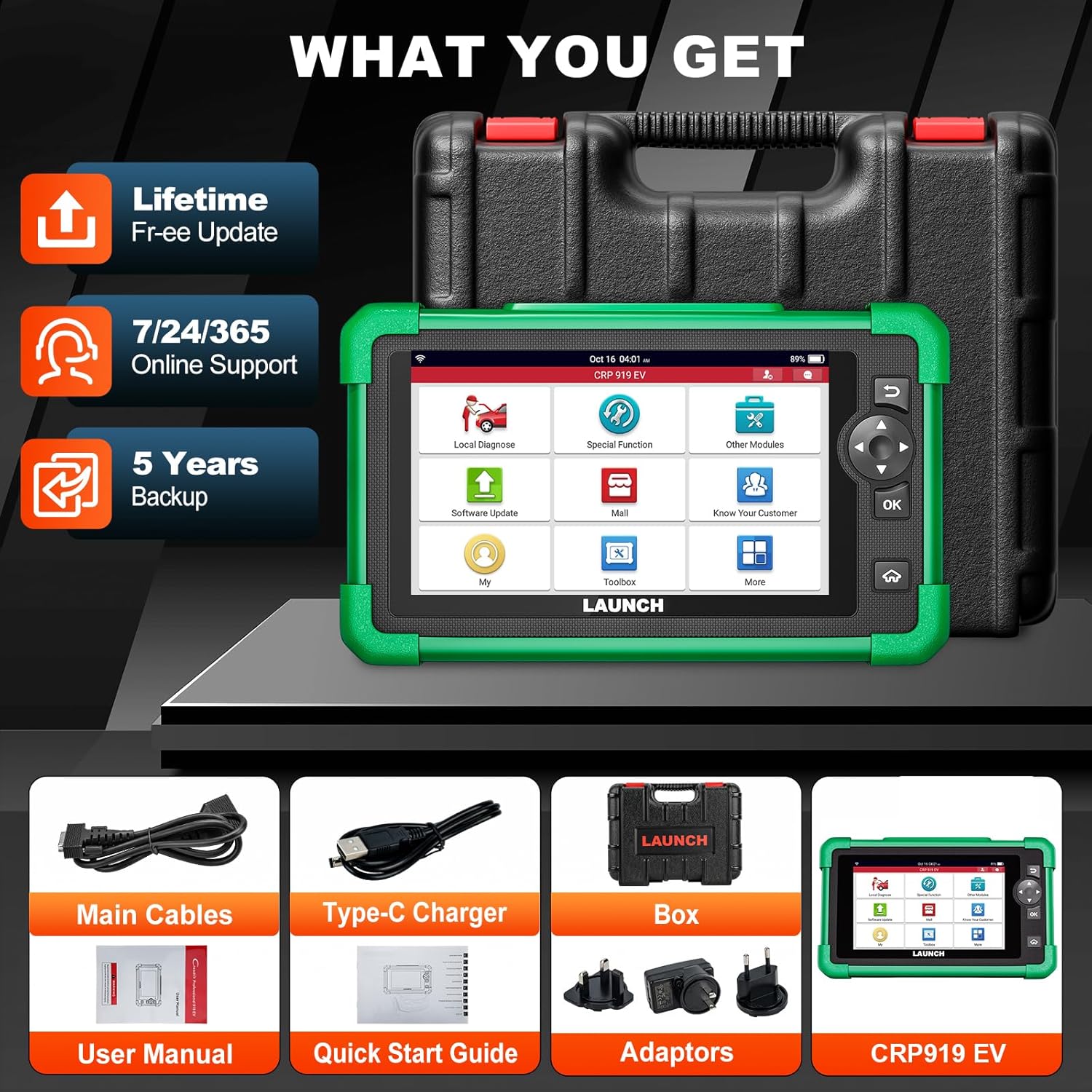
Figure 3.1: Included components with the LAUNCH X431 CRP919 EV scanner.
4. Inställning
4.1 Initial laddning
Before first use, fully charge the CRP919 EV scanner. Connect the Type-C charger to the device's charging port and plug it into a power outlet. The charging indicator will show the charging status. A full charge can provide up to 15 hours or more of battery life.
4.2 Slå på/av
- För att slå på: Press and hold the Power button located on the side of the device until the screen illuminates.
- För att stänga av: Tryck och håll ner strömknappen tills en avstängningsmeny visas. Välj "Stäng av" och bekräfta.
4.3 Nätverksanslutning
For software updates, online feedback, and cloud services, connect the device to a Wi-Fi network:
- Från huvudmenyn trycker du på "Inställningar".
- Välj "Wi-Fi" och slå på det.
- Välj önskat Wi-Fi-nätverk från listan och ange lösenordet om du blir ombedd att göra det.
- Confirm connection. The device supports 2.4GHz and 5GHz dual-band Wi-Fi for faster transmission.
4.4 Programuppdateringar
Regular software updates are crucial for optimal performance, new vehicle coverage, and bug fixes. The CRP919 EV offers 2 years of free updates.
- Se till att enheten är ansluten till Wi-Fi.
- From the main menu, tap "Software Update".
- The system will check for available updates. Follow the on-screen prompts to download and install them.

Figure 4.1: Software update interface and hardware optimization.
5. Bruksanvisning
The LAUNCH X431 CRP919 EV provides a wide range of diagnostic and service functions. Below are key operational aspects:
5.1 Anslutning till fordon
- Locate the vehicle's OBD-II diagnostic port (usually under the dashboard).
- Connect the main diagnostic cable to the CRP919 EV and then to the vehicle's OBD-II port.
- Vrid fordonets tändning till "ON"-läget (motorn avstängd).
- On the scanner, select "Local Diagnose" to begin communication.
5.2 Full System Diagnostics (EV & ICE)
This function allows you to scan all available electronic control units (ECUs) in the vehicle, including engine, transmission, ABS, SRS, and specific EV high-voltage system.
- Automatisk skanning 2.0: The device features an intelligent Auto VIN function that automatically identifies the vehicle's VIN for quick system access.
- Läs/rensa koder: Retrieve diagnostic trouble codes (DTCs) and clear them after repairs.
- Live-dataström: View real-time data parameters from various sensors and components in text, graph, or multi-in-one formats.
- EV System Diagnostics: Specifically for EVs, perform battery pack analysis and high-voltage system diagnostics. This includes reading/clearing codes, performing HV parts replacement, and generating HV system diagnostic reports.

Figur 5.1: Överview of All System Diagnose capabilities.
5.3 Dubbelriktad styrning (aktivt test)
Bidirectional control allows the scanner to send commands to vehicle ECUs to perform specific tests and functions, such as activating solenoids, relays, or motors, to verify system integrity without using the vehicle's controls.
- Access this function from the "Active Test" menu.
- Common tests include activating fuel pumps, cycling ABS solenoids, testing window motors, or operating cooling fans.
- This feature helps in quickly locating faulty components.

Figure 5.2: Bidirectional control functionality for component testing.
5.4 43+ Service Functions
The CRP919 EV supports over 43 common maintenance and reset functions, accelerating repair processes.
- Oljeåterställning: Återställ oljelivslängdssystemet efter ett oljebyte.
- EPB-återställning: Återställ den elektroniska parkeringsbromsen efter byte av bromsbelägg.
- SAS-återställning: Kalibrera styrvinkelsensorn.
- BMS-återställning: Register new battery and clear fault codes.
- Återställning av gasreglage: Relearn throttle body position.
- ABS-blödning: Utför luftning av ABS-bromsarna.
- TPMS återställning: Återställ däcktrycksövervakningssystemet.
- And many more, including Injector Coding, Gear Reset, DPF Regeneration, etc.

Figur 5.3: Examples of 43+ service functions available.
5.5 ECU-kodning
ECU Coding allows for customization of vehicle settings, module matching, unlocking hidden functions, and module retrofitting. This advanced function requires careful operation and knowledge of vehicle systems.
5.6 CANFD & DOIP Protocols
The CRP919 EV supports the latest CANFD and DOIP communication protocols, ensuring compatibility with newer vehicle models (up to 2024/2025) that utilize these advanced network architectures.
5.7 FCA AutoAuth
For FCA (Fiat Chrysler Automobiles) vehicles, the scanner supports FCA AutoAuth, allowing secure access to protected diagnostic functions on these vehicles.

Figure 5.4: Global compatibility and protocol support.
5.8 Ytterligare funktioner
- WiFi Print: Directly print diagnostic reports via Wi-Fi.
- Cloud Health Report: Generate and store vehicle health reports in the cloud for easy access and sharing.
- Onlinefeedback: Submit feedback or issues directly to LAUNCH for support.
- DTCs Library: Built-in database for looking up diagnostic trouble code definitions.
- Fjärrdiagnos: Potential for remote assistance (requires additional setup/software).

Figure 5.5: User interface and support features.
6. Underhåll
Proper maintenance ensures the longevity and optimal performance of your LAUNCH X431 CRP919 EV scanner:
- Rengöring: Använd en mjuk, torr trasa för att rengöra enheten. Undvik slipande rengöringsmedel eller lösningsmedel.
- Lagring: Store the scanner in its protective carrying case in a cool, dry place when not in use. Avoid extreme temperatures.
- Batteriomsorg: For long-term storage, ensure the battery is charged to approximately 50-70% to preserve its lifespan. Recharge periodically if stored for extended periods.
- Programuppdateringar: Regularly update the software to ensure compatibility with new vehicles and access to the latest features and bug fixes.
- Kabelinspektion: Periodically inspect diagnostic cables for any signs of wear, damage, or corrosion. Replace damaged cables immediately.
7. Felsökning
This section addresses common issues you might encounter with the CRP919 EV scanner.
| Problem | Möjlig orsak | Lösning |
|---|---|---|
| Enheten slås inte på. | Lågt batteri; Strömknappen trycks inte in tillräckligt länge; Enheten är inte i drift. | Charge the device; Press and hold the Power button for 3-5 seconds; Contact technical support. |
| Det gick inte att ansluta till fordonet. | Loose cable connection; Vehicle ignition off; Damaged OBD-II port; Vehicle not supported. | Ensure cable is securely connected; Turn ignition ON; Check vehicle's OBD-II port; Verify vehicle compatibility. |
| Software is slow or freezes. | Too many applications running; Low storage; Software bug. | Close unnecessary applications; Clear cache/data; Perform software update; Restart device. |
| Problem med Wi-Fi-anslutningen. | Felaktigt lösenord; Utom räckhåll; Routerproblem. | Re-enter password; Move closer to router; Restart router; Try another Wi-Fi network. |
| "Mall" features require additional payment. | Certain advanced features or brand-specific software are add-ons. | This is by design. Purchase desired add-ons through the "Mall" section if needed. |
8. Specifikationer
| Särdrag | Detalj |
|---|---|
| Modell | LAUNCH X431 CRP919 EV |
| Operativsystem | Android 10.0 |
| Visa | 7.0-inch Touch Screen, 1024x600 resolution |
| Processor | 1.8GHz Octa-core Qualcomm Snapdragon CPU |
| Minne / lagring | 64GB (internal) |
| Batteri | 6000mAh rechargeable battery (up to 15+ hours) |
| Anslutningsmöjligheter | 2.4GHz & 5GHz Dual-band Wi-Fi, USB Type-C |
| Mått (L x B x H) | 12.8 x 5.38 x 11.4 cm |
| Objektets vikt | 6.82 pund |
| Protokoll som stöds | CANFD, DOIP, OBD-II/EOBD, etc. |
| Fordonstäckning | 150+ car brands, 1996-2025 models (including EV/HEV) |
9. Garanti och support
LAUNCH provides comprehensive support for the CRP919 EV scanner:
- Programuppdateringar: Enjoy 2 years of free software updates from the date of activation.
- Teknisk support: Access 7/24/365 online support for any operational or technical queries.
- Onlineresurser: Utilize the built-in "Online Library," "FAQ," and "Online Feedback" features for self-help and direct communication with LAUNCH support.
- Garanti: Refer to your purchase documentation for specific warranty terms and conditions. Typically, LAUNCH products come with a standard manufacturer's warranty covering defects in materials and workmanship.
For further assistance, please visit the official LAUNCH webwebbplatsen eller kontakta deras kundtjänst direkt.
Ask a question about this manual
Ask about setup, troubleshooting, compatibility, parts, safety, or missing instructions. Manuals+ will review the question and use this page’s manual context to help answer it.