
1. Introduktion
This manual provides essential information for the proper setup, operation, maintenance, and troubleshooting of your Meizu mblu 21 4G LTE smartphone. Please read this manual thoroughly before using your device to ensure optimal performance and longevity.
The Meizu mblu 21 features a 6.79-inch HD display, a 13MP dual camera system, and runs on Android 14. It is designed for efficient performance and reliable connectivity.
2. Inställning
2.1 Paketets innehåll
Kontrollera att ditt paket innehåller följande artiklar:
- Meizu mblu 21 Smartphone
- Strömadapter
- Snabbstartsguide (om medföljer)
2.2 Installation av SIM-kort och MicroSD-kort
The Meizu mblu 21 supports Dual Nano SIM cards and a MicroSD card for expandable storage.
- Leta reda på SIM-kortsfacket på sidan av enheten.
- Insert the SIM ejector tool (not included, use a thin pin if necessary) into the small hole on the SIM tray to eject it.
- Place your Nano SIM card(s) and/or MicroSD card into the designated slots on the tray, ensuring proper orientation.
- Sätt försiktigt tillbaka SIM-kortshållaren i telefonen tills den klickar på plats.
2.3 Första start och nätverkskonfiguration
- Press and hold the power button until the Meizu logo appears.
- Följ anvisningarna på skärmen för att slutföra den första installationen, inklusive språkval, Wi-Fi-anslutning och konfiguration av Google-konto.
- For cellular connectivity, ensure your SIM card is active. This device is an international version and in the USA market, it operates exclusively on T-Mobile's 4G LTE network. Outside the USA, it is compatible with various carriers worldwide.
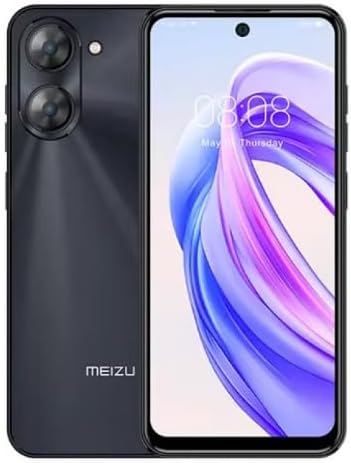
Bild 2.3.1: Fram och bak view of the Meizu mblu 21 smartphone. The front displays the screen with a punch-hole camera, while the rear shows the dual camera module and the Meizu branding.
3. Bruksanvisning
3.1 Grundläggande navigering (Android 14)
Your Meizu mblu 21 runs on Android 14, offering an intuitive user experience. Use gestures or on-screen navigation buttons to move between apps, access settings, and manage notifications.
3.2 Kameraanvändning
The device features a 13MP Smart Camera on the rear and an 8MP front camera. Open the Camera app to capture photos and videos. Utilize various modes and settings for optimal results.
3.3 Säkerhetsfunktioner
Unlock your device using the side-mounted fingerprint sensor for instant access or the 8MP front camera for Smart Face Unlock.
3.4 Anslutningar
- Wi-Fi: Supports Dual-Band Wi-Fi (2.4GHz and 5GHz) for stable internet access.
- Bluetooth: Bluetooth 5.0 för anslutning till trådlösa tillbehör.
- VoLTE: Enjoy clearer voice calls with VoLTE HD Calls.

Bild 3.4.1: Visual representation of key connectivity and operating system features, including Android 14, Dual-Band Wi-Fi, Bluetooth 5.0, and VoLTE HD Calls.
4. Underhåll
4.1 Allmän vård
- Håll enheten torr och borta från extrema temperaturer.
- Rengör skärmen och höljet med en mjuk, luddfri trasa. Undvik starka kemikalier.
- Skydda skärmen med ett skärmskydd och kroppen med ett skyddande fodral för att förhindra repor och skador.
4.2 Batterihantering
The 4900mAh battery is designed for all-day performance. To prolong battery life:
- Undvik att ladda ur batteriet helt ofta.
- Use the provided power adapter for charging.
- Optimize background app usage and screen brightness in settings.

Bild 4.2.1: En intern view of the Meizu mblu 21 smartphone highlighting the 4900mAh battery, emphasizing its capacity for extended use.
5. Felsökning
5.1 Vanliga problem och lösningar
- Enheten slås inte på: Se till att batteriet är laddat. Anslut till nätadaptern och försök igen.
- Problem med nätverksanslutning: Check if your SIM card is properly inserted and active. Verify network settings and ensure you are within T-Mobile's coverage area in the USA.
- Långsam prestanda: Stäng onödiga bakgrundsapplikationer. Rensa cacheminnet och tillfälliga program. files. Restart the device.
- Batteriet laddas ur snabbt: Reduce screen brightness, disable unused features like Bluetooth or GPS, and check for power-intensive apps.
If problems persist, consider performing a factory reset (back up your data first) or contacting customer support.
6. Specifikationer
| Modellnummer | M416L |
| Operativsystem | Android 14 |
| Visa | 6.79 Inches HD, 2340 x 1080 Resolution, 90Hz Adaptive Refresh Rate |
| Processor | Octa Core 1.6GHz ARM Mali-G57 |
| Minne | 64 GB Internal Storage, 4 GB RAM |
| Batteri | 4900mAh (4.9E+3 Milli)amp Hours) Lithium Polymer |
| Bakre kamera | 13MP Smart Camera, 5P Precision Lens |
| Främre kamera | 8 MP |
| Cellulär teknik | 4G LTE FDD: 2,3,4,5,7,8,12,17,26,28,66; 3G WCDMA: 2/4/5/8; 2G Quad Band |
| SIM-typ | Dual Nano SIM + MicroSD |
| Wi-Fi | Dubbelband (2.4 GHz och 5 GHz) |
| Bluetooth | 5.0 |
| Ljudjack | USB typ C |
| Objektets vikt | 14 uns |
| FCC ID | 2ANQ6-M416L |

Bild 6.1: The Meizu mblu 21 smartphone presented in its Titan Black color variant, showcasindess design.
7. Garanti och support
For warranty information, please refer to the warranty card included with your product or consult the retailer where the device was purchased. Meizu provides support for its products. For further assistance, please visit the official Meizu webwebbplats eller kontakta deras kundtjänst.