
Introduktion
The Trust Gaming GXT 498B Forta Gaming Headset is officially licensed for PlayStation 5 and PlayStation 4 consoles, designed to provide an immersive audio experience. This wired over-ear headset features 50mm drivers for powerful sound, a detachable microphone with a pop filter for clear communication, and comfortable ear pads for extended gaming sessions. This manual provides instructions for setup, operation, maintenance, and troubleshooting to ensure optimal performance of your headset.
Vad finns i lådan
- Trust Gaming GXT 498B Forta Gaming Headset
- Detachable Microphone with Pop Filter
- 1.2m Audio Cable (3.5mm jack)
- Användarmanual

Image: The retail packaging for the Trust Gaming GXT 498B Forta Gaming Headset, showing the headset and included accessories.
Installationsinstruktioner
- Anslut ljudkabeln: Locate the 3.5mm audio jack on your PlayStation 5 DualSense wireless controller or PlayStation 4 DualShock 4 wireless controller. Insert the 3.5mm audio cable from the headset firmly into the controller's audio jack.
- Anslut mikrofonen: The microphone is detachable. Align the microphone's connector with the port on the left earcup of the headset and push it in until it clicks securely into place. Ensure the pop filter is correctly positioned over the microphone for optimal voice clarity.
- Justera headsetets passform: Extend or retract the adjustable padded headband to fit comfortably over your head. The earcups are moveable to ensure a snug fit over your ears.
- Configure Audio Settings (PlayStation):
- För PS5: Gå till Inställningar > Ljud > Ljudutgång. Välja Hörlurar as the output device. Adjust the volume and microphone levels as needed.
- För PS4: Gå till Inställningar > Enheter > Ljudenheter. Välja Headset anslutet till Controller as the input and output device. Adjust the volume and microphone levels.
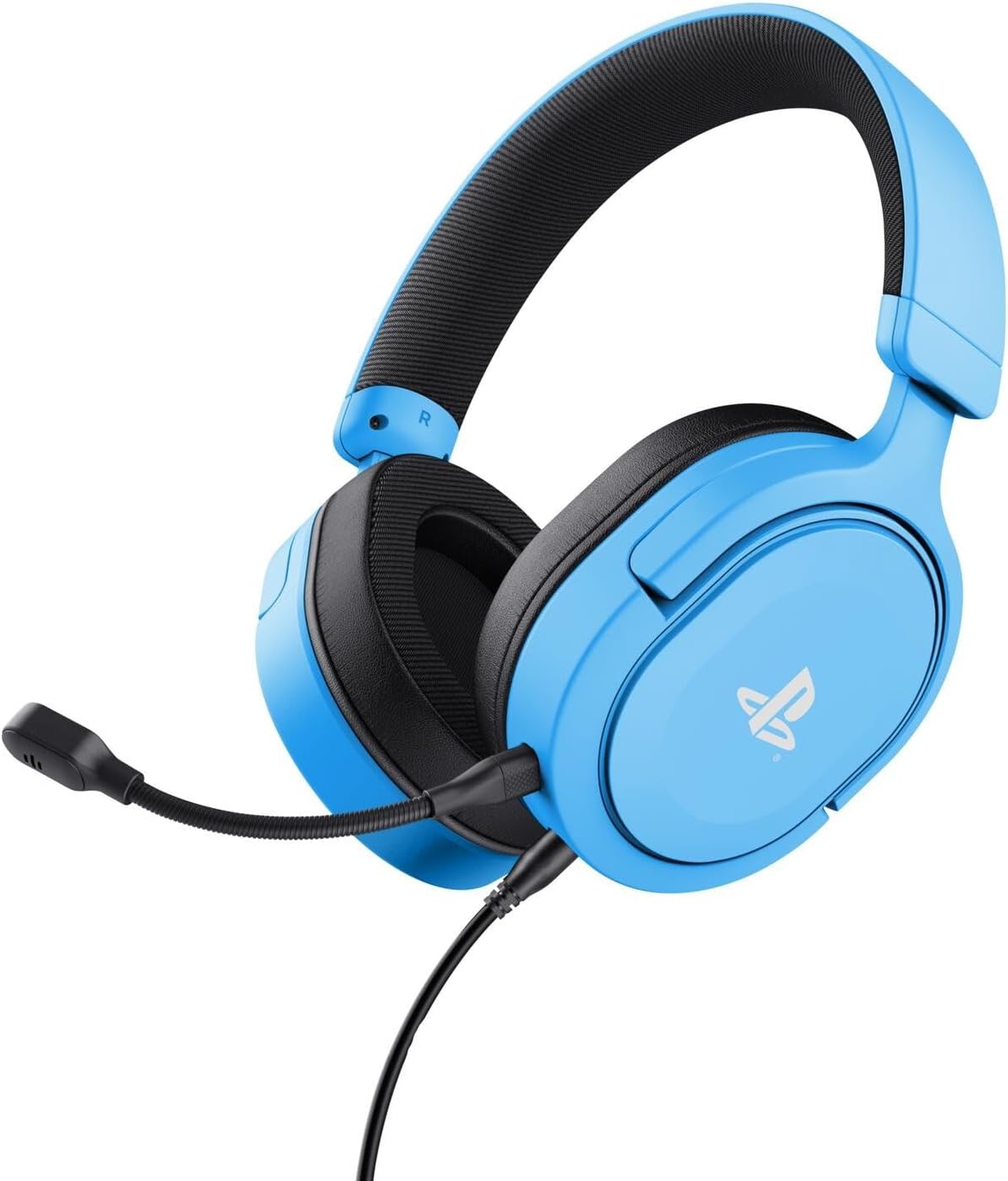
Image: The Trust Gaming GXT 498B Forta Gaming Headset, showcasing dess design och avtagbara mikrofon.
Bruksanvisning
- Volymkontroll: The headset features an in-line volume control wheel on the audio cable. Rotate the wheel up or down to adjust the audio output level.
- Mikrofonavstängning: An in-line mute switch is located on the audio cable. Slide the switch to mute or unmute the microphone.
- 3D-ljud: The headset supports 3D Audio on compatible PlayStation 5 games, providing an enhanced spatial sound experience. Ensure 3D Audio is enabled in your PS5 sound settings for optimal immersion.
- Löstagbar mikrofon: The microphone can be detached when not in use for a more streamlined headset profile. Store it safely to prevent loss or damage.

Bild: En närbild view of the Trust Gaming GXT 498B Forta headset, highlighting the earcups and the attached audio cable with controls.
Underhåll
- Rengöring: Use a soft, dry cloth to clean the headset. For ear pads, a slightly damp En trasa kan användas, men se till att ingen fukt kommer in i högtalargallren. Använd inte starka kemikalier eller slipande rengöringsmedel.
- Lagring: Förvara headsetet på en sval, torr plats, skyddad från direkt solljus och extrema temperaturer. Undvik att placera tunga föremål på headsetet.
- Kabelvård: Avoid sharp bends or kinks in the audio cable. Do not pull the cable forcefully when disconnecting.
- Mikrofonvård: Handle the detachable microphone with care. When not in use, detach it and store it safely to prevent damage.
Felsökning
- Inget ljud från headsetet:
- Ensure the 3.5mm audio cable is fully inserted into both the headset and the controller.
- Check the in-line volume control wheel on the cable and turn it up.
- Verify audio settings on your PlayStation console (refer to "Setup Instructions" section).
- Test the headset with another device (e.g., smartphone, PC) to determine if the issue is with the headset or the console.
- Mikrofonen fungerar inte:
- Se till att den löstagbara mikrofonen är ordentligt fastsatt i headsetet.
- Check the in-line microphone mute switch and ensure it is in the "unmute" position.
- Verify microphone input settings on your PlayStation console (refer to "Setup Instructions" section).
- Ensure the pop filter is not obstructing the microphone's input.
- Sound Quality Issues (Distortion, Low Volume):
- Adjust the volume levels on both the headset's in-line control and your console's settings.
- Se till att ljudkabeln inte är skadad eller vikt.
- Try connecting the headset to a different audio source to rule out console-specific issues.
Specifikationer
| Modellnamn | GXT 498B Forta |
| Modellnummer | 25556 |
| Anslutningsmöjligheter | Trådbunden (3.5 mm-jack) |
| Kabellängd | 1.2 meter |
| Drivrutinsstorlek | 50 mm |
| Frekvensintervall | 20 Hz - 20,000 XNUMX Hz |
| Impedans | 32 ohm |
| Känslighet | 90 dB |
| Mikrofontyp | Detachable with Pop Filter |
| Öronplacering | Over-Ear |
| Objektets vikt | 253 gram |
| Kompatibla enheter | PlayStation 5, PlayStation 4, PC |
| Material | Plastic (up to 65% recycled) |
Garanti och support
This Trust Gaming GXT 498B Forta Gaming Headset is covered by the manufacturer's standard warranty. For detailed warranty information, please refer to the documentation included with your purchase or visit the official GXTrust website. For technical support, troubleshooting assistance beyond this manual, or warranty claims, please contact GXTrust customer service through their official support channels.
Vänligen spara ditt inköpsbevis för garantiändamål.