
1. Introduktion
Welcome to the PUSUN PT 9001 Professional Padel Ball Machine user manual. This document provides essential information for the safe and effective operation of your new padel ball machine. The PT 9001 PRO is designed to enhance your padel training with advanced features, including remote and app control, oscillation, and adjustable ball delivery.
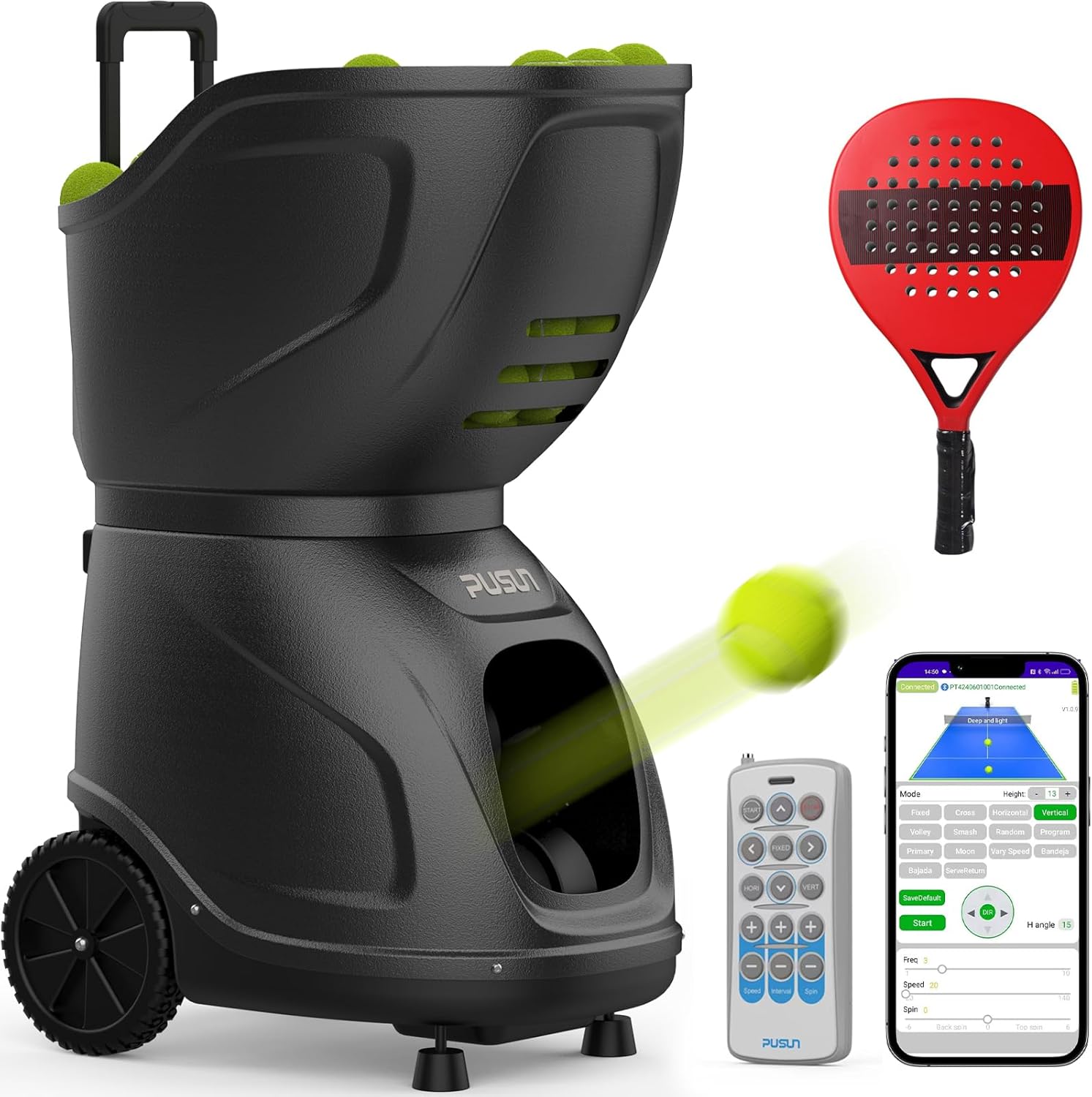
Image 1.1: The PUSUN PT 9001 Padel Ball Machine, showcasing dess design, fjärrkontroll och smartphone-appgränssnitt.
The PUSUN PT 9001 PRO offers a superior capacity of over 150 balls and a built-in lithium battery providing 7-10 hours of continuous training. It features complete speed and angle control, allowing ball speeds from 20 to 140 km/h and elevation angles from 5 to 45 degrees. This machine simulates various padel shots, suitable for all skill levels from beginners to advanced players.
2. Installation och installation
Follow these steps to set up your PUSUN PT 9001 Padel Ball Machine for training.
- Attach the Top Cover (Funnel): Securely place the top cover onto the main unit.
- Load Padel Balls: Fill the machine with padel balls. The machine has a capacity of over 150 balls.
- Press the Power Switch: Locate the power switch on the control panel and turn the machine ON.
- Scan QR Code to Download APP: Use your smartphone to scan the QR code provided on the machine or in the included user manual to download the control application.
- Connect Machine and Settings: Open the app, connect to your PT 9001 machine via Bluetooth, and configure your desired training settings.
- Börja träna: Once settings are applied, initiate your training session.
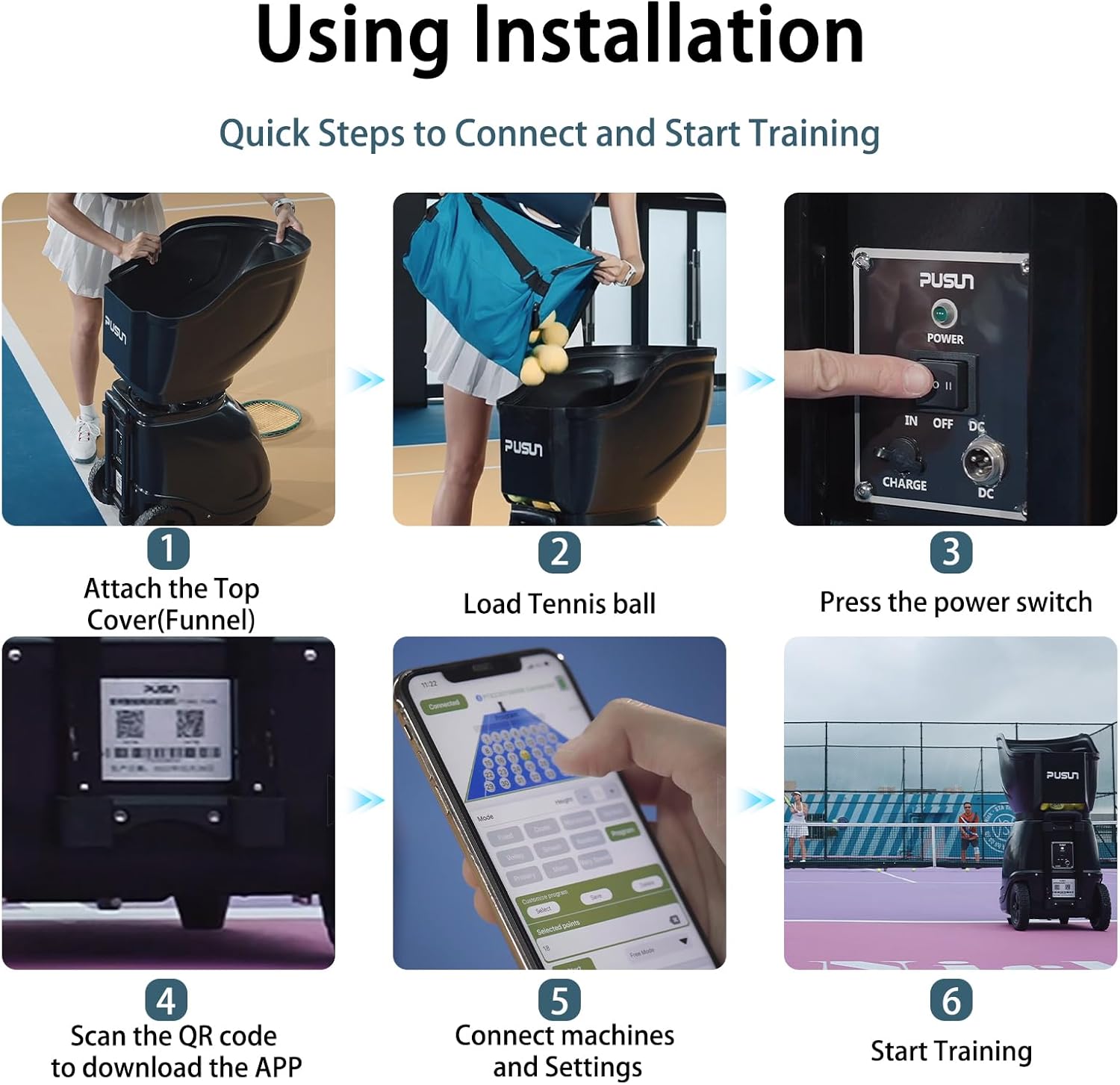
Image 2.1: A visual guide illustrating the quick steps to connect and start training with the PUSUN PT 9001 Padel Ball Machine.

Bild 2.2: Detaljerad view of the PUSUN PT 9001 Padel Ball Machine's components, including the retractable pull rod, ball frame, window, launch port, serve wheel, moving wheel, power indicator, IN/DC switch, charging port, and DC port.
3. Använda maskinen
The PUSUN PT 9001 offers flexible control options via both a remote control and a dedicated smartphone application.
3.1. Fjärrkontroll
The included remote control allows for quick adjustments during your training session.

Image 3.1: The remote control layout for the PUSUN PT 9001, detailing button functions for starting/stopping, default settings, horizontal/vertical cycle shots, ball speed, shot frequency, spin, and angle adjustments.
- 01/ Start: Initiates ball delivery.
- 02/ Stop: Halts ball delivery.
- 03/ Default setting shots: Activates pre-programmed shot sequences.
- 04/ Horizontal cycle shots: Controls horizontal oscillation.
- 05/ Vertical cycle shots: Styr vertikal oscillation.
- 06/ Ball speed: Adjusts the speed of the delivered balls (20-140 km/h).
- 07/ Shots frequency: Sets the interval between ball deliveries (1.8 to 8 seconds per ball).
- 08/ Spin balls: Adjusts the spin applied to the balls.
- 09/ Adjust the leftward angle of the serve: Fine-tunes horizontal ball placement to the left.
- 10/ Adjust the rightward angle of the serve: Fine-tunes horizontal ball placement to the right.
- 11/ Adjust the upward angle of the serve: Increases the vertical trajectory of the ball.
- 12/ Adjust the downward angle of the serve: Decreases the vertical trajectory of the ball.
3.2. Kontroll via smartphone-app
The intelligent app control allows for comprehensive customization of your training sessions. You can manage the machine directly from your smartphone to customize launch frequency, speed, angle, and create specific training programs.

Bild 3.2: En sida vid sida view comparing the detailed control options available through the smartphone application and the physical remote control for the PUSUN PT 9001.
4. Training Modes and Features
The PT 9001 PRO offers multiple training modes and features to simulate various padel shots and enhance your practice.

Image 4.1: An illustration of the diverse training modes available with the PUSUN PT 9001, including deep and shallow ball, cross ball, two-line ball, horizontal swing ball, fixed point ball, V-ray speed, high drop ball, volley ball, random ball, primary, smash, moon, and program modes.
4.1. Pre-set Combinations
- One-button switch for five horizontal combinations: Easily switch between different horizontal ball delivery patterns.
- One-button switch for three vertical combinations: Quickly change vertical ball delivery patterns.
- Topspin/Underspin training: Practice with various ball spins.
- Groundstrokes: Focus on fundamental groundstrokes.
- Backglas high/Backglas low: Simulate shots off the back wall at different heights.
4.2. APP Wireless Link Combinations
The app allows you to choose from various combinations to tailor your training:
- Deep and Shallow Ball
- Cross Ball
- Two Line Ball
- Horizontal Swing Ball
- Fixed Point Ball
- V-ray Speed
- High Drop Ball
- Volleyboll
- Random Ball
- Primär
- Smash
- Månen
- Program (Customizable sequences)
5. Bärbarhet och förvaring
The PUSUN PT 9001 PRO is designed for easy transport and storage, making it suitable for various training scenarios.

Bild 5.1: Visuellt exempelamples of the PUSUN PT 9001 being easily transported with its pull rod and wheels, stored compactly in a car trunk, and used on a padel court.
Weighing only 23 kg and constructed with high-quality ABS and metal components, the machine combines mobility with durability. It features a retractable pull rod and rollers for convenient movement.
6. Underhåll
Regular maintenance ensures the longevity and optimal performance of your PUSUN PT 9001 Padel Ball Machine.
- Rengöring: Torka regelbundet av maskinens utsida med en mjuk, damp cloth. Ensure no moisture enters the internal components.
- Bollkvalitet: Use clean, dry padel balls. Dirty or wet balls can affect performance and potentially damage the internal mechanisms.
- Batteriomsorg: For optimal battery life, fully charge the machine after each use and avoid completely draining the battery frequently. If storing for extended periods, charge the battery to approximately 50-70% and recharge every few months.
- Lagring: Förvara maskinen på en torr, sval plats, borta från direkt solljus och extrema temperaturer.
- Inspektion: Periodically inspect the ball delivery wheels and other moving parts for any signs of wear or obstruction.
7. Felsökning
This section addresses common issues you might encounter with your PUSUN PT 9001 Padel Ball Machine.
| Problem | Möjlig orsak | Lösning |
|---|---|---|
| Maskinen slås inte på. | Batteriet är urladdat eller så är strömbrytaren avstängd. | Ensure the power switch is in the 'ON' position. Charge the battery using the provided charger. |
| Bollarna skjuts inte av eller skjuts av inkonsekvent. | Low ball quantity, jammed balls, or worn launch wheels. | Check ball capacity and refill if necessary. Clear any jammed balls from the launch mechanism. Inspect launch wheels for wear; contact support if replacement is needed. |
| Remote control or app not connecting. | Bluetooth not enabled, machine not in pairing mode, or remote battery low. | Ensure Bluetooth is active on your device. Power cycle the machine. Check and replace remote control batteries if needed. Re-pair the device if necessary. |
| Inaccurate ball placement or speed. | Incorrect settings in app/remote, or machine not placed on a level surface. | Verify settings in the app or remote control. Ensure the machine is on a stable, level surface. |
If you encounter issues not listed here or if the suggested solutions do not resolve the problem, please contact PUSUN customer support.
8. Specifikationer
Detailed technical specifications for the PUSUN PT 9001 Padel Ball Machine.
| Särdrag | Detalj |
|---|---|
| Stämpla | PUSUN |
| Modell | PT 9001 PRO |
| Bollkapacitet | 150+ balls |
| Batteritid | 7-10 timmar |
| Hastighetsintervall | 20-140 km/h (approx. 12-87 MPH) |
| Elevation Angle Control | 5-45 grader |
| Kontrollmetod | App & fjärrkontroll |
| Serve Frequency | 1.8-8 seconds/ball |
| Maximum Serving Distance | 30 meter |
| Material | ABS |
| Objektets vikt | 27 kilo |
| Paketets vikt | 23 kilo |
| Objekts mått (LxBxH) | 22.05 x 34.25 x 15.75 tum |
| Inkluderade komponenter | Charger, Padel ball machine, Remote control, User manual |

Image 8.1: An infographic summarizing key specifications such as ball capacity, speed range, elevation angle, serve frequency, control methods, maximum distance, and battery life.

Image 8.2: Dimensions of the PUSUN PT 9001 in both its operational (stand-by) and compact (folded) states, with measurements in centimeters.
9. Officiell produktvideo
Watch the official product video for a visual demonstration of the PUSUN PT 9001 Padel Ball Machine in action.
Video 9.1: An official video demonstrating the PUSUN PT 9001 Professional Padel Ball Machine, highlighting its features and use during training sessions.
10. Garanti och support
Your PUSUN PT 9001 Padel Ball Machine comes with a 3 års tillverkargaranti.
For technical assistance, troubleshooting, or warranty claims, please contact PUSUN customer support. You can typically find contact information on the manufacturer's webwebbplats eller via din köpplattform.
Kundsupport: For assistance, please refer to the contact details provided with your product packaging or visit the official PUSUN webplats.