
Thundeal TD93 Pro
Thundeal TD93 Pro Mini Projector User Manual
Model: TD93 Pro | Brand: Thundeal
1. Introduktion
This manual provides detailed instructions for the setup, operation, and maintenance of your Thundeal TD93 Pro Mini Projector. Please read this manual thoroughly before using the product to ensure proper functionality and to extend its lifespan.

Image 1.1: Thundeal TD93 Pro Mini Projector overview.
2. Vad finns i lådan
Kontrollera att alla artiklar som listas nedan ingår i ditt paket:
- Thundeal TD93 Pro Projector
- Fjärrkontroll
- Nätsladd
- Användarmanual (detta dokument)
- AV-kabel
- HDMI-kabel
- Projektorlinsskydd

Image 2.1: Package contents of the TD93 Pro Projector.
3. Product Specifications and Features
3.1. Tekniska specifikationer
| Modellnummer | TD93 Pro (Item Model Number: TD97) |
| Inbyggd upplösning | 1920 x 1080 (Full HD) |
| Stöd för maximal upplösning | 2K 4K UHD (from HD Signal) |
| Ljusstyrka | 12000 XNUMX lumen |
| Kontrastförhållande | 15000:1 |
| Bildförhållande | 4:3 / 16:9 / Auto |
| Operativsystem | Android 9.0 OS |
| Trådlös anslutning | 2.4G / 5G WiFi, Bluetooth-compatible |
| Minne | RAM 1G DDR3 + ROM 8G |
| Keystone Correction | 6D Keystone (4-point corner +/- 60°, Vertical +/- 60°) |
| Zoomfunktion | 50-100% Proportional Reduction |
| Projektionsstorlek | 49 to 300 inches (recommended 93-150 inches) |
| Projektionsavstånd | 1.6 to 6.5 meters (recommended 3-5 meters) |
| Lamp Livstid | 50,000 XNUMX timmar |
| Audio | Built-in 5W stereo speakers with SRS sound system |
| Specialfunktioner | 3D-Ready (Red-Blue 3D), Auto Horizontal Keystone, Built-In Wi-Fi, Portable, Dust Removal Net |
3.2. Nyckelfunktioner
- High Definition Visuals: Native 1080P resolution with support for 2K/4K UHD signals, delivering clear and vibrant images.
- Smart Android OS: Integrated Android 9.0 operating system allows direct app downloads and streaming.
- Dual-band wifi: 2.4G and 5G WiFi connectivity for stable and fast wireless streaming and screen mirroring.
- Bluetooth-anslutning: Anslut externa Bluetooth-högtalare eller hörlurar för förbättrat ljud.
- Advanced Image Correction: 6D Keystone correction (4-point and vertical) for flexible placement and precise image alignment.
- Flexibel projektion: Adjustable zoom from 50% to 100% and support for screen sizes up to 300 inches.
- Långvarig Lamp: LED lamp designed for up to 50,000 hours of operation.
- Multi-Media Compatibility: Supports various input sources including HDMI, USB, AV, and direct office file uppspelning via USB.

Image 3.1: Visual comparison of projector brightness and resolution.
4. Installationsguide
4.1. Projektorplacering
Projektorn kan placeras i olika positioner för att passa dina behov. viewmiljö:
- På ett skrivbord: Placera projektorn på en stabil, plan yta.
- På ett stativ: Utilize the 6mm screw hole on the bottom for tripod mounting.
- Ceiling Hoisting: Mount the projector to the ceiling using a compatible hanger.
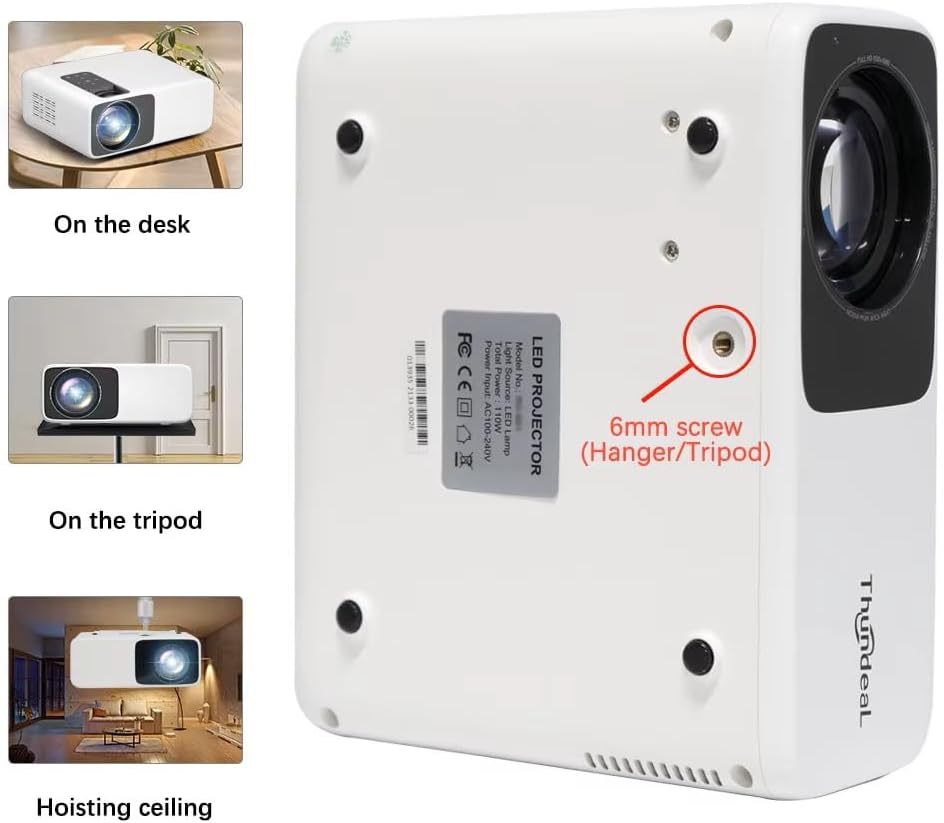
Image 4.1: Projector placement options and mounting point.
För optimalt viewing, ensure the projector is positioned perpendicular to the screen or wall. Adjust the projection distance (1.6 to 6.5 meters) to achieve your desired screen size (49 to 300 inches). A distance of 3-5 meters for a 93-150 inch screen is recommended for eye comfort.
4.2. Strömanslutning
- Anslut nätsladden till projektorns strömingång.
- Anslut den andra änden av nätsladden till ett vanligt eluttag.
- Tryck på strömknappen på projektorn eller fjärrkontrollen för att slå på den.
5. Bruksanvisning
5.1. Multi-Media Connections
The TD93 Pro projector offers various ports for connecting external devices:
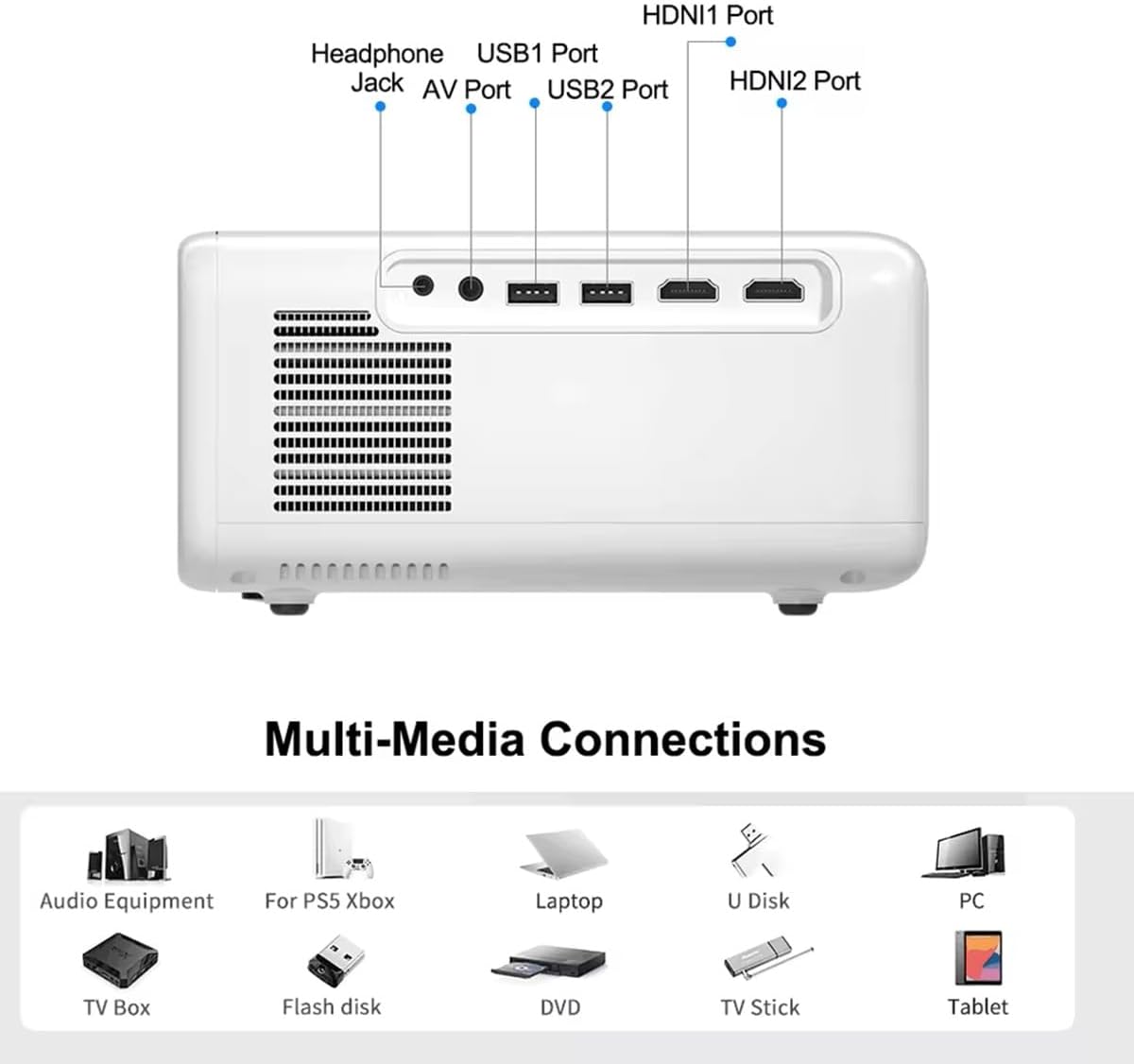
Image 5.1: Available multimedia connection ports.
- HDMI-portar (HDMI1, HDMI2): Connect devices such as TV boxes, gaming consoles (PS5, Xbox), laptops, or Blu-ray players.
- USB-portar (USB1, USB2): Connect USB flash drives for direct media playback (photos, videos, office documents).
- AV-port: Anslut äldre enheter med den medföljande AV-kabeln.
- Hörlursuttag (3.5 mm): Anslut externa hörlurar eller högtalare.
To switch input sources, use the "Source" button on the remote control or the projector's control panel and select the desired input (HDMI1, HDMI2, AV, USB).
5.2. Trådlös anslutning
5.2.1. WiFi Connection (2.4G/5G)
The projector supports dual-band WiFi for internet access and network features:
- Navigate to the "Settings" menu on the projector's Android interface.
- Select "Network & Internet" and then "Wi-Fi".
- Slå på Wi-Fi och välj önskat nätverk från listan.
- Ange lösenordet om du blir ombedd och anslut.
5.2.2. Bluetooth-anslutning
Connect Bluetooth-compatible audio devices like speakers or headphones:
- Go to "Settings" > "Connected devices" > "Bluetooth".
- Slå på Bluetooth.
- Sätt din Bluetooth -enhet i parningsläge.
- Välj din enhet från listan över tillgängliga enheter att para ihop.
5.3. Screen Mirroring (Airplay/WiFi-Display)
Wirelessly display content from your Android or iOS phone:

Image 5.2: Screen mirroring from iOS and Android devices.
- Ensure both your projector and mobile device are connected to the same Wi-Fi network.
- On the projector's main interface, select the "Screen Mirroring" or "Airplay/WiFi-Display" application.
- For iOS devices: Open Control Center, tap "Screen Mirroring" or "AirPlay Mirroring", and select the projector from the list.
- For Android devices: Open the notification panel, find "Cast", "Smart View", "Wireless Display", or similar function, and select the projector.
5.4. Bildjustering
5.4.1. Keystone Correction (6D)
The projector features 6D keystone correction to adjust image shape:
- Vertikal nyckelsten: Adjust +/- 60 degrees vertically using the remote control.
- 4-Point Corner Keystone: Adjust each of the four corners independently by +/- 60 degrees for side projection or irregular surfaces. This allows for precise rectangular image alignment.
Access keystone settings via the projector's menu or dedicated buttons on the remote.
5.4.2. Zoomfunktion
Adjust the display size from 50% to 100% proportionally without moving the projector. This feature is useful for fine-tuning the image size to fit your screen or wall.
Access the zoom function through the projector's menu settings.
5.5. Android OS and App Usage
The integrated Android 9.0 OS allows you to download and install applications directly from the Play Store. Ensure the projector is connected to Wi-Fi to access online services and apps.
- Play Butik: Access the Google Play Store to download streaming apps, games, and utilities.
- Uppspelning av media: Use pre-installed media players or download alternatives (e.g., VLC player for AC3 audio support).
6. Underhåll
6.1. Dammborttagning
The projector is equipped with a built-in dust net for easy cleaning. Regularly clean the dust net to maintain optimal performance and prevent overheating. Press to pop out the dust net for cleaning.
6.2. Kylsystem
The advanced cooling system is designed to dissipate heat efficiently and extend the lamp's lifespan. Ensure proper ventilation around the projector and avoid blocking air vents during operation.
6.3. Lamp Livstid
Lysdioden lamp has an estimated lifespan of 50,000 hours. No lamp replacement is typically required during the product's operational life under normal usage conditions.
7. Felsökning
7.1. No Image Displayed
- Kontrollera om projektorn är påslagen.
- Kontrollera att ingångskällan är korrekt vald (t.ex. HDMI1, USB).
- Se till att alla kablar är ordentligt anslutna.
- Justera fokus och keystone-korrigering.
7.2. Inget ljud
- Kontrollera volymnivån på projektorn och den anslutna källenheten.
- Ensure external speakers or headphones are properly connected and powered on if used.
- If using an external source, verify its audio output settings.
- For AC3 audio, ensure you are using a compatible player like VLC.
7.3. Connectivity Issues (WiFi/Bluetooth)
- Ensure WiFi is enabled and you are connected to the correct network.
- Starta om projektorn och din router/Bluetooth-enhet.
- For screen mirroring, confirm both devices are on the same Wi-Fi network.
7.4. Image is Blurry or Distorted
- Justera fokusringen på projektorlinsen.
- Use the keystone correction features to correct any trapezoidal distortion.
- Se till att projektionsytan är plan och slät.
8. Garanti och support
För garantiinformation och teknisk support, vänligen se dokumentationen som medföljde vid köptillfället eller kontakta din återförsäljare. Spara ditt inköpskvitto som köpbevis.
Ask a question about this manual
Ask about setup, troubleshooting, compatibility, parts, safety, or missing instructions. Manuals+ will review the question and use this page’s manual context to help answer it.