
SatelliteSale SS-RC-NOTUS-M2
SatelliteSale Notus M2 Remote Control User Manual
Model: SS-RC-NOTUS-M2 | Brand: SatelliteSale
1. Introduktion
This manual provides detailed instructions for the SatelliteSale Notus M2 Remote Control, a voice-activated Bluetooth replacement designed for Optimum Stream Devices. It covers setup, operation, maintenance, and troubleshooting to ensure optimal performance and user experience.

Bild: Fram view of the SatelliteSale Notus M2 Remote Control.
2. Paketets innehåll
Kontrollera att alla artiklar finns i paketet:
- 1 x SatelliteSale Notus M2 Remote Control
- 2 x AAA-batterier (förinstallerade eller medföljer separat)
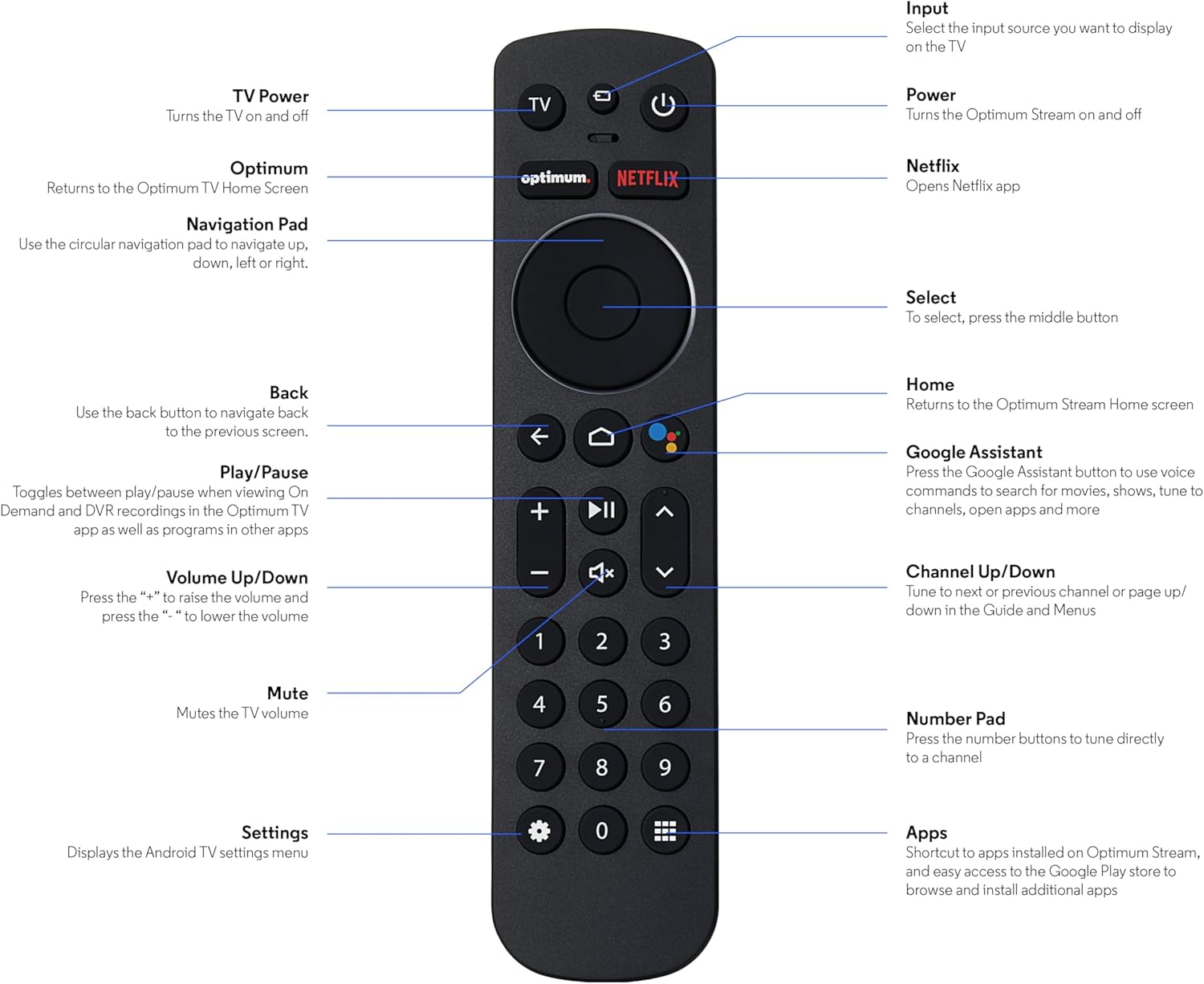
Image: The SatelliteSale Notus M2 Remote Control shown alongside two AAA batteries.
3. Remote Control Layout and Functions
Familiarize yourself with the buttons and their functions on your SatelliteSale Notus M2 Remote Control.

Image: Detailed diagram of the SatelliteSale Notus M2 Remote Control with labels for each button and its corresponding function.
- TV-ström: Slår på och stänger av TV: n.
- Input: Selects the input source to display on the TV.
- Driva: Turns the Optimum Stream device on and off.
- Optimalt: Returns to the Optimum TV Home Screen.
- Netflix: Opens the Netflix application directly.
- Navigeringsplatta (rund): Use to navigate up, down, left, or right within menus.
- Select (Middle Button of Nav Pad): Bekräftar ett val.
- Tillbaka: Återgår till föregående skärm.
- Hem: Returns to the Optimum Stream Home screen.
- Google Assistant (Microphone Icon): Activates voice commands for search, playback control, and hands-free assistance.
- Spela/pausa: Toggles between play and pause for content.
- Volym upp/ner (+/-): Justerar TV-volymen.
- Stum: Mutes the TV volume.
- Channel Up/Down (Arrows): Tunes to the next or previous channel, or navigates pages in guides and menus.
- Numeriskt tangentbord (0-9): Directly tunes to a channel or enters numerical input.
- Inställningar (kugghjulsikon): Displays the Android TV settings menu.
- Apps (Grid Icon): Provides shortcuts to installed apps on Optimum Stream and access to the Google Play Store.
4. Inställning
4.1 Batteriinstallation
The remote requires two AAA batteries. Ensure correct polarity when inserting.
- Leta reda på batterifacket på baksidan av fjärrkontrollen.
- Skjut batterilocket nedåt för att öppna.
- Sätt i två AAA-batterier och matcha (+) och (-) polerna enligt anvisningarna inuti batterifacket.
- Replace the battery cover by sliding it back into place until it clicks.

Bild: View på fjärrkontrollen med batterifacket öppet, vilket visar rätt riktning för isättning av AAA-batterier.
4.2 Pairing Your Remote with Optimum Stream Device
Your remote is designed to be paired with your Optimum Stream device for full functionality, including Bluetooth connectivity and voice control. If your remote becomes unpaired or if you are setting up a new remote, follow these steps:

Image: An illustration explaining the importance of direct line of sight for initial pairing and the flexibility of remote placement after pairing.
Viktig anmärkning: For initial pairing, the Optimum Stream box needs to be in direct line of sight of the remote. If your box is behind a TV or in a cabinet, you may need to temporarily relocate it so the remote can be directly pointed at the Stream box. Once pairing is complete, the Stream box can be moved out of sight as the remote uses Bluetooth.
- Ensure batteries are correctly installed in your remote.
- Turn on your TV and your Optimum Stream cable box.
- Press any button on the Stream remote to ensure you are on the Home Screen.
- Från startskärmen väljer du Inställningar (kugghjulsikon).
- Välja Device and Remote Settings > Fjärrkontroller och tillbehör.
- Välja Add Stream Remote.
- Följ instruktionerna på skärmen för att slutföra ihopparningsprocessen.
- You will see an on-screen confirmation once the remote is successfully paired.

Image: Visual representation of pairing steps 1 through 5, showing the remote and on-screen prompts.

Image: Visual representation of pairing steps 6 through 9, detailing the final stages of the pairing process.
5. Bruksanvisning
5.1 Röststyrning
The SatelliteSale Notus M2 remote features voice control for convenient operation. Press the microphone button (Google Assistant icon) and speak your command clearly. You can use voice commands to:
- Leta efter content (movies, TV shows, actors).
- Styr uppspelning (spela upp, pausa, spola framåt, spola bakåt).
- Öppna applikationer.
- Tune to specific channels.
- Get information (weather, sports scores).

Image: A person using the voice control feature of the remote, with sound waves emanating from the remote towards the TV screen.

Bild: Ett example of a voice command, "Hey Google, turn on the Spider-Man movie," displayed on screen with the remote.
5.2 Bluetooth Wireless Connectivity
Once paired, the remote utilizes Bluetooth for communication with your Optimum Stream device. This means you do not need a direct line of sight to operate the device, allowing for greater flexibility in remote usage and device placement.
5.3 Dedicated Streaming App Buttons
The remote includes dedicated buttons for popular streaming applications, such as Netflix. Pressing these buttons provides one-touch access to your favorite entertainment platforms.
6. Underhåll
- Rengöring: Använd en mjuk, torr trasa för att rengöra fjärrkontrollen. Använd inte flytande rengöringsmedel eller aerosoler.
- Batteribyte: Replace batteries when the remote's response becomes sluggish or it stops functioning. Always replace both batteries at the same time with new AAA batteries.
- Lagring: Förvara fjärrkontrollen på en sval, torr plats, skyddad från direkt solljus och extrema temperaturer.
7. Felsökning
| Problem | Möjlig orsak | Lösning |
|---|---|---|
| Fjärrkontrollen svarar inte. | Döda eller låga batterier. | Byt ut båda AAA-batterierna mot nya. |
| Remote not controlling Optimum Stream device. | Remote is unpaired or pairing failed. | Follow the pairing instructions in Section 4.2. Ensure direct line of sight during initial pairing. |
| Röststyrningen fungerar inte. | Remote not paired via Bluetooth, or microphone issue. | Ensure the remote is properly paired via Bluetooth (Section 4.2). Speak clearly and close to the microphone. |
| Knapparna är klibbiga eller svarar inte. | Smuts eller skräp under knapparna. | Rengör fjärrkontrollen med en mjuk, torr trasa. Undvik spill. |
8. Specifikationer
| Särdrag | Detalj |
|---|---|
| Modellnummer | SS-RC-NOTUS-M2 |
| Anslutningsmöjligheter | Bluetooth trådlös |
| Specialfunktioner | Voice Activated (Google Assistant), Dedicated App Buttons, Ergonomic Design |
| Kompatibla enheter | Optimum Stream Box (powered by Android TV) |
| Strömkälla | 2 x AAA-batterier (ingår) |
| Färg | Matt Svart |
| Objektets vikt | 3.66 uns |
| Paketets mått | 7.28 x 1.89 x 1.22 tum |
9. Garanti och support
For warranty information or technical support, please refer to the official SatelliteSale webwebbplatsen eller kontakta deras kundtjänst direkt. Spara ditt inköpskvitto för garantiärenden.
Tillverkare: Satellitförsäljning
Webplats: Visit the SatelliteSale Store on Amazon
Ask a question about this manual
Ask about setup, troubleshooting, compatibility, parts, safety, or missing instructions. Manuals+ will review the question and use this page’s manual context to help answer it.