
1. Introduktion
This manual provides essential information for the installation, operation, and maintenance of your ERYING ITX Gaming Motherboard Combo Kit with the 12th Gen Core i9 12900HK processor. This high-performance PC mainboard is designed for gaming enthusiasts, offering robust features and reliable performance. Please read this manual thoroughly before proceeding with installation and use to ensure proper functionality and to prevent damage.
2. Nyckelfunktioner
- Powerful 12th Gen Core i9 12900HK CPU: Features 14 cores and 20 threads for exceptional gaming and multitasking performance.
- DDR4 minnesstöd: Designed for high-speed data processing, enhancing overall system responsiveness.
- PCIe 4.0 Slots: Provides lightning-fast data transfer rates and compatibility with the latest graphics cards and expansion devices.
- M.2 Slot for NVMe SSDs: Supports ultra-fast SSD storage for quick load times and smooth gameplay.
- RJ45 2.5G Ethernet: Ensures high-speed internet connectivity, ideal for online gaming and streaming.
3. Paketets innehåll
Upon opening the package, please verify that all components are present and in good condition. The typical package contents include:
- ERYING ITX Gaming Motherboard with integrated 12th Gen Core i9 12900HK CPU
- I / O-skärm
- SATA-datakablar
- M.2 SSD Screw Kit
- Användarmanual (detta dokument)
- Drivrutins-CD/USB (eller nedladdningsinstruktioner)
Note: Specific accessories may vary. If any items are missing or damaged, please contact your retailer.
4. Installation och installation
Before beginning installation, ensure your workspace is clean, well-lit, and free of static electricity. It is recommended to wear an anti-static wrist strap.
4.1. Moderkort överview
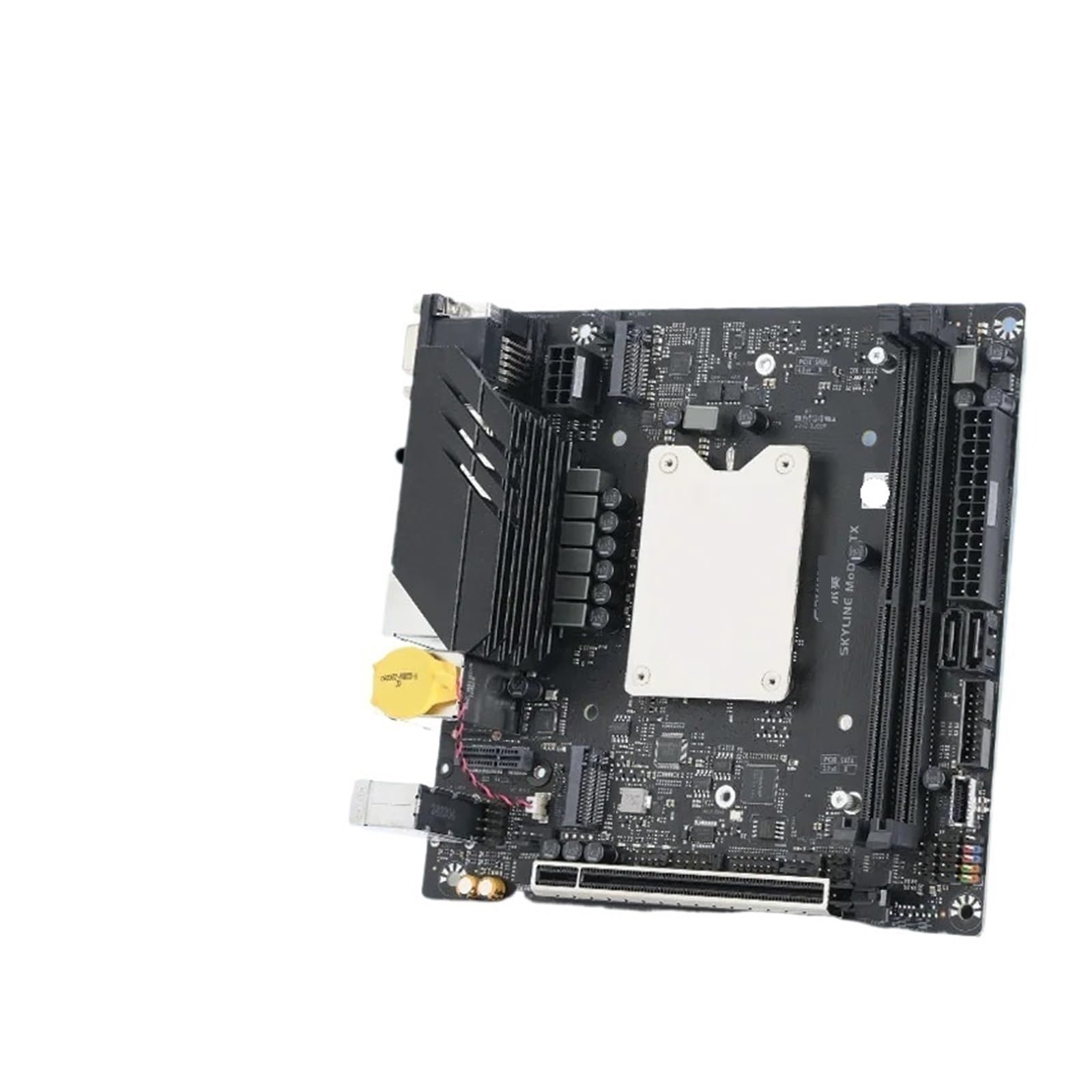
Image 1: ERYING ITX Gaming Motherboard. This image displays the compact ITX form factor motherboard, highlighting the CPU heatsink mounting area, DDR4 RAM slots, PCIe 4.0 slot, M.2 slot, and various rear I/O ports including USB, audio, and video outputs. The integrated CPU is located under the central heatsink mounting bracket.
4.2. Komponentinstallation
- Installera RAM-moduler: Locate the DDR4 memory slots. Open the clips on both ends of the slot. Align the RAM module with the slot, ensuring the notch on the module matches the key in the slot. Press down firmly on both ends until the clips snap into place.
- Installera M.2 SSD (om tillämpligt): Locate the M.2 slot. Insert the M.2 SSD at an angle into the slot. Gently push it down and secure it with the provided screw.
- Installera grafikkort (om tillämpligt): Locate the PCIe 4.0 x16 slot. Open the retention clip. Align your graphics card with the slot and press down firmly until it is fully seated and the clip locks. Secure the card to your PC case with screws.
- Montera moderkort i chassit: Carefully align the motherboard with the standoffs in your PC case. Secure the motherboard with screws, ensuring it is firmly seated but not overtightened.
- Anslut strömförsörjning: Connect the 24-pin ATX power connector and the 8-pin (or 4+4-pin) CPU power connector from your power supply to the corresponding ports on the motherboard. Connect SATA power cables to storage devices if used.
- Anslut frontpanelens kablar: Connect the power button, reset button, HDD LED, power LED, and front panel USB/audio cables to the appropriate headers on the motherboard. Refer to the motherboard diagram for exact pin locations.
- Anslut SATA-enheter: Connect SATA data cables from your storage devices (HDDs/SSDs) to the SATA ports on the motherboard.
5. Bruksanvisning
- Första start: After all components are installed and connected, connect your monitor, keyboard, and mouse. Power on your system.
- BIOS/UEFI-inställningar: During startup, press the designated key (usually DEL or F2) to enter the BIOS/UEFI setup utility. Here you can configure boot order, system time, and other advanced settings.
- Installation av operativsystem: Sätt i installationsmediet för operativsystemet (USB-enhet eller DVD). Ställ in startordningen i BIOS/UEFI för att prioritera installationsmediet. Följ anvisningarna på skärmen för att installera operativsystemet.
- Drivrutinsinstallation: After OS installation, install all necessary drivers for the motherboard components (chipset, audio, LAN, etc.). These can typically be found on the manufacturer's webwebbplatsen eller det medföljande drivrutinsmediet.
6. Underhåll
Regelbundet underhåll hjälper till att säkerställa moderkortets livslängd och optimala prestanda.
- Håll det rent: Periodically clean dust from inside your PC case using compressed air. Pay attention to heatsinks and fans to prevent overheating.
- BIOS/UEFI-uppdateringar: Kontrollera tillverkarens website for BIOS/UEFI updates. Updates can improve stability, compatibility, and performance. Follow update instructions carefully.
- Drivrutinsuppdateringar: Håll dina systemdrivrutiner uppdaterade för att säkerställa kompatibilitet och optimal prestanda med ny programvara och hårdvara.
- Miljökontroll: Använd systemet i ett välventilerat utrymme, borta från direkt solljus, överdriven värme, fuktighet och damm.
7. Felsökning
Det här avsnittet tar upp vanliga problem som du kan stöta på.
- Ingen ström:
- Ensure the power supply is connected correctly to the motherboard (24-pin ATX and 8-pin CPU).
- Check if the power supply switch is in the "ON" position.
- Kontrollera anslutningen av strömknappen på frontpanelen till moderkortet.
- Ingen skärm:
- Ensure the monitor is connected to the graphics card (or motherboard integrated graphics if no discrete GPU).
- Sätt tillbaka grafikkortet och RAM-modulerna.
- Testa med en annan skärm- eller bildskärmskabel.
- Systeminstabilitet/krascher:
- Check for overheating. Ensure CPU cooler is properly installed and fans are working.
- Verify RAM modules are correctly seated and functioning.
- Uppdatera drivrutiner och BIOS/UEFI till de senaste versionerna.
- Operativsystemet startar inte:
- Kontrollera startordningen i BIOS/UEFI.
- Ensure storage devices (SSD/HDD) are properly connected and detected.
- Run a diagnostic tool for your storage device.
For more complex issues, consult the manufacturer's support webwebbplatsen eller kontakta teknisk support.
8. Specifikationer
| Särdrag | Detalj |
|---|---|
| Stämpla | Generisk |
| Modellnamn | STBBTUSAB-COREI9-NONE |
| CPU | Integrated 12th Gen Intel Core i9-12900HK (14 Cores, 20 Threads) |
| Minnesstöd | DDR4 (Specific speeds and capacities depend on motherboard revision) |
| Expansionsplatser | PCIe 4.0 x16 (for graphics card) |
| Lagring | M.2 slot for NVMe SSDs, SATA ports |
| Nätverk | RJ45 2.5G Ethernet |
| Formfaktor | ITX |
| ASIN | B0FS7RWD3J |
9. Garanti och support
This product is covered by a standard manufacturer's warranty. For specific warranty terms and conditions, please refer to the documentation provided with your purchase or visit the manufacturer's official website. For technical support, troubleshooting assistance, or to inquire about warranty claims, please contact your retailer or the product manufacturer directly.
Vänligen spara ditt inköpsbevis för garantiändamål.