1. Introduktion
This manual provides detailed instructions for the installation, operation, and maintenance of your Rimoody 6G+128G 8 Core Wireless Carplay Android Car Radio. Please read this manual thoroughly before installation and use to ensure proper function and to prevent damage. This unit is specifically designed for Peugeot 508 models manufactured between 2011 and 2018.
2. Produkt överview och funktioner
The Rimoody Android Car Radio is an advanced multimedia system featuring a 9-inch IPS capacitive touchscreen. It offers a comprehensive suite of functionalities to enhance your driving experience.
Nyckelfunktioner:
- Operativsystem: Android with 6GB RAM + 128GB ROM for smooth performance.
- Visa: 9-inch IPS capacitive touchscreen with 1280 x 720 resolution.
- Processor: 8-core processor for fast operation.
- Anslutning: Built-in WiFi, Bluetooth 5.0, Dual USB ports.
- Smartphone-integration: Wireless/Wired Carplay and Android Auto, Android/iOS Mirror Link.
- Navigering: Built-in GPS with support for offline maps (requires internet for initial download) and online navigation via Google Maps or other apps.
- Audio: FM/AM/RDS radio tuner with 30 preset stations, DSP EQ for customizable sound.
- Säkerhet och bekvämlighet: Supports AHD/CVBS reverse input for rear view camera, steering wheel control, split screen function, external microphone support.
- Valfria funktioner: DAB+, OBD, DVR, Intelligent Voice Control, Network Radio, Global Weather Display (adapters/modules not included).
- Canbus-integration: Syncs real-time vehicle information.

Image: Wireless/Wired Carplay, Android Auto, and Mirror Link capabilities. This image illustrates how the car radio integrates with smartphones for navigation, music, and communication, showing icons for phone calls, music playback, and navigation apps.

Image: GPS Navigation and WiFi. The image displays the car radio screen showing both offline and online map interfaces, along with a YouTube video playing, demonstrating the unit's internet connectivity and multimedia capabilities.
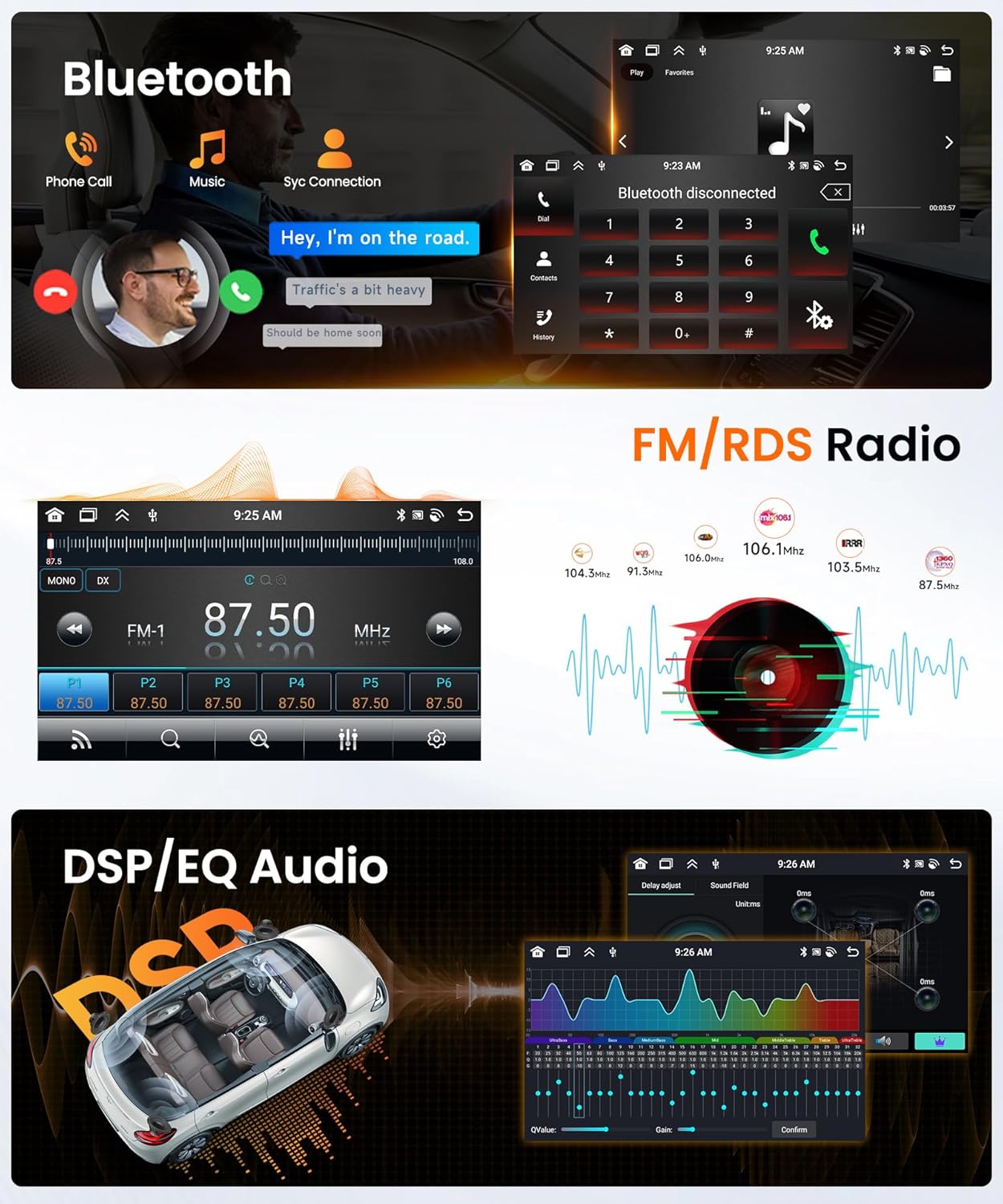
Image: Bluetooth, FM/RDS Radio, and DSP/EQ Audio. This image shows the Bluetooth call interface, FM radio tuner with frequency display, and the digital sound processing (DSP) equalizer settings for audio customization.
3. Installation och installation
Proper installation is crucial for the optimal performance of your car radio. If you are unsure about any steps, it is recommended to seek professional assistance. Ensure the vehicle's power is disconnected before starting installation.
3.1 Inkluderade komponenter:
- Huvudenhet
- Instruktionsmanual
- GPS-antenn
- RCA-kabel
- Canbus-dekoder
- USB-kabel (x2)
- Radioantennadapter
- Omvänd linje
- Monteringstillbehör
- Installation Tool (Pry Bar)
- Strömkabel
- Bak View Kamera
- Extern mikrofon

Image: Product dimensions and included accessories. This image provides a visual representation of the car radio's physical size and lists all the components that come in the package, such as cables, antennas, and the rear view kamera.
3.2 Disassembly Precautions:
- Use a pry tool to carefully remove the HVAC control panel. Disconnect the wiring and then unscrew the 4 screws securing the main unit.
- Disconnect the main unit wiring. Use a pry bar to remove the trim above the original car's radio. Unscrew the two screws securing the top of the radio.
- Use a pry bar to remove the outer frame of the original car's radio. Unscrew the four screws, remove the radio, disconnect the wiring, and take out the air vents on both sides from the car frame.
3.3 Installationssteg:
Notera: If the wiring harness does not match your vehicle, please contact customer service to request the correct wiring harness.
- Install the new radio into the new frame and tighten the 4 screws on the back. Attach the air vents to the new frame and secure the brackets. Then tighten the 4 screws on both sides of the brackets.
- Connect the new radio to the corresponding vehicle wiring harness and ensure the protocol box (Canbus) is properly connected. Then install the new radio back into the vehicle and tighten the 2 screws at the top.
- Reconnect all panels and trim pieces in reverse order of disassembly.
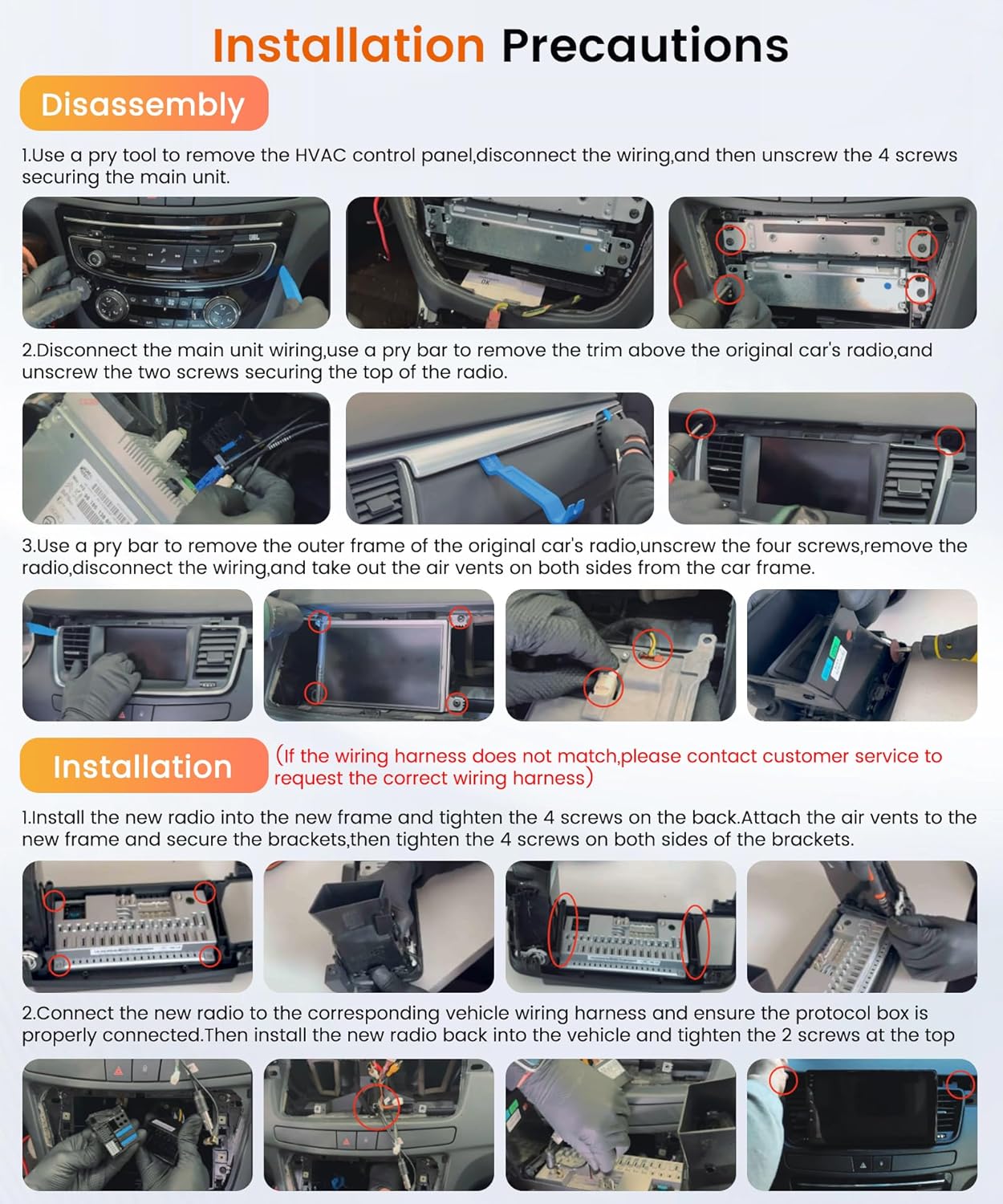
Image: Installation Precautions. This image provides a visual, step-by-step guide for both the disassembly of the original car radio and the installation of the new Rimoody unit, showing specific points for prying and screw removal/fastening.
4. Bruksanvisning
4.1 Grundläggande användning
- Ström på/av: Press and hold the power button on the unit or steering wheel control to turn the unit on or off. A short press typically mutes/unmutes audio.
- Pekskärm: Navigate the interface by tapping, swiping, and pinching on the 9-inch display.
- Volymkontroll: Justera volymen med de fysiska knapparna på enheten eller rattkontrollerna.
4.2 Systeminställningar
- Android-system: Access various settings through the 'Settings' icon on the home screen, similar to an Android smartphone.
- WiFi-anslutning: Go to Settings > Network & Internet > Wi-Fi to connect to an available network for online features and app downloads.
- Fabriksinställningar Nyckelord: Standardnyckelordet för fabriksinställningar är 1234. Use with caution as incorrect changes can affect system stability.
- Språk: The system supports multiple languages including Chinese, English, French, Italian, Korean, Japanese, Arabic, Spanish, Portuguese, Russian, Turkish, Vietnamese, Hebrew, Polish, and German. Change in system settings.
4.3 Navigering
- GPS: The unit has built-in GPS. For navigation, you can use pre-installed offline maps (download data via internet) or online map applications like Google Maps after connecting to WiFi.
- App Store: Download additional navigation apps (e.g., Waze) from the Google Play Store.
4.4 Smartphone-integration
- Wireless/Wired Carplay & Android Auto: Connect your iOS or Android phone to access phone functions, music, and navigation via voice control or the touchscreen. Follow on-screen prompts for initial setup.
- Mirror Link (Android/iOS): Connect your smartphone via the original USB cable or WiFi to mirror its screen content onto the car radio display. This allows you to view videos, navigate, and listen to music directly from your phone.
4.5 Ljud och radio
- Bluetooth: Pair your mobile phone via Bluetooth 5.0 for hands-free calling and audio streaming. The unit includes a built-in microphone and supports an external microphone.
- FM/RDS-radio: Access the radio application to scan for FM/AM stations. RDS (Radio Data System) provides additional information like station name and traffic updates where available. You can manually search or use auto-scan.
- DSP-EQ: Utilize the Digital Sound Processor (DSP) and Equalizer (EQ) settings to fine-tune audio output. Adjust frequency, balance, and choose from various sound types to optimize your listening experience.
4.6 Kamera och rattkontroll
- AHD bak View Kamera: When the vehicle is shifted into reverse gear, the car radio screen will automatically display the rear view image, enhancing safety during parking and reversing.
- Rattkontroll: The unit supports your vehicle's steering wheel controls. Access the 'Steering Wheel Control' settings in the system to map functions (e.g., volume, track skip, mode) to your steering wheel buttons.

Bild: Baksida View Camera and Steering Wheel Control. This image shows the car radio displaying the rear view camera feed with parking guidelines, and the interface for programming steering wheel control buttons.
4.7 avancerade funktioner
- Delad skärm: The Android system supports a triple split screen function, allowing you to display up to three applications simultaneously (e.g., navigation, music player, and contacts).
- Intelligent Voice Control (Optional): If equipped, use natural language commands to ask questions, get directions, check weather, or play music.
- Nätverksradio (valfritt): With special equipment, access mainstream radio stations from over 20 countries and regions globally via internet connection.
- Global väderdisplay (valfritt): With special equipment, view real-time weather information for global cities, including temperature, humidity, and wind conditions.

Image: Split Screen and Optional Accessories. This image demonstrates the split-screen feature, showing navigation, music, and radio simultaneously. It also highlights support for optional accessories like DVR, DAB+, and OBD2 (sold separately).

Image: Intelligent Voice, Internet Radio, and Global Climate. This image illustrates the optional intelligent voice control feature, internet radio interface with various stations, and a global weather display showing temperature and conditions.
5. Underhåll
- Rengöring: Använd en mjuk, torr trasa för att rengöra skärmen och enheten. För envisa fläckar, använd en lätt torr trasa.amp En trasa med ett milt, icke-slipande rengöringsmedel kan användas, så att ingen vätska kommer in i enheten.
- Programuppdateringar: Periodically check for system software updates via the 'Settings' menu when connected to WiFi. Updates can improve performance and add new features.
- Temperatur: Använd enheten inom det angivna arbetstemperaturintervallet på -20 ℃ till 75 ℃. Extrema temperaturer kan påverka prestanda och livslängd.
6. Felsökning
- Ingen ström: Kontrollera alla strömanslutningar och säkringar. Se till att fordonets tändning är påslagen.
- Inget ljud: Verify volume settings, check speaker connections, and ensure the unit is not muted. Check DSP/EQ settings.
- GPS-signalförlust: Se till att GPS-antennen är korrekt installerad och har en tydlig yta view av himlen.
- Bluetooth-anslutningsproblem: Ensure Bluetooth is enabled on both the car radio and your phone. Try unpairing and re-pairing the devices.
- Pekskärmen svarar inte: Försök att starta om enheten. Om problemet kvarstår kan en fabriksåterställning (med nyckelordet 1234) vara nödvändig, men detta kommer att radera all användardata.
- Systemet är långsamt/fryser: Close unnecessary applications. Clear cache from time to time. If persistent, a factory reset may be required.
- Bak View Kameran visar inte: Check the camera's power and video connections. Ensure the reverse gear signal wire is correctly connected.
7. Specifikationer
| System | Android |
| Skärmstorlek | 9 tum |
| Minne (RAM+ROM) | 6 GB (RAM) + 128 GB (ROM) |
| Skärmupplösning | 1280 x 720 |
| Uteffekt | 4 x 45 W (totalt 180 watt) |
| Bluetooth-version | 5.0 |
| Arbetstemperatur | -20℃ till 75℃ |
| Rattkontroll | Stöds |
| Videoutgång | Stöds |
| Omvänd ingång | AHD/CVBS |
| Extern mikrofon | Stöds |
| Delad skärm | Stöds |
| Kartor | Inbyggda offlinekartor (internet krävs för datanedladdning) |
| WiFi | Stöds |
| USB-portar | Dubbel USB-port |
| Fabriksinställningsnyckelord | 1234 |
| Kompatibla enheter | Smartphone |
8. Garanti och support
Rimoody is committed to providing quality products and customer satisfaction. While specific warranty details should be referenced from your purchase documentation, we offer dedicated customer service and technical support.
If you encounter any problems with installation, operation, or have questions regarding your car radio, please do not hesitate to contact our professional customer service team and technicians. We are ready to assist you in resolving any issues.