
Introduktion
This instruction manual provides essential information for the proper setup, operation, maintenance, and troubleshooting of your Fluval AquaSky 3.0 LED 12 Watts aquarium lighting system. Please read this manual thoroughly before use to ensure optimal performance and longevity of your product.
The Fluval AquaSky 3.0 LED is an advanced lighting system designed for aquatic environments, offering customizable light spectrums and dynamic effects. It features RGB + Dual White LEDs and is exclusively controlled via the FluvalConnect mobile app, utilizing both Bluetooth and Wi-Fi (2.4 GHz) connectivity.
Produkt överview
The Fluval AquaSky 3.0 LED light provides a comprehensive solution for aquarium illumination. Key features include:
- Customizable Color Spectrum: Adjust the light output with RGB and dual white LEDs to create ideal conditions for your aquatic life.
- Programmable Light Cycle: Set a 24-hour light cycle to simulate natural day and night conditions.
- Dynamiska effekter: Access various pre-set weather effects and light simulations.
- Mobilappkontroll: Exclusively controlled via the FluvalConnect mobile app for seamless management.
- Dubbel anslutning: Connect via Bluetooth or Wi-Fi (2.4 GHz) for flexible control options.
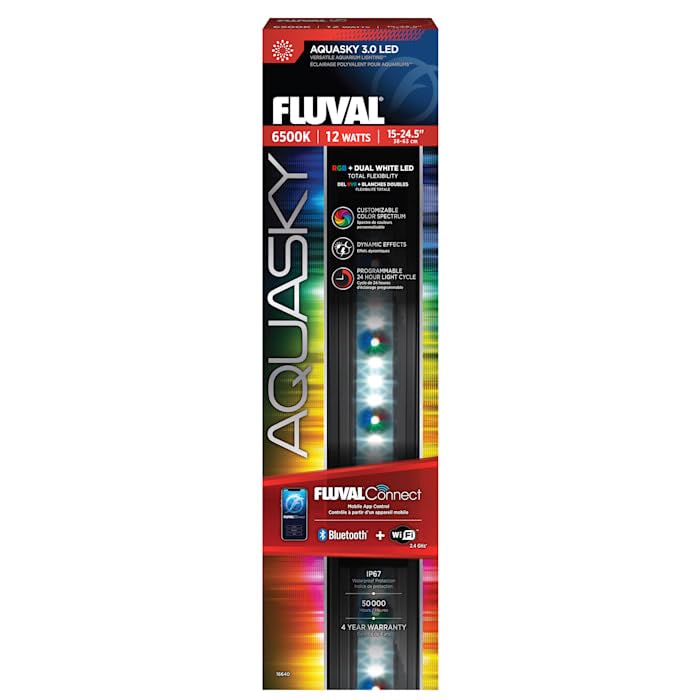
Image: Fluval AquaSky 3.0 LED 12 Watts product packaging, showing key features and branding.
Inställning
- Packa upp enheten: Carefully remove the Fluval AquaSky 3.0 LED light and all accessories from the packaging. Inspect for any damage.
- Positionering: Place the light fixture securely over your aquarium. Ensure the mounting legs are stable. Note: For tanks without a lid, ensure the light's legs are securely positioned to prevent accidental displacement.
- Strömanslutning: Connect the power adapter to the light fixture, then plug the adapter into a suitable electrical outlet. Ensure a drip loop is formed to prevent water from running along the cord to the outlet.
- Download FluvalConnect App: Download the FluvalConnect mobile app from your device's app store (Google Play for Android or App Store for iOS).
- Första parning: Open the FluvalConnect app and follow the on-screen instructions to pair your device with the AquaSky 3.0 LED light via Bluetooth or Wi-Fi (2.4 GHz).
Bruksanvisning
The Fluval AquaSky 3.0 LED is controlled exclusively through the FluvalConnect mobile application. There is no physical on/off button on the unit itself.
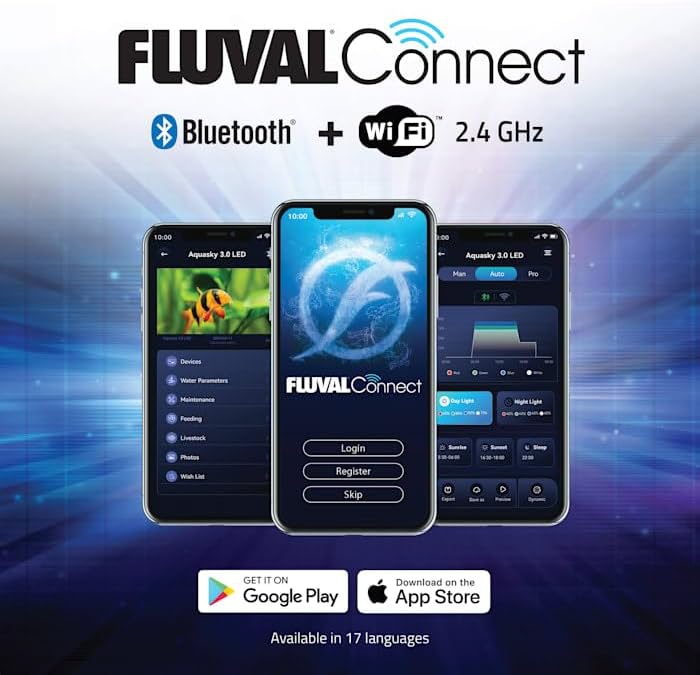
Image: Screenshots of the FluvalConnect mobile application interface, showing login, device management, and light settings.
- Starta appen: Open the FluvalConnect app on your smartphone or tablet.
- Anslut till enhet: Ensure your mobile device's Bluetooth is enabled or it is connected to the same 2.4 GHz Wi-Fi network as your AquaSky 3.0 LED. Select your light from the list of available devices.
- Adjust Light Settings:
- Färgspektrum: Use the color wheel or sliders within the app to customize the RGB and white LED output.
- Ljuscykel: Set a 24-hour schedule for your light, including sunrise, daylight, sunset, and moonlight phases.
- Dynamiska effekter: Choose from various pre-programmed weather effects (e.g., cloudy, lightning) or other dynamic light simulations.
- På/av-kontroll: To turn the light on or off, use the dedicated controls within the FluvalConnect app. There is no manual switch on the fixture.
Underhåll
Regular maintenance ensures the optimal performance and lifespan of your Fluval AquaSky 3.0 LED light.
- Rengöring av fixturen: Disconnect the power before cleaning. Wipe the exterior of the light fixture with a soft, damp trasa. Använd inte slipande rengöringsmedel eller lösningsmedel. Se till att inget vatten kommer in i de elektriska komponenterna.
- LED-vård: The LEDs are designed for long-term use and do not require replacement under normal operating conditions. Keep the LED surface clean to maintain light output efficiency.
- Inspektion av nätsladd: Periodically inspect the power cord and adapter for any signs of damage. If damaged, discontinue use and replace with genuine Fluval parts.
Felsökning
| Problem | Möjlig orsak | Lösning |
|---|---|---|
| Ljuset tänds inte. | No power, app not connected, or light is off in the app. |
|
| Cannot connect to the light via FluvalConnect app. | Bluetooth/Wi-Fi issues, app permissions, or light is out of range. |
|
| Light settings are not saving or applying. | Connectivity interruption or app synchronization issue. |
|
Specifikationer
| Stämpla | Fluval |
| Modellnummer | 16640 |
| Energiförbrukning | 12 Watt |
| LED typ | RGB + Dual White LEDs |
| Kontrollmetod | FluvalConnect Mobile App (Bluetooth & Wi-Fi 2.4 GHz) |
| Objektets vikt | 5.3 pund |
| Paketets mått | 19 x 5 x 2 tum |
| UPC | 015561166409 |
Garanti & Support
For warranty information, please refer to the documentation included with your product or visit the official Fluval website. Fluval typically offers a 4-year warranty on their AquaSky 3.0 LED products.
For technical support, troubleshooting assistance, or to purchase replacement parts, please contact Fluval customer service or visit their official brand store:


