
Introduktion
The Hoestr Body Camera Hoestr03 is a compact, high-definition camcorder designed for various recording needs, including home security, patrol, travel, delivery, and outdoor activities. Featuring 1296P video recording, IR night vision, and a 180° rotatable lens, this device offers versatile functionality. Its long-lasting 3000mAh battery ensures extended recording times, and the included 64GB TF card provides ample storage. This manual provides detailed instructions for setup, operation, and maintenance to ensure optimal performance of your device.
Paketets innehåll
Kontrollera att alla artiklar som anges nedan ingår i ditt paket:
- 1 x Hoestr Body Camera Hoestr03
- 1 x 64GB TF-kort
- 2 x Back Clips (for clothes and bicycle mounting)
- 1 x USB-C-kabel
- 1 x Användarmanual
Produkt överview
The Hoestr Body Camera Hoestr03 is designed for ease of use and durability. Familiarize yourself with its components and controls.

Figure 1: Hoestr Body Camera Hoestr03, showing its compact size when held in hand.
Nyckelfunktioner:
- Kompakt design: Palm-sized (3.5 x 1.6 x 0.6 inches) and lightweight (2.75 ounces) for discreet and portable use.
- 180° roterbar lins: Manually adjust the lens to capture footage from various angles (front, top, back, or anything in between).
- 1.54-tums LCD-skärm: För live view, menynavigering och uppspelning.
- Integrated Clips: Includes sturdy clips for attaching to clothing, backpacks, or bicycles.
- USB-C-port: För laddning och dataöverföring.
- Micro SD -kortplats: Stöder upp till 256 GB (64 GB-kort ingår).
Kontroller och indikatorer:

Figure 2: Quick Operation Help diagram illustrating the location and function of buttons and ports.
- TF-kortplats: Insert/remove Micro SD card (FAT32, 256GB MAX).
- Ström på / av-knapp: Långt tryck för att slå på/stänga av.
- Meny/OK-knapp: Long press 'M' key to enter menu, set language, date, formatting. Press 'OK' to confirm selections.
- Record Video Slider: Slide up to start recording video, slide down to save.
- Night Vision Key (Volume +): Short press during recording to activate/deactivate night vision.
- Image Rotation Key (Volume -): Press before recording to rotate upside-down image.
- Record Audio Slider: Slide up to start recording audio, slide down to save.
- USB-C-port: Connect to computer for file management or charging.
Inställning
1. Sätta i TF-kortet
Ensure the device is powered off. Gently insert the provided 64GB TF card into the TF card slot until it clicks into place. The camera supports FAT32 format and up to 256GB capacity.
2. Laddar enheten
Connect the USB-C cable to the camera's USB-C port and the other end to a USB power adapter (not included) or a computer. The device takes approximately 4 hours to fully charge. A full charge provides up to 10 hours of 1080P video recording (under default settings).
Grundläggande drift
1. Ström på/av
Long press the Power On/Off button located on the side of the device until the screen lights up. To power off, long press the same button until the screen shuts down.
2. Videoinspelning
With the device powered on, slide the Record Video slider up to begin 1080P video recording. The screen will display recording indicators. To stop recording and save the file, slide the slider down.
3. Ljudinspelning
To record audio only, slide the Record Audio slider up. The device will begin recording audio. To stop recording and save the audio file, slide the slider down.
4. Ta foton
While in standby mode, press the Photo button (often integrated with the Menu/OK button or a dedicated button) to capture a still image.
Avancerade funktioner
1. 180° roterbar lins
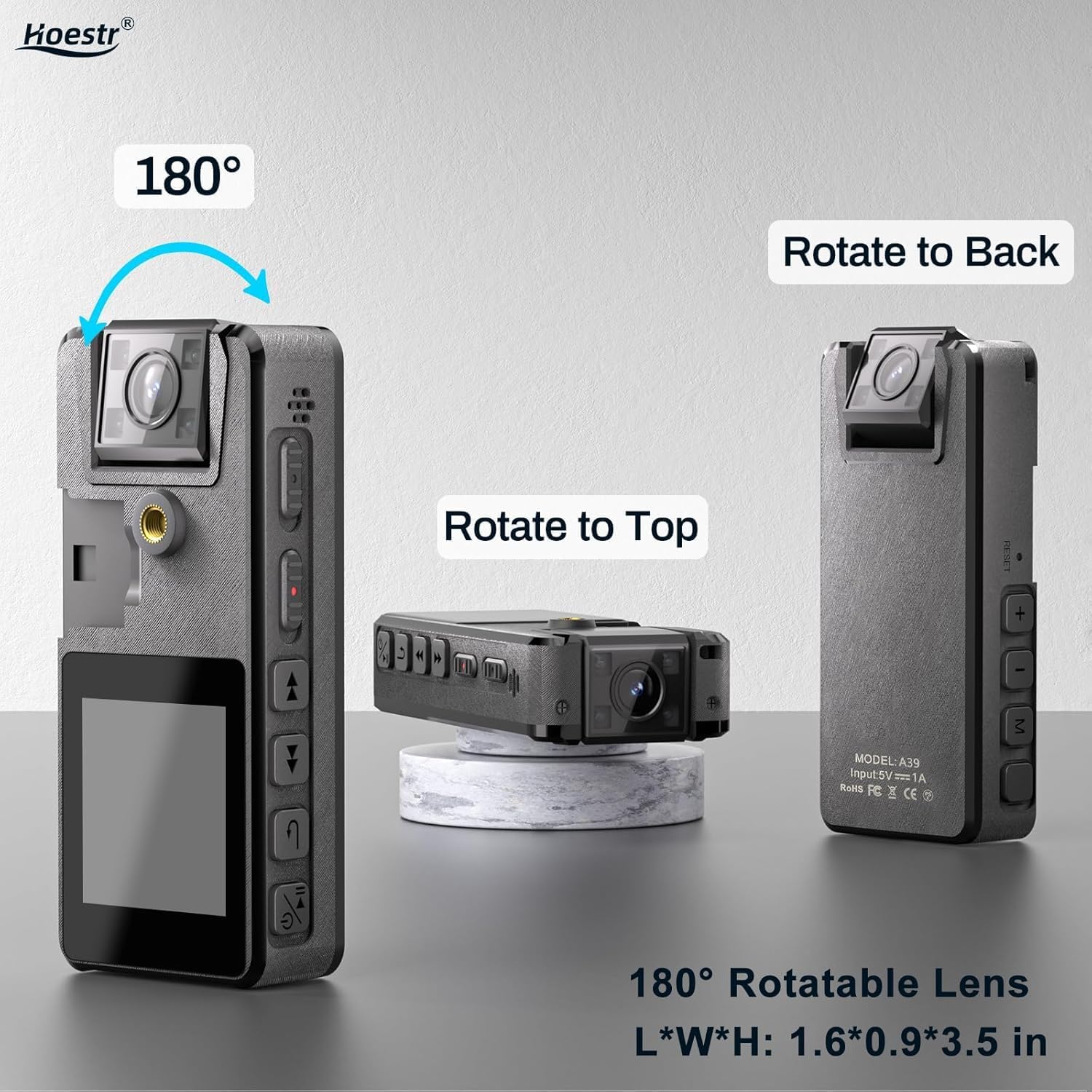
Figure 3: The 180° rotatable lens allows for flexible recording angles, shown in various positions.
The camera's lens can be manually rotated 180 degrees. This allows you to adjust the viewing angle to suit your recording needs, whether it's forward-facing, upward, or backward.
2. IR-nattseende

Figure 4: IR Night Vision in action, providing clear visuals in low-light conditions.
To activate night vision, short press the 'Volume +' button during recording. This feature enables the camera to record visual images even in dimly lit environments.
3. Rörelsedetektering
Enable motion detection through the device's menu. When activated, the camera will automatically start recording when it detects movement and stop when the scene becomes static. This helps conserve battery life and storage space.
4. Bildrotation
If your image appears upside down due to the lens orientation, press the 'Volume -' button before recording to rotate the image 180 degrees. This eliminates the need for post-processing.
5. Auto Save & Time Stamp
Videos are automatically saved every 10 minutes to prevent data loss. All recordings come with a default time stamp for easy organization and verification.
Ansluter till dator
To manage your recorded files, connect the Hoestr Body Camera Hoestr03 to your computer using the provided USB-C cable. The device will appear as a removable storage drive. You can then access, transfer, or delete your video and audio files.
Video 1: A seller-provided video demonstrating the use experience of a mini body camera, including connecting to a computer.
Underhåll
- Håll kameran ren genom att torka av den med en mjuk, torr trasa.
- Undvik att utsätta enheten för extrema temperaturer, direkt solljus eller fukt.
- Försök inte att ta isär eller reparera kameran själv, eftersom det upphäver garantin.
- Säkerhetskopiera regelbundet dina inspelade files för att förhindra dataförlust.
Felsökning
If you encounter any issues with your Hoestr Body Camera Hoestr03, please refer to the following common solutions:
- Enheten slås inte på: Se till att batteriet är laddat. Anslut till en strömkälla och försök igen.
- Kan inte spela in: Check if the TF card is inserted correctly and has sufficient free space. Format the TF card if necessary (this will erase all data).
- Dålig videokvalitet: Ensure the lens is clean. Check lighting conditions and activate night vision if needed.
- Bilden är upp och ner: Use the 'Volume -' button to rotate the image before recording.
- Enheten svarar inte: Try resetting the device by gently pressing the reset button (if available, refer to the physical device for location) or by powering it off and on again.
Specifikationer
| Särdrag | Specifikation |
|---|---|
| Stämpla | Hoestr |
| Modellnummer | Hoestr03 |
| Objektets vikt | 2.82 uns |
| Produktens mått | 3.5 x 0.9 x 1.6 tum |
| Batteri | 3000mAh litiumjonbatteri (ingår) |
| Videoinspelningsupplösning | 1296P, 1080P, 720P |
| Videoinspelningsformat | MOV |
| Ljudformat som stöds | AAC |
| Fotosensorteknik | CMOS |
| Typ av flashminne | Micro SD (upp till 256 GB) |
| Skärmstorlek | 1.54 tum |
| Anslutningsteknik | USB |
| Specialfunktioner | IR Night Vision, Motion Detection, 180° Rotatable Lens |
Garanti och support
Hoestr offers a comprehensive 12-month warranty for the Body Camera Hoestr03. Additionally, lifetime customer assistance is available to address any inquiries or issues you may encounter. Please do not hesitate to reach out to us anytime, and we guarantee a response within 24 hours.
Video 2: En videovisning från säljarenasing the use experience and features of mini body cameras.