
1. Introduktion
This manual provides detailed instructions for the LAUNCH Creader Elite V3.0 OBD2 Scanner, a professional diagnostic tool designed specifically for Land Rover and Jaguar vehicles. It covers device setup, operational procedures for various diagnostic and service functions, software updates, and troubleshooting tips. Please read this manual thoroughly before operating the device to ensure correct usage and optimal performance.
2. Produkt överview
2.1. Vad finns i lådan
- 1 * LAUNCH Creader Elite V3.0 OBD2 Scanner for JLR
- 1 * OBD2 Diagnostic Cable
- 1 * Snabbstartguide
- 1 * Användarmanual
2.2. Nyckelfunktioner
The LAUNCH Creader Elite V3.0 offers a comprehensive suite of features for vehicle diagnostics and maintenance:
- Förbättrad hårdvara: Features Android 8.1 operating system, 32GB ROM, 3000mAh battery, and 2.4&5GHz dual-band Wi-Fi for improved performance.
- DoIP Protocol Support: Supports the new DoIP protocol for Land Rover & Jaguar models manufactured after 2017 (requires an adapter).
- Full Systems Diagnostics: Provides in-depth scanning for all available vehicle modules, including engine, transmission, ABS, SRS, and more.
- Dubbelriktad styrning (aktivt test): Allows control of vehicle components and systems for active testing, such as windows, mirrors, wipers, and horn.
- Comprehensive Service Functions: Includes Oil Reset, Electronic Parking Brake (EPB) Reset, Battery Management System (BMS) Reset, Steering Angle Sensor (SAS) Calibration, Injector Coding, Throttle Relearn, Height Calibration, Transmission Adaptation, Crankshaft/Camshaft Relearn, Sunroof Calibration, and more.
- 4-i-1 live-dataström: Displays real-time data from multiple sensors simultaneously in a graphical format, with recording and playback capabilities.
- Smart Diagnostic Functions: Features Auto VIN for automatic vehicle identification, DTC Lookup for code explanations, and the ability to generate and share diagnostic reports.
- Fullständiga OBD2-funktioner: Supports all 10 OBD2 test modes for universal vehicle compatibility (post-1996 models).
- Livstidsfria uppdateringar: Provides lifetime free software updates specifically for Land Rover and Jaguar vehicle brands.
2.3. Enhetsjämförelse
The Creader Elite V3.0 offers significant upgrades over previous versions:

Image: Comparison of Creader Elite V3.0, V2.0, and V1.0, highlighting V3.0's superior features like DoIP, Android 8.1, 32GB memory, and 2.4&5GHz WiFi.
2.4. Fysisk beskrivning
The device features a durable orange casing with a 4-inch touchscreen display. The back of the device includes product identification details such as the model number, FCC ID, and serial number.
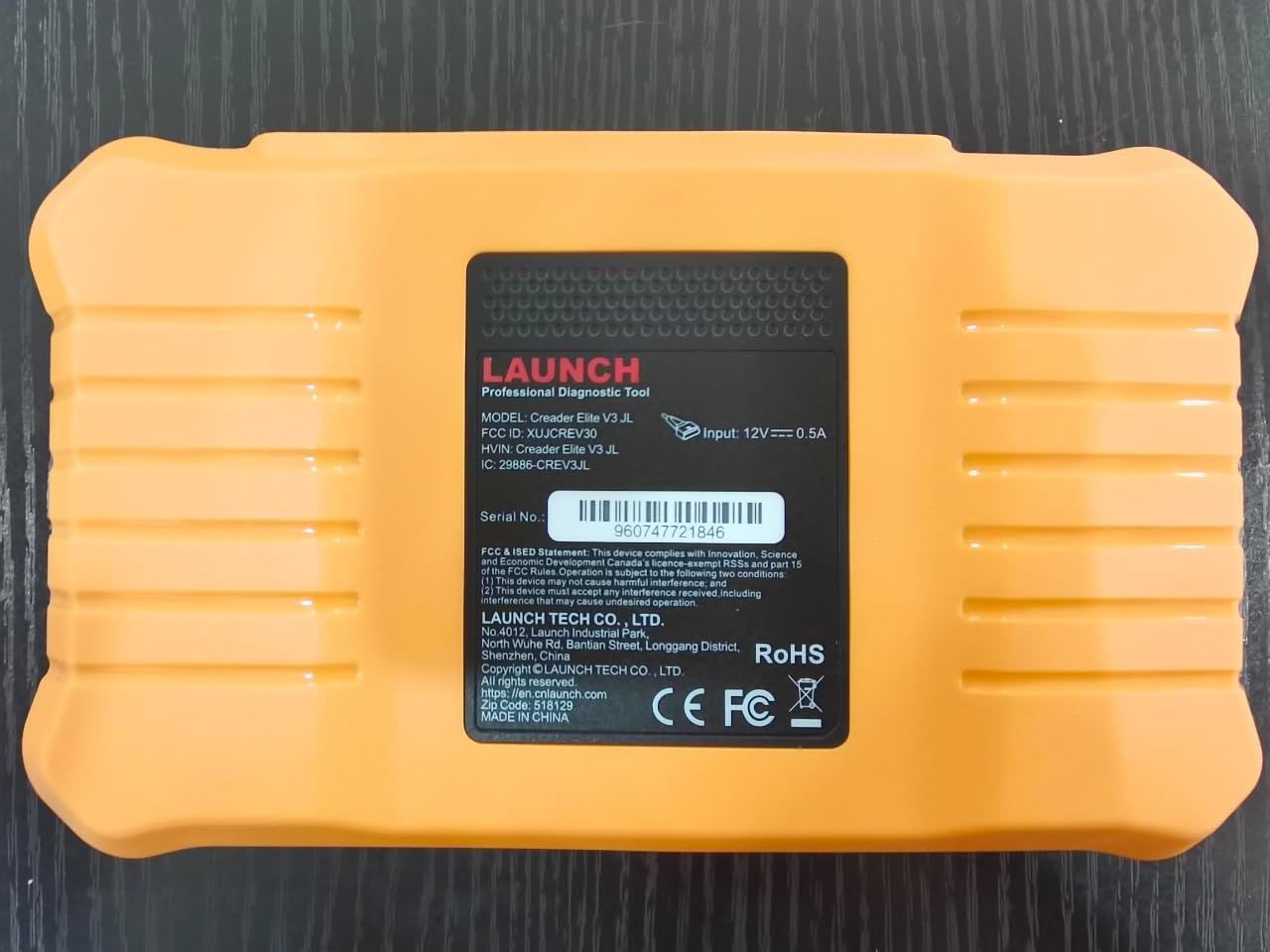
Bild: Baksida view of the LAUNCH Creader Elite V3.0, displaying the model number, FCC ID, and serial number (e.g., 960747721846).
3. Inställning
3.1. Första strömpåslagning
- Se till att enheten är fulladdad eller ansluten till en strömkälla.
- Tryck och håll strömknappen intryckt tills skärmen tänds.
- Följ anvisningarna på skärmen för att välja önskat språk och region.
3.2. Wi-Fi-anslutning
- Från huvudmenyn, navigera till Inställningar.
- Välja Wi-Fi och slå på den.
- Välj önskat Wi-Fi-nätverk från listan och ange lösenordet om du blir ombedd att göra det.
- Confirm the connection. A stable internet connection is required for software updates and online resources.
3.3. Registrering och aktivering
Upon first use or after a factory reset, you may be prompted to register your device. Follow the on-screen instructions to create an account or log in. This step is crucial for accessing software updates and technical support.
4. Bruksanvisning
4.1. Anslutning till fordonet
- Locate the vehicle's OBD2 diagnostic port, typically under the dashboard on the driver's side.
- Se till att fordonets tändning är i ON position (engine off or running, depending on the test).
- Connect the OBD2 diagnostic cable to the vehicle's OBD2 port and to the LAUNCH Creader Elite V3.0 device.
- The device will automatically power on or prompt you to do so.
4.2. Full Systems Diagnostics
This function allows you to scan all available electronic control units (ECUs) in the vehicle.

Image: Display showing OE-level all system diagnostics, including Auto VIN, fault codes, 4-in-1 live data, and MIL reset.
- Välj från huvudmenyn Lokal diagnos.
- Choose the vehicle brand (Land Rover or Jaguar).
- Välja Autosökning or Manuellt val. Auto Search (Auto VIN) will attempt to automatically identify the vehicle.
- Once the vehicle is identified, select Hälsorapport or Systemskanning to perform a comprehensive scan of all modules.
- Review the diagnostic trouble codes (DTCs) and ECU information. You can then choose to clear codes if necessary.
4.3. Servicefunktioner
The Creader Elite V3.0 provides numerous maintenance and reset services. Access these functions via Diagnose > Brand > System Selection > Special Function.

Bild: Överview of various service functions including Oil Reset, Brake Reset, SAS Calibration, Start-Stop Reset, TPMS Reset, Injector Coding, Battery Reset, ABS Bleeding, Seat Calibration, and Height Calibration.
Common services include:
- Oljeåterställning: Återställer motoroljens livslängdssystem.
- EPB-återställning: Resets the electronic parking brake after replacement.
- SAS kalibrering: Kalibrerar styrvinkelsensorn.
- Injektorkodning: Kodar nya injektornummer i styrenheten.
- Omlärning av gasreglage: Lärer in spjällhusets position igen.
- Höjdkalibrering: Calibrates the vehicle's suspension height.
- Batteriåterställning: Registers a new battery replacement.
- ABS-blödning: Utför luftning av ABS-bromsar.
Note: The availability of specific service functions may vary depending on the vehicle model and year. Always check compatibility before performing a service.
4.4. Bi-Directional Control (Active Tests)
Active tests allow you to send commands to vehicle systems and components to verify their functionality.

Image: Depicts bi-directional active tests, showing the device sending commands to vehicle actuators like wipers, windows, clutch, and injectors to check their status.
- Navigate to the desired vehicle system within the diagnostic menu.
- Välja Aktivt test or Dubbelriktad kontroll.
- Choose the specific component or system you wish to test (e.g., 'Wiper Test', 'Window Test', 'Horn Test').
- Följ instruktionerna på skärmen för att aktivera och observera komponentens svar.
4.5. Fullständiga OBD2-funktioner
For universal vehicle diagnostics (all OBD2 compliant vehicles after 1996), use the OBD II menyalternativ.
- Läs koder: Retrieves generic (P0, P2, P3, U0) and manufacturer specific (P1, P3, U1) codes.
- Rensa koder: Clears diagnostic trouble codes and turns off the Malfunction Indicator Light (MIL).
- Livedata: Visar dataström i realtid från fordonets sensorer.
- I/M -beredskap: Kontrollerar beredskapen för utsläppsrelaterade monitorer.
- Stillbild: Visar en ögonblicksbild av driftsförhållandena vid tidpunkten för ett utsläppsrelaterat fel.
- O2-sensortest: Hämtar testresultat från O2-sensormonitorn.
- Test av inbyggd monitor (läge 6): Hämtar resultat för utsläppsrelaterade drivlinekomponenter och system.
- Test av avdunstningssystemet (läge 8): Initierar ett test av systemet för kontroll av avdunstningsutsläpp.
- Fordonsinformation: Hämtar fordonets identifieringsnummer (VIN), kalibrerings-ID (CALID) och kalibreringsverifieringsnummer (CVN).
4.6. Real-Time Monitoring and Data Stream
Monitor various vehicle parameters in real-time to diagnose intermittent issues or verify repairs.

Image: Real-time monitoring screen showing battery voltage, transmission oil temperature, coolant temperature, and vehicle speed, with a detailed 4-in-1 data stream graph below.
- Från diagnostikmenyn väljer du Livedata.
- Välj de parametrar du vill övervaka.
- The device can display up to four data streams simultaneously in a graphical format.
- Använd Spela in och Uppspelning functions to capture and review data for later analysis.
4.7. Smart Diagnostic Features
The device includes features to streamline the diagnostic process:
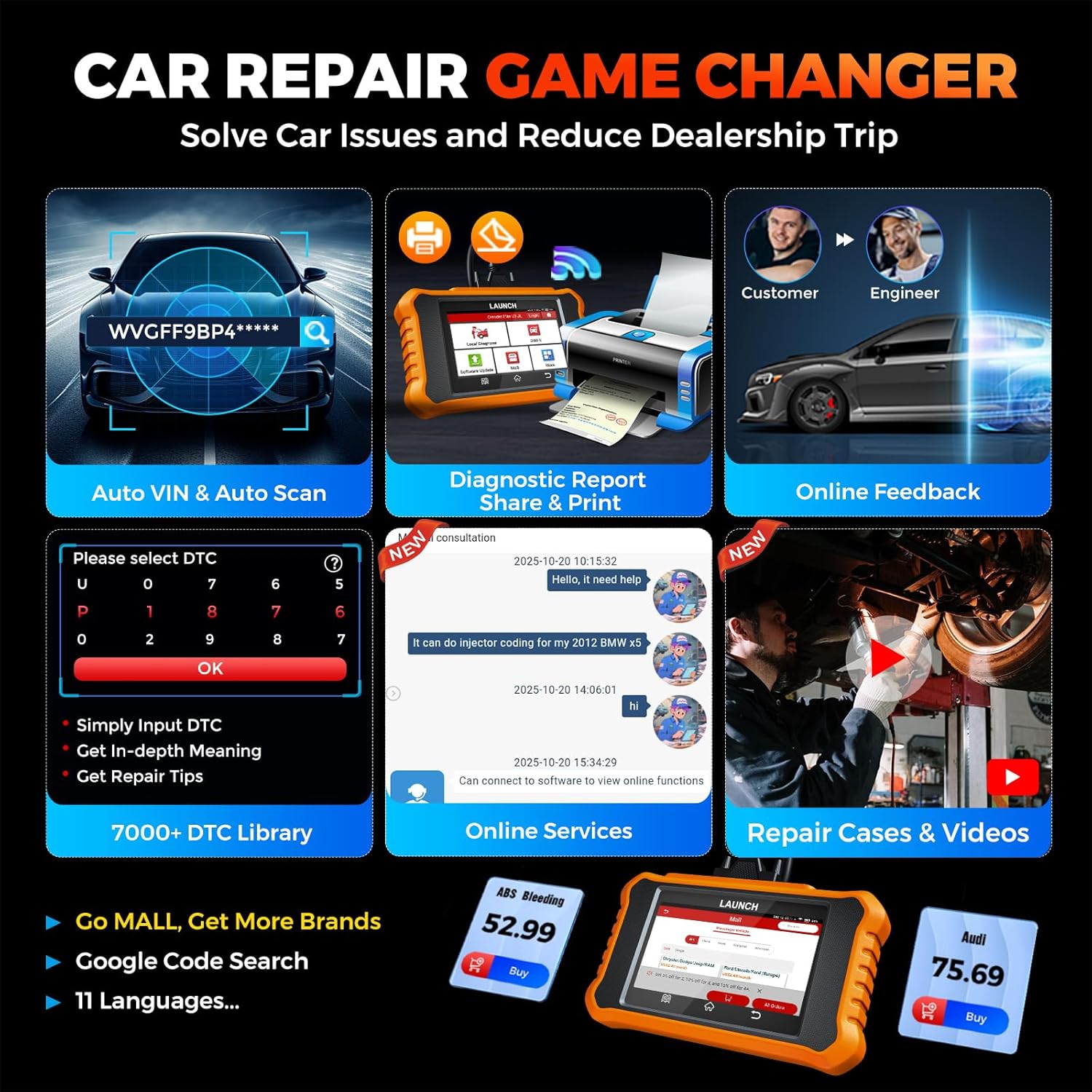
Image: Smart diagnostic features such as Auto VIN, diagnostic report generation and printing, online feedback, 7000+ DTC library, and access to online services.
- Bilens VIN-nummer: Automatically identifies vehicle information (year, make, model) for quicker diagnostics.
- DTC-sökning: Ger detaljerade förklaringar av diagnostiska felkoder.
- Diagnostisk rapport: Generates a professional diagnostic report that can be shared or printed.
- Onlinefeedback: Allows users to submit feedback or issues directly to technical support.
5. Underhåll och uppdateringar
5.1. Programuppdateringar
The LAUNCH Creader Elite V3.0 offers lifetime free software updates for Land Rover and Jaguar brands.
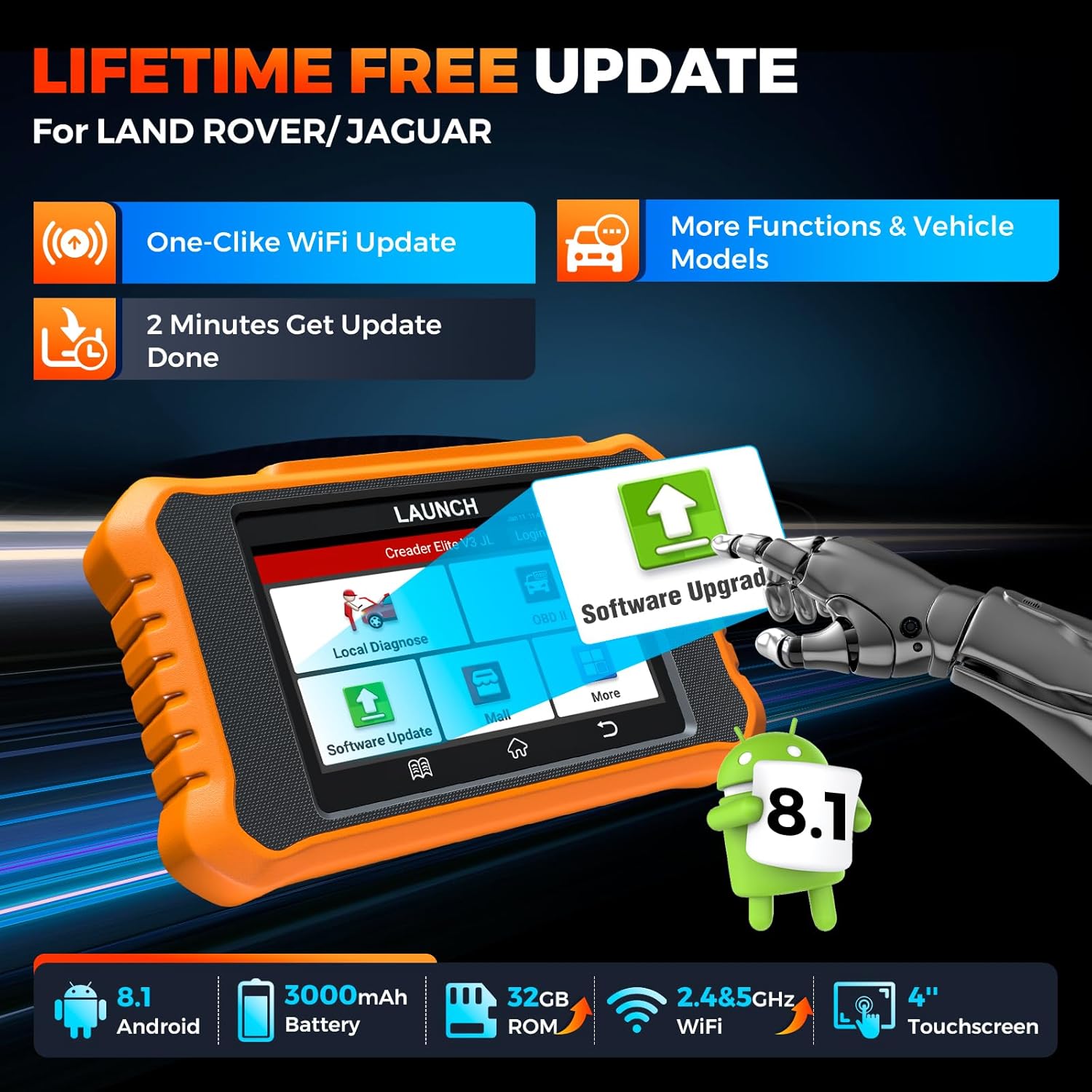
Image: Device screen illustrating the one-click Wi-Fi update process, emphasizing lifetime free updates for Land Rover/Jaguar and the ability to get more functions and vehicle models.
- Se till att enheten är ansluten till ett stabilt Wi-Fi-nätverk.
- Välj från huvudmenyn Programuppdatering.
- Enheten kommer att söka efter tillgängliga uppdateringar.
- Select the updates you wish to install and follow the on-screen prompts. Updates typically take a few minutes.
5.2. Expanding Vehicle Coverage (Mall)
If you require diagnostic capabilities for other vehicle brands beyond Land Rover and Jaguar, you can purchase additional software packages from the Köpcenter application on the device. Please note that software purchased from the Mall is typically valid for one year and may require re-purchase after expiry.
5.3. Enhetsvård
- Håll enheten ren och fri från damm och fukt.
- Undvik att tappa enheten eller utsätta den för kraftiga stötar.
- Förvara enheten på en sval, torr plats när den inte används.
- Använd endast den medföljande laddningskabeln och tillbehören.
6. Kompatibilitet
The LAUNCH Creader Elite V3.0 is primarily designed for:

Image: Device interface showing diagnostic options for Land Rover (Defender, Discovery, Range Rover, Evoque) and Jaguar (E-Pace, F-Pace, F-Type, S-Type, X-Type, XE, XF, XJ, XK) models, with a note on DoIP protocol for models after 2017.
- Land Rover: Compatible with models such as Defender, Discovery, Discovery Sport, Range Rover, Range Rover Evoque, etc.
- Jaguar: Compatible with models such as E-Pace, F-Pace, F-Type, S-Type, X-Type, XE, XF, XJ, XK, etc.
- DoIP Protocol: Supports Land Rover & Jaguar models after 2017, requiring a separate DoIP adapter.
- Universal OBD2: Fully compatible with all OBD2 compliant vehicles manufactured after 1996 for basic OBD2 functions.
For specific vehicle compatibility, it is recommended to contact technical support via obdbox21@163.com.
7. Specifikationer
| Modell | LAUNCH Creader Elite 3.0-JL |
| Operativsystem | Android 8.1 |
| Skärmstorlek | 4 tum |
| Intern lagring (ROM) | 32 GB |
| Batterikapacitet | 3000 mAh |
| Wi-Fi | 2.4 & 5GHz Dual-band |
| Strömkälla | Batteridriven |
| Objektets vikt | 1.49 pund |
| Paketets mått | 8 x 7.5 x 1.5 tum |
| Passform för fordon | Universal Fit (for OBD2 functions) |
8. Felsökning
8.1. Enheten slås inte på
- Check battery level. Connect the device to a charger and allow it to charge for at least 30 minutes.
- Se till att strömknappen är korrekt nedtryckt och hållen.
- If connected to the vehicle, ensure the vehicle's ignition is on and the OBD2 cable is securely connected.
8.2. Kommunikationsfel med fordonet
- Verify the OBD2 cable is securely connected to both the device and the vehicle's port.
- Se till att fordonets tändning är i ON placera.
- Confirm that the vehicle is OBD2 compliant (generally 1996 and newer for US vehicles).
- Try a different OBD2 compliant vehicle to rule out a vehicle-specific issue.
- Ensure the correct vehicle brand software is installed and up to date.
8.3. Software Update Failure
- Check your Wi-Fi connection for stability and signal strength.
- Ensure the device has sufficient battery charge or is connected to power during the update process.
- Verify that there is enough free storage space on the device.
- Starta om enheten och försök uppdatera igen.
8.4. Inaccurate Readings or Functions Not Working
- Ensure the vehicle's make, model, and year are correctly identified by the device.
- Verify that the specific function is supported for your vehicle model and year. Refer to the compatibility section or contact support.
- Ensure the device software is fully updated.
9. Garanti och support
9.1. Garantiinformation
The LAUNCH Creader Elite V3.0 comes with an Extended 60-Day Return & Replacement policy and a 5-Year Quality Backup. Please retain your proof of purchase for warranty claims.
9.2. Teknisk support
For any technical assistance, questions, or compatibility inquiries, please contact our support team:
- E-post: obdbox21@163.com
- Our support team is available 24/7/365.
Note: Please direct all support inquiries to the provided email address. Do not contact LAUNCH Tech USA for support related to this specific product.


