
1. Introduktion
Thank you for choosing the ACEMAGIC LX16PRO Gaming Laptop. This manual provides essential information for setting up, operating, maintaining, and troubleshooting your new device. The LX16PRO is designed for performance and productivity, featuring an AMD Ryzen 7 7730U processor, a 16-inch IPS display, 16GB DDR4 RAM, and a 512GB NVMe SSD, running on Windows 11 Pro.

Bild: Överview of the ACEMAGIC LX16PRO laptop, highlighting its AMD Ryzen 7 7730U processor, AMD Radeon Graphics, 16-inch FHD IPS display, up to 64GB DDR4 RAM, up to 4TB NVMe SSD, WiFi 6, and backlit keyboard.
2. Inställning
2.1 Första start
- Packa upp: Ta försiktigt ut den bärbara datorn och alla tillbehör ur förpackningen.
- Anslut ström: Plug the power adapter into the DC jack on the laptop and then into a power outlet.
- Ström på: Öppna den bärbara datorns lock och tryck på strömbrytaren, som vanligtvis sitter på tangentbordet.
- Windows-installation: Följ instruktionerna på skärmen för att slutföra den första installationen av Windows 11 Pro, inklusive språk, region, nätverksanslutning och skapande av användarkonto.
2.2 Ansluta kringutrustning
The LX16PRO offers various ports for connecting external devices:
- USB 3.2: Anslut USB-enheter som möss, tangentbord eller externa lagringsenheter.
- Typ-C (full funktion): Use for data transfer, video output, or charging compatible devices.
- HDMI: Anslut till externa bildskärmar eller TV-apparater för utökad visning.
- 3.5 mm hörlursuttag: Anslut hörlurar eller externa högtalare.
- TF-kortsockel: Insert a TF (microSD) card for additional storage or data transfer.

Bild: Höger sida view of the laptop, displaying the DC power input, a full-function Type-C port, an HDMI port, and a USB 3.2 port.
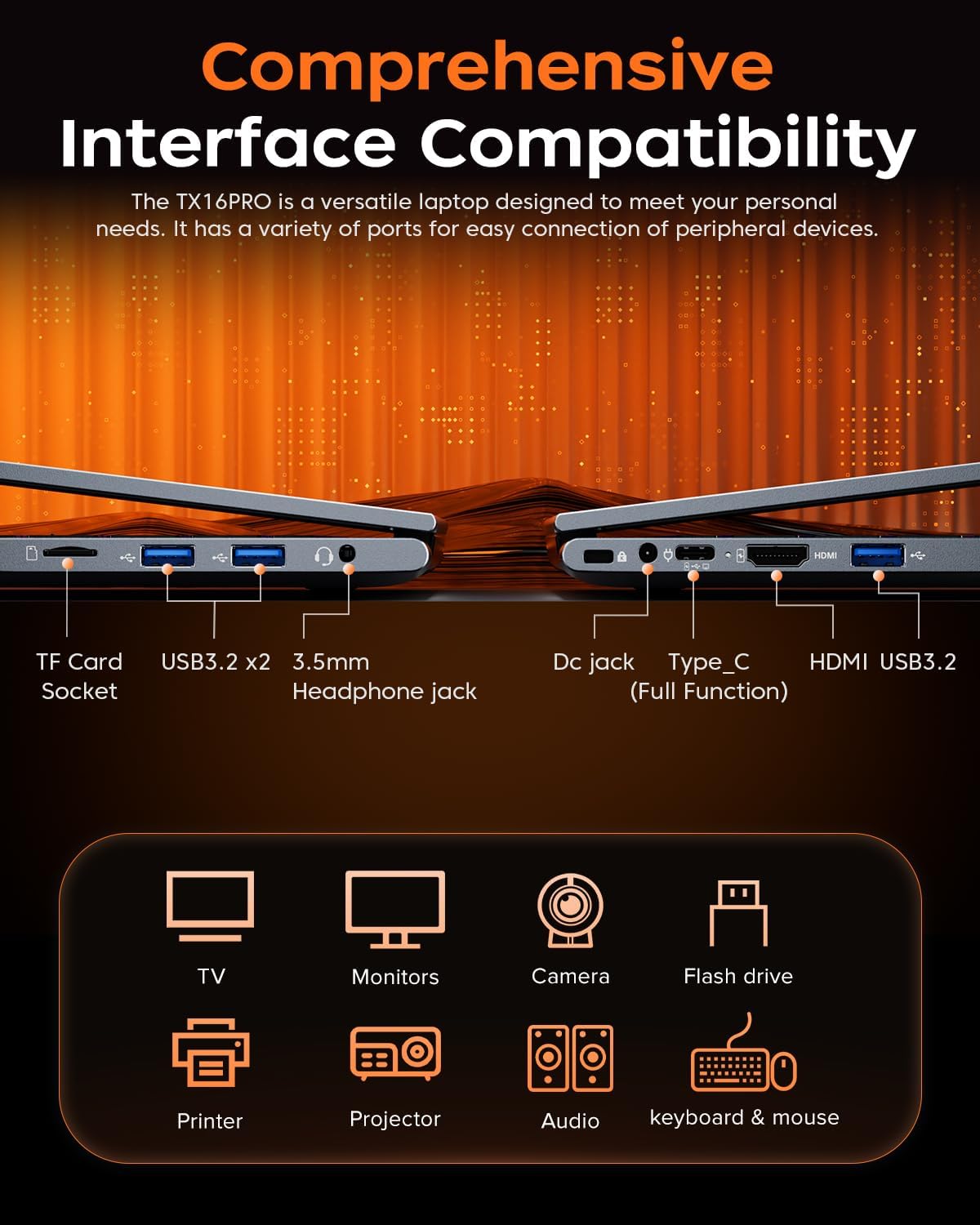
Bild: Vänster sida view of the laptop, showing the TF card socket, two USB 3.2 ports, and the 3.5mm headphone jack.
3. Bruksanvisning
3.1 Tangentbord och pekplatta
The laptop features a backlit keyboard and a responsive touchpad with multi-touch capabilities. The backlit keyboard enhances visibility in low-light conditions, and the numeric keypad provides convenience for data entry.
- Bakgrundsbelysningskontroll: Use the dedicated function keys (e.g., Fn + Fx) to adjust keyboard backlight brightness or toggle it on/off.
- Pekplattans gester: Utilize multi-touch gestures for navigation, zooming, and other functions within Windows 11 Pro.

Image: Close-up of the laptop's backlit keyboard and large touchpad, illustrating its design and functionality.
3.2 Display
The 16-inch IPS display offers Full HD (1920x1200) resolution for clear and vibrant visuals. Adjust display settings through Windows settings for optimal viewerfarenhet.

Bild: Skärmen på den bärbara datorn visasasing vivid graphics, emphasizing the 16-inch display with Full HD (1920x1200) resolution and IPS technology.
3.3 Trådlös anslutning
The LX16PRO supports WiFi 6 and Bluetooth 5.2 for fast and reliable wireless connections.
- WiFi 6: Connect to high-speed wireless networks for internet access and online activities.
- Bluetooth 5.2: Para ihop med Bluetooth-aktiverade enheter som hörlurar, högtalare eller annan kringutrustning.

Image: A visual comparison demonstrating the improved transfer speeds and reduced latency of WiFi 6 over WiFi 5, beneficial for gaming and streaming.
3.4 Strömlägen
Optimize performance and battery life by adjusting power modes in Windows settings (Settings > System > Power & battery).
- Bästa prestanda: Maximizes system speed for demanding tasks like gaming.
- Balanserad: Offers a good compromise between performance and power efficiency for everyday use.
- Best Power Efficiency: Conserves battery life for extended usage, suitable for light tasks.

Image: The laptop displayed alongside three power modes, indicating their respective performance levels and recommended uses for gaming, work, and extended battery life.
4. Underhåll
4.1 Batterivård
- Undvik att ladda ur batteriet helt ofta.
- Förvara den bärbara datorn på en sval och torr plats när den inte används under längre perioder.
- För optimal batteritid, undvik att utsätta den bärbara datorn för extrema temperaturer.

Bild: En intern view of the laptop highlighting the 54Wh battery, indicating its capacity for extended use.
4.2 Lagringshantering
- Städa regelbundet upp onödiga saker files and applications to maintain optimal performance of the 512GB NVMe SSD.
- Consider external storage or cloud services for large files to free up internal drive space.

Image: A visual representation of the laptop's memory (16GB DDR4 RAM, upgradable to 64GB) and storage (512GB NVMe SSD, upgradable to 4TB) capabilities.
4.3 Rengöring
- Använd en mjuk, luddfri trasa för att rengöra skärmen och de yttre ytorna.
- Undvik starka kemikalier eller slipande material.
- Rengör kylventilerna regelbundet för att säkerställa korrekt luftflöde och förhindra överhettning.

Image: An illustration of the laptop's internal cooling system, featuring dual copper pipes and a dedicated fan designed to maintain low temperatures during operation.
5. Felsökning
If you encounter issues with your ACEMAGIC LX16PRO laptop, refer to the following common solutions:
- Ingen ström: Se till att nätadaptern är ordentligt ansluten till både den bärbara datorn och ett fungerande eluttag. Kontrollera strömindikatorlampan.
- Visa problem: If the screen is blank, try connecting an external monitor via HDMI to check if the issue is with the laptop's display or graphics output. Adjust display settings in Windows.
- Anslutningsproblem: For WiFi issues, restart your router and the laptop. For Bluetooth, ensure the device is discoverable and within range.
- Långsam prestanda: Close unnecessary applications, check for background processes, and ensure your system is up to date. Consider running a disk cleanup.
- Systemfrysning: If the system becomes unresponsive, press and hold the power button for 10-15 seconds to force a shutdown. Restart the laptop.
For further assistance, please contact ACEMAGIC customer support.
6. Specifikationer
Below are the detailed specifications for the ACEMAGIC LX16PRO Gaming Laptop:
| Särdrag | Detalj |
|---|---|
| Modellnamn | LX16PRO |
| Processor | AMD Ryzen 7 7730U (8 kärnor, 16 trådar, upp till 4.5 GHz) |
| Grafik | AMD Radeon ™ Graphics |
| RAM | 16GB DDR4 (2666 MHz), Max 64GB |
| Lagring | 512GB NVMe SSD (PCIE x 4), Max 4TB |
| Visa | 16-inch IPS, 1920x1200 (FHD), 60 Hz |
| Operativsystem | Windows 11 Pro |
| Anslutningsmöjligheter | WiFi 6 (802.11ax), Bluetooth 5.2 |
| Hamnar | 1x HDMI, 1x Type-C (Full Function), 3x USB 3.2, 1x 3.5mm Audio Jack, 1x TF Card Socket, 1x DC Jack |
| Tangentbord | Backlit Keypad, QWERTY Layout |
| Pekplatta | Multi-touch |
| Webkam | Ja (fram) |
| Batteri | 1 Lithium Ion, 55 Watt Hours (approx. 4 hours life) |
| Mått | 35.73 x 22.86 x 1.67 cm |
| Vikt | 1.78 kg |
7. Garanti och support
ACEMAGIC provides customers with a one-year limited warranty and 30-day returns. Lifetime technical support and offline maintenance are also available. For any issues or inquiries, please feel free to contact ACEMAGIC customer support.
8. Produkt överview Video
Video: En kort genomgångview of the ACEMAGIC TX16PRO Laptop, showcasing its 16-inch FHD display, 180-degree hinge, backlit keyboard, and various connectivity ports including DC jack, Type-C, HDMI, USB 3.2, TF card socket, and 3.5mm headphone jack. This video highlights the physical features and design of the laptop.