
Introduktion
The Henkion Multifunction RJ45 Network Cable Tester LT-600 is a versatile tool designed for network professionals and DIY enthusiasts. It integrates advanced cable testing, tracing, and network diagnostic functionalities to efficiently identify and resolve network issues. This manual provides detailed instructions for setup, operation, and maintenance of your device.
Nyckelfunktioner
- Advanced UTP cable testing for sequence, type, and remote kit detection.
- Digital signal Ethernet cable tracing for various metal cables, rejecting noise and false signals.
- POE++ detection supporting IEEE802.3BT/AT/AF and non-standard protocols, displaying voltage, pins, and polarity.
- Comprehensive network tools including IP discovery, IP address scan, PING test, LLDP/CDP detection, and Port flashing.
- RJ45 TDR cable test for pair status, length, attenuation, reflectivity, impedance, and skew.
- Cable length measurement up to 3000 meters with report creation.
- PD power detection and NCV (Non-Contact Voltage) scan function.
- FTP function for copying test reports and data.
- 4-inch IPS touch screen with 800*480 resolution.
- Built-in rechargeable lithium-ion batteries for both emitter and receiver.
Inställning
Paketets innehåll
Paketet innehåller följande artiklar:
- Host (Emitter) x1
- Mottagare x1
- RJ45 to BNC connector x1
- Skruvmejsel x1
- Nyckelband x1
- Tool Bag x1
- Typ-C-kabel x1
- BNC alligator clip x1
- RJ45 cable x1
- RJ11 cable x1
- Förpackningslåda x1
- Användarmanual x1
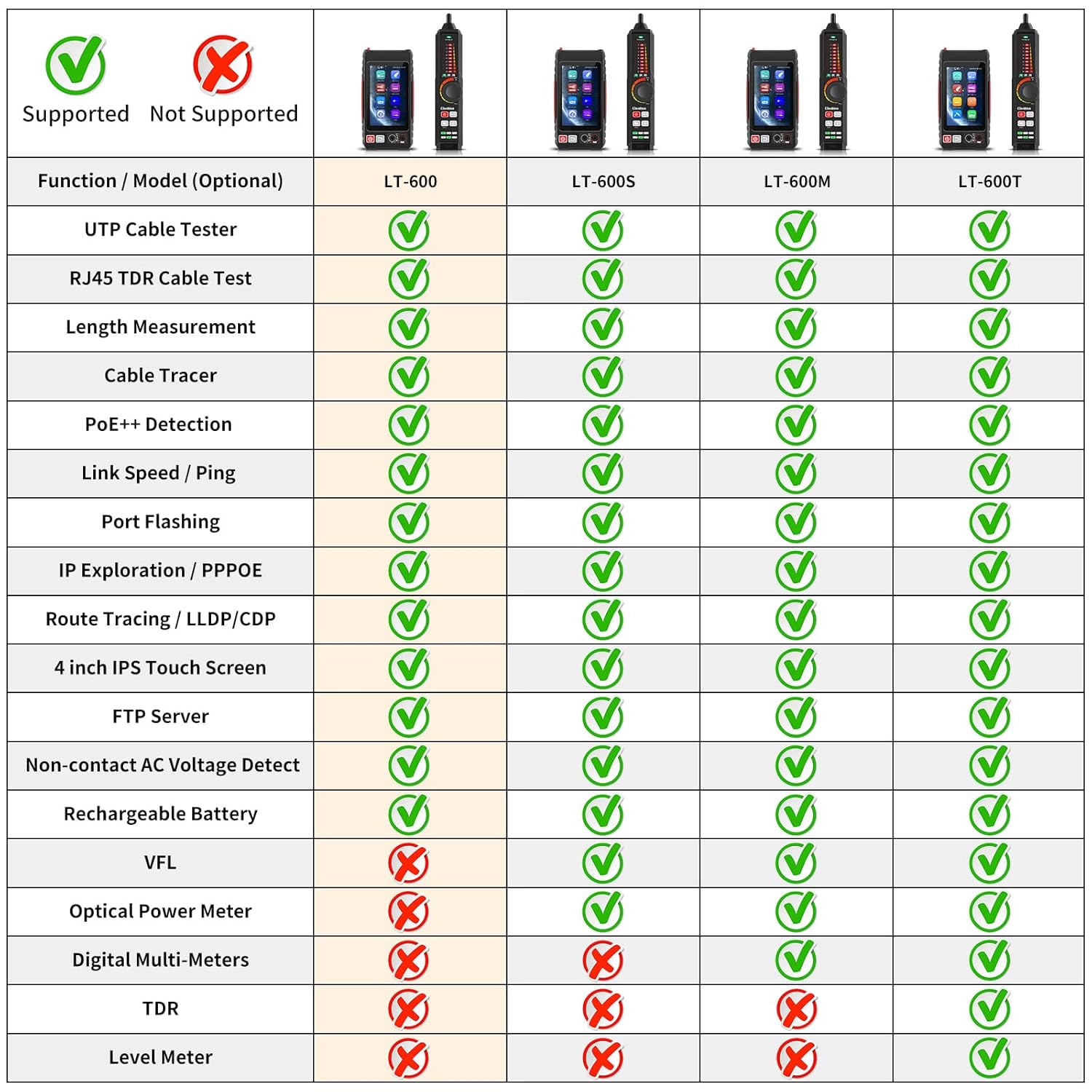
Image: The Henkion LT-600 package contents laid out, showing the main unit, receiver, cables, adapters, screwdriver, lanyard, and carrying bag.
Produkt överview
Familiarize yourself with the main components and interfaces of the tester.
Host (Emitter) Details

Bild: Detaljerad view of the main unit (host) showing the 4-inch IPS touch screen, power button, return button, UTP/SCAN port, LAN/Flash port, and Type-C charging port.
Mottagarens detaljer

Bild: Detaljerad view of the receiver unit showing the LED power indicators, earphone port, PD powered test port, Type-C charging port, sensitivity knob, mode button, SCNV button, light button, and RJ45 test port.
Batteri och laddning
Both the emitter and receiver units are equipped with built-in rechargeable lithium-ion batteries. The emitter has a 3.7V 4000mAh battery (approx. 6 hours working time), and the receiver has a 3.7V 2000mAh battery (approx. 12 hours working time). Use the provided Type-C cable to charge both units.

Image: The Henkion LT-600 host and receiver units connected via Type-C cables to a USB charger for recharging.
Video: A demonstration of connecting the Henkion LT-600 units to a charger, showing the charging process and the device's interface.
Bruksanvisning
UTP-kabeltest
This function tests any two or more wires in a network cable. The screen displays the connection sequence, 1000/100M, and cable number. The receiver is identified through indicators.

Image: The host unit displaying the UTP cable test results, showing wire mapping and identifying faults like open circuits or short circuits. The receiver unit is connected to the other end of the cable.
Kabelspårare
The cable tracer can quickly find the target cable (BNC cable, network cable, telephone cable, and other various metal cables) from a bundle of cables. It decisively rejects noise and false signals. Rotate the sensitivity knob on the receiver to adjust the sensitivity for accurate cable location.

Image: The host unit displaying the cable tracing interface, with the receiver unit being used to trace a cable among several others. Icons for various cable types are shown.
RJ45 TDR Cable Test
Test cable pair status, length, attenuation, reflectivity, impedance, and skew. The maximum measurement length is up to 180 meters. This function helps assess cable quality.

Image: The host unit displaying the RJ45 TDR test results, showing the status (open, short) and attenuation for each line pair. Options for "Good quality cable", "Poor quality cable", and "Wet cable" are visible.
Kabellängdsmätning
Measure opens of network cables with a maximum measurement length of up to 3000 meters. Accuracy is Cable length x 3% ± 1m. Ensure you choose the correct cable type for more accurate results. Test reports can be created.

Image: The host unit displaying the cable length measurement interface, showing the length of each wire pair and options to calibrate or create a report.
POE Detect
The RJ45 POE Tester supports IEEE802.3BT/AT/AF and non-standard protocol detection. It displays power supply voltage, power supply pins, and pin polarity. This helps verify if the POE switch's power output is normal.

Image: The host unit displaying POE detection results, showing the POE protocol, max power, polarity, and POE modes. A network cable is connected to a POE switch and the tester.
Video: A demonstration of the Henkion LT-600's POE detection capabilities, showing how it identifies POE protocol, max power, and active pins.
Nätverksverktyg
The device includes various network tools for comprehensive diagnostics:
- IP-upptäckt: Searches the entire network segment for IP addresses of connected devices.
- IP-skanning: Quickly finds the IP address of IP cameras or other devices, supporting scanning MAC address, camera manufacturer, and IP conflicts.
- PING-test: Tests if a connected IP camera or other network device's Ethernet port is working normally and if the IP address is correct.
- Spårare: Determines the path of an IP packet across the network.
- LLDP/CDP Detection: Detects main capabilities, management addresses, device identification, interface information, and other details of switches and devices (requires switch support for LLDP/CDP protocol).
- Portblinkande: Quickly locates the port of the Ethernet switch and other devices connected to the tester by flashing the port LED.
- PPPOE Dial-up: Tests PPPOE over Ethernet connections.

Image: The host unit displaying various network tool interfaces, including IP discovery, IP scan, PING, Tracer, and LLDP/CDP, demonstrating their functionalities.
Non-Contact AC Voltage Detektion (NCV)
The receiver unit features an inductive NCV scan function with sound and light dual alarms. It supports distinguishing between live and neutral wires, and detects alternating current voltage.

Image: The receiver unit demonstrating non-contact AC voltage detection, showing how it identifies live and neutral wires with visual and auditory alerts.
FTP Server & File Chef
The FTP function allows users to copy test reports and data via network FTP. The File Manager is used to view and organize saved test reports and screenshots.

Image: The host unit displaying the FTP server and File Manager interfaces, showing how to access and manage saved data and reports.
Ficklampa
Both the host and receiver units include a flashlight function to provide illumination in dark working environments.

Image: The host unit displaying the flashlight interface, with the flashlight beam visible in a dark setting.
Specifikationer
| Särdrag | Beskrivning |
|---|---|
| Modell | LT-600 |
| Screen & Display | 4 tum IPS pekskärm, 800*480 upplösning |
| Sändsignal | Digital signal (avvisar kraftfullt brus och falska signaler) |
| Kabeltyper | Stöder RJ45 tvinnat par, RJ11 telefonkabel, BNC-videokabel och lågvolymskabeltage metal cables |
| UTP-kabeltest | Tests any two or more wires in a network cable. Displays connection sequence, 1000/100M, and cable number. Receiver identified through indicators. |
| Cable Tracing/Wire Mapping/Continuity Test | Emitter: Minimum recognition length of 10cm. Receiver: Minimum recognition length of 1m. |
| Kortslutningsdetektering | Stöder kortslutningsdetektering i nätverkskablar |
| Längdmätning | Measures opens of network cables, max measurement length up to 3000 meters. Accuracy: Cable length x 3% ± 1m. |
| RJ45 TDR Cable Test | Tests cable pair status, length, attenuation reflectivity, impedance, skew, and other parameters. Max measurable length up to 180 meters. |
| Port blinkar | Lokaliserar snabbt portar anslutna till Ethernet-switchar och andra enheter. |
| POE-testning | Stöder IEEE802.3BT/AT/AF och detektering av icke-standardiserade protokoll. Visar strömförsörjningens volymtage, power supply pins, and pin polarity. |
| Nätverksverktyg | IP discovery, IP address scan, PING test, LLDP/CDP detection, switch port flashing, PPPOE dial-up, FTP server, etc. |
| Batterikraft | Emitter: 3.7V 4000mAh lithium-ion rechargeable battery (working time about 6 hours). Receiver: 3.7V 2000mAh lithium-ion rechargeable battery (working time about 12 hours). |
| Driftstemperatur | -10°C ~ +50°C |
| Driftfuktighet | 30 %–90 % |
| Dimensions (Emitter) | 154 x 86 x 40mm (5.91 x 3.39 x 1.57 inch) / 0.3Kg (0.66lbs) |
| Mått (mottagare) | 210 x 40 x 25mm (8.26 x 1.57 x 0.98 inch) / 0.13Kg (0.3lbs) |
Felsökning
- Enheten slås inte på: Ensure the internal battery connector is securely plugged in. Charge the device fully using the provided Type-C cable.
- Felaktig mätning av kabellängd: Verify that the correct cable type is selected in the settings before performing the test.
- No signal or false signals during cable tracing: Adjust the sensitivity knob on the receiver unit. Ensure the cable is properly connected to the UTP/SCAN port.
- Network tools not functioning: Ensure the device is properly connected to the LAN port of the network you are testing. For LLDP/CDP, confirm that the network switch supports these protocols.
- Problem med skärmen: If the screen is unresponsive or shows incorrect information, try restarting the device.
Garanti och support
Henkion offers a 30-day free return policy for this product. For any technical inquiries, support, or service needs, please contact the Technical Department of our company. We are committed to providing the best service possible to our customers.